Vali keel

Lifetime History Request Form – Fillable PDF

  1. Keel Inglise
  2. Riik USA
  3. Tegevus Vehicle Records
  4. osakond Department of Motor Vehicles
Täitke see vorm
Lifetime History Request Form – Fillable PDF

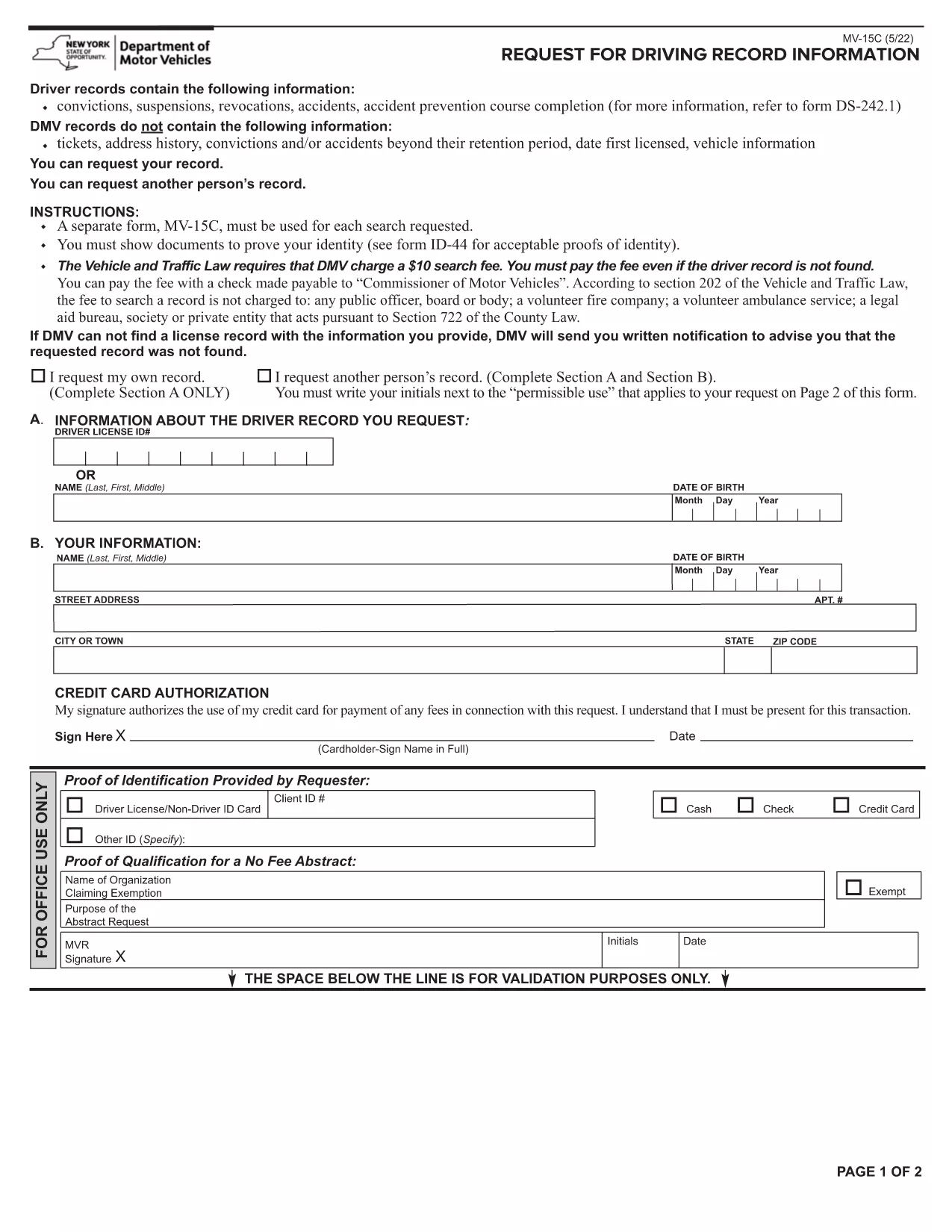
Need a complete record of every ticket, suspension, or accident ever listed on your driving file? The Lifetime History Request Form lets you request a full, permanent abstract of your motor vehicle history from the New York State Department of Motor Vehicles (DMV).

What Is a Lifetime History Request Form?

This form (PDF MV‑15C) is the official DMV request used to obtain a Lifetime Driving Record. Unlike a standard abstract that only shows recent activity, a lifetime record includes every conviction, accident, and point ever recorded.

Who Needs a Lifetime Driving Record?

  • Employers conducting background checks for commercial driver positions.
  • Insurance companies assessing risk for high‑value policies.
  • Legal professionals needing a complete history for court cases.
  • Drivers who suspect errors in their current record and need proof of correction.

How to Fill Out the Form Online with Formize

Instead of printing, signing, and scanning, you can complete the form directly in your browser:

  1. Click the "Fill out this form" button on this page.
  2. Wait a few seconds while the Formize PDF Filler app loads.
  3. Enter your personal information exactly as it appears on your driver's license.
  4. Choose the Lifetime Record option, review the fee, and submit.
  5. When the DMV processes your request, you’ll receive a downloadable PDF via email.

Common Mistakes to Avoid

  • Incorrect ID numbers: Double‑check your Client ID and license number.
  • Missing signature: The Formize filler adds a digital signature field—make sure to sign before submitting.
  • Wrong record type: Select "Lifetime" rather than "Standard" if you need the full history.

Download, Save, and Submit Your Completed Form

After you finish filling the form, click Download PDF to keep a copy for your records. You can then mail the signed form with payment, or follow the DMV’s online payment instructions directly from the filler.

Need a quick start? The fillable PDF is ready below.

KKK
  • What is the difference between a standard and a lifetime driving record?

    A standard record shows recent activity (typically the last 3‑5 years). A lifetime record includes every violation, accident, and suspension ever recorded on your file.

  • How long does it take to receive the lifetime record?

    Processing usually takes 5‑7 business days after the DMV receives your completed form and payment.

  • Can I request a lifetime record for someone else?

    Only the record holder or a legally authorized representative may request a lifetime record, and proper consent documentation is required.

  • Is there a fee for the lifetime history request?

    Yes, the DMV charges a fee (currently $10) for a lifetime abstract. The exact amount is displayed in the form before you submit.

  • Do I need to print the PDF after filling it online?

    No. The Formize filler lets you sign digitally and submit electronically. You can download a copy for your records if you wish.

  • What identification is required with the request?

    You must provide your driver’s license number, date of birth, and a valid photo ID (driver’s license or passport) when the DMV verifies your identity.

  • Can I correct errors on my lifetime record?

    Yes. After receiving your record, you can file a correction request with the DMV if you find inaccurate information.

  • Is the form available for other states?

    This specific MV‑15C form is for New York State. Other states have their own versions; check the local DMV website for details.

KUIDAS

5 lihtsa sammuga veebis tasuta lifetime history request form täitmine:

  1. 1
    Open the Fillable Form
    Click the "Fill out this form" button on the page. The Formize PDF Filler will open in a new tab.
  2. 2
    Enter Your Information
    Complete each field – name, address, driver’s license number, and date of birth – exactly as shown on your ID.
  3. 3
    Select Lifetime Record
    Choose the "Lifetime" option from the record‑type dropdown and verify the applicable fee.
  4. 4
    Sign and Submit
    Use the digital signature field, then click "Submit". The form will be securely sent to the DMV.
  5. 5
    Download Confirmation
    When the DMV processes your request, you’ll receive a confirmation email with a downloadable copy of your lifetime record.
PDF-täiterakenduse vormindamine
UMBES

mall lifetime history request form

Traditsioonilise PDF-dokumendi vaatamise ja täitmise funktsioonide komplektiga koos veebirakenduse ja tundliku paigutuse eelistega saate märksõna lifetime history request form lõpule viia minutitega.

FUNKTSIOONID

PDF täiteaine

Lihtsaim viis märksõna lifetime history request form veebis täitmiseks

  • Täitke kiiresti lifetime history request form
    Kas otsite viisi lifetime history request form kiireks veebis täitmiseks? Meie veebipõhise tasuta PDF-vormi täitja abil saate teada, kuidas seda PDF-dokumenti vähem kui minutiga redigeerida ja täita.
  • Lihtne kasutada veebipõhist PDF-redaktorit
    Kas olete tüdinenud PDF-failide printimisest, et saaksite neid enne uuesti skannimist ja tagasisaatmist redigeerida? Redigeerige PDF-dokumente võrgus tasuta. Kasutage meie veebipõhist PDF-redaktorit, et säästa aega ja paberit.
  • Suurepärased tööriistad, kõik platvormid
    Kas soovite teada, kuidas Macis täita lifetime history request form või kuidas kasutada tasuta PDF-täitjat? Meie veebipõhised PDF-tööriistad töötavad kõigil platvormidel.
  • Turvaline failide salvestusruum
    Lõpetatud failid „lifetime history request form” salvestatakse turvatud andmebaasi, mida haldab Amazon Cloudi hostimine. Saate oma failid meie süsteemist igal ajal kustutada. Igal juhul kustutatakse need failid 24 tunni pärast automaatselt.
  • Vestelge kasutajaga lifetime history request form
    Vestelge kasutajaga „lifetime history request form” saidil Chatize, mis on tasuta PDF-i lugeja abiline. Esitage küsimusi ja saage vastused märksõnalt „lifetime history request form”. Klõpsake ülaloleval nupul Vestle dokumendiga.

Kustuta täitmise seanss

Kas kustutada valitud täitmisseanss? Sellisel juhul läheb teie edu vormi täitmisel kaotsi.

Kustuta redigeerimisseanss

Kas kustutada valitud redigeerimisseanss? Sel juhul lähevad teie edu vormi loomisel ja redigeerimisel kaotsi.