
Vali keel

DS-157 Supplemental Nonimmigrant Visa Application – Fillable PDF

  1. Keel Inglise
  2. Riik USA
  3. osakond Riigiministeerium
  4. Tegevus Viisad
Täitke see vorm
DS-157 Supplemental Nonimmigrant Visa Application – Fillable PDF

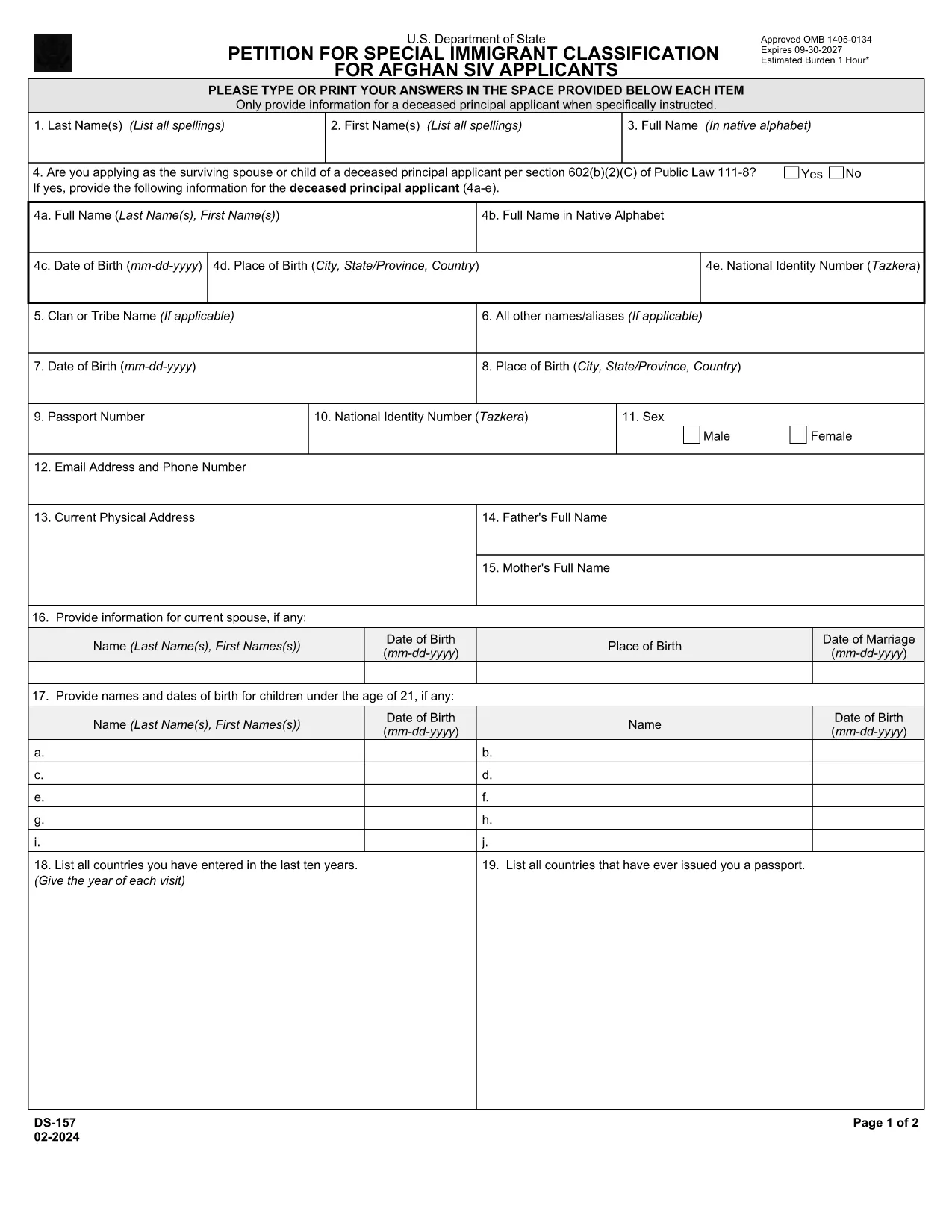
The DS-157 (Supplemental Nonimmigrant Visa Application) is required for certain male visa applicants, especially Afghan Special Immigrant Visa (SIV) candidates. It collects detailed personal, employment, and travel information that supports the main DS-160 application.

What is the DS-157 Form?

Issued by the U.S. Department of State, the DS-157 is a supplemental questionnaire that must be submitted with your visa packet. It is a fillable PDF that can be completed electronically, printed, signed, and attached to your visa interview documents.

How to Fill the DS-157 Online with Formize

Formize provides a secure, browser‑based PDF filler so you never need to download, print, or scan the form. Follow these steps:

  • Click the **"Fill out this form"** button on this page.
  • Wait a few seconds while the Formize PDF Filler app loads.
  • Enter your information in the highlighted fields. Use the tab key or click to move between sections.
  • When finished, click **"Save & Download"** to get a copy you can print or email.
  • Sign the form with your finger (touchscreen) or type your signature, then download the completed PDF.

Common Mistakes to Avoid

  • Leaving fields blank – every question must be answered, even if the answer is “None” or “N/A”.
  • Incorrect dates – double‑check birth dates, travel dates, and employment periods.
  • Illegible signatures – use the built‑in e‑signature tool for a clear, legal signature.
  • Mismatched information – ensure details match those on your DS‑160 and supporting documents.

Where to Submit the Completed Form

Print the filled DS-157, sign it in ink if you printed a hard copy, and attach it to your visa interview packet. Submit the package to the U.S. Embassy or Consulate handling your case. Some posts now accept the PDF electronically; verify the specific instructions on your appointment notice.

Download the Official PDF

For reference or offline use, you can download the official, government‑issued PDF directly from the Department of State:

Download DS-157 PDF

Using Formize’s online filler saves you time, reduces errors, and eliminates the need for a scanner.

KKK
  • Who must complete the DS-157 form?

    All male non‑immigrant visa applicants between ages 16‑45, including Afghan SIV applicants, must submit a DS-157 in addition to the DS‑160.

  • Is the DS-157 form available in languages other than English?

    The official form is only provided in English. If you need translation assistance, you must provide an accurate English version for the U.S. Embassy.

  • Can I submit the DS-157 electronically?

    Some U.S. posts accept an electronic PDF, but most still require a printed, signed copy. Check the instructions on your appointment notice.

  • Do I need a notarized signature on the DS-157?

    No notarization is required. A regular signature (ink or e‑signature) is sufficient as long as it matches the signature on your other visa documents.

  • What happens if I make a mistake on the DS-157?

    Correct the error by crossing out the mistake neatly, writing the correct information, and initialing the change. If the mistake is extensive, download a fresh copy and refill the form.

  • How long is the DS-157 valid?

    The DS-157 is tied to a specific visa application. If your application is withdrawn or denied, you must obtain a new form for any future applications.

KUIDAS

4 lihtsa sammuga veebis tasuta ds-157 täitmine:

  1. 1
    Open the Formize filler
    Click the "Fill out this form" button on the page. The Formize PDF Filler will open in a new tab.
  2. 2
    Enter your information
    Type directly into each highlighted field. Use the tab key or click to move to the next question.
  3. 3
    Add your signature
    Use the built‑in e‑signature tool to sign with your finger or mouse. The signature is legally binding.
  4. 4
    Save and download
    When all fields are complete, click "Save & Download" to get a copy of the filled PDF. Print it if a hard copy is required.
PDF-täiterakenduse vormindamine
UMBES

Viisa vormid

ds-157 on üks viisavormidest, mis on dokumendid, mida kasutatakse välisriiki sisenemiseks viisa taotlemiseks. Viisa on dokument, mis võimaldab välisriigi kodanikul teatud aja jooksul välisriiki siseneda, seal viibida ja mõnikord ka seal töötada. Viisa saamise täpsed vormid ja nõuded on riigiti ja viisatüübiti erinevad.

Viisavormid nõuavad tavaliselt isikuandmeid, nagu nimi, sünniaeg ja passiandmed, samuti teavet reisi eesmärgi ja pikkuse, kavandatava sihtkoha ja selle kohta, kas taotlejale on varem viisa andmisest keeldutud või ta on riigist välja saadetud. Vormid võivad nõuda ka tõendavaid dokumente, nagu pass, fotod ja rahalise toetuse tõend.

Ameerika Ühendriikides on kõige levinumad viisavormid DS-160 ja DS-260. Vormi DS-160 kasutatakse mitteimmigrandi viisa taotlemiseks, vormi DS-260 aga immigrandi viisa taotlemiseks. Need vormid nõuavad üksikasjalikku teavet taotleja isikliku ja reisiajaloo kohta, samuti tõendavaid dokumente, nagu pass, reisi marsruut ja finantsdokumendid.

Teistes riikides võivad kehtida erinevad viisavormid ja nõuded, kuid põhiprotsess hõlmab tavaliselt viisataotluse täitmist, tõendavate dokumentide esitamist ja USA saatkonnas või konsulaadis konsulaarametnikuga vestlusel osalemist. Oluline on märkida, et viisa taotlemise protsess võib olla keeruline ja aeganõudev ning viisat taotlevatel isikutel on soovitatav konsulteerida immigratsiooniadvokaadi või muu kvalifitseeritud spetsialistiga, et tagada kõigi vajalike vormide ja nõuete täitmine.

FUNKTSIOONID

PDF täiteaine

Lihtsaim viis märksõna ds-157 veebis täitmiseks

  • Täitke kiiresti ds-157
    Kas otsite viisi ds-157 kiireks veebis täitmiseks? Meie veebipõhise tasuta PDF-vormi täitja abil saate teada, kuidas seda PDF-dokumenti vähem kui minutiga redigeerida ja täita.
  • Lihtne kasutada veebipõhist PDF-redaktorit
    Kas olete tüdinenud PDF-failide printimisest, et saaksite neid enne uuesti skannimist ja tagasisaatmist redigeerida? Redigeerige PDF-dokumente võrgus tasuta. Kasutage meie veebipõhist PDF-redaktorit, et säästa aega ja paberit.
  • Suurepärased tööriistad, kõik platvormid
    Kas soovite teada, kuidas Macis täita ds-157 või kuidas kasutada tasuta PDF-täitjat? Meie veebipõhised PDF-tööriistad töötavad kõigil platvormidel.
  • Turvaline failide salvestusruum
    Lõpetatud failid „ds-157” salvestatakse turvatud andmebaasi, mida haldab Amazon Cloudi hostimine. Saate oma failid meie süsteemist igal ajal kustutada. Igal juhul kustutatakse need failid 24 tunni pärast automaatselt.
  • Vestelge kasutajaga ds-157
    Vestelge kasutajaga „ds-157” saidil Chatize, mis on tasuta PDF-i lugeja abiline. Esitage küsimusi ja saage vastused märksõnalt „ds-157”. Klõpsake ülaloleval nupul Vestle dokumendiga.

Kustuta täitmise seanss

Kas kustutada valitud täitmisseanss? Sellisel juhul läheb teie edu vormi täitmisel kaotsi.

Kustuta redigeerimisseanss

Kas kustutada valitud redigeerimisseanss? Sel juhul lähevad teie edu vormi loomisel ja redigeerimisel kaotsi.