Vali keel

Driver Medical Evaluation Form (DS‑326) – Fillable PDF

  1. Riik USA
  2. Keel Inglise
  3. Tegevus Vehicle Licensing
  4. osakond DMV
Täitke see vorm
Driver Medical Evaluation Form (DS‑326) – Fillable PDF

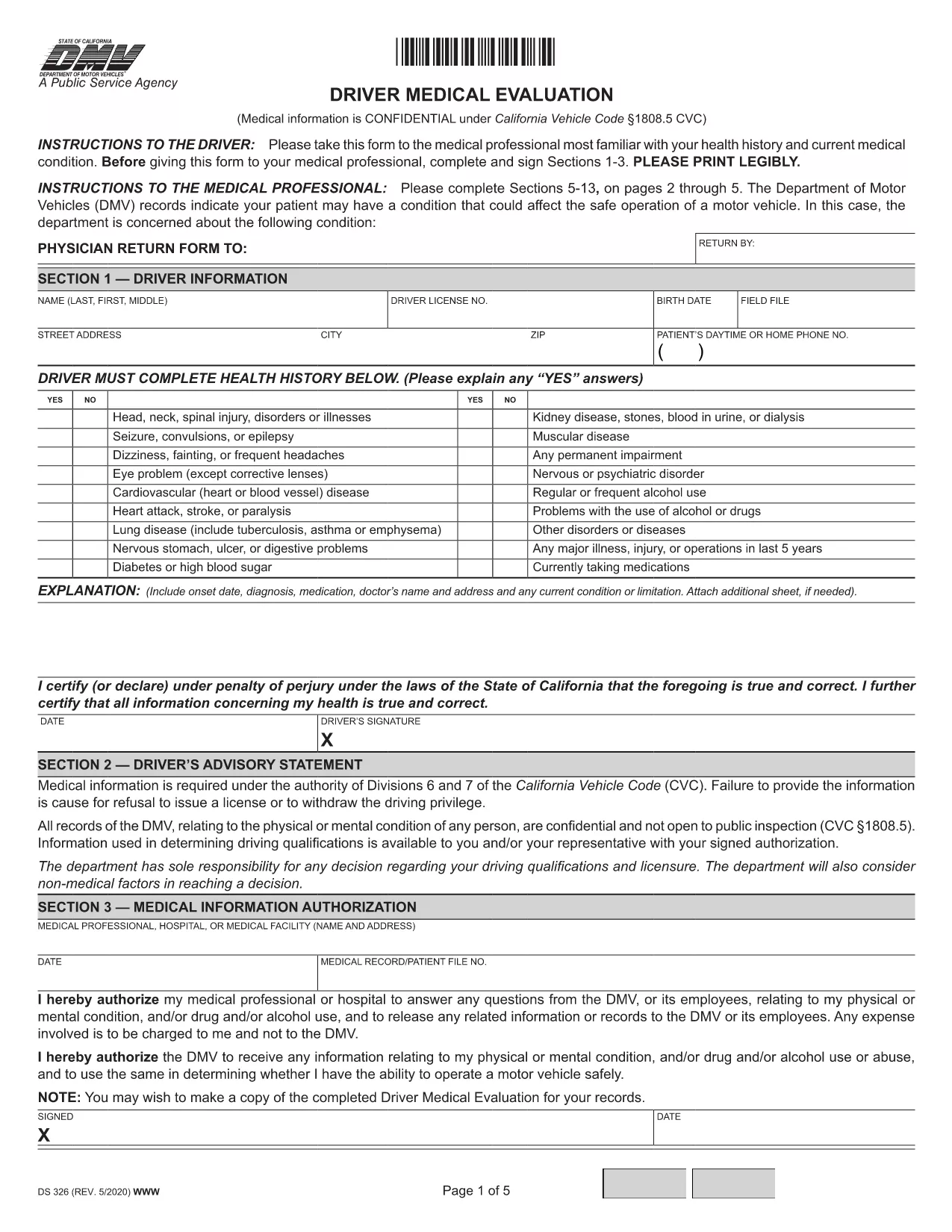
The Driver Medical Evaluation (form DS‑326) is required by the California Department of Motor Vehicles (DMV) for drivers who need to prove medical fitness for a license or permit. This fillable PDF lets you complete the health history, medical information authorization, and physician certification without printing or scanning.

What Is the Driver Medical Evaluation Form?

DS‑326 collects critical data about a driver’s vision, cardiovascular health, neurological conditions, and any medication that may affect safe operation of a vehicle. The DMV uses this information to decide whether to issue, renew, or restrict a driver’s license.

How to Complete the Fillable PDF Online

Instead of downloading the file and opening it in a PDF editor, simply click the "Fill out this form" button on this page. The Formize PDF Filler app will load in your browser, allowing you to type directly into each field, add signatures, and save your progress.

Common Mistakes to Avoid

  • Leaving the health‑history sections blank – every question must be answered, even if the answer is "None".
  • Forgetting the physician’s signature and license number – the form is invalid without a completed certification.
  • Submitting an outdated version – always use the latest DS‑326 PDF provided here.

Where to Submit the Completed Form

After you finish, you can download the completed PDF and mail it to your local DMV office, or upload it through the DMV’s online portal if you have an account. Keep a copy for your records.

Need more help? Review the FAQs below or follow the step‑by‑step guide in the "How to" section.

KKK
  • Who needs to fill out DS‑326?

    Any driver applying for a commercial license, a medical waiver, or a license renewal where the DMV requires proof of medical fitness must complete DS‑326.

  • Can I fill out the form on a mobile device?

    Yes. The Formize PDF Filler works on smartphones and tablets, but using a larger screen makes data entry easier.

  • What if my physician refuses to sign?

    The DMV requires a qualified medical professional’s certification. If a physician declines, you must find another licensed provider who can evaluate your fitness.

  • How long is the DS‑326 valid?

    The evaluation is typically valid for one year from the date of the physician’s signature, unless the DMV issues a different validity period.

  • Do I need to attach supporting medical records?

    Attach any relevant test results or specialist reports that the physician references in the certification section.

  • Is there a fee to submit the form?

    There is no fee for the DS‑326 itself, but the DMV may charge processing fees for license issuance or renewal.

  • Can I save my progress and finish later?

    Yes. The Formize filler allows you to save a draft locally and reopen it later to complete the remaining fields.

  • What should I do if I make a mistake after submitting?

    Contact your local DMV office promptly. They may require a new, corrected DS‑326 or allow you to submit an amendment form.

KUIDAS

5 lihtsa sammuga veebis tasuta driver medical evaluation täitmine:

  1. 1
    Click the Fill‑out Button
    Press the "Fill out this form" button on the page to launch the Formize PDF Filler.
  2. 2
    Wait for the Filler to Load
    The online filler loads in a few seconds; no download or installation is required.
  3. 3
    Enter All Required Information
    Complete each section—personal details, health history, and physician certification—using your keyboard.
  4. 4
    Add Your Signature
    Use the built‑in signature field to sign electronically; you can also type your name if allowed.
  5. 5
    Save or Submit the Form
    Download the finished PDF for mailing, or upload it directly to the DMV portal if you have an account.
PDF-täiterakenduse vormindamine
UMBES

mall driver medical evaluation

Traditsioonilise PDF-dokumendi vaatamise ja täitmise funktsioonide komplektiga koos veebirakenduse ja tundliku paigutuse eelistega saate märksõna driver medical evaluation lõpule viia minutitega.

FUNKTSIOONID

PDF täiteaine

Lihtsaim viis märksõna driver medical evaluation veebis täitmiseks

  • Täitke kiiresti driver medical evaluation
    Kas otsite viisi driver medical evaluation kiireks veebis täitmiseks? Meie veebipõhise tasuta PDF-vormi täitja abil saate teada, kuidas seda PDF-dokumenti vähem kui minutiga redigeerida ja täita.
  • Lihtne kasutada veebipõhist PDF-redaktorit
    Kas olete tüdinenud PDF-failide printimisest, et saaksite neid enne uuesti skannimist ja tagasisaatmist redigeerida? Redigeerige PDF-dokumente võrgus tasuta. Kasutage meie veebipõhist PDF-redaktorit, et säästa aega ja paberit.
  • Suurepärased tööriistad, kõik platvormid
    Kas soovite teada, kuidas Macis täita driver medical evaluation või kuidas kasutada tasuta PDF-täitjat? Meie veebipõhised PDF-tööriistad töötavad kõigil platvormidel.
  • Turvaline failide salvestusruum
    Lõpetatud failid „driver medical evaluation” salvestatakse turvatud andmebaasi, mida haldab Amazon Cloudi hostimine. Saate oma failid meie süsteemist igal ajal kustutada. Igal juhul kustutatakse need failid 24 tunni pärast automaatselt.
  • Vestelge kasutajaga driver medical evaluation
    Vestelge kasutajaga „driver medical evaluation” saidil Chatize, mis on tasuta PDF-i lugeja abiline. Esitage küsimusi ja saage vastused märksõnalt „driver medical evaluation”. Klõpsake ülaloleval nupul Vestle dokumendiga.

Kustuta täitmise seanss

Kas kustutada valitud täitmisseanss? Sellisel juhul läheb teie edu vormi täitmisel kaotsi.

Kustuta redigeerimisseanss

Kas kustutada valitud redigeerimisseanss? Sel juhul lähevad teie edu vormi loomisel ja redigeerimisel kaotsi.