
Vali keel

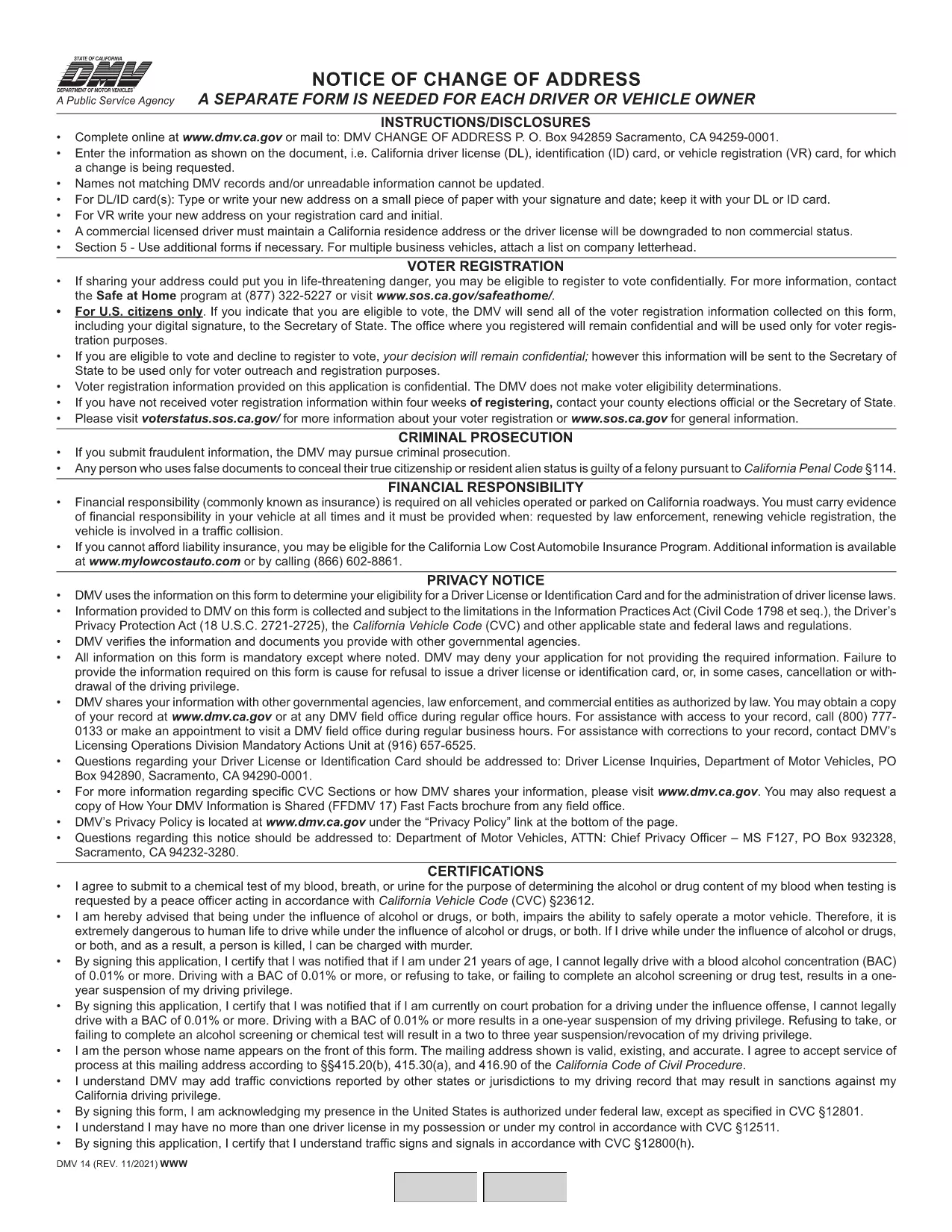
California DMV Form 14 – Notice of Change of Address

  1. Keel Inglise
  2. Riik USA
  3. Tegevus Juhiluba
  4. osariik California
Täitke see vorm
California DMV Form 14 – Notice of Change of Address

When you move in California, the Department of Motor Vehicles (DMV) requires you to update your address on your driver license or identification card. Form DMV‑14, also called the “Notice of Change of Address,” is the official document used for this purpose.

What Is DMV Form 14?

Form DMV‑14 is a short, printable notice that captures your new residential address, mailing address (if different), and vehicle information. The form is required for:

  • Driver licenses
  • Identification cards
  • Vehicle registrations

Submitting the form promptly helps the DMV keep your records current and ensures you receive important notices, renewal reminders, and traffic citations.

How to Fill Out the Form Online with Formize

Instead of downloading the PDF, printing it, and manually filling it in, you can complete the form instantly on our site:

  1. Click the "Fill out this form" button below the description.
  2. Our Formize PDF Filler app will load the fillable version of DMV‑14.
  3. Enter your information in the highlighted fields (address, phone, vehicle details, etc.).
  4. Review the completed form and click Submit to download a completed PDF or share it directly with the DMV.

All data stays in your browser; we never store personal details.

Common Mistakes to Avoid

  • Using the wrong ink color: If you print the form, use black or dark blue ink only.
  • Leaving fields blank: Every field marked with an asterisk (*) is mandatory.
  • Incorrect ZIP code: Double‑check the ZIP code for both old and new addresses.
  • Signing the wrong section: The signature must appear on the "Driver/Owner Signature" line.

Where to Submit Your Completed Form

After you’ve filled out and saved the PDF, you have three submission options:

  1. Mail: Send the form to DMV, P.O. Box 942859, Sacramento, CA 94259‑0001.
  2. In‑person: Bring the printed form to any California DMV office.
  3. Online (recommended): Upload the completed PDF through the California DMV website under "Change of Address".

Updating your address online is the fastest way to have the change processed, usually within 5‑7 business days.

KKK
  • Do I need to submit Form DMV‑14 for every vehicle I own?

    No. You only need to submit the form once for the primary address change. The DMV will automatically update the address on all vehicles linked to your driver license.

  • Can I file Form DMV‑14 online without printing?

    Yes. Use the Formize PDF Filler on this page to complete the form digitally, then download the finished PDF or upload it directly to the DMV website.

  • How long does it take for the address change to be processed?

    When submitted online, the DMV typically updates your records within 5‑7 business days. Mail submissions may take longer.

  • Is there a fee to change my address with Form DMV‑14?

    Changing your address on a driver license or ID card is free. However, if you need a new card with the updated address, a replacement fee applies.

  • What should I do if I make a mistake on the form?

    If you catch an error before submitting, simply correct it in the fillable PDF and re‑save. If you have already mailed the form, fill out a new Form DMV‑14 with the correct information.

KUIDAS

4 lihtsa sammuga veebis tasuta DMV Form 14 täitmine:

  1. 1
    Open the Fillable Form
    Click the "Fill out this form" button on the page. The Formize PDF Filler will open the DMV‑14 document in your browser.
  2. 2
    Enter Your New Address
    Type your new residential address, mailing address (if different), and any vehicle information into the highlighted fields.
  3. 3
    Review and Sign
    Double‑check all entries for accuracy, then add your electronic signature using the signature field.
  4. 4
    Download or Submit
    Click "Download PDF" to save a copy, or use the "Submit to DMV" option to upload the completed form directly to the California DMV portal.
PDF-täiterakenduse vormindamine
UMBES

Juhiloa taotlusvormid

Enamikus riikides on enne teele asumist kohustuslik omada juhiluba. Juhiloa saamine on oluline verstapost kõigile, kes soovivad autot juhtida.

DMV Form 14 on üks juhiloa taotlusvormidest, mis on dokumendid, mida kasutatakse teabe kogumiseks inimestelt, kes soovivad juhiluba taotleda. Tavaliselt sisaldab see väljasid taotleja nime, sünnikuupäeva, ID-numbri, kontaktteabe, samuti tema juhiloa ajaloo ja kogemuste kohta.

FUNKTSIOONID

PDF täiteaine

Lihtsaim viis märksõna DMV Form 14 veebis täitmiseks

  • Täitke kiiresti DMV Form 14
    Kas otsite viisi DMV Form 14 kiireks veebis täitmiseks? Meie veebipõhise tasuta PDF-vormi täitja abil saate teada, kuidas seda PDF-dokumenti vähem kui minutiga redigeerida ja täita.
  • Lihtne kasutada veebipõhist PDF-redaktorit
    Kas olete tüdinenud PDF-failide printimisest, et saaksite neid enne uuesti skannimist ja tagasisaatmist redigeerida? Redigeerige PDF-dokumente võrgus tasuta. Kasutage meie veebipõhist PDF-redaktorit, et säästa aega ja paberit.
  • Suurepärased tööriistad, kõik platvormid
    Kas soovite teada, kuidas Macis täita DMV Form 14 või kuidas kasutada tasuta PDF-täitjat? Meie veebipõhised PDF-tööriistad töötavad kõigil platvormidel.
  • Turvaline failide salvestusruum
    Lõpetatud failid „DMV Form 14” salvestatakse turvatud andmebaasi, mida haldab Amazon Cloudi hostimine. Saate oma failid meie süsteemist igal ajal kustutada. Igal juhul kustutatakse need failid 24 tunni pärast automaatselt.
  • Vestelge kasutajaga DMV Form 14
    Vestelge kasutajaga „DMV Form 14” saidil Chatize, mis on tasuta PDF-i lugeja abiline. Esitage küsimusi ja saage vastused märksõnalt „DMV Form 14”. Klõpsake ülaloleval nupul Vestle dokumendiga.

Kustuta täitmise seanss

Kas kustutada valitud täitmisseanss? Sellisel juhul läheb teie edu vormi täitmisel kaotsi.

Kustuta redigeerimisseanss

Kas kustutada valitud redigeerimisseanss? Sel juhul lähevad teie edu vormi loomisel ja redigeerimisel kaotsi.