
Vali keel

Form 5839 – Physician’s Statement and Authorization (Fillable PDF)

  1. Keel Inglise
  2. Riik USA
  3. Tegevus Juhiluba
  4. osariik Missouri
Täitke see vorm
Form 5839 – Physician’s Statement and Authorization (Fillable PDF)

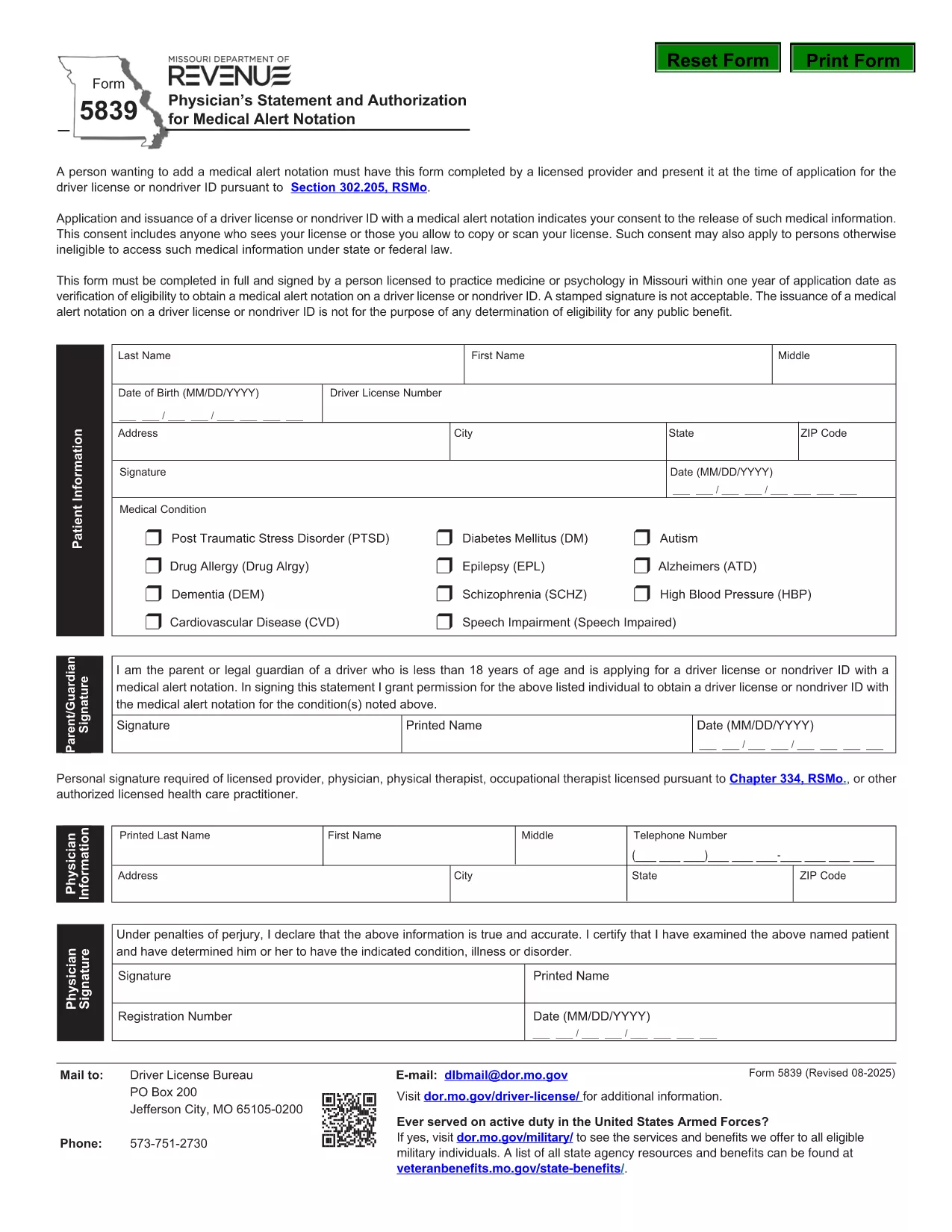
Form 5839 is the official Missouri Physician’s Statement and Authorization required when you want a medical alert notation placed on a driver’s license or non‑driver ID. The form must be completed by a licensed health‑care provider and presented at the time of application.

What Is Form 5839 and Who Needs It?

This form is used under Section 302.205, RSMo to certify medical conditions that affect driving ability. It is typically needed by individuals with conditions such as epilepsy, diabetes, vision impairments, or any health issue that the Missouri Department of Revenue deems relevant for a medical alert.

How to Complete Form 5839 Online

Instead of downloading the PDF and editing it manually, simply click the "Fill out this form" button on this page. The Formize PDF Filler app will load, allowing you to complete every field directly in your browser. Once finished, you can save or print the completed form.

Common Mistakes to Avoid on Form 5839

  • Leaving any required fields blank – the form will be rejected.
  • Using an unsigned or non‑licensed provider’s signature.
  • Providing outdated contact information for the physician.
  • Submitting a scanned copy with low resolution; use the online filler for a clear PDF.

Where to Submit the Completed Form

After filling out Form 5839, bring the printed copy (or a saved electronic version) to your local Missouri Department of Revenue office when applying for or renewing a driver’s license or ID. The office will verify the medical information before adding the alert notation.

FAQs About Form 5839

Below are answers to the most common questions about this form. For more details, refer to the downloadable PDF linked at the bottom of the page.

KKK
  • Who is authorized to sign Form 5839?

    Only a licensed physician, osteopathic doctor, or other qualified health‑care professional can sign the form.

  • Can I submit a scanned copy of the form?

    Yes, but the scan must be clear and legible. Using the online Formize filler ensures a high‑quality PDF.

  • Do I need to attach medical records?

    Generally no, unless the Department of Revenue specifically requests supporting documentation.

  • How long does the medical alert stay on my license?

    The alert remains until the physician provides a new statement indicating the condition has resolved.

  • Is there a fee to file Form 5839?

    No separate fee is charged for the medical statement; any standard licensing fees still apply.

  • What if my physician’s signature is missing?

    The form will be rejected. Contact the physician to obtain a proper signature before submission.

KUIDAS

4 lihtsa sammuga veebis tasuta Form 5839 täitmine:

  1. 1
    Click the Fill‑out Button
    Press the "Fill out this form" button on the page. The Formize PDF Filler loads in your browser.
  2. 2
    Enter All Required Information
    Complete each field – patient details, physician’s credentials, and the medical condition description.
  3. 3
    Save or Print the Completed Form
    When all sections are filled, click "Save" to download a copy or "Print" to obtain a hard‑copy for submission.
  4. 4
    Submit to the Missouri Department of Revenue
    Take the printed form (or a saved PDF) to your local DMV office when applying for or renewing your license.
PDF-täiterakenduse vormindamine
UMBES

Juhiloa taotlusvormid

Enamikus riikides on enne teele asumist kohustuslik omada juhiluba. Juhiloa saamine on oluline verstapost kõigile, kes soovivad autot juhtida.

Form 5839 on üks juhiloa taotlusvormidest, mis on dokumendid, mida kasutatakse teabe kogumiseks inimestelt, kes soovivad juhiluba taotleda. Tavaliselt sisaldab see väljasid taotleja nime, sünnikuupäeva, ID-numbri, kontaktteabe, samuti tema juhiloa ajaloo ja kogemuste kohta.

FUNKTSIOONID

PDF täiteaine

Lihtsaim viis märksõna Form 5839 veebis täitmiseks

  • Täitke kiiresti Form 5839
    Kas otsite viisi Form 5839 kiireks veebis täitmiseks? Meie veebipõhise tasuta PDF-vormi täitja abil saate teada, kuidas seda PDF-dokumenti vähem kui minutiga redigeerida ja täita.
  • Lihtne kasutada veebipõhist PDF-redaktorit
    Kas olete tüdinenud PDF-failide printimisest, et saaksite neid enne uuesti skannimist ja tagasisaatmist redigeerida? Redigeerige PDF-dokumente võrgus tasuta. Kasutage meie veebipõhist PDF-redaktorit, et säästa aega ja paberit.
  • Suurepärased tööriistad, kõik platvormid
    Kas soovite teada, kuidas Macis täita Form 5839 või kuidas kasutada tasuta PDF-täitjat? Meie veebipõhised PDF-tööriistad töötavad kõigil platvormidel.
  • Turvaline failide salvestusruum
    Lõpetatud failid „Form 5839” salvestatakse turvatud andmebaasi, mida haldab Amazon Cloudi hostimine. Saate oma failid meie süsteemist igal ajal kustutada. Igal juhul kustutatakse need failid 24 tunni pärast automaatselt.
  • Vestelge kasutajaga Form 5839
    Vestelge kasutajaga „Form 5839” saidil Chatize, mis on tasuta PDF-i lugeja abiline. Esitage küsimusi ja saage vastused märksõnalt „Form 5839”. Klõpsake ülaloleval nupul Vestle dokumendiga.

Kustuta täitmise seanss

Kas kustutada valitud täitmisseanss? Sellisel juhul läheb teie edu vormi täitmisel kaotsi.

Kustuta redigeerimisseanss

Kas kustutada valitud redigeerimisseanss? Sel juhul lähevad teie edu vormi loomisel ja redigeerimisel kaotsi.