
Vali keel

NY DMV MV-TEENS Fillable PDF – Teen Driver Notification Enrollment

  1. Keel Inglise
  2. Riik USA
  3. Tegevus Juhiluba
  4. osariik New York
Täitke see vorm
NY DMV MV-TEENS Fillable PDF – Teen Driver Notification Enrollment

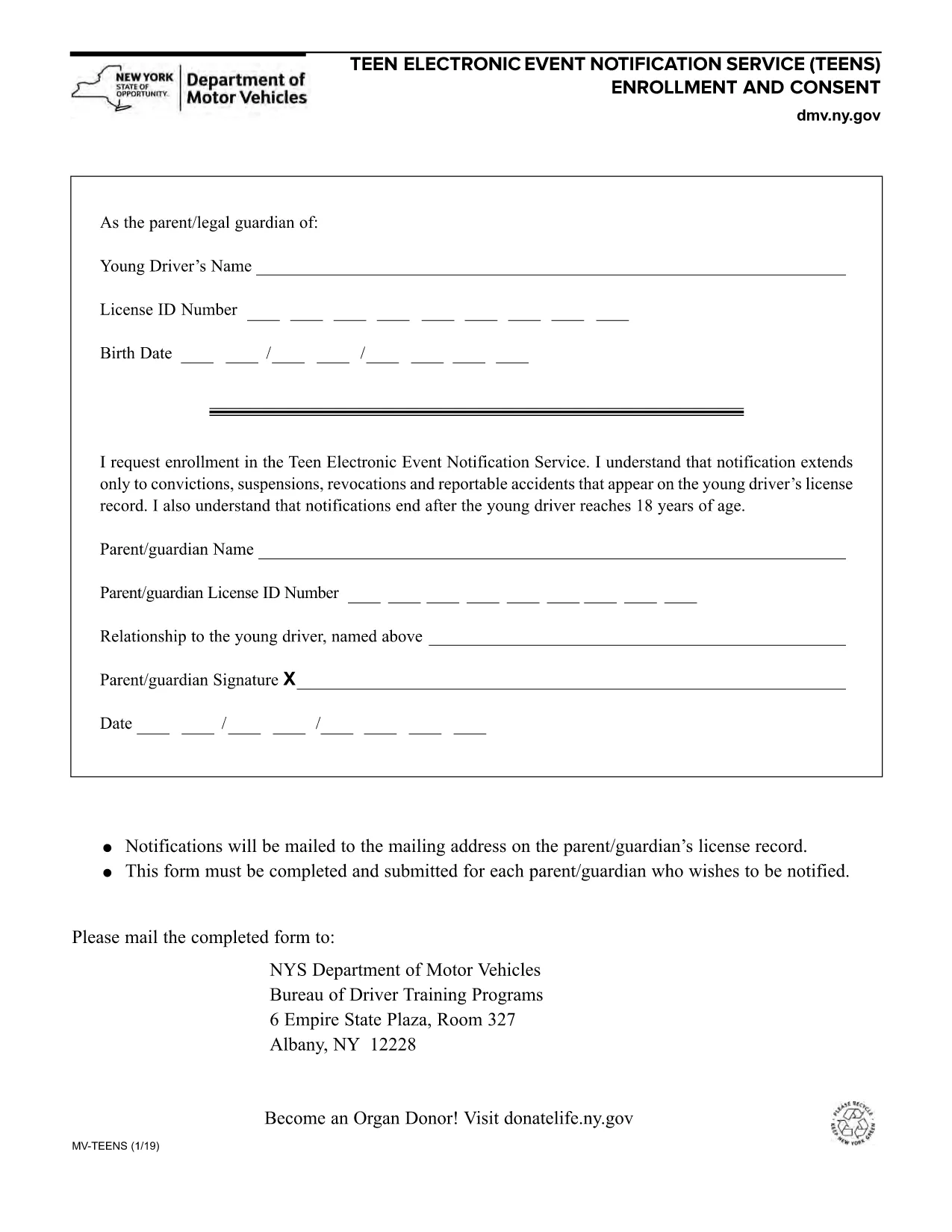
The MV-TEENS form is the official New York Department of Motor Vehicles (DMV) application for the Teen Electronic Event Notification Service. By enrolling, parents or legal guardians receive electronic alerts for convictions, suspensions, revocations, and reportable accidents that appear on a teen driver’s license record until the driver turns 18.

This fillable PDF is hosted on Formize, allowing you to complete the entire form directly in your browser—no printer, scanner, or PDF editor required. Simply click the “Fill out this form” button, let the Formize PDF Filler load, and start entering the required information.

Below you’ll find step‑by‑step instructions, tips to avoid common errors, and answers to the most frequently asked questions about the MV-TEENS form.

KKK
  • Who can enroll in the MV-TEENS service?

    A parent or legal guardian of a driver under 18 years old can enroll on the teen’s behalf.

  • Is there a fee to submit the MV-TEENS form?

    No. The MV-TEENS enrollment is free of charge.

  • What types of notifications will I receive?

    You will receive electronic alerts for convictions, suspensions, revocations, and reportable accidents recorded on the teen’s license.

  • How long does the enrollment stay active?

    Notifications stop automatically when the teen driver reaches 18 years of age.

  • Can I edit the form after I’ve submitted it?

    Once submitted, you must complete a new MV-TEENS form to make changes.

  • Do I need a New York State driver’s license to use this form?

    Yes, the form is only for drivers licensed in New York State.

  • What if I don’t have internet access to fill the form online?

    You can download the PDF, print it, fill it out by hand, and mail it to the address listed on the form.

  • How will I receive the notifications?

    Notifications are sent via email to the address you provide on the form.

KUIDAS

5 lihtsa sammuga veebis tasuta MV-TEENS täitmine:

  1. 1
    Open the Fillable Form
    Click the “Fill out this form” button on the page. The Formize PDF Filler app will load in a new window.
  2. 2
    Enter Required Information
    Complete each field: driver’s name, date of birth, license number, parent/guardian contact details, and consent statements.
  3. 3
    Review for Accuracy
    Use the built‑in preview to double‑check all entries. Correct any mistakes before proceeding.
  4. 4
    Submit or Save
    When finished, click “Submit” to generate a completed PDF you can download, email, or print. You may also choose “Save” to keep an editable copy.
  5. 5
    Confirmation
    A confirmation screen will appear with a reference number. Keep this number for future correspondence with the NY DMV.
PDF-täiterakenduse vormindamine
UMBES

Juhiloa taotlusvormid

Enamikus riikides on enne teele asumist kohustuslik omada juhiluba. Juhiloa saamine on oluline verstapost kõigile, kes soovivad autot juhtida.

MV-TEENS on üks juhiloa taotlusvormidest, mis on dokumendid, mida kasutatakse teabe kogumiseks inimestelt, kes soovivad juhiluba taotleda. Tavaliselt sisaldab see väljasid taotleja nime, sünnikuupäeva, ID-numbri, kontaktteabe, samuti tema juhiloa ajaloo ja kogemuste kohta.

FUNKTSIOONID

PDF täiteaine

Lihtsaim viis märksõna MV-TEENS veebis täitmiseks

  • Täitke kiiresti MV-TEENS
    Kas otsite viisi MV-TEENS kiireks veebis täitmiseks? Meie veebipõhise tasuta PDF-vormi täitja abil saate teada, kuidas seda PDF-dokumenti vähem kui minutiga redigeerida ja täita.
  • Lihtne kasutada veebipõhist PDF-redaktorit
    Kas olete tüdinenud PDF-failide printimisest, et saaksite neid enne uuesti skannimist ja tagasisaatmist redigeerida? Redigeerige PDF-dokumente võrgus tasuta. Kasutage meie veebipõhist PDF-redaktorit, et säästa aega ja paberit.
  • Suurepärased tööriistad, kõik platvormid
    Kas soovite teada, kuidas Macis täita MV-TEENS või kuidas kasutada tasuta PDF-täitjat? Meie veebipõhised PDF-tööriistad töötavad kõigil platvormidel.
  • Turvaline failide salvestusruum
    Lõpetatud failid „MV-TEENS” salvestatakse turvatud andmebaasi, mida haldab Amazon Cloudi hostimine. Saate oma failid meie süsteemist igal ajal kustutada. Igal juhul kustutatakse need failid 24 tunni pärast automaatselt.
  • Vestelge kasutajaga MV-TEENS
    Vestelge kasutajaga „MV-TEENS” saidil Chatize, mis on tasuta PDF-i lugeja abiline. Esitage küsimusi ja saage vastused märksõnalt „MV-TEENS”. Klõpsake ülaloleval nupul Vestle dokumendiga.

Kustuta täitmise seanss

Kas kustutada valitud täitmisseanss? Sellisel juhul läheb teie edu vormi täitmisel kaotsi.

Kustuta redigeerimisseanss

Kas kustutada valitud redigeerimisseanss? Sel juhul lähevad teie edu vormi loomisel ja redigeerimisel kaotsi.