
Vali keel

DL-14C – Texas Election Identification Certificate (Fillable PDF)

  1. Keel Inglise
  2. Riik USA
  3. Tegevus Juhiluba
  4. osariik Texas
Täitke see vorm
DL-14C – Texas Election Identification Certificate (Fillable PDF)

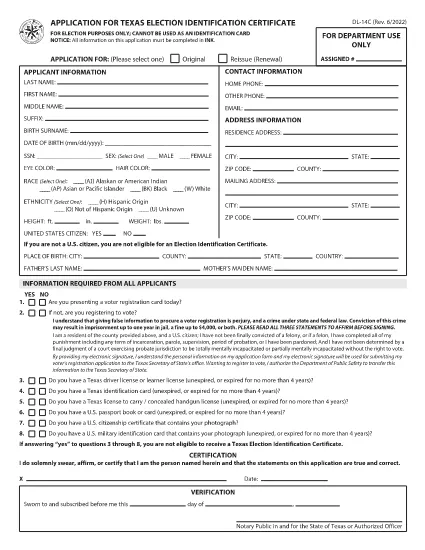
The DL-14C is the official Application for a Texas Election Identification Certificate (EIC). This card allows eligible voters to prove their identity at the polls without a driver’s license or state ID. Our fillable PDF version lets you complete the form quickly, securely, and without printing.

What Is the DL-14C Form?

The DL-14C is issued by the Texas Department of Public Safety (DPS) in partnership with the Texas Secretary of State. It is available to any Texas resident who does not have a driver’s license or state ID but needs a valid photo ID for voting.

How to Fill Out the DL-14C Online

Instead of downloading the PDF and opening a separate editor, simply click the "Fill out this form" button on this page. The Formize PDF Filler app will load the document directly in your browser, allowing you to enter data, add signatures, and save a completed copy.

  • Step 1 – Open the Form: Click the blue "Fill out this form" button.
  • Step 2 – Enter Your Information: Fill in personal details, address, and citizenship status. All fields are searchable and auto‑validated.
  • Step 3 – Upload Supporting Documents: Attach a copy of your birth certificate, passport, or other accepted ID.
  • Step 4 – Sign Electronically: Use your mouse or touchscreen to add a digital signature.
  • Step 5 – Save & Submit: Download the completed PDF or email it directly to the Texas DPS office.

Common Mistakes to Avoid

  • Leaving the SSN field blank when it is optional – you can write “N/A” to avoid processing delays.
  • Providing an outdated address – the DPS requires a current residential address.
  • Uploading non‑PDF supporting documents – convert images to PDF before attaching.
  • Forgetting to sign – an unsigned form is rejected.

Where to Submit Your Completed Form

After you have saved the filled PDF, mail it to the address listed on the last page of the form or submit it in person at any Texas Department of Public Safety office. You can also upload the file through the DPS online portal if you have an account.

Frequently Asked Questions

Below are quick answers to the most common queries about the DL-14C.

KKK
  • Do I have to provide my Social Security Number on the DL-14C?

    No. The SSN field is optional for Election Identification Certificate applicants. You can write “N/A” if you prefer not to disclose it.

  • Can I use a driver’s license number on this form?

    Only if you already have a Texas driver’s license. The DL-14C is intended for residents who do NOT have a driver’s license or state ID.

  • How long does it take to receive the Election ID after submitting the form?

    Processing typically takes 7‑10 business days after the DPS receives a complete application and supporting documents.

  • What documents are accepted as proof of identity?

    A certified birth certificate, valid U.S. passport, or an out‑of‑state driver’s license with a translation are accepted.

  • Is there a fee to obtain the Election Identification Certificate?

    No. The DL-14C application for an Election ID is free of charge.

  • Can I fill out the DL-14C on a mobile device?

    Yes. The Formize PDF Filler works on smartphones and tablets, allowing you to complete the form on the go.

KUIDAS

4 lihtsa sammuga veebis tasuta DL-14C täitmine:

  1. 1
    Open the Fillable Form
    Click the "Fill out this form" button on the page. The Formize PDF Filler will load the DL-14C directly in your browser.
  2. 2
    Complete All Required Fields
    Enter your personal information, address, and citizenship details. Use the built‑in validation to avoid errors.
  3. 3
    Add Supporting Documents and Sign
    Upload PDFs of your birth certificate or passport, then add an electronic signature. Save the completed form to your device.
  4. 4
    Submit the Application
    Print and mail, deliver in person to a DPS office, or upload the PDF through the DPS online portal.
PDF-täiterakenduse vormindamine
UMBES

Juhiloa taotlusvormid

Enamikus riikides on enne teele asumist kohustuslik omada juhiluba. Juhiloa saamine on oluline verstapost kõigile, kes soovivad autot juhtida.

DL-14C on üks juhiloa taotlusvormidest, mis on dokumendid, mida kasutatakse teabe kogumiseks inimestelt, kes soovivad juhiluba taotleda. Tavaliselt sisaldab see väljasid taotleja nime, sünnikuupäeva, ID-numbri, kontaktteabe, samuti tema juhiloa ajaloo ja kogemuste kohta.

FUNKTSIOONID

PDF täiteaine

Lihtsaim viis märksõna DL-14C veebis täitmiseks

  • Täitke kiiresti DL-14C
    Kas otsite viisi DL-14C kiireks veebis täitmiseks? Meie veebipõhise tasuta PDF-vormi täitja abil saate teada, kuidas seda PDF-dokumenti vähem kui minutiga redigeerida ja täita.
  • Lihtne kasutada veebipõhist PDF-redaktorit
    Kas olete tüdinenud PDF-failide printimisest, et saaksite neid enne uuesti skannimist ja tagasisaatmist redigeerida? Redigeerige PDF-dokumente võrgus tasuta. Kasutage meie veebipõhist PDF-redaktorit, et säästa aega ja paberit.
  • Suurepärased tööriistad, kõik platvormid
    Kas soovite teada, kuidas Macis täita DL-14C või kuidas kasutada tasuta PDF-täitjat? Meie veebipõhised PDF-tööriistad töötavad kõigil platvormidel.
  • Turvaline failide salvestusruum
    Lõpetatud failid „DL-14C” salvestatakse turvatud andmebaasi, mida haldab Amazon Cloudi hostimine. Saate oma failid meie süsteemist igal ajal kustutada. Igal juhul kustutatakse need failid 24 tunni pärast automaatselt.
  • Vestelge kasutajaga DL-14C
    Vestelge kasutajaga „DL-14C” saidil Chatize, mis on tasuta PDF-i lugeja abiline. Esitage küsimusi ja saage vastused märksõnalt „DL-14C”. Klõpsake ülaloleval nupul Vestle dokumendiga.

Kustuta täitmise seanss

Kas kustutada valitud täitmisseanss? Sellisel juhul läheb teie edu vormi täitmisel kaotsi.

Kustuta redigeerimisseanss

Kas kustutada valitud redigeerimisseanss? Sel juhul lähevad teie edu vormi loomisel ja redigeerimisel kaotsi.