Vali keel

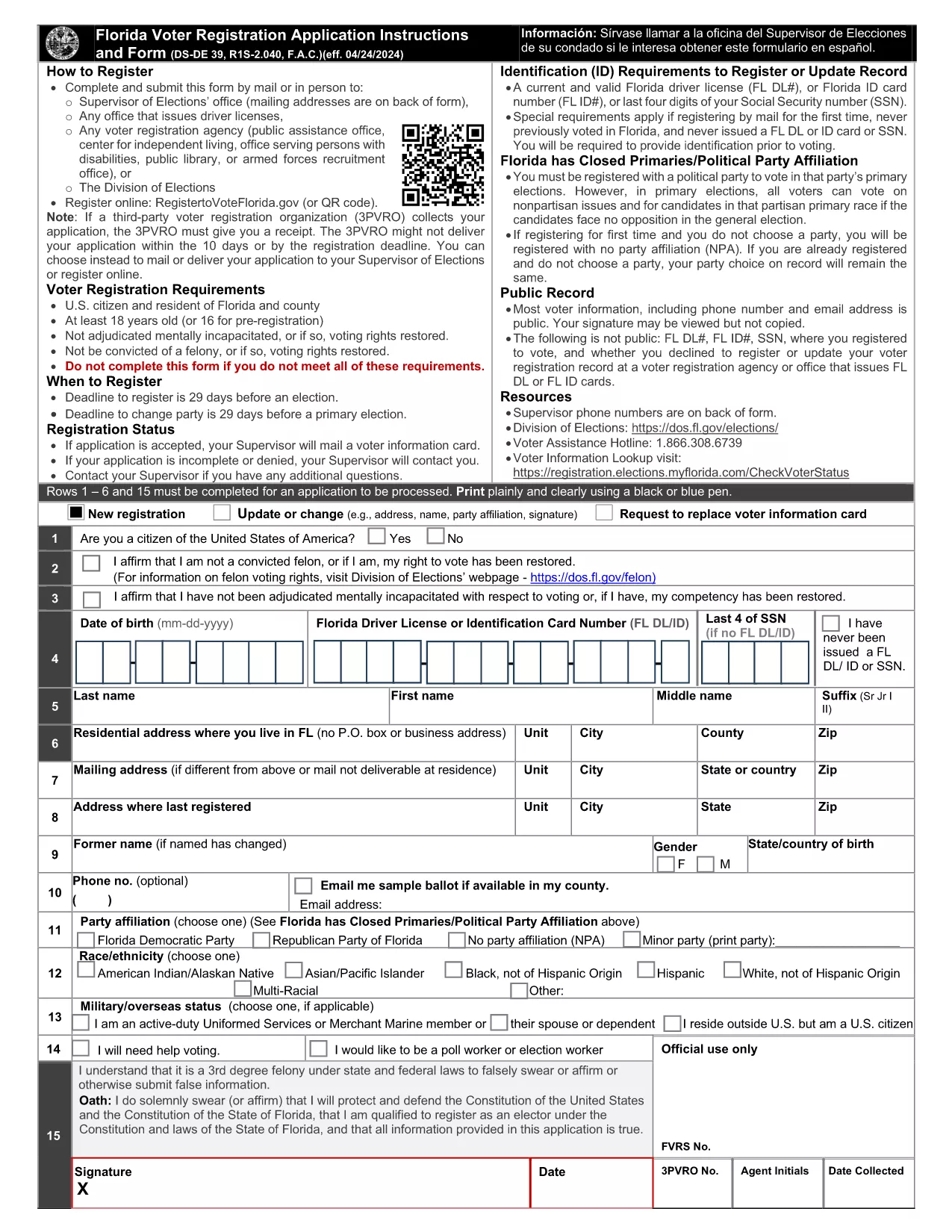
New Voter Registration Application – Fillable PDF

  1. Keel Inglise
  2. Riik USA
  3. Tegevus Elections
  4. osakond Florida Department of State
Täitke see vorm
New Voter Registration Application – Fillable PDF

Registering to vote is a civic duty, and the easiest way to get started is with a fillable PDF voter registration form. The Florida New Voter Application is available for instant download, and with Formize’s PDF Filler you can complete it entirely online—no printing, scanning, or faxing required.

Why Choose a Fillable PDF Form?

  • Fully searchable and editable fields that guide you step‑by‑step.
  • Save time: fill, sign, and submit in minutes.
  • Secure and compliant with state election standards.
  • Accessible on any device—desktop, tablet, or smartphone.

How to Complete the Form Online with Formize

Simply click the "Fill out this form" button on this page. The Formize PDF Filler app will load the PDF directly in your browser. Follow the on‑screen prompts to enter your personal details, address, and citizenship information.

Common Mistakes to Avoid

  • Leaving required fields blank – the filler will highlight missing information.
  • Using an outdated address – double‑check spelling and ZIP code.
  • Forgetting to sign electronically – the signature field is mandatory.
  • Submitting an unsigned form – the system will block incomplete submissions.

Submission Guidelines & What Happens Next

After you finish, click "Submit" to download a completed copy. Print the signed page (if required by your county) and mail it to the address listed on the form, or deliver it in person to a local Florida Department of State office.

Eligibility Requirements

To be eligible for this form you must be a U.S. citizen, at least 18 years old on Election Day, and a resident of Florida. If you are 16‑17 years old, you may complete the form but cannot vote until you turn 18.

Ready to become a registered voter? Click the button below and start the process instantly.

KKK
  • Do I need to print the form after filling it online?

    Most Florida counties accept a printed copy of the completed form. If your local office accepts electronic submissions, you can email the PDF directly.

  • Can I save my progress and finish later?

    Yes. The Formize PDF Filler allows you to save a draft to your device and resume at any time before you submit.

  • What if I make a mistake after submitting?

    Contact your county Supervisor of Elections to request a correction. You may need to fill out a new form if the error is significant.

  • Is the electronic signature legally binding?

    Florida law recognizes electronic signatures on voter registration forms as long as the signer follows the on‑screen instructions.

  • How long does it take for my registration to be processed?

    The state typically processes paper registrations within 30 days. You can check your status online using the Florida Voter Registration portal.

KUIDAS

4 lihtsa sammuga veebis tasuta new voter registration täitmine:

  1. 1
    Open the Fillable Form
    Click the "Fill out this form" button on the page. The Formize PDF Filler will load the voter application directly in your browser.
  2. 2
    Enter Your Information
    Complete each highlighted field—name, address, date of birth, citizenship, and party affiliation. The filler validates entries in real time.
  3. 3
    Sign Electronically
    Use the signature field to add your electronic signature. This step is required for the form to be accepted.
  4. 4
    Review & Submit
    Double‑check all information, then click "Submit" to generate a completed PDF. Download, print (if needed), and mail it to the address on the form.
PDF-täiterakenduse vormindamine
UMBES

mall new voter registration

Traditsioonilise PDF-dokumendi vaatamise ja täitmise funktsioonide komplektiga koos veebirakenduse ja tundliku paigutuse eelistega saate märksõna new voter registration lõpule viia minutitega.

FUNKTSIOONID

PDF täiteaine

Lihtsaim viis märksõna new voter registration veebis täitmiseks

  • Täitke kiiresti new voter registration
    Kas otsite viisi new voter registration kiireks veebis täitmiseks? Meie veebipõhise tasuta PDF-vormi täitja abil saate teada, kuidas seda PDF-dokumenti vähem kui minutiga redigeerida ja täita.
  • Lihtne kasutada veebipõhist PDF-redaktorit
    Kas olete tüdinenud PDF-failide printimisest, et saaksite neid enne uuesti skannimist ja tagasisaatmist redigeerida? Redigeerige PDF-dokumente võrgus tasuta. Kasutage meie veebipõhist PDF-redaktorit, et säästa aega ja paberit.
  • Suurepärased tööriistad, kõik platvormid
    Kas soovite teada, kuidas Macis täita new voter registration või kuidas kasutada tasuta PDF-täitjat? Meie veebipõhised PDF-tööriistad töötavad kõigil platvormidel.
  • Turvaline failide salvestusruum
    Lõpetatud failid „new voter registration” salvestatakse turvatud andmebaasi, mida haldab Amazon Cloudi hostimine. Saate oma failid meie süsteemist igal ajal kustutada. Igal juhul kustutatakse need failid 24 tunni pärast automaatselt.
  • Vestelge kasutajaga new voter registration
    Vestelge kasutajaga „new voter registration” saidil Chatize, mis on tasuta PDF-i lugeja abiline. Esitage küsimusi ja saage vastused märksõnalt „new voter registration”. Klõpsake ülaloleval nupul Vestle dokumendiga.

Kustuta täitmise seanss

Kas kustutada valitud täitmisseanss? Sellisel juhul läheb teie edu vormi täitmisel kaotsi.

Kustuta redigeerimisseanss

Kas kustutada valitud redigeerimisseanss? Sel juhul lähevad teie edu vormi loomisel ja redigeerimisel kaotsi.