
Vali keel

Form 10837 – Fillable PDF for IRS

  1. Riik USA
  2. Keel Inglise
  3. Tegevus Maksud
  4. osakond IRS
Täitke see vorm
Form 10837 – Fillable PDF for IRS

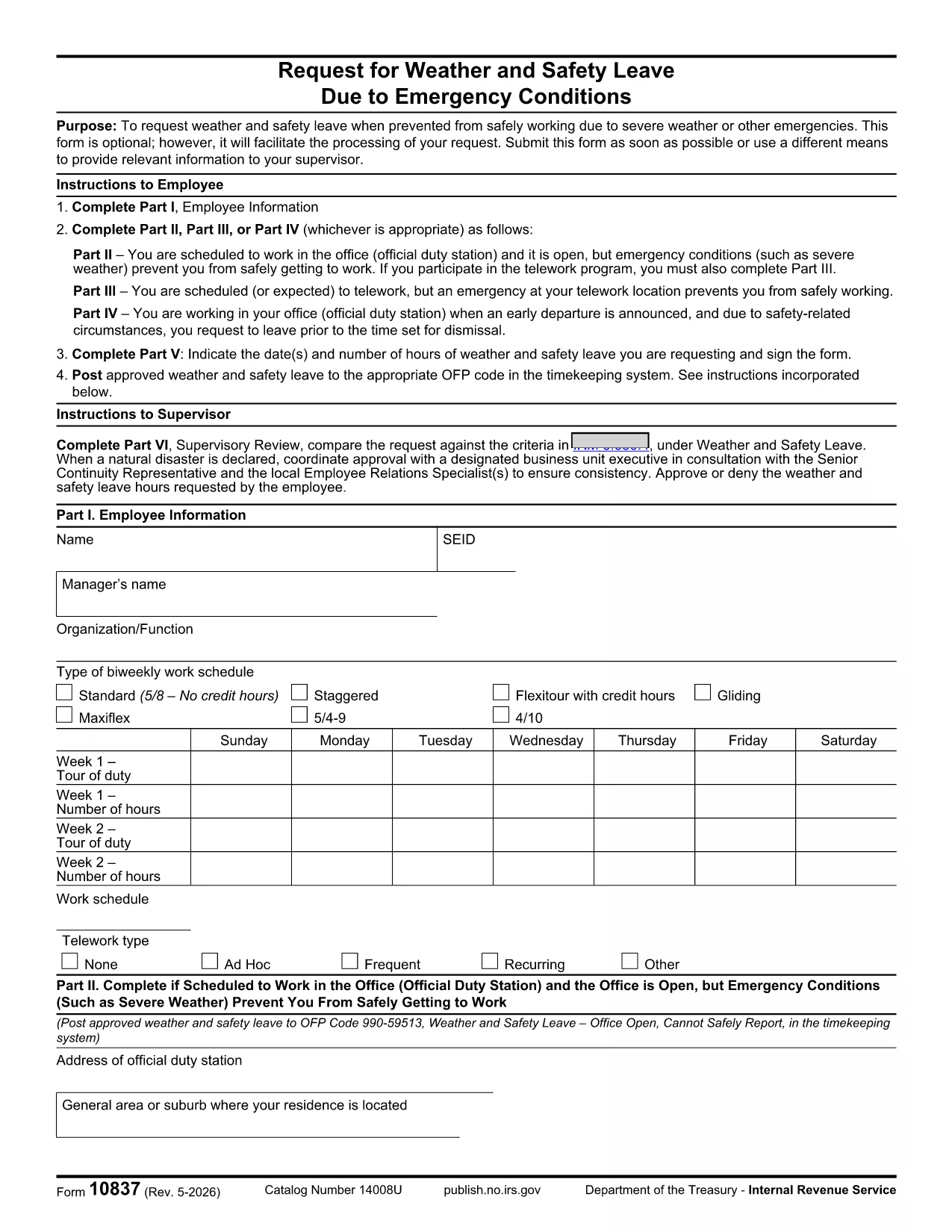
Form 10837 is an Internal Revenue Service (IRS) tax document used for reporting specific tax information. Whether you need the form for personal tax compliance or for a business filing, our fillable PDF lets you complete it quickly and accurately.

What Is Form 10837?

Form 10837, rev. 5‑2026, is a standard IRS form that collects detailed financial data required for certain tax calculations. The form is frequently requested by tax professionals, accountants, and individuals filing complex returns.

How to Fill Form 10837 Online

Instead of downloading the PDF, opening a separate editor, and printing, you can fill it directly on our site:

  1. Click the "Fill out this form" button on the page.
  2. Wait a few seconds while the Formize PDF Filler app loads securely in your browser.
  3. Enter your information in the highlighted fields – the interface works on desktop, tablet, and mobile.
  4. Save your progress at any time, then submit or download the completed PDF for your records.

Common Mistakes & Tips

  • Incorrect dates: Double‑check all date fields; the IRS rejects forms with mismatched tax years.
  • Missing signatures: Use the built‑in signature tool to sign electronically before saving.
  • Numeric errors: The filler validates numbers in real time, but review totals for rounding differences.
  • Attachment omissions: If the form requires supporting documents, attach them using the "Add File" button.

Where to Find Help

If you have questions while completing Form 10837, consult the IRS instructions PDF linked below, or search the IRS Help Center for guidance. Our site also offers a short tutorial video on using the Formize filler.

KKK
  • Do I need Adobe Reader to fill Form 10837?

    No. Our online Formize filler works in any modern browser without installing Adobe Reader.

  • Can I sign Form 10837 electronically?

    Yes. The filler includes an electronic signature tool that complies with IRS e‑signature guidelines.

  • Is the filled PDF secure?

    All data is processed locally in your browser and encrypted during any upload, ensuring your personal information stays private.

  • What if I make a mistake after saving?

    Open the saved PDF again with the Formize filler, edit the fields, and re‑save. The file remains fully editable.

  • Do I need to print Form 10837 after filling it?

    Only if your specific tax situation requires a hard copy. Otherwise, the electronic PDF is acceptable for most IRS submissions.

  • Where can I find the official IRS instructions for Form 10837?

    The official instructions are included in the PDF linked below or can be accessed on the IRS website.

KUIDAS

4 lihtsa sammuga veebis tasuta Form 10837 täitmine:

  1. 1
    Open the Fillable Form
    Click the "Fill out this form" button on the page to launch the Formize PDF Filler.
  2. 2
    Enter Your Information
    Type directly into each highlighted field. The filler validates dates, numbers, and required entries in real time.
  3. 3
    Add Attachments (if needed)
    Use the "Add File" button to upload any supporting documents the IRS requires.
  4. 4
    Save or Submit
    When finished, click "Save PDF" to download a copy for your records, or click "Submit" to send it directly to the IRS portal if available.
PDF-täiterakenduse vormindamine
UMBES

Maksuvormid

Form 10837 on üks maksuvormidest, mida kasutatakse maksudega seotud teabe esitamiseks asjaomasele maksuhaldurile. Maksuvorme on erinevat tüüpi, sealhulgas föderaal-, osariigi ja kohalikud maksuvormid, mis võivad olenevalt maksumaksja olukorrast ja asukohast erineda.

FUNKTSIOONID

PDF täiteaine

Lihtsaim viis märksõna Form 10837 veebis täitmiseks

  • Täitke kiiresti Form 10837
    Kas otsite viisi Form 10837 kiireks veebis täitmiseks? Meie veebipõhise tasuta PDF-vormi täitja abil saate teada, kuidas seda PDF-dokumenti vähem kui minutiga redigeerida ja täita.
  • Lihtne kasutada veebipõhist PDF-redaktorit
    Kas olete tüdinenud PDF-failide printimisest, et saaksite neid enne uuesti skannimist ja tagasisaatmist redigeerida? Redigeerige PDF-dokumente võrgus tasuta. Kasutage meie veebipõhist PDF-redaktorit, et säästa aega ja paberit.
  • Suurepärased tööriistad, kõik platvormid
    Kas soovite teada, kuidas Macis täita Form 10837 või kuidas kasutada tasuta PDF-täitjat? Meie veebipõhised PDF-tööriistad töötavad kõigil platvormidel.
  • Turvaline failide salvestusruum
    Lõpetatud failid „Form 10837” salvestatakse turvatud andmebaasi, mida haldab Amazon Cloudi hostimine. Saate oma failid meie süsteemist igal ajal kustutada. Igal juhul kustutatakse need failid 24 tunni pärast automaatselt.
  • Vestelge kasutajaga Form 10837
    Vestelge kasutajaga „Form 10837” saidil Chatize, mis on tasuta PDF-i lugeja abiline. Esitage küsimusi ja saage vastused märksõnalt „Form 10837”. Klõpsake ülaloleval nupul Vestle dokumendiga.

Kustuta täitmise seanss

Kas kustutada valitud täitmisseanss? Sellisel juhul läheb teie edu vormi täitmisel kaotsi.

Kustuta redigeerimisseanss

Kas kustutada valitud redigeerimisseanss? Sel juhul lähevad teie edu vormi loomisel ja redigeerimisel kaotsi.