
Vali keel

Form 14446 (FR) – Fillable PDF Form

  1. Riik USA
  2. Keel Inglise
  3. Tegevus Maksud
  4. osakond IRS
Täitke see vorm
Form 14446 (FR) – Fillable PDF Form

Form 14446 (FR) – Fillable PDF Form

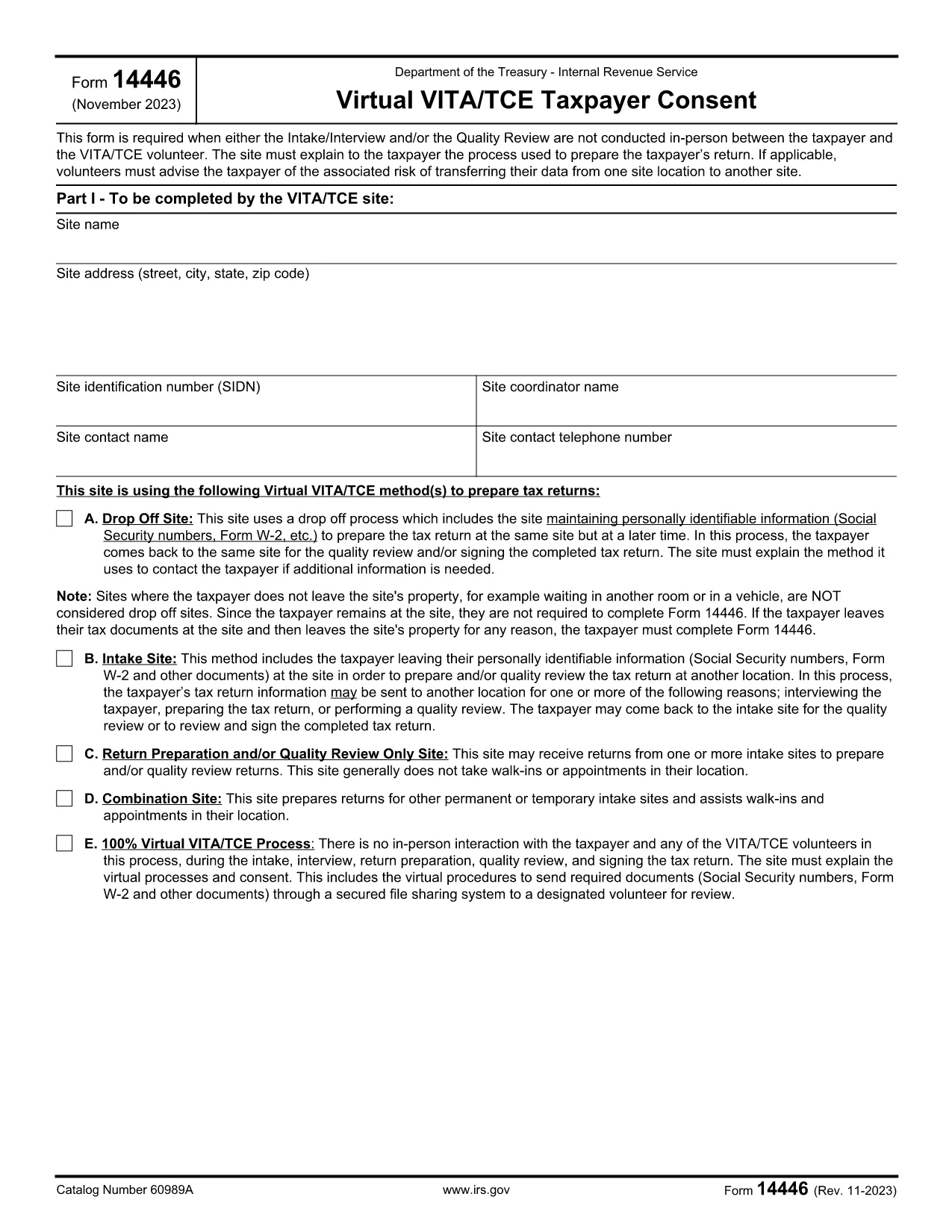
Form 14446 (FR) is the French‑language version of the IRS form used for tax‑exempt organization reporting. Whether you are a charity, a nonprofit, or a fiscal sponsor, you need a reliable way to complete the form accurately and submit it on time.

What is Form 14446 (FR)?

This form collects detailed financial information required by the Internal Revenue Service (IRS) for organizations that file a Form 990 in French. The French version is officially recognized for entities that operate primarily in French‑speaking territories of the United States.

How to Fill Out Form 14446 Online

Instead of downloading a static PDF and opening it in a separate editor, you can fill the form directly on this page. Click the "Fill out this form" button and wait for the Formize PDF Filler app to load. The entire process stays within your browser, keeping your data secure.

Common Mistakes to Avoid

  • Leaving required fields blank: The filler highlights missing entries before you can submit.
  • Using the wrong currency format: Enter amounts without commas (e.g., 12345.67) to prevent validation errors.
  • Submitting an unsigned form: The digital signature field must be completed; otherwise the IRS will reject the filing.

Where to Submit the Completed Form

After you finish, you can:

  • Download the completed PDF and mail it to the address indicated in the instructions.
  • Upload the file directly to the IRS e‑file portal (if you have an authorized e‑file account).

Formize stores the file securely for 30 days, giving you time to choose the submission method that works best for you.

Download vs. Fill Online – Why Choose Formize

Using the online filler eliminates version‑control issues, reduces the risk of corrupted files, and provides real‑time validation. It’s the fastest, safest way to complete Form 14446 (FR) without the hassle of external PDF editors.

Download the official PDF (for reference)

KKK
  • Do I need to download the PDF before filling it out?

    No. Simply click the “Fill out this form” button and the Formize PDF Filler will load the form directly in your browser.

  • Is the French version of the form accepted by the IRS?

    Yes. Form 14446 (FR) is the officially sanctioned French translation for organizations that qualify for French‑language filing.

  • Can I save my progress and finish later?

    The filler allows you to download a partially completed PDF at any time. You can reopen it later in Formize to continue.

  • What browsers are supported?

    Formize works with the latest versions of Chrome, Edge, Firefox, and Safari. Ensure JavaScript is enabled.

  • Is my data secure while using the online filler?

    All data is processed locally in your browser and encrypted during any upload. Formize does not store personal information after the 30‑day retention period.

  • Do I need a digital signature?

    Yes. The form includes a built‑in digital signature field. You can sign using a mouse, touchpad, or by typing your name and selecting a signature style.

  • What if I make a mistake after submitting?

    If the form is already mailed, you’ll need to submit a corrected version. If you submit electronically, you can upload a revised PDF before the IRS processing deadline.

  • Where can I find the official instructions for Form 14446 (FR)?

    The official instruction booklet is linked at the bottom of this page and also available on the IRS website.

KUIDAS

5 lihtsa sammuga veebis tasuta Form 14446 täitmine:

  1. 1
    Click the Fill Button
    Press the bright “Fill out this form” button on the page. The Formize PDF Filler will open in a new tab.
  2. 2
    Wait for the Filler to Load
    A short loading screen appears while the secure filler app initializes. This ensures the latest version of Form 14446 (FR) is used.
  3. 3
    Complete Each Field
    Enter your organization’s information, financial figures, and signatures. Required fields are highlighted in red until filled.
  4. 4
    Review and Validate
    Click the “Validate” button. The app checks for missing data, format errors, and unsigned sections.
  5. 5
    Save or Submit
    When validation passes, download the completed PDF or upload it directly to the IRS e‑file portal from the same screen.
PDF-täiterakenduse vormindamine
UMBES

Föderaalsed maksuvormid

Form 14446 on üks föderaalseid maksuvorme, mis on dokumendid, mida kasutatakse föderaalsete tulumaksude teatamiseks ja esitamiseks Ameerika Ühendriikide siseriiklikule tuluteenistusele (IRS). Neid vorme kasutavad üksikisikud, ettevõtted ja organisatsioonid oma sissetulekute, mahaarvamiste ja muu föderaalse maksukohustuse arvutamiseks vajaliku teabe esitamiseks.

Kõige sagedamini kasutatav föderaalne maksuvorm on vorm 1040, mida kasutavad üksikisiku maksumaksjad oma isikliku tulumaksu teatamiseks. Teiste sageli kasutatavate vormide hulka kuuluvad vorm 1065 partnerluste jaoks, Vorm 1120 ettevõtetele ja vorm 990 maksuvabastusega organisatsioonidele.

Föderaalsed maksuvormid nõuavad tavaliselt, et maksumaksjad teataksid erinevatest sissetulekuallikatest, nagu palgad, palgad ja jootrahad, samuti investeeringutest, üüripindadest ja muudest allikatest saadud tulu. Vormid võimaldavad ka maksumaksjatel nõuda mahaarvamisi ja krediite mitmesuguste kulude, näiteks heategevuslike sissemaksete, hüpoteegi intresside ja tervishoiukulude katteks.

Oluline on esitada föderaalmaksuvormid täpselt ja õigeaegselt, kuna selle tegemata jätmine võib kaasa tuua trahve ja intressitasusid IRS-ilt.

FUNKTSIOONID

PDF täiteaine

Lihtsaim viis märksõna Form 14446 veebis täitmiseks

  • Täitke kiiresti Form 14446
    Kas otsite viisi Form 14446 kiireks veebis täitmiseks? Meie veebipõhise tasuta PDF-vormi täitja abil saate teada, kuidas seda PDF-dokumenti vähem kui minutiga redigeerida ja täita.
  • Lihtne kasutada veebipõhist PDF-redaktorit
    Kas olete tüdinenud PDF-failide printimisest, et saaksite neid enne uuesti skannimist ja tagasisaatmist redigeerida? Redigeerige PDF-dokumente võrgus tasuta. Kasutage meie veebipõhist PDF-redaktorit, et säästa aega ja paberit.
  • Suurepärased tööriistad, kõik platvormid
    Kas soovite teada, kuidas Macis täita Form 14446 või kuidas kasutada tasuta PDF-täitjat? Meie veebipõhised PDF-tööriistad töötavad kõigil platvormidel.
  • Turvaline failide salvestusruum
    Lõpetatud failid „Form 14446” salvestatakse turvatud andmebaasi, mida haldab Amazon Cloudi hostimine. Saate oma failid meie süsteemist igal ajal kustutada. Igal juhul kustutatakse need failid 24 tunni pärast automaatselt.
  • Vestelge kasutajaga Form 14446
    Vestelge kasutajaga „Form 14446” saidil Chatize, mis on tasuta PDF-i lugeja abiline. Esitage küsimusi ja saage vastused märksõnalt „Form 14446”. Klõpsake ülaloleval nupul Vestle dokumendiga.

Kustuta täitmise seanss

Kas kustutada valitud täitmisseanss? Sellisel juhul läheb teie edu vormi täitmisel kaotsi.

Kustuta redigeerimisseanss

Kas kustutada valitud redigeerimisseanss? Sel juhul lähevad teie edu vormi loomisel ja redigeerimisel kaotsi.