
Vali keel

FE-6 Claim for Death Benefits – Fillable PDF Form

  1. Keel Inglise
  2. Riik USA
  3. osakond Personalijuhtimise büroo
  4. Sektor Föderaalse töötajate rühma kindlustusvormid
Täitke see vorm
FE-6 Claim for Death Benefits – Fillable PDF Form

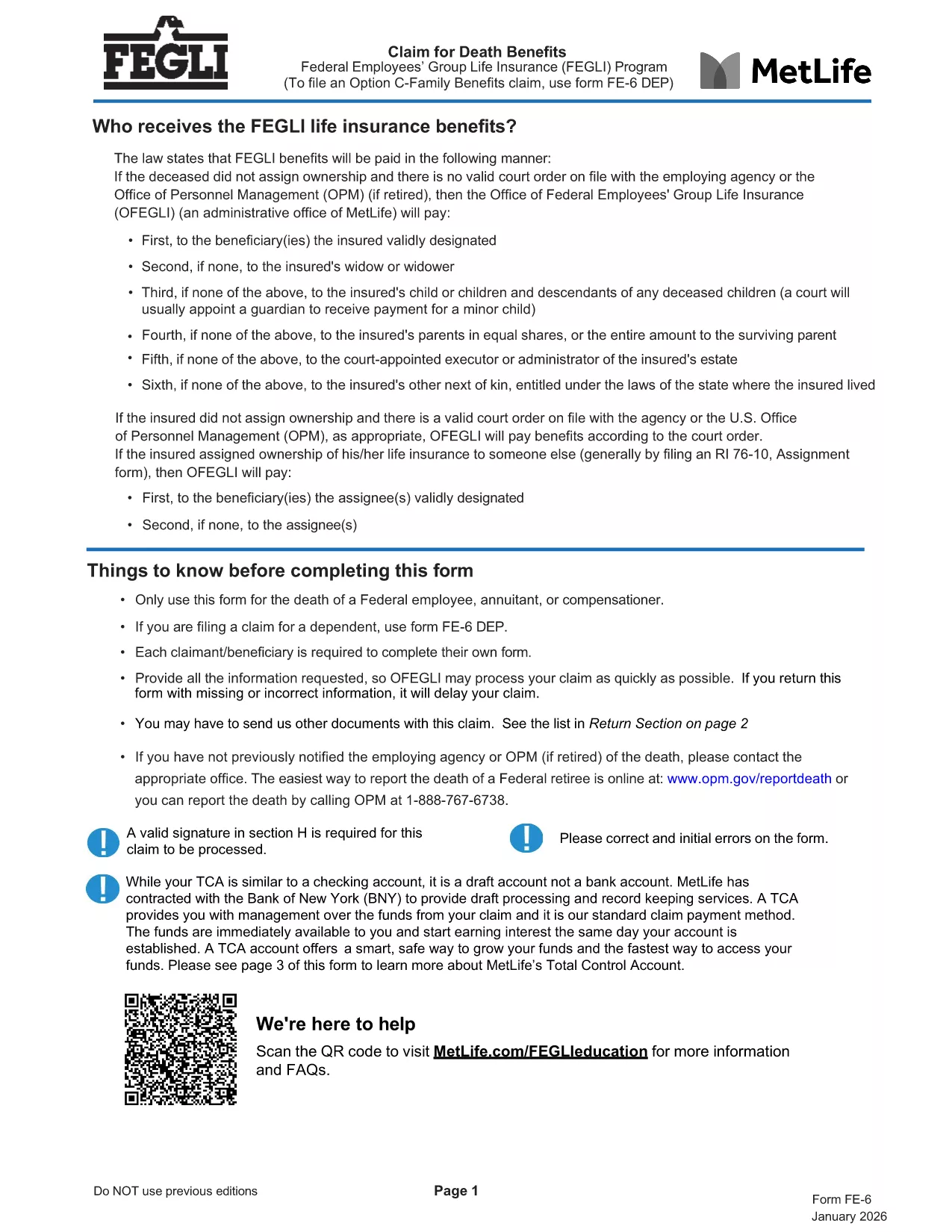
The FE-6 Claim for Death Benefits is the official form used by the Office of Personnel Management (OPM) to request Federal Employees Group Life Insurance (FEGLI) benefits after the death of a federal employee, annuitant, or compensation recipient. With Formize you can open the fillable PDF directly in your browser, fill it out, and save a completed copy without installing any software.

What Is the FE-6 Form?

The FE-6 collects essential information about the deceased, the claimant, and the type of benefit being requested. It is required for:

  • Life‑insurance death benefits for a federal employee or annuitant.
  • Beneficiary designations and payment options (e.g., Total Control Account).
  • Claims for eligible dependents (use FE‑6 DEP for dependents).

How to Complete the FE-6 Online with Formize

Instead of downloading the PDF and opening a separate editor, simply click the **"Fill out this form"** button below. The Formize PDF Filler app loads the fillable document in seconds, letting you type directly into each field.

  1. Click the button – the form opens in a secure, browser‑based editor.
  2. Enter the required data – follow the on‑screen prompts for each section (deceased information, claimant details, beneficiary choices, etc.).
  3. Attach supporting documents – upload a certified copy of the death certificate and any other required paperwork.
  4. Save and download the completed PDF to your computer.
  5. Print or email the file to the address listed in the final section of the form.

Common Mistakes to Avoid

  • Leaving any required field blank – OPM will reject incomplete claims.
  • Using an uncertified death certificate – the document must bear an official stamp or signature.
  • Submitting the wrong version – ensure you are using the current FE-6 (2026 revision).
  • Not signing the form – a handwritten or electronic signature is mandatory.

Where to Send Your Completed Claim

After you have saved the filled PDF, mail it with the certified death certificate to:

Office of Federal Employees Group Life Insurance
P.O. Box 6080
Scranton, PA 18505‑6080
(For overnight delivery: OFEGLI 10 Ed Preate Drive, Moosic, PA 18507)

If you are a federal employee filing on behalf of a dependent, send the completed FE‑6 DEP to the same address or to your employing agency.

KKK
  • Who can use the FE-6 form?

    The FE-6 is for the estate of a deceased federal employee, annuitant, or compensation recipient. Dependents use the separate FE‑6 DEP form.

  • Do I need a certified death certificate?

    Yes. OPM requires a certified copy with an official stamp or signature. Uncertified copies will cause a delay or rejection.

  • Can I fill out the FE-6 on a mobile device?

    The Formize PDF Filler works on most modern smartphones and tablets. For best results, use a larger screen or a desktop browser.

  • How long does OPM take to process the claim?

    Processing typically takes 30‑45 days after receipt of a complete, signed claim and certified death certificate.

  • What if I make a mistake after submitting?

    Contact the Office of Federal Employees Group Life Insurance at 1‑800‑633‑4542. They can advise whether a corrected form must be resubmitted.

  • Is there a filing fee for the FE-6?

    No. Filing the FE-6 claim is free of charge.

  • Can I submit the claim electronically?

    OPM currently requires a mailed hard copy with the certified death certificate. The PDF can be filled electronically, but the final submission is by mail.

KUIDAS

5 lihtsa sammuga veebis tasuta FE-6 form täitmine:

  1. 1
    Open the FE-6 Form
    Click the "Fill out this form" button on the page. The Formize PDF Filler loads the official FE-6 PDF directly in your browser.
  2. 2
    Enter Required Information
    Complete each section—deceased’s details, claimant information, and beneficiary selections—exactly as instructed.
  3. 3
    Upload Supporting Documents
    Add a certified copy of the death certificate and any other required files using the upload field.
  4. 4
    Save and Download
    When all fields are filled, click "Save" to download the completed PDF to your device.
  5. 5
    Submit the Claim
    Print (or email) the saved form and mail it with the death certificate to the OPM address shown in the form.
PDF-täiterakenduse vormindamine
UMBES

Personalijuhtimise büroo (OPM) vormid

FE-6 form on üks ametlikest vormidest, mida kasutab Ameerika Ühendriikide personalihalduse amet, mis on föderaalvalitsuse sõltumatu asutus, mis vastutab avaliku teenistuse tööjõu ja föderaalsete töötajate hüvitiste haldamise eest. OPM kehtestab föderaalse tööhõivega seotud eeskirjad ja eeskirjad, haldab erinevaid personaliprogramme ja osutab teenuseid föderaaltöötajatele, pensionäridele ja tööotsijatele.

Siin on mõned näited personalijuhtimise kontori vormidest:

Standardvorm 86 (SF-86) : seda vormi kasutatakse tausta uurimise protsessis isikute puhul, kes taotlevad julgeolekukontrolli. See kogub põhjalikku isiku-, töö-, haridus- ja finantsteavet, samuti üksikasju väliskontaktide ja -tegevuste kohta.

Standardvorm 2809 (SF-2809) : seda vormi kasutatakse föderaalsete töötajate tervisehüvitiste (FEHB) programmis registreerumiseks, mis pakub föderaaltöötajatele, pensionäridele ja nende abikõlblikele pereliikmetele tervisekindlustust.

Standardvorm 2817 (SF-2817): seda vormi kasutatakse föderaalse töötajate hambaravi ja nägemise kindlustusprogrammi (FEDVIP) kindlustuse jätkamise taotlemiseks pärast pensionile jäämist või föderaalteenistusest lahkumist.

Standardvorm 3107 (SF-3107) : seda vormi kasutatakse avaliku teenistuse pensionisüsteemi (CSRS) alusel pensionihüvitiste taotlemiseks.

Standardvorm 2801 (SF-2801) : seda vormi kasutatakse föderaalse töötajate pensionisüsteemi (FERS) alusel pensionihüvitiste taotlemiseks.

Standardvorm 15 (SF-15) : seda vormi kasutatakse veterani eelistuse taotlemiseks föderaalses töökohas. Selle esitavad veteranid või nende abikõlblikud pereliikmed, kes otsivad föderaalvalitsuses töövõimalusi.

Need näited esindavad mõningaid levinud OPM-vorme, mida kasutatakse föderaalse tööhõive ja töötajate hüvitiste kontekstis. Siiski on OPM-il mitmeid muid vorme, mis on seotud erinevate personaliprogrammide, pensionile jäämise, kindlustuse ja muude föderaalse tööhõive aspektidega. Nõutavad konkreetsed vormid võivad olenevalt tehingu, programmi või taotletava hüve olemusest erineda. Soovitatav on tutvuda USA personalijuhtimise büroo ametliku veebisaidiga (www.opm.gov) või küsida juhiseid OPM-ilt või asjakohastelt personalitöötajatelt, et saada täpset ja paremat teavet. ajakohane teave konkreetsete OPM-vormide kohta, mis on seotud teie föderaalse töö või hüvitistega seotud vajadustega.

FUNKTSIOONID

PDF täiteaine

Lihtsaim viis märksõna FE-6 form veebis täitmiseks

  • Täitke kiiresti FE-6 form
    Kas otsite viisi FE-6 form kiireks veebis täitmiseks? Meie veebipõhise tasuta PDF-vormi täitja abil saate teada, kuidas seda PDF-dokumenti vähem kui minutiga redigeerida ja täita.
  • Lihtne kasutada veebipõhist PDF-redaktorit
    Kas olete tüdinenud PDF-failide printimisest, et saaksite neid enne uuesti skannimist ja tagasisaatmist redigeerida? Redigeerige PDF-dokumente võrgus tasuta. Kasutage meie veebipõhist PDF-redaktorit, et säästa aega ja paberit.
  • Suurepärased tööriistad, kõik platvormid
    Kas soovite teada, kuidas Macis täita FE-6 form või kuidas kasutada tasuta PDF-täitjat? Meie veebipõhised PDF-tööriistad töötavad kõigil platvormidel.
  • Turvaline failide salvestusruum
    Lõpetatud failid „FE-6 form” salvestatakse turvatud andmebaasi, mida haldab Amazon Cloudi hostimine. Saate oma failid meie süsteemist igal ajal kustutada. Igal juhul kustutatakse need failid 24 tunni pärast automaatselt.
  • Vestelge kasutajaga FE-6 form
    Vestelge kasutajaga „FE-6 form” saidil Chatize, mis on tasuta PDF-i lugeja abiline. Esitage küsimusi ja saage vastused märksõnalt „FE-6 form”. Klõpsake ülaloleval nupul Vestle dokumendiga.

Kustuta täitmise seanss

Kas kustutada valitud täitmisseanss? Sellisel juhul läheb teie edu vormi täitmisel kaotsi.

Kustuta redigeerimisseanss

Kas kustutada valitud redigeerimisseanss? Sel juhul lähevad teie edu vormi loomisel ja redigeerimisel kaotsi.