Vali keel

Social Security Benefits Application (Form SSA‑1‑BK) – Fillable PDF

  1. Riik USA
  2. Keel Inglise
  3. Tegevus Retirement Benefits
  4. osakond Social Security Administration
Täitke see vorm
Social Security Benefits Application (Form SSA‑1‑BK) – Fillable PDF

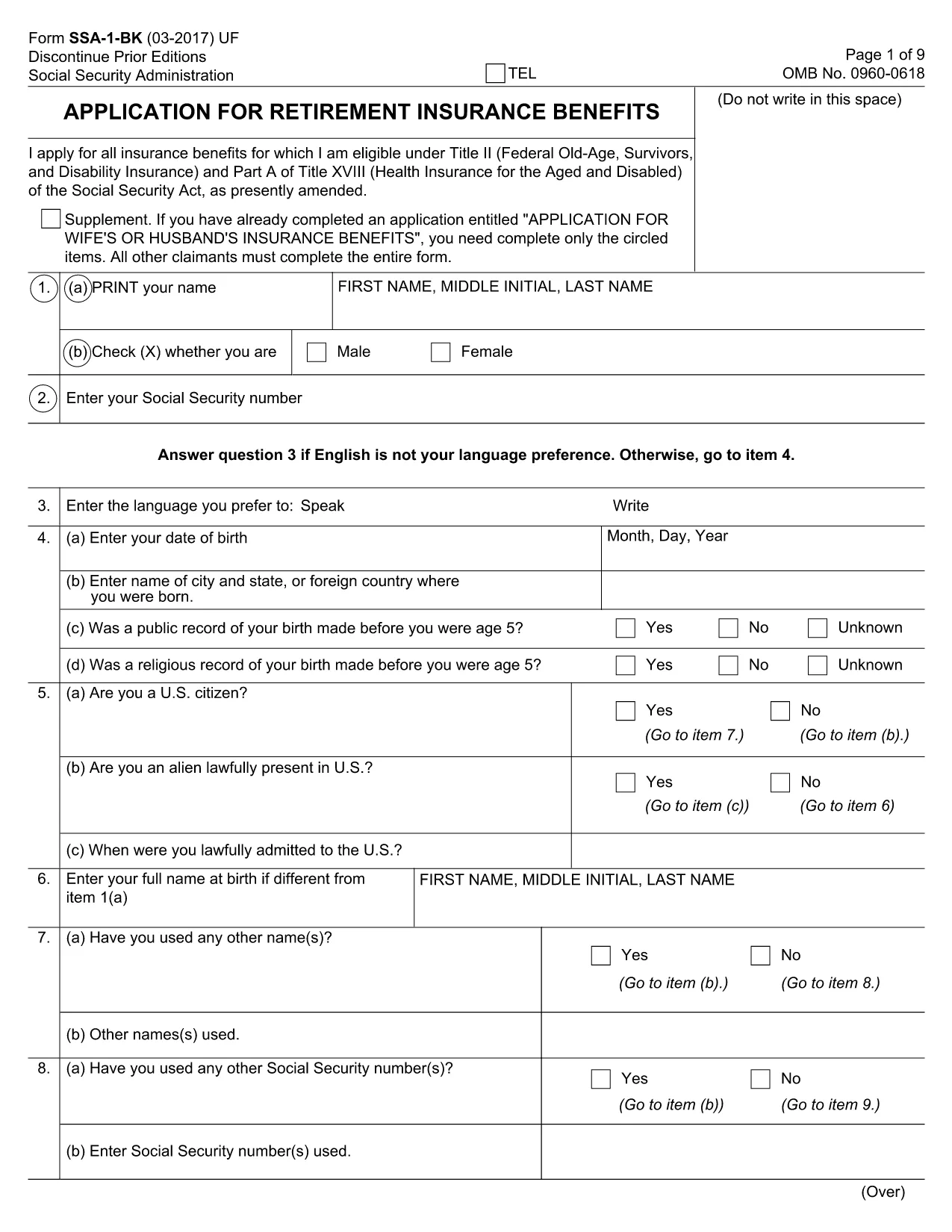
The SSA‑1‑BK is the official Application for Social Security Benefits. Whether you’re applying for retirement, disability, or survivor benefits, this fillable PDF lets you enter your information quickly and accurately.

Formize hosts a secure, browser‑based PDF filler so you never need to download, print, or scan the form. Just click the button, fill out each field, and submit directly to the Social Security Administration (SSA) when you’re ready.

What Is the SSA‑1‑BK Form?

SSA‑1‑BK collects personal data, work history, and benefit preferences. The form is required for:

  • Retirement insurance benefits
  • Disability benefits
  • Spousal or survivor benefits

It is used nationwide and must be signed with your Social Security number (SSN) before the SSA processes your claim.

How to Complete the Application Online

Follow the simple steps below to fill out the form directly on Formize’s platform:

  1. Click the “Fill out this form” button on this page.
  2. Wait a few seconds while the Formize PDF Filler loads.
  3. Enter your information in each field – the filler automatically formats dates and SSNs.
  4. Use the built‑in validation to catch missing or incorrectly entered data.
  5. Review the completed form, add your electronic signature, and click Submit to download a copy for your records.

Common Mistakes to Avoid

  • Leaving required fields blank – the filler will highlight any missing information before you can submit.
  • Incorrect SSN format – use the nine‑digit format (e.g., 123‑45‑6789); the tool adds dashes automatically.
  • Mismatched dates – ensure birth dates and employment dates follow MM/DD/YYYY.
  • Submitting without a signature – the electronic signature field is mandatory.

Where to Submit Your Completed Form

After you download the filled PDF, you can:

  • Mail it to your local Social Security office.
  • Upload it through the SSA’s mySocialSecurity portal.
  • Bring a printed copy to your nearest SSA office.

Using the fillable PDF reduces errors and speeds up processing, helping you receive benefits sooner.

KKK
  • Do I need to print the SSA‑1‑BK form after filling it online?

    Printing is optional. You can upload the completed PDF through the SSA’s online portal, mail it, or bring a printed copy to an SSA office.

  • Is the Formize filler secure for personal data?

    Yes. Formize uses SSL encryption and does not store your data after you download the completed PDF.

  • Can I save my progress and return later?

    The filler allows you to download a partially completed PDF at any time, so you can resume editing later.

  • What if I make a mistake after submitting?

    You can correct errors by downloading a new copy of the form, fixing the fields, and resubmitting it to the SSA.

  • Do I need a digital signature for the SSA‑1‑BK?

    The SSA accepts electronic signatures on the fillable PDF. Just use the signature field provided by Formize.

  • How long does it take for the SSA to process my application?

    Processing times vary, but using a complete, error‑free fillable PDF typically speeds up review compared to handwritten forms.

KUIDAS

4 lihtsa sammuga veebis tasuta SSA-1-BK täitmine:

  1. 1
    Open the Fillable Form
    Click the “Fill out this form” button on the page. The Formize PDF Filler app will load directly in your browser.
  2. 2
    Enter Your Information
    Complete each field. The filler automatically formats dates, SSNs, and validates required entries.
  3. 3
    Review and Sign
    Check the preview for accuracy, add your electronic signature, and confirm that all required boxes are checked.
  4. 4
    Download or Submit
    Save the finished PDF to your device or follow the on‑screen instructions to submit it to the Social Security Administration.
PDF-täiterakenduse vormindamine
UMBES

mall SSA-1-BK

Traditsioonilise PDF-dokumendi vaatamise ja täitmise funktsioonide komplektiga koos veebirakenduse ja tundliku paigutuse eelistega saate märksõna SSA-1-BK lõpule viia minutitega.

FUNKTSIOONID

PDF täiteaine

Lihtsaim viis märksõna SSA-1-BK veebis täitmiseks

  • Täitke kiiresti SSA-1-BK
    Kas otsite viisi SSA-1-BK kiireks veebis täitmiseks? Meie veebipõhise tasuta PDF-vormi täitja abil saate teada, kuidas seda PDF-dokumenti vähem kui minutiga redigeerida ja täita.
  • Lihtne kasutada veebipõhist PDF-redaktorit
    Kas olete tüdinenud PDF-failide printimisest, et saaksite neid enne uuesti skannimist ja tagasisaatmist redigeerida? Redigeerige PDF-dokumente võrgus tasuta. Kasutage meie veebipõhist PDF-redaktorit, et säästa aega ja paberit.
  • Suurepärased tööriistad, kõik platvormid
    Kas soovite teada, kuidas Macis täita SSA-1-BK või kuidas kasutada tasuta PDF-täitjat? Meie veebipõhised PDF-tööriistad töötavad kõigil platvormidel.
  • Turvaline failide salvestusruum
    Lõpetatud failid „SSA-1-BK” salvestatakse turvatud andmebaasi, mida haldab Amazon Cloudi hostimine. Saate oma failid meie süsteemist igal ajal kustutada. Igal juhul kustutatakse need failid 24 tunni pärast automaatselt.
  • Vestelge kasutajaga SSA-1-BK
    Vestelge kasutajaga „SSA-1-BK” saidil Chatize, mis on tasuta PDF-i lugeja abiline. Esitage küsimusi ja saage vastused märksõnalt „SSA-1-BK”. Klõpsake ülaloleval nupul Vestle dokumendiga.

Kustuta täitmise seanss

Kas kustutada valitud täitmisseanss? Sellisel juhul läheb teie edu vormi täitmisel kaotsi.

Kustuta redigeerimisseanss

Kas kustutada valitud redigeerimisseanss? Sel juhul lähevad teie edu vormi loomisel ja redigeerimisel kaotsi.