Vali keel

I-485 Supplement J – Fillable PDF Form

  1. Riik USA
  2. Keel Inglise
  3. osakond USA kodakondsus- ja immigratsiooniteenistus
Täitke see vorm
I-485 Supplement J – Fillable PDF Form

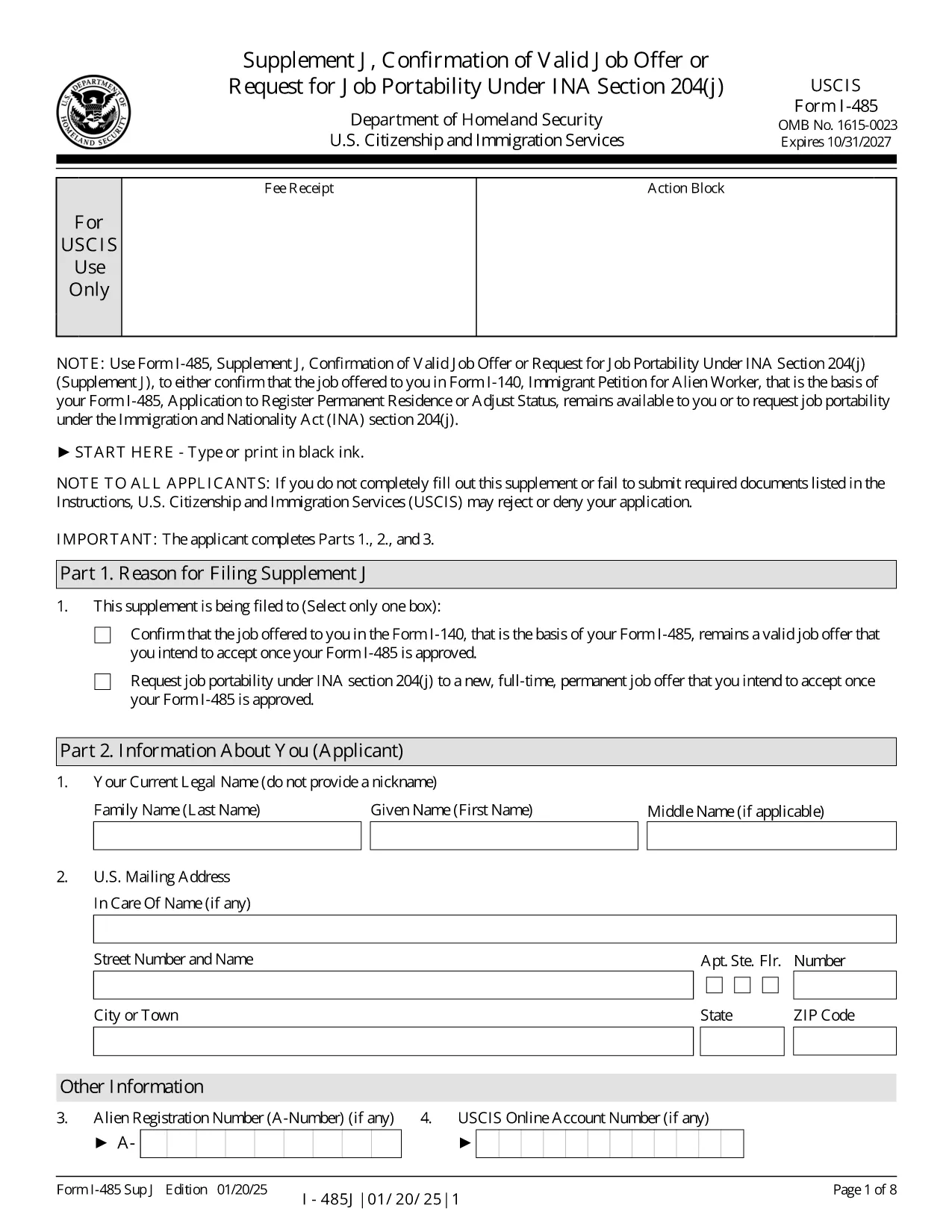
The I-485 Supplement J is the USCIS form used to confirm that the job offer listed in your Form I‑140 is still valid, or to request job portability under INA §204(j). This supplement is required for most employment‑based adjustment‑of‑status applicants.

Our fillable PDF version lets you enter data directly on the screen, eliminates the need for printing, and ensures the correct edition of the form (current as of 01/20/25). When you finish, you can download a completed PDF ready for submission by mail or online.

Key benefits of using the Formize fillable PDF:

  • Auto‑save while you type – no lost information.
  • Built‑in validation to reduce common errors.
  • One‑click download of the final, USCIS‑approved PDF.

Below you’ll find quick answers to the most common questions and a step‑by‑step guide to finish the form in seconds.

KKK
  • Do I have to file Supplement J with every I-485 application?

    You must file Supplement J when you submit an I‑485 based on a pending or approved I‑140 that requires a job offer, or when you request job portability after 180 days of pending status.

  • Can I submit Supplement J online?

    Yes, if you have an I‑485 receipt number that begins with “IOE” and you are filing only the supplement (no other forms). Otherwise, you must file by mail.

  • What is job portability under INA §204(j)?

    Job portability allows you to change to a new, full‑time, permanent job in the same or similar occupational classification after your I‑485 has been pending for at least 180 days.

  • What happens if I make a mistake on the form?

    USCIS may reject the supplement and request a corrected version. Using the fillable PDF reduces errors because the app validates entries before you download.

  • Do I need a lawyer’s signature on Supplement J?

    If an attorney or accredited representative prepared the application, they must sign the form using Form G‑28. The fillable PDF allows you to upload a scanned signature image.

  • Is there a filing fee for Supplement J?

    No separate fee is required for Supplement J. The fee is covered by the I‑485 filing fee.

  • Can I use an older edition of the form?

    USCIS only accepts the current edition (dated 01/20/25). Using an outdated version may lead to a rejection.

  • How long does it take USCIS to process Supplement J?

    Processing time varies, but USCIS typically reviews Supplement J within the same timeframe as the pending I‑485. They may request additional evidence if needed.

  • What if I change employers after filing Supplement J?

    You would need to file a new Supplement J to confirm the new job offer, provided the new role is in the same or similar occupational classification.

  • Where can I find the official instructions for Supplement J?

    The official instructions are available on the USCIS website and can be downloaded alongside the PDF form.

KUIDAS

5 lihtsa sammuga veebis tasuta I-485 Supplement J täitmine:

  1. 1
    Click the Fillable Form Button
    Press the “Fill out this form” button on the page. The Formize PDF Filler app will open in a new tab.
  2. 2
    Wait for the Filler to Load
    The app loads the I‑485 Supplement J template. This only takes a few seconds.
  3. 3
    Enter Your Information
    Complete each field directly on the screen. Required fields are highlighted, and the filler validates dates, numbers, and signatures.
  4. 4
    Review and Save
    When all sections are complete, click “Review” to see a preview. If everything looks correct, click “Download Completed PDF.”
  5. 5
    Submit to USCIS
    Print the downloaded PDF (if filing by mail) or upload it to your USCIS online account, following the filing instructions on the USCIS website.
PDF-täiterakenduse vormindamine
UMBES

mall I-485 Supplement J

Traditsioonilise PDF-dokumendi vaatamise ja täitmise funktsioonide komplektiga koos veebirakenduse ja tundliku paigutuse eelistega saate märksõna I-485 Supplement J lõpule viia minutitega.

FUNKTSIOONID

PDF täiteaine

Lihtsaim viis märksõna I-485 Supplement J veebis täitmiseks

  • Täitke kiiresti I-485 Supplement J
    Kas otsite viisi I-485 Supplement J kiireks veebis täitmiseks? Meie veebipõhise tasuta PDF-vormi täitja abil saate teada, kuidas seda PDF-dokumenti vähem kui minutiga redigeerida ja täita.
  • Lihtne kasutada veebipõhist PDF-redaktorit
    Kas olete tüdinenud PDF-failide printimisest, et saaksite neid enne uuesti skannimist ja tagasisaatmist redigeerida? Redigeerige PDF-dokumente võrgus tasuta. Kasutage meie veebipõhist PDF-redaktorit, et säästa aega ja paberit.
  • Suurepärased tööriistad, kõik platvormid
    Kas soovite teada, kuidas Macis täita I-485 Supplement J või kuidas kasutada tasuta PDF-täitjat? Meie veebipõhised PDF-tööriistad töötavad kõigil platvormidel.
  • Turvaline failide salvestusruum
    Lõpetatud failid „I-485 Supplement J” salvestatakse turvatud andmebaasi, mida haldab Amazon Cloudi hostimine. Saate oma failid meie süsteemist igal ajal kustutada. Igal juhul kustutatakse need failid 24 tunni pärast automaatselt.
  • Vestelge kasutajaga I-485 Supplement J
    Vestelge kasutajaga „I-485 Supplement J” saidil Chatize, mis on tasuta PDF-i lugeja abiline. Esitage küsimusi ja saage vastused märksõnalt „I-485 Supplement J”. Klõpsake ülaloleval nupul Vestle dokumendiga.

Kustuta täitmise seanss

Kas kustutada valitud täitmisseanss? Sellisel juhul läheb teie edu vormi täitmisel kaotsi.

Kustuta redigeerimisseanss

Kas kustutada valitud redigeerimisseanss? Sel juhul lähevad teie edu vormi loomisel ja redigeerimisel kaotsi.