Vali keel

I-817 Application for Family Unity Benefits – Fillable PDF

  1. Riik USA
  2. Keel Inglise
  3. osakond USA kodakondsus- ja immigratsiooniteenistus
Täitke see vorm
I-817 Application for Family Unity Benefits – Fillable PDF

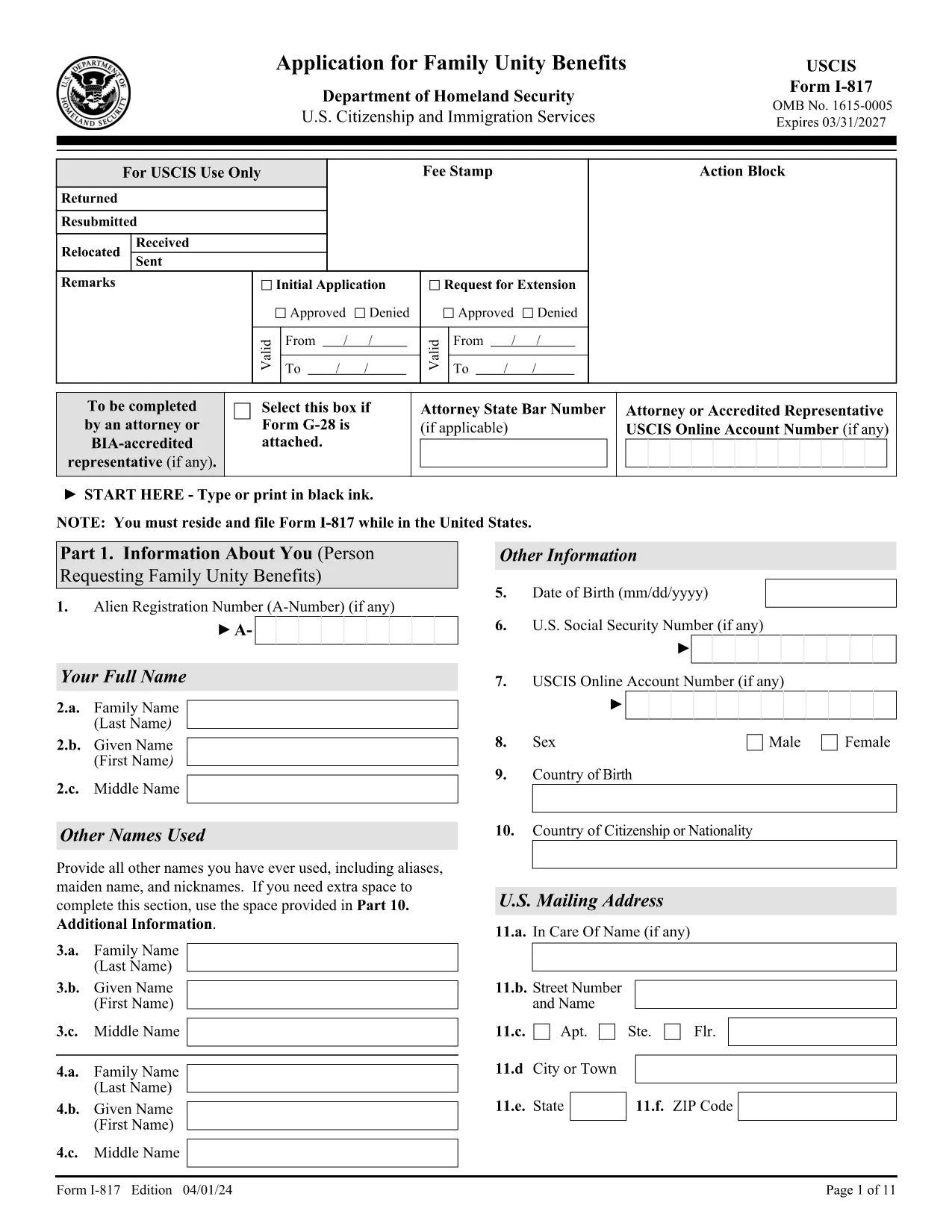
The Form I-817 is the official United States Citizenship and Immigration Services (USCIS) application used to request initial or extended benefits under the Family Unity Program. Whether you are applying for the first time or seeking an extension, the form must be completed accurately to avoid rejection.

What Is Form I-817?

I-817 collects personal information about the applicant and the qualifying family member (spouse or parent). The form is part of USCIS’s effort to keep families together while they navigate immigration processes.

How to Fill Out the I-817 Form Online

Instead of printing, printing, and scanning, you can complete the form directly in your browser using Formize’s built‑in PDF filler:

  1. Click the "Fill out this form" button on this page.
  2. Wait a few seconds while the Formize PDF Filler app loads.
  3. Enter your information in each fillable field. The app automatically saves your progress.
  4. Review the completed form for accuracy.
  5. Click "Submit" to download the finished PDF or print it for mailing.

Common Mistakes & Tips for a Successful Submission

  • Missing signatures: An unsigned form will be rejected. Sign at the bottom of the last page.
  • Incorrect edition date: Ensure the PDF shows the edition date 04/01/24 on every page.
  • Incomplete sections: Part 1 (your personal info) and Part 3 (relationship info) are required.
  • Wrong filing address: Check USCIS’s Direct Filing Addresses page for the correct lockbox.
  • Forgot the E‑Notification form (G‑1145): Attach it if you want email/text confirmation of receipt.

Where to File Your Completed I-817

After completing the form, follow USCIS’s filing instructions. The address varies by state and whether you are using a courier service. Visit the USCIS Direct Filing Addresses page for the most up‑to‑date location.

Download the Official I-817 PDF

The official, up‑to‑date PDF is hosted by USCIS. Click the button below to open the fillable version in Formize or to download it directly.

Fill out this form

KKK
  • Who is eligible to file Form I-817?

    U.S. citizens and lawful permanent residents can request Family Unity Benefits for a spouse or parent who is a qualifying relative.

  • Is there a filing fee for I-817?

    Yes. Check the current USCIS Fee Schedule for the exact amount, as fees can change annually.

  • Can I submit the I-817 form electronically?

    USCIS currently requires a paper submission, but you can complete the form online with Formize, then print and mail it.

  • What happens if I miss a required field?

    USCIS will reject the form and send a notice. Fill every required field, especially Part 1 and Part 3.

  • Do I need to attach Form G‑1145 for e‑notification?

    Attaching Form G‑1145 is optional but recommended if you want an email or text confirmation when USCIS receives your application.

  • How long does USCIS take to process an I-817 application?

    Processing times vary by service center; typically it ranges from 2 to 6 months. Check the USCIS Processing Times page for current estimates.

  • Can I edit the I-817 after I’ve mailed it?

    No. If you need to make changes, you must submit a new Form I-817 with the correct information.

  • Where can I find the latest edition of Form I-817?

    The most recent edition (04/01/24) is available on the USCIS website – the link provided on this page points to that version.

KUIDAS

5 lihtsa sammuga veebis tasuta I-817 form täitmine:

  1. 1
    Open the Fillable Form
    Click the "Fill out this form" button on the page. The Formize PDF Filler will open in a new tab.
  2. 2
    Load the Formize PDF Filler
    Wait a few seconds while the app loads the I-817 PDF. All fields become editable.
  3. 3
    Enter Your Information
    Type your details into each highlighted field. The app saves your entries automatically.
  4. 4
    Review & Sign
    Double‑check every section, then add your electronic signature at the bottom of the last page.
  5. 5
    Download or Print
    Click "Submit" to download the completed PDF or print it for mailing to the USCIS lockbox address.
PDF-täiterakenduse vormindamine
UMBES

mall I-817 form

Traditsioonilise PDF-dokumendi vaatamise ja täitmise funktsioonide komplektiga koos veebirakenduse ja tundliku paigutuse eelistega saate märksõna I-817 form lõpule viia minutitega.

FUNKTSIOONID

PDF täiteaine

Lihtsaim viis märksõna I-817 form veebis täitmiseks

  • Täitke kiiresti I-817 form
    Kas otsite viisi I-817 form kiireks veebis täitmiseks? Meie veebipõhise tasuta PDF-vormi täitja abil saate teada, kuidas seda PDF-dokumenti vähem kui minutiga redigeerida ja täita.
  • Lihtne kasutada veebipõhist PDF-redaktorit
    Kas olete tüdinenud PDF-failide printimisest, et saaksite neid enne uuesti skannimist ja tagasisaatmist redigeerida? Redigeerige PDF-dokumente võrgus tasuta. Kasutage meie veebipõhist PDF-redaktorit, et säästa aega ja paberit.
  • Suurepärased tööriistad, kõik platvormid
    Kas soovite teada, kuidas Macis täita I-817 form või kuidas kasutada tasuta PDF-täitjat? Meie veebipõhised PDF-tööriistad töötavad kõigil platvormidel.
  • Turvaline failide salvestusruum
    Lõpetatud failid „I-817 form” salvestatakse turvatud andmebaasi, mida haldab Amazon Cloudi hostimine. Saate oma failid meie süsteemist igal ajal kustutada. Igal juhul kustutatakse need failid 24 tunni pärast automaatselt.
  • Vestelge kasutajaga I-817 form
    Vestelge kasutajaga „I-817 form” saidil Chatize, mis on tasuta PDF-i lugeja abiline. Esitage küsimusi ja saage vastused märksõnalt „I-817 form”. Klõpsake ülaloleval nupul Vestle dokumendiga.

Kustuta täitmise seanss

Kas kustutada valitud täitmisseanss? Sellisel juhul läheb teie edu vormi täitmisel kaotsi.

Kustuta redigeerimisseanss

Kas kustutada valitud redigeerimisseanss? Sel juhul lähevad teie edu vormi loomisel ja redigeerimisel kaotsi.