
Vali keel

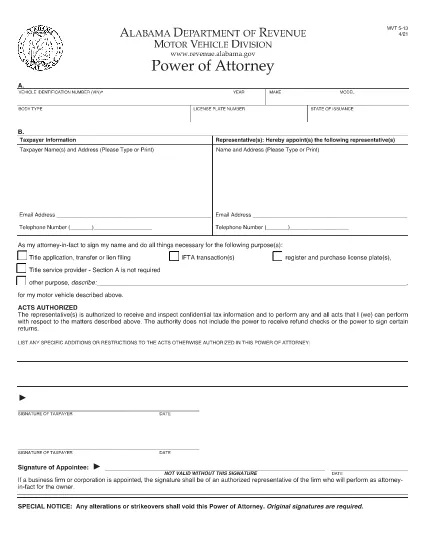
Alabama Motor Vehicle Power of Attorney (Form MVT‑5‑13)

  1. Keel Inglise
  2. Riik USA
  3. Tegevus Sõiduki registreerimine
  4. osariik Alabama
Täitke see vorm
Alabama Motor Vehicle Power of Attorney (Form MVT‑5‑13)

The Alabama Motor Vehicle Power of Attorney (Form MVT‑5‑13) lets a vehicle owner authorize another person—called the appointee or attorney‑in‑fact—to perform specific vehicle‑related tasks such as registration, title transfer, or sale. This form is required whenever the owner cannot be present at the Alabama Department of Revenue or a local licensing office.

What Is Form MVT‑5‑13?

Form MVT‑5‑13 is a short, state‑approved document that grants limited authority to a trusted representative. It is used for:

  • Transferring a vehicle title
  • Registering or renewing a vehicle
  • Submitting a bill of sale
  • Handling lien releases
The form must be signed by both the vehicle owner (taxpayer) and the appointed representative.

How to Fill the MVT‑5‑13 Online

Instead of downloading the PDF and editing it in a separate program, simply click the "Fill out this form" button on this page. The Formize PDF Filler app will load instantly, allowing you to complete every field directly in your browser.

Signing Requirements & Notarization

Alabama law requires:

  • Both the owner and the representative to sign and date the form.
  • A notary public is not mandatory, but a notarized signature adds credibility and is often requested by the licensing office.
If you choose notarization, bring a valid ID and the completed form to a notary.

Common Mistakes to Avoid

  • Leaving sections blank: Every field marked with an asterisk (*) is required.
  • Incorrect VIN: Double‑check the Vehicle Identification Number; a single digit error can delay processing.
  • Mismatched signatures: The signatures on the PDF must match the printed names exactly.
  • Using an expired form: Ensure you are using the latest version (the link below is the current 2021 revision).

Where to Submit the Completed Form

After filling and signing, you can:

  • Bring the printed form to any Alabama Department of Revenue office.
  • Mail it to the appropriate Vehicle Licensing Office.
  • Upload a scanned copy through the online portal if the agency permits electronic submissions.
Having a clean, correctly completed Form MVT‑5‑13 speeds up title transfers and registration renewals.

Download the official PDF version of Form MVT‑5‑13 for reference or offline use.

KKK
  • Who can be appointed as an attorney‑in‑fact on Form MVT‑5‑13?

    Any adult individual you trust – a family member, friend, attorney, or title‑service representative – can be appointed, as long as they are willing to sign the form.

  • Is notarization required for the MVT‑5‑13?

    Alabama law does not require notarization, but many licensing offices prefer or require a notarized signature for added security.

  • Can I use the same Form MVT‑5‑13 for multiple vehicles?

    No. Each vehicle requires its own completed Form MVT‑5‑13 with the specific VIN, make, model, and year.

  • How long is the power of attorney valid?

    The form remains effective until the vehicle transaction is completed, or until you submit a written revocation to the Department of Revenue.

  • What should I do if I make a mistake after signing?

    Correct the error by crossing out the mistake, initialing the change, and having both the owner and representative sign again. For major errors, submit a new Form MVT‑5‑13.

  • Can I submit the form electronically?

    Some county offices accept scanned copies via their online portals. Check with your local licensing office for electronic submission policies.

  • Do I need to provide additional documents with the POA?

    Typically you’ll need the vehicle’s current title, a valid photo ID for both parties, and any applicable fees for the transaction you’re performing.

  • Is there a fee to download the PDF?

    No. The PDF is provided free of charge; you only pay any notary or filing fees required by the Department of Revenue.

KUIDAS

5 lihtsa sammuga veebis tasuta MVT-5-13 täitmine:

  1. 1
    Click the Fill Button
    Press the “Fill out this form” button on the page. The Formize PDF Filler app loads instantly in your browser.
  2. 2
    Enter All Required Information
    Complete each field – vehicle details, owner information, and representative details. Required fields are marked with an asterisk (*).
  3. 3
    Review and Sign
    Double‑check the entered data, then use the built‑in signature tool to sign as the owner and as the appointee.
  4. 4
    Download or Email the Completed Form
    When you’re satisfied, click “Save & Download” to get a copy, or choose “Email” to send the filled PDF directly to the licensing office.
  5. 5
    Print and Notarize (if needed)
    Print the saved PDF, bring it to a notary public for notarization if your local office requires it, then submit the final document.
PDF-täiterakenduse vormindamine
UMBES

Sõiduki registreerimisvormid

MVT-5-13 on üks sõiduki registreerimisvormidest, mis on dokumendid, mida kasutatakse mootorsõiduki registreerimiseks vastavas valitsusasutuses, tavaliselt Motor Vehicles (DMV) või samaväärses asutuses. Need vormid on vajalikud, kui isik ostab uue või kasutatud sõiduki, annab sõiduki omandiõiguse üle või kolib koos sõidukiga uude jurisdiktsiooni.

Konkreetsed sõidukite registreerimisvormid võivad jurisdiktsiooniti erineda, kuid üldjuhul nõuavad need järgmist teavet:

Sõiduki teave: see sisaldab üksikasju sõiduki kohta, nagu mark, mudel, aasta, sõiduki identifitseerimisnumber (VIN) ja odomeetri näit.

Omaniku teave: vorm nõuab teavet sõiduki omaniku kohta, sealhulgas tema nime, aadressi, kontaktteavet ja juhiloa numbrit.

Omandiõigust tõendav dokument: olenevalt asjaoludest võidakse nõuda omandiõigust tõendavat dokumenti, näiteks omandiõigust, müügilehte või tootja päritolutunnistust (uute sõidukite puhul).

Kindlustusteave: tavaliselt nõutakse tõendit kehtiva sõidukikindlustuskaitse kohta. See võib hõlmata kindlustuspoliisi numbri, kindlustuslepingu kuupäevade ja kindlustusseltsi andmete esitamist.

Tasude maksmine: sõiduki registreerimine hõlmab erinevate tasude tasumist, nagu registreerimistasud, maksud ja võib-olla ka muud jurisdiktsiooniga seotud tasud.

Lisaks nendele põhinõuetele võivad mõnel jurisdiktsioonil olla täiendavad vormid või dokumentatsiooninõuded. Näiteks võivad teatud piirkondades olla vajalikud heitkoguste testimise tulemused, ohutuskontrollid või elukoha tõendamine.

Kui sõiduki registreerimisvormid on täidetud ja esitatud, väljastab valitsusasutus registreerimistunnistuse, numbrimärgid ja registreerimiskleebised. Need dokumendid näitavad, et sõiduk on seaduslikult registreeritud ja lubatud sõita avalikel teedel.

Oluline on märkida, et sõiduki registreerimisnõuded võivad jurisdiktsiooniti oluliselt erineda. Seetõttu on soovitatav konsulteerida kohaliku DMV või samaväärse agentuuriga konkreetsete vormide ja protseduuride kohta, mis teie asukohas kehtivad.

FUNKTSIOONID

PDF täiteaine

Lihtsaim viis märksõna MVT-5-13 veebis täitmiseks

  • Täitke kiiresti MVT-5-13
    Kas otsite viisi MVT-5-13 kiireks veebis täitmiseks? Meie veebipõhise tasuta PDF-vormi täitja abil saate teada, kuidas seda PDF-dokumenti vähem kui minutiga redigeerida ja täita.
  • Lihtne kasutada veebipõhist PDF-redaktorit
    Kas olete tüdinenud PDF-failide printimisest, et saaksite neid enne uuesti skannimist ja tagasisaatmist redigeerida? Redigeerige PDF-dokumente võrgus tasuta. Kasutage meie veebipõhist PDF-redaktorit, et säästa aega ja paberit.
  • Suurepärased tööriistad, kõik platvormid
    Kas soovite teada, kuidas Macis täita MVT-5-13 või kuidas kasutada tasuta PDF-täitjat? Meie veebipõhised PDF-tööriistad töötavad kõigil platvormidel.
  • Turvaline failide salvestusruum
    Lõpetatud failid „MVT-5-13” salvestatakse turvatud andmebaasi, mida haldab Amazon Cloudi hostimine. Saate oma failid meie süsteemist igal ajal kustutada. Igal juhul kustutatakse need failid 24 tunni pärast automaatselt.
  • Vestelge kasutajaga MVT-5-13
    Vestelge kasutajaga „MVT-5-13” saidil Chatize, mis on tasuta PDF-i lugeja abiline. Esitage küsimusi ja saage vastused märksõnalt „MVT-5-13”. Klõpsake ülaloleval nupul Vestle dokumendiga.

Kustuta täitmise seanss

Kas kustutada valitud täitmisseanss? Sellisel juhul läheb teie edu vormi täitmisel kaotsi.

Kustuta redigeerimisseanss

Kas kustutada valitud redigeerimisseanss? Sel juhul lähevad teie edu vormi loomisel ja redigeerimisel kaotsi.