
Vali keel

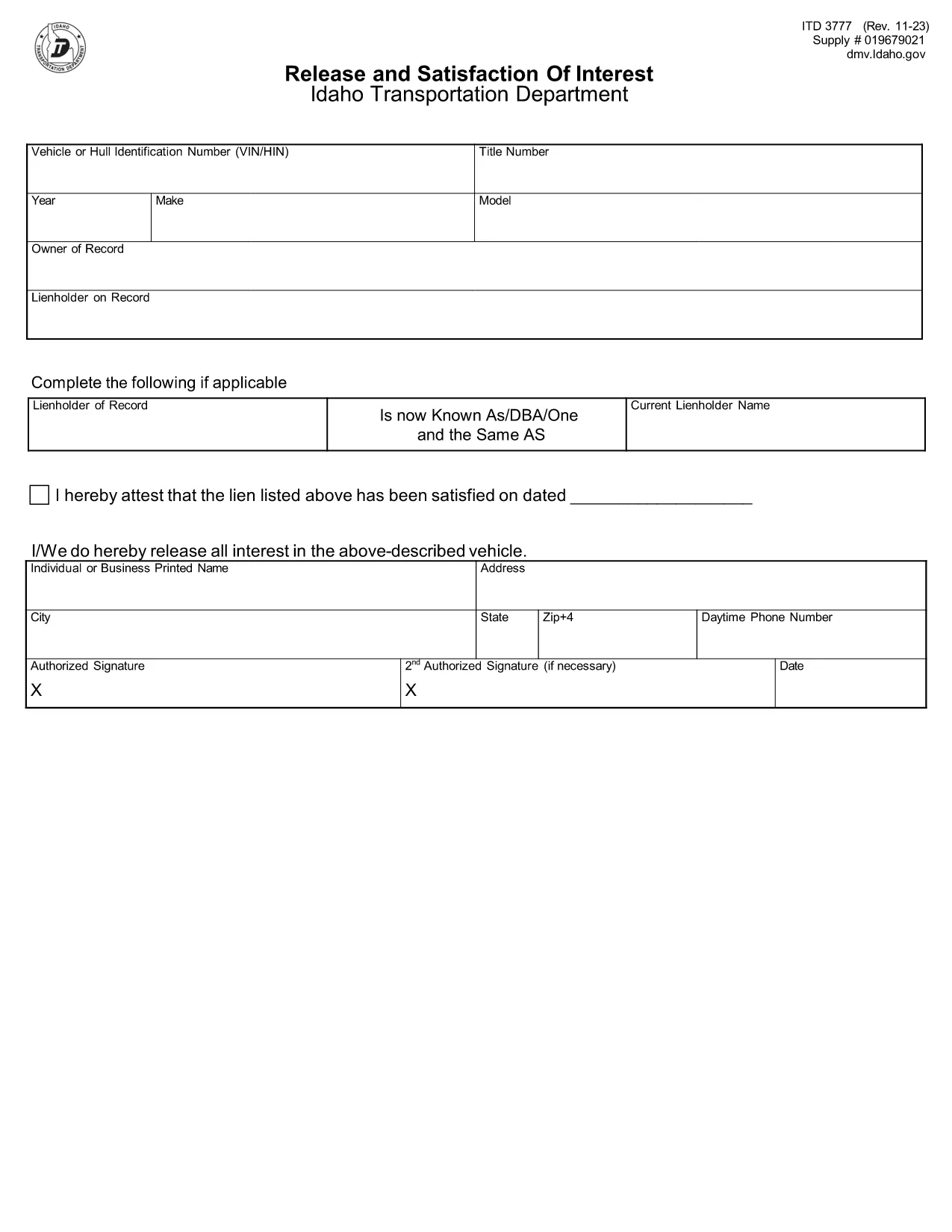
ITD Form 3777 – Fillable PDF for Idaho Vehicle Title

  1. Keel Inglise
  2. Riik USA
  3. Tegevus Sõiduki registreerimine
  4. osariik Idaho
Täitke see vorm
ITD Form 3777 – Fillable PDF for Idaho Vehicle Title

The Idaho Transportation Department (ITD) requires Form 3777 for many vehicle‑title transactions. Whether you’re transferring ownership, correcting an error, or applying for a new title, this fillable PDF streamlines the process and reduces paperwork.

Formize hosts a secure, web‑based PDF filler that lets you complete the form directly in your browser. No extra software is needed—just click the button, fill the fields, and download the finished document ready for submission to the Idaho DMV.

Key features of the ITD Form 3777 fillable PDF:

  • Auto‑tab navigation for faster entry
  • Built‑in validation to catch common errors
  • Save and resume later capability
  • Instant PDF preview before download

Using the online filler helps you avoid typical pitfalls such as missing signatures, incorrect VIN formatting, or omitted fee information. Follow the step‑by‑step guide below to ensure a smooth submission.

KKK
  • What is the purpose of ITD Form 3777?

    Form 3777 is used by the Idaho Transportation Department for vehicle title applications, transfers, and corrections. It ensures the state has accurate ownership records.

  • Can I fill out Form 3777 on a mobile device?

    Yes. The Formize PDF Filler is responsive and works on smartphones, tablets, and desktops.

  • Do I need to print the form after filling it online?

    A printed copy is required only if you are mailing the form to the ITD. If you submit electronically, the downloaded PDF can be uploaded directly.

  • Is there a fee for using the online filler?

    No. The Formize filler is free to use. Any state filing fees are paid directly to the Idaho Transportation Department.

  • What common mistakes should I avoid?

    Make sure the VIN is entered exactly as it appears on the vehicle, include all required signatures, and double‑check the fee amount listed on the form.

  • Where do I send the completed Form 3777?

    Mail the completed form to the Idaho Transportation Department, Vehicle Services Section, PO Box 34, Boise, ID 83707, or submit it at your county motor vehicle office.

  • Can I save my progress and finish later?

    Yes. The Formize filler lets you save a draft PDF and return to it later without losing entered data.

KUIDAS

5 lihtsa sammuga veebis tasuta ITD Form 3777 täitmine:

  1. 1
    Click the Fill‑Out Button
    On this page, click the bright “Fill out this form” button. The Formize PDF Filler app will open in a new tab.
  2. 2
    Wait for the Filler to Load
    A short loading screen appears while the fillable PDF is prepared. This only takes a few seconds.
  3. 3
    Enter Your Information
    Complete each field—owner details, vehicle information, and signatures. The filler highlights required fields and validates entries in real time.
  4. 4
    Review and Validate
    Use the built‑in preview to double‑check every entry. Correct any highlighted errors before proceeding.
  5. 5
    Download or Submit
    When you’re satisfied, click “Download Completed PDF” to save a copy, or print directly for mailing to the Idaho Transportation Department.
PDF-täiterakenduse vormindamine
UMBES

Sõiduki registreerimisvormid

Kui teil on mootorsõiduk, haagis või paat või liisingu, peate täitma teatud kohustusi, et teie sõiduk oleks seaduslikult registreeritud ja ohutu.

ITD Form 3777 on üks sõiduki registreerimisvormidest, mis on dokumendid, mida kasutatakse mootorsõiduki registreerimiseks vastavas osariigi või provintsi ametiasutuses. Neid vorme nõutakse tavaliselt siis, kui inimene ostab uue või kasutatud sõiduki või kui ta kolib sõidukiga uude osariiki või provintsi.

Sõiduki registreerimiseks vajalikud täpsed nõuded ja vormid võivad asukohati erineda, kuid üldiselt hõlmab protsess sõiduki, omaniku ja sõiduki pandiõiguse kohta teabe esitamist.

Pärast registreerimisvormide ja tasude esitamist väljastab osariigi või provintsi ametiasutus sõiduki omanikule registreerimistunnistuse või numbrimärgi. See registreerimine võimaldab sõidukit seaduslikult kasutada avalikel teedel ja maanteedel.

FUNKTSIOONID

PDF täiteaine

Lihtsaim viis märksõna ITD Form 3777 veebis täitmiseks

  • Täitke kiiresti ITD Form 3777
    Kas otsite viisi ITD Form 3777 kiireks veebis täitmiseks? Meie veebipõhise tasuta PDF-vormi täitja abil saate teada, kuidas seda PDF-dokumenti vähem kui minutiga redigeerida ja täita.
  • Lihtne kasutada veebipõhist PDF-redaktorit
    Kas olete tüdinenud PDF-failide printimisest, et saaksite neid enne uuesti skannimist ja tagasisaatmist redigeerida? Redigeerige PDF-dokumente võrgus tasuta. Kasutage meie veebipõhist PDF-redaktorit, et säästa aega ja paberit.
  • Suurepärased tööriistad, kõik platvormid
    Kas soovite teada, kuidas Macis täita ITD Form 3777 või kuidas kasutada tasuta PDF-täitjat? Meie veebipõhised PDF-tööriistad töötavad kõigil platvormidel.
  • Turvaline failide salvestusruum
    Lõpetatud failid „ITD Form 3777” salvestatakse turvatud andmebaasi, mida haldab Amazon Cloudi hostimine. Saate oma failid meie süsteemist igal ajal kustutada. Igal juhul kustutatakse need failid 24 tunni pärast automaatselt.
  • Vestelge kasutajaga ITD Form 3777
    Vestelge kasutajaga „ITD Form 3777” saidil Chatize, mis on tasuta PDF-i lugeja abiline. Esitage küsimusi ja saage vastused märksõnalt „ITD Form 3777”. Klõpsake ülaloleval nupul Vestle dokumendiga.

Kustuta täitmise seanss

Kas kustutada valitud täitmisseanss? Sellisel juhul läheb teie edu vormi täitmisel kaotsi.

Kustuta redigeerimisseanss

Kas kustutada valitud redigeerimisseanss? Sel juhul lähevad teie edu vormi loomisel ja redigeerimisel kaotsi.