
Vali keel

VSA‑22 Application for Assigned Vehicle Identification Number (Fillable PDF)

  1. Keel Inglise
  2. Riik USA
  3. Tegevus Sõiduki registreerimine
  4. osariik Virginia
Täitke see vorm
VSA‑22 Application for Assigned Vehicle Identification Number (Fillable PDF)

What Is the VSA‑22 Form?

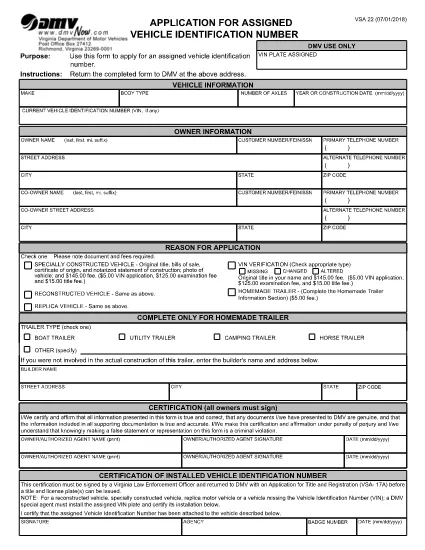
The VSA‑22 is the Virginia Department of Motor Vehicles (DMV) application used to request an assigned vehicle identification number (VIN). It is required for homemade trailers, custom‑built vehicles, and any vehicle that does not already have a DMV‑assigned VIN.

How to Fill Out VSA‑22 Online with Formize

Instead of downloading the PDF and editing it in a separate program, you can complete the form directly on our site. Follow the simple steps below and the Formize PDF Filler will load the fillable document in your browser.

  • Step 1 – Open the Form: Click the "Fill out this form" button on this page.
  • Step 2 – Load the PDF: The Formize PDF Filler app loads the VSA‑22 PDF automatically.
  • Step 3 – Enter Your Information: Fill in vehicle details, owner information, and the reason for the VIN request.
  • Step 4 – Sign & Date: Use your mouse or touch screen to add a digital signature and date.
  • Step 5 – Download or Email: Save the completed form as a PDF or email it directly to the Virginia DMV.

Common Mistakes to Avoid

Even a small error can delay processing. Make sure you:

  • Enter the exact vehicle make, model, and construction date.
  • Provide a complete mailing address for the owner and co‑owner.
  • Check the correct box for the reason you need a VIN (e.g., homemade trailer, custom build).
  • Attach the required supporting documents, such as receipts for materials or a builder’s affidavit.
  • Sign in the Applicant Certification section and, if applicable, have a law‑enforcement officer sign the VIN installation certification.

Where to Submit the Completed Form

After you have saved the filled PDF, mail it to:

Virginia Department of Motor Vehicles
P. O. Box 27412
Richmond, VA 23269-7412
United States

Include any required fees and supporting documentation. The DMV will assign a VIN and send you a VIN plate to install on your vehicle.

FAQs About the VSA‑22 Application

Below are the most frequently asked questions about the VSA‑22 form.

KKK
  • Who needs to file a VSA‑22 form?

    Anyone who builds a homemade trailer, custom vehicle, or any vehicle that does not already have a DMV‑issued VIN must submit a VSA‑22 to obtain an assigned VIN.

  • Can I use the VSA‑22 for a used vehicle?

    No. The VSA‑22 is only for vehicles that lack an assigned VIN, such as homemade trailers or custom‑built cars.

  • What supporting documents are required?

    Typically you need receipts for materials, a builder’s affidavit, and, if applicable, a law‑enforcement officer’s certification of the installed VIN.

  • How much is the fee for a VSA‑22 application?

    The fee varies by vehicle type; check the Virginia DMV fee schedule or contact your local DMV office for the current amount.

  • How long does it take to receive the assigned VIN?

    Processing usually takes 7‑10 business days after the DMV receives the completed form and all required documents.

  • Do I need to notarize the VSA‑22 form?

    Notarization is not required, but the VIN installation certification must be signed by a Virginia law‑enforcement officer.

  • Can I submit the VSA‑22 online instead of by mail?

    Virginia DMV currently requires the completed form and supporting documents to be mailed. However, you can fill out the PDF online using Formize before printing and mailing.

  • What happens if I make a mistake on the form?

    Incorrect or incomplete information can delay processing. Correct any errors before submitting, or contact the DMV for guidance.

KUIDAS

5 lihtsa sammuga veebis tasuta VSA-22 form täitmine:

  1. 1
    Open the Fillable Form
    Click the "Fill out this form" button on this page to launch the Formize PDF Filler.
  2. 2
    Load the VSA‑22 PDF
    The Formize app automatically loads the VSA‑22 PDF from the Virginia DMV.
  3. 3
    Enter All Required Information
    Fill in vehicle details, owner data, and the reason for the VIN request using the on‑screen fields.
  4. 4
    Add Your Digital Signature
    Use your mouse, trackpad, or touchscreen to sign the Applicant Certification section.
  5. 5
    Save or Email the Completed Form
    Download the finished PDF to your computer or email it directly to the Virginia DMV address.
PDF-täiterakenduse vormindamine
UMBES

Sõiduki registreerimisvormid

Kui teil on mootorsõiduk, haagis või paat või liisingu, peate täitma teatud kohustusi, et teie sõiduk oleks seaduslikult registreeritud ja ohutu.

VSA-22 form on üks sõiduki registreerimisvormidest, mis on dokumendid, mida kasutatakse mootorsõiduki registreerimiseks vastavas osariigi või provintsi ametiasutuses. Neid vorme nõutakse tavaliselt siis, kui inimene ostab uue või kasutatud sõiduki või kui ta kolib sõidukiga uude osariiki või provintsi.

Sõiduki registreerimiseks vajalikud täpsed nõuded ja vormid võivad asukohati erineda, kuid üldiselt hõlmab protsess sõiduki, omaniku ja sõiduki pandiõiguse kohta teabe esitamist.

Pärast registreerimisvormide ja tasude esitamist väljastab osariigi või provintsi ametiasutus sõiduki omanikule registreerimistunnistuse või numbrimärgi. See registreerimine võimaldab sõidukit seaduslikult kasutada avalikel teedel ja maanteedel.

FUNKTSIOONID

PDF täiteaine

Lihtsaim viis märksõna VSA-22 form veebis täitmiseks

  • Täitke kiiresti VSA-22 form
    Kas otsite viisi VSA-22 form kiireks veebis täitmiseks? Meie veebipõhise tasuta PDF-vormi täitja abil saate teada, kuidas seda PDF-dokumenti vähem kui minutiga redigeerida ja täita.
  • Lihtne kasutada veebipõhist PDF-redaktorit
    Kas olete tüdinenud PDF-failide printimisest, et saaksite neid enne uuesti skannimist ja tagasisaatmist redigeerida? Redigeerige PDF-dokumente võrgus tasuta. Kasutage meie veebipõhist PDF-redaktorit, et säästa aega ja paberit.
  • Suurepärased tööriistad, kõik platvormid
    Kas soovite teada, kuidas Macis täita VSA-22 form või kuidas kasutada tasuta PDF-täitjat? Meie veebipõhised PDF-tööriistad töötavad kõigil platvormidel.
  • Turvaline failide salvestusruum
    Lõpetatud failid „VSA-22 form” salvestatakse turvatud andmebaasi, mida haldab Amazon Cloudi hostimine. Saate oma failid meie süsteemist igal ajal kustutada. Igal juhul kustutatakse need failid 24 tunni pärast automaatselt.
  • Vestelge kasutajaga VSA-22 form
    Vestelge kasutajaga „VSA-22 form” saidil Chatize, mis on tasuta PDF-i lugeja abiline. Esitage küsimusi ja saage vastused märksõnalt „VSA-22 form”. Klõpsake ülaloleval nupul Vestle dokumendiga.

Kustuta täitmise seanss

Kas kustutada valitud täitmisseanss? Sellisel juhul läheb teie edu vormi täitmisel kaotsi.

Kustuta redigeerimisseanss

Kas kustutada valitud redigeerimisseanss? Sel juhul lähevad teie edu vormi loomisel ja redigeerimisel kaotsi.