
زبان را انتخاب کنید

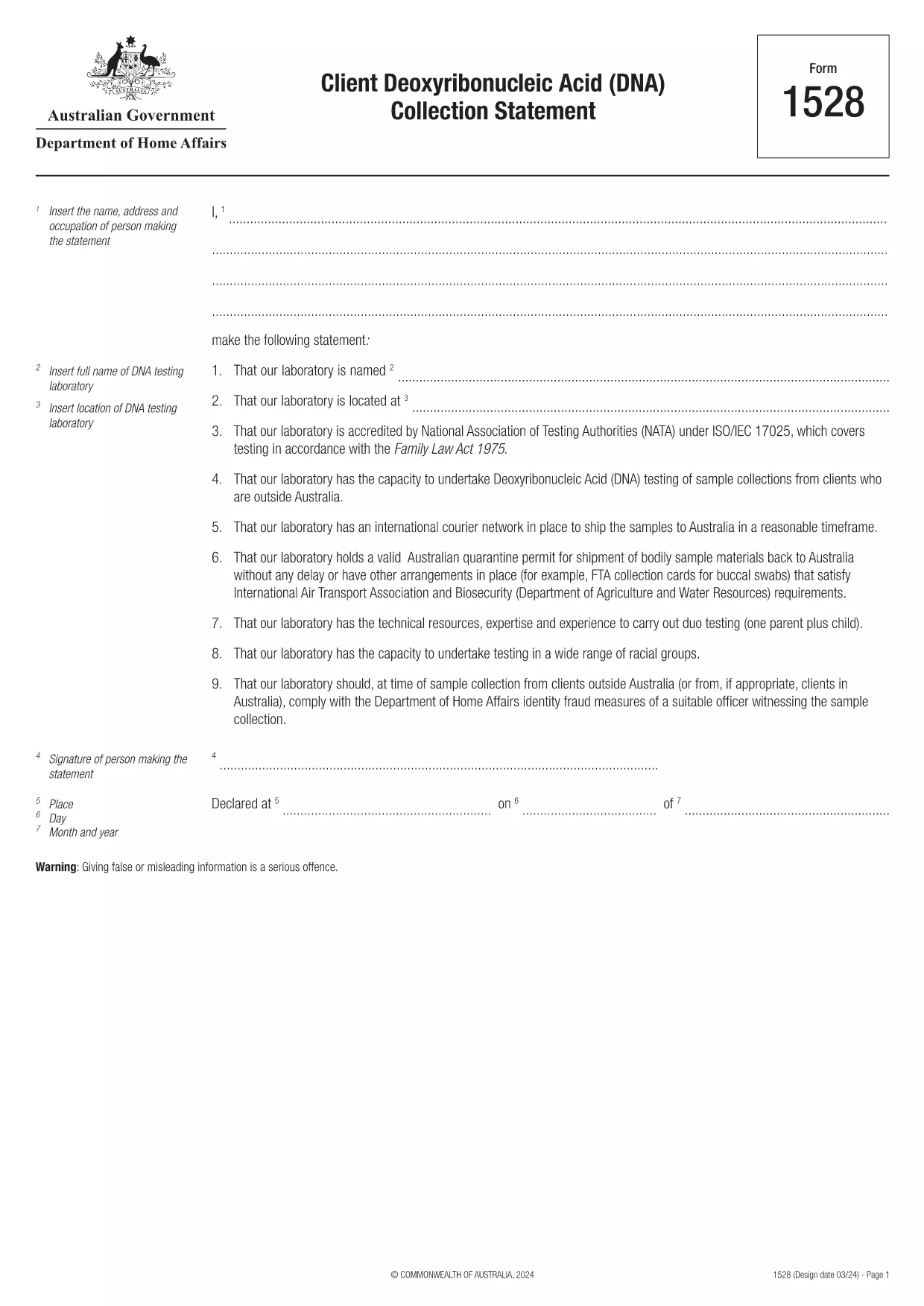
Form 1528 – Client DNA Collection Statement (Fillable PDF)

  1. کشور استرالیا
  2. زبان انگلیسی
  3. فعالیت شخصیت یا هویت
این فرم را پر کنید
Form 1528 – Client DNA Collection Statement (Fillable PDF)

Form 1528 is the official Client Deoxyribonucleic Acid (DNA) Collection Statement required by the Australian Department of Home Affairs. The form captures the name, address and occupation of the person making the statement, as well as details of the DNA testing laboratory.

What Is Form 1528?

This form is used when an individual must provide a DNA sample for immigration, visa, or forensic purposes. It must be completed by the person providing the sample and signed by an authorised DNA testing laboratory.

How to Fill Out Form 1528 with Formize

Instead of printing, scanning, or editing the PDF manually, simply click the “Fill out this form” button on this page. The Formize PDF Filler app will load the fillable version, letting you enter data, add signatures, and save the completed document in seconds.

Common Mistakes & Tips

  • Leave no blank fields – the Department rejects forms with empty required sections.
  • Use the exact laboratory name and address as it appears on the lab’s official letterhead.
  • Check date formats – use DD/MM/YYYY throughout.
  • Sign electronically only after all information is verified; a digital signature is accepted.

Where to Submit the Completed Form

After you download the completed PDF, you can upload it through your online visa portal, email it to the requesting officer, or deliver a printed copy to the nearest Australian Visa Application Centre.

Need More Help?

For detailed guidance, review the instructions on the Department of Home Affairs website or contact your DNA testing laboratory for clarification on laboratory‑specific fields.

سوالات متداول
  • Is an electronic signature accepted on Form 1528?

    Yes. The Department of Home Affairs accepts a clear electronic signature created with the Formize PDF Filler.

  • Can I print the form after filling it online?

    Absolutely. After completing the form, you can download the PDF and print a hard copy if you prefer a physical submission.

  • What if I make a mistake after saving the form?

    Open the saved PDF again in Formize, edit the incorrect fields, and re‑save. The fillable PDF allows unlimited edits before final submission.

  • Do I need to attach any supporting documents?

    Typically, the DNA laboratory will provide a separate certification letter. Attach that letter alongside the completed Form 1528 when you submit your application.

  • How long does it take to process Form 1528?

    Processing time varies by case, but the Department generally reviews the statement within 5‑10 business days after receipt.

  • Is there a fee for using Formize’s PDF filler?

    Formize offers a free basic fillable version for Form 1528. Advanced features such as bulk signing require a paid plan, but are not needed for a single submission.

  • Can I fill out Form 1528 on a mobile device?

    Yes. The Formize PDF Filler works on smartphones and tablets, allowing you to complete the form anywhere.

  • What format should I use when uploading the completed form?

    Upload the final document as a PDF file. Ensure the file size does not exceed the portal’s limit (usually 5 MB).

چگونه

نحوه پر کردن Form 1528 به صورت رایگان و آنلاین در 5 با مراحل آسان:

  1. 1
    Open the Fillable Form
    Click the “Fill out this form” button on the page. The Formize PDF Filler app will launch in a new tab with the fillable version of Form 1528.
  2. 2
    Enter Your Information
    Type the required details – personal data, laboratory name, and address – directly into the highlighted fields.
  3. 3
    Add Electronic Signatures
    Use the signature tool to sign the statement and, if required, the laboratory representative’s signature.
  4. 4
    Review & Validate
    Double‑check every field for accuracy, especially dates and laboratory information.
  5. 5
    Download or Submit
    When you’re satisfied, click “Save & Download” to get the completed PDF, or use the built‑in “Submit” button to send it directly to the Home Affairs portal.
برنامه PDF Filler را فرم‌بندی کنید
در باره

فرم های شخصیت یا هویت

Form 1528 یکی از اسناد یا فرم‌هایی است که مربوط به احراز هویت یا تأیید هویت فرد است. این فرم ها معمولاً به اطلاعات شخصی و اسنادی برای تأیید هویت شخص نیاز دارند. در اینجا چند نمونه از فرم هایی وجود دارد که معمولاً با تأیید هویت مرتبط هستند:

فرم‌های تأیید هویت: این فرم‌ها توسط سازمان‌هایی مانند کارفرمایان، سازمان‌های دولتی یا مؤسسات مالی برای تأیید هویت افراد استفاده می‌شوند. آنها معمولاً اطلاعات شخصی مانند نام، آدرس، تاریخ تولد و شماره تأمین اجتماعی را درخواست می‌کنند و ممکن است به اسناد پشتیبانی مانند شناسه، گذرنامه یا گواهی تولد دولتی نیاز داشته باشند.

فرم‌های اثبات آدرس: این فرم‌ها برای تأیید آدرس محل سکونت افراد استفاده می‌شوند. آنها ممکن است از شخص بخواهند که قبض آب و برق، صورتحساب بانکی، قرارداد اجاره یا سایر اسنادی که نشان دهنده آدرس فعلی وی باشد ارائه دهد.

فرم‌های مجوز بررسی پیشینه: هنگامی که سازمانی یک بررسی سوابق را روی یک فرد انجام می‌دهد، اغلب از فرد می‌خواهد فرمی را برای تأیید چک پر کند. این فرم‌ها ممکن است اطلاعات شخصی، از جمله نام، تاریخ تولد، و شماره تامین اجتماعی را درخواست کنند که به تعیین هویت فرد کمک می‌کند.

فرم‌های استشهاد سرقت هویت: در موارد سرقت هویت، قربانیان ممکن است نیاز به پر کردن فرم استشهاد سرقت هویت داشته باشند. این فرم به افراد کمک می کند تا استفاده جعلی از هویت خود را گزارش کنند و یک پرونده قانونی از حادثه ارائه می دهد.

توجه به این نکته مهم است که اشکال و الزامات خاص برای ایجاد یا تأیید هویت می‌تواند بسته به زمینه، مانند هدف، حوزه قضایی یا سازمان درگیر، متفاوت باشد. برای دریافت دقیق ترین و به روزترین اطلاعات، همیشه به فرم های خاص ارائه شده توسط سازمان یا موسسه درخواست تایید هویت مراجعه کنید.

امکانات

پرکننده PDF

ساده ترین راه برای پر کردن فرم های PDF به صورت آنلاین

  • به سرعت Form 1528 را پر کنید
    به دنبال راهی برای پر کردن سریع Form 1528 آنلاین هستید؟ با پرکننده فرم PDF رایگان آنلاین ما، می‌دانید چگونه این سند pdf را در کمتر از یک دقیقه ویرایش و پر کنید.
  • آسان برای استفاده از ویرایشگر PDF آنلاین
    آیا از چاپ فایل‌های پی‌دی‌اف خسته شده‌اید تا بتوانید آن‌ها را قبل از اسکن مجدد و ارسال مجدد، ویرایش کنید؟ اسناد PDF را به صورت آنلاین به صورت رایگان ویرایش کنید. از ویرایشگر pdf آنلاین ما برای صرفه جویی در زمان و کاغذ استفاده کنید.
  • ابزارهای عالی، همه پلتفرم ها
    آیا نمی دانید که چگونه Form 1528 را در مک پر کنید، یا شاید چگونه از پرکننده PDF به صورت رایگان استفاده کنید؟ ابزارهای PDF آنلاین ما روی همه پلتفرم ها کار می کنند.
  • ذخیره سازی امن فایل
    فایل‌های تکمیل‌شده «Form 1528» در یک پایگاه داده ایمن که توسط میزبانی ابری آمازون مدیریت می‌شود، ذخیره می‌شوند. شما می توانید فایل های خود را در هر زمان از سیستم ما حذف کنید. در هر صورت این فایل ها پس از 24 ساعت به صورت خودکار پاک می شوند.
  • چت با Form 1528
    با «Form 1528» در Chatize که یک دستیار PDF خوان رایگان است، گپ بزنید. سوال بپرسید و از "Form 1528" پاسخ بگیرید. فقط روی دکمه Chat With Document در بالا کلیک کنید.

حذف جلسه پر کردن

جلسه پر کردن انتخاب شده را حذف کنید؟ در این صورت پیشرفت شما در تکمیل فرم از بین خواهد رفت.

حذف جلسه ویرایش

جلسه ویرایش انتخابی حذف شود؟ در این صورت پیشرفت شما در ایجاد و ویرایش فرم از بین خواهد رفت.