زبان را انتخاب کنید

Reg 116 Report & Consent Form – Fillable PDF

  1. زبان انگلیسی
  2. کشور استرالیا
  3. بخش City of Melbourne
  4. فعالیت Building Regulations
این فرم را پر کنید
Reg 116 Report & Consent Form – Fillable PDF

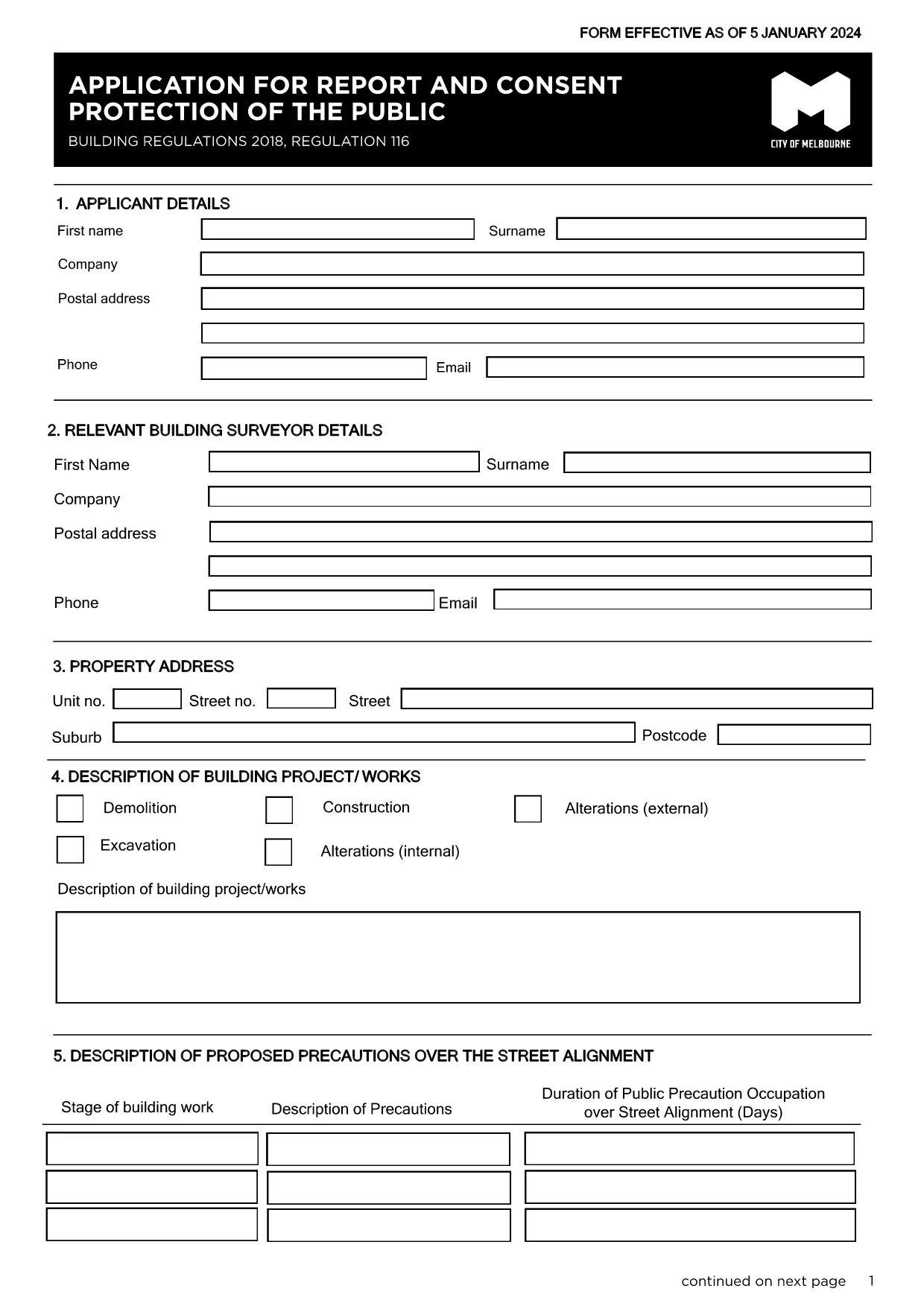
The Regulation 116 Report and Consent is required for any construction or demolition work that could affect public safety in the City of Melbourne. This fillable PDF lets you provide all necessary details quickly, securely, and in compliance with the Building Act 1993.

What Is the Reg 116 Report & Consent?

Reg 116 is a specific provision of the Building Regulations 2018 that mandates a formal report and consent before starting public‑protection measures such as hoardings, scaffolding, gantries, or exclusion zones. The form captures project details, risk assessments, and proposed safety measures.

When Do You Need This Form?

  • Any new construction, alteration, or demolition that impacts public spaces.
  • When a Construction Management Plan (CMP) is required.
  • Before installing hoardings, scaffolding, or temporary structures near footpaths or roads.

How to Complete the Form Online with Formize

Instead of downloading the PDF and editing it in a separate program, simply click the "Fill out this form" button on this page. The Formize PDF Filler app will load automatically, allowing you to:

  1. Enter text directly into each field.
  2. Upload supporting drawings or risk‑assessment documents.
  3. Save a draft and return later if needed.
  4. Submit the completed form securely to the City of Melbourne.

Common Mistakes to Avoid

  • Leaving required fields blank – the system will highlight missing information before you can submit.
  • Using an outdated version – always use the latest PDF linked below.
  • Submitting without a signature – you can add a digital signature in Formize or print, sign, and scan.

Where to Submit the Completed Form

After you finish, the Formize platform routes the file to the City of Melbourne’s Building Department. You will receive a confirmation email with a reference number. If you prefer a hard copy, you can print the PDF and deliver it to:

Building Department
City of Melbourne
Administration Building, 120 Swanston St
Melbourne VIC 3000

For any questions, refer to the FAQ section below.

سوالات متداول
  • What is Regulation 116?

    Regulation 116 requires a Report and Consent for any work that could affect public safety, such as hoardings, scaffolding, or temporary structures.

  • Do I need a digital signature?

    A digital signature is accepted when using Formize. If you prefer a handwritten signature, print, sign, and scan the completed PDF before uploading.

  • Can I save a draft and finish later?

    Yes. Formize lets you save your progress and return to the form at any time using the same browser session or by logging into your account.

  • How long does the approval take?

    The City of Melbourne typically reviews Reg 116 submissions within 5‑10 business days, depending on project complexity.

  • Is there a fee for filing Reg 116?

    Yes. As of the latest schedule, the fee for a public‑protection consent is $334.50. Check the City’s fee schedule for updates.

  • What if I submit the wrong version of the form?

    The system will reject outdated versions. Always use the latest PDF linked on this page to avoid delays.

  • Can I submit the form by email?

    While you can email a completed PDF, using the Formize online submission ensures the file is logged and tracked automatically.

  • What supporting documents are required?

    Attach a site plan, risk assessment, and any relevant engineering drawings. The form’s attachment section lists all required files.

  • Who can I contact for help?

    For technical assistance with the Formize filler, refer to the help icon on the form. For regulatory questions, contact the City of Melbourne Building Department at building@melbourne.vic.gov.au.

چگونه

نحوه پر کردن Reg 116 report and consent به صورت رایگان و آنلاین در 5 با مراحل آسان:

  1. 1
    Open the Fillable Form
    Click the "Fill out this form" button on the page. The Formize PDF Filler will load in your browser.
  2. 2
    Enter Your Details
    Complete each field – project description, site address, risk assessments, and proposed safety measures.
  3. 3
    Add Attachments
    Upload any required drawings, risk‑assessment PDFs, or supporting documents using the attachment icon.
  4. 4
    Review and Sign
    Use the built‑in digital signature tool or print, sign, and scan the form before final submission.
  5. 5
    Submit Securely
    Press the Submit button. You’ll receive an email confirmation with a reference number for tracking.
برنامه PDF Filler را فرم‌بندی کنید
در باره

قالب Reg 116 report and consent

با مجموعه‌ای از ویژگی‌های سنتی برای مشاهده و پر کردن یک سند PDF، همراه با مزایای یک برنامه وب و طرح‌بندی واکنش‌گرا، می‌توانید Reg 116 report and consent را در چند دقیقه تکمیل کنید.

امکانات

پرکننده PDF

ساده ترین راه برای پر کردن فرم های PDF به صورت آنلاین

  • به سرعت Reg 116 report and consent را پر کنید
    به دنبال راهی برای پر کردن سریع Reg 116 report and consent آنلاین هستید؟ با پرکننده فرم PDF رایگان آنلاین ما، می‌دانید چگونه این سند pdf را در کمتر از یک دقیقه ویرایش و پر کنید.
  • آسان برای استفاده از ویرایشگر PDF آنلاین
    آیا از چاپ فایل‌های پی‌دی‌اف خسته شده‌اید تا بتوانید آن‌ها را قبل از اسکن مجدد و ارسال مجدد، ویرایش کنید؟ اسناد PDF را به صورت آنلاین به صورت رایگان ویرایش کنید. از ویرایشگر pdf آنلاین ما برای صرفه جویی در زمان و کاغذ استفاده کنید.
  • ابزارهای عالی، همه پلتفرم ها
    آیا نمی دانید که چگونه Reg 116 report and consent را در مک پر کنید، یا شاید چگونه از پرکننده PDF به صورت رایگان استفاده کنید؟ ابزارهای PDF آنلاین ما روی همه پلتفرم ها کار می کنند.
  • ذخیره سازی امن فایل
    فایل‌های تکمیل‌شده «Reg 116 report and consent» در یک پایگاه داده ایمن که توسط میزبانی ابری آمازون مدیریت می‌شود، ذخیره می‌شوند. شما می توانید فایل های خود را در هر زمان از سیستم ما حذف کنید. در هر صورت این فایل ها پس از 24 ساعت به صورت خودکار پاک می شوند.
  • چت با Reg 116 report and consent
    با «Reg 116 report and consent» در Chatize که یک دستیار PDF خوان رایگان است، گپ بزنید. سوال بپرسید و از "Reg 116 report and consent" پاسخ بگیرید. فقط روی دکمه Chat With Document در بالا کلیک کنید.

حذف جلسه پر کردن

جلسه پر کردن انتخاب شده را حذف کنید؟ در این صورت پیشرفت شما در تکمیل فرم از بین خواهد رفت.

حذف جلسه ویرایش

جلسه ویرایش انتخابی حذف شود؟ در این صورت پیشرفت شما در ایجاد و ویرایش فرم از بین خواهد رفت.