زبان را انتخاب کنید

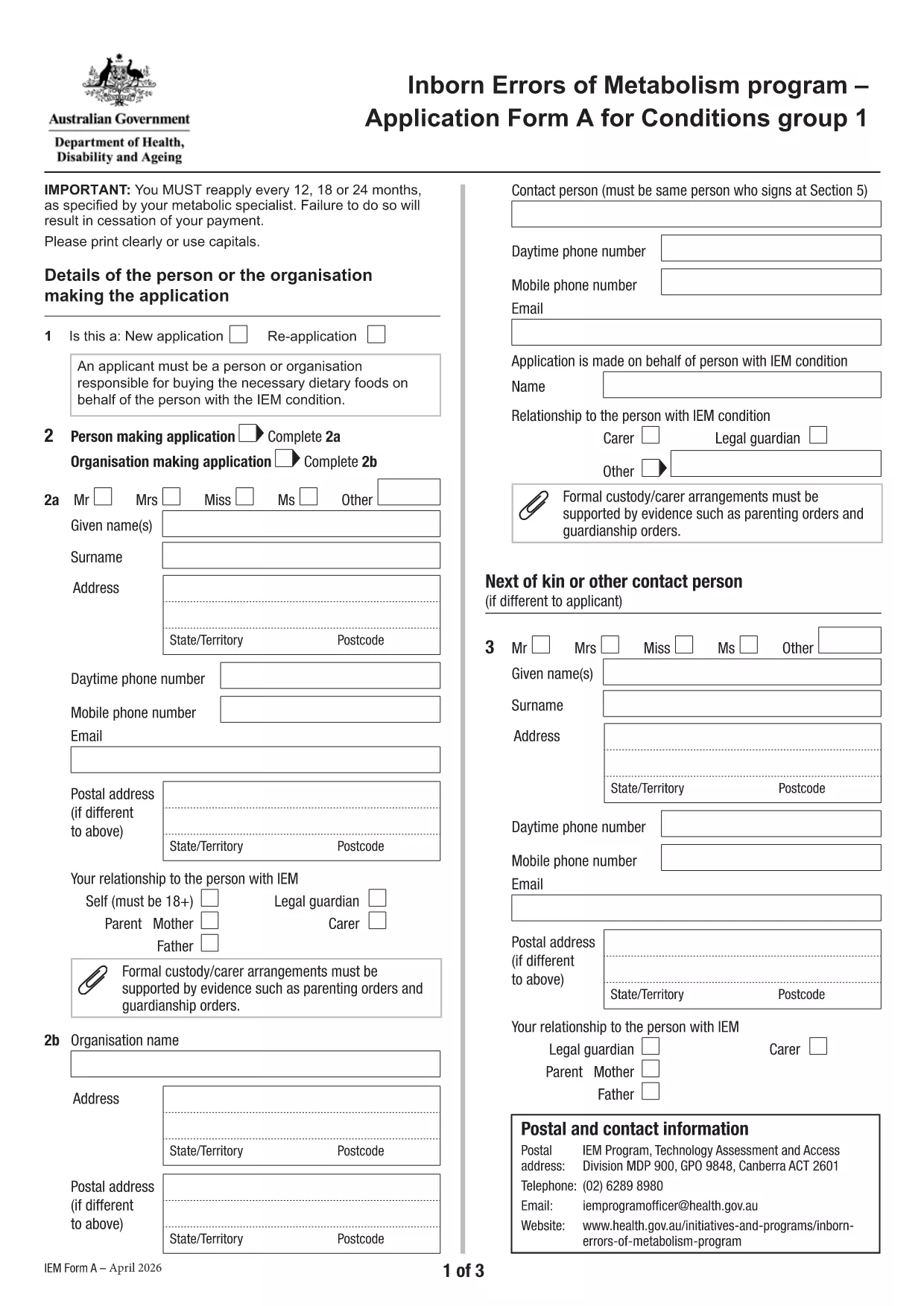
Application Form A – Inborn Errors of Metabolism

  1. زبان انگلیسی
  2. کشور استرالیا
  3. فعالیت Health Assistance
  4. بخش وزارت بهداشت و رفاه خانواده
این فرم را پر کنید
Application Form A – Inborn Errors of Metabolism

Application Form A is the official Australian Government form used to apply for financial assistance for individuals diagnosed with certain Inborn Errors of Metabolism, specifically dihydropteridine reductase (DHPR) deficiency, hyperphenylalaninemia, and phenylketonuria (PKU). The form must be completed and resubmitted every 12 months to maintain eligibility.

What is Application Form A?

This PDF form collects personal details, medical diagnosis, treatment information, and financial data required by the Department of Health’s Inborn Errors of Metabolism program. It is a fillable PDF, meaning you can type directly into the fields without printing.

Who needs to complete this form?

  • Individuals diagnosed with DHPR deficiency, hyperphenylalaninemia, or PKU.
  • Parents or legal guardians applying on behalf of a minor.
  • Anyone who has previously received assistance under the program and needs to renew their claim.

How to fill out Application Form A online

Instead of downloading the PDF and opening it in a separate editor, simply click the "Fill out this form" button on this page. The Formize PDF Filler app will load automatically, allowing you to complete the form directly in your browser.

Common mistakes to avoid

  • Leaving required fields blank – the form will not submit.
  • Providing outdated medical reports – attach the most recent diagnosis documents.
  • Using an unsupported browser – Chrome is recommended for best performance.
  • Submitting the form before the 12‑month renewal period – ensure you are within the eligibility window.

Where to submit the completed form

After you finish filling out the form, click the Submit button within the Formize interface. Your application will be securely transmitted to the Department of Health’s processing team. You will receive a confirmation email with a reference number for future inquiries.

Need more help? Review the FAQs below or contact your local health service for assistance.

سوالات متداول
  • What conditions are covered by Application Form A?

    The form is only for DHPR deficiency, hyperphenylalaninemia, and phenylketonuria (PKU). Other metabolic conditions must use Application Form B.

  • How often must I re‑apply?

    You must reassess and submit a new Application Form A every 12 months to continue receiving assistance.

  • Can I fill out the form on a mobile device?

    Yes, the Formize PDF Filler works on most smartphones and tablets, though a larger screen (tablet or desktop) is recommended for easier navigation.

  • What if I make a mistake after submitting?

    Contact the Department of Health’s Inborn Errors of Metabolism program using the reference number from your confirmation email. They can guide you on how to correct the error.

  • Do I need to print the form after filling it online?

    No. The form is submitted electronically via Formize. Printing is only necessary if you want a hard copy for your records.

  • Which browsers are supported?

    Chrome is the recommended browser for optimal performance. Firefox, Edge, and Safari also work but may have limited functionality.

  • Is my personal and medical information secure?

    Yes. Formize uses SSL encryption, and the Department of Health follows strict privacy guidelines to protect your data.

  • Can I save my progress and finish later?

    The Formize platform allows you to save a draft. Click the "Save Draft" button before exiting and return using the same link.

چگونه

نحوه پر کردن Application Form A به صورت رایگان و آنلاین در 5 با مراحل آسان:

  1. 1
    Open the fillable form
    Click the "Fill out this form" button on the page. The Formize PDF Filler will open in a new tab.
  2. 2
    Enter your information
    Type directly into each field. Use the tab key to move quickly between sections.
  3. 3
    Attach supporting documents
    Upload recent medical reports and proof of identity using the attachment icons beside each required field.
  4. 4
    Review and submit
    Check all entries for accuracy, then click the "Submit" button. You will receive a confirmation email with a reference number.
  5. 5
    Save a copy
    After submission, download a PDF copy of the completed form for your records.
برنامه PDF Filler را فرم‌بندی کنید
در باره

قالب Application Form A

با مجموعه‌ای از ویژگی‌های سنتی برای مشاهده و پر کردن یک سند PDF، همراه با مزایای یک برنامه وب و طرح‌بندی واکنش‌گرا، می‌توانید Application Form A را در چند دقیقه تکمیل کنید.

امکانات

پرکننده PDF

ساده ترین راه برای پر کردن فرم های PDF به صورت آنلاین

  • به سرعت Application Form A را پر کنید
    به دنبال راهی برای پر کردن سریع Application Form A آنلاین هستید؟ با پرکننده فرم PDF رایگان آنلاین ما، می‌دانید چگونه این سند pdf را در کمتر از یک دقیقه ویرایش و پر کنید.
  • آسان برای استفاده از ویرایشگر PDF آنلاین
    آیا از چاپ فایل‌های پی‌دی‌اف خسته شده‌اید تا بتوانید آن‌ها را قبل از اسکن مجدد و ارسال مجدد، ویرایش کنید؟ اسناد PDF را به صورت آنلاین به صورت رایگان ویرایش کنید. از ویرایشگر pdf آنلاین ما برای صرفه جویی در زمان و کاغذ استفاده کنید.
  • ابزارهای عالی، همه پلتفرم ها
    آیا نمی دانید که چگونه Application Form A را در مک پر کنید، یا شاید چگونه از پرکننده PDF به صورت رایگان استفاده کنید؟ ابزارهای PDF آنلاین ما روی همه پلتفرم ها کار می کنند.
  • ذخیره سازی امن فایل
    فایل‌های تکمیل‌شده «Application Form A» در یک پایگاه داده ایمن که توسط میزبانی ابری آمازون مدیریت می‌شود، ذخیره می‌شوند. شما می توانید فایل های خود را در هر زمان از سیستم ما حذف کنید. در هر صورت این فایل ها پس از 24 ساعت به صورت خودکار پاک می شوند.
  • چت با Application Form A
    با «Application Form A» در Chatize که یک دستیار PDF خوان رایگان است، گپ بزنید. سوال بپرسید و از "Application Form A" پاسخ بگیرید. فقط روی دکمه Chat With Document در بالا کلیک کنید.

حذف جلسه پر کردن

جلسه پر کردن انتخاب شده را حذف کنید؟ در این صورت پیشرفت شما در تکمیل فرم از بین خواهد رفت.

حذف جلسه ویرایش

جلسه ویرایش انتخابی حذف شود؟ در این صورت پیشرفت شما در ایجاد و ویرایش فرم از بین خواهد رفت.