
زبان را انتخاب کنید

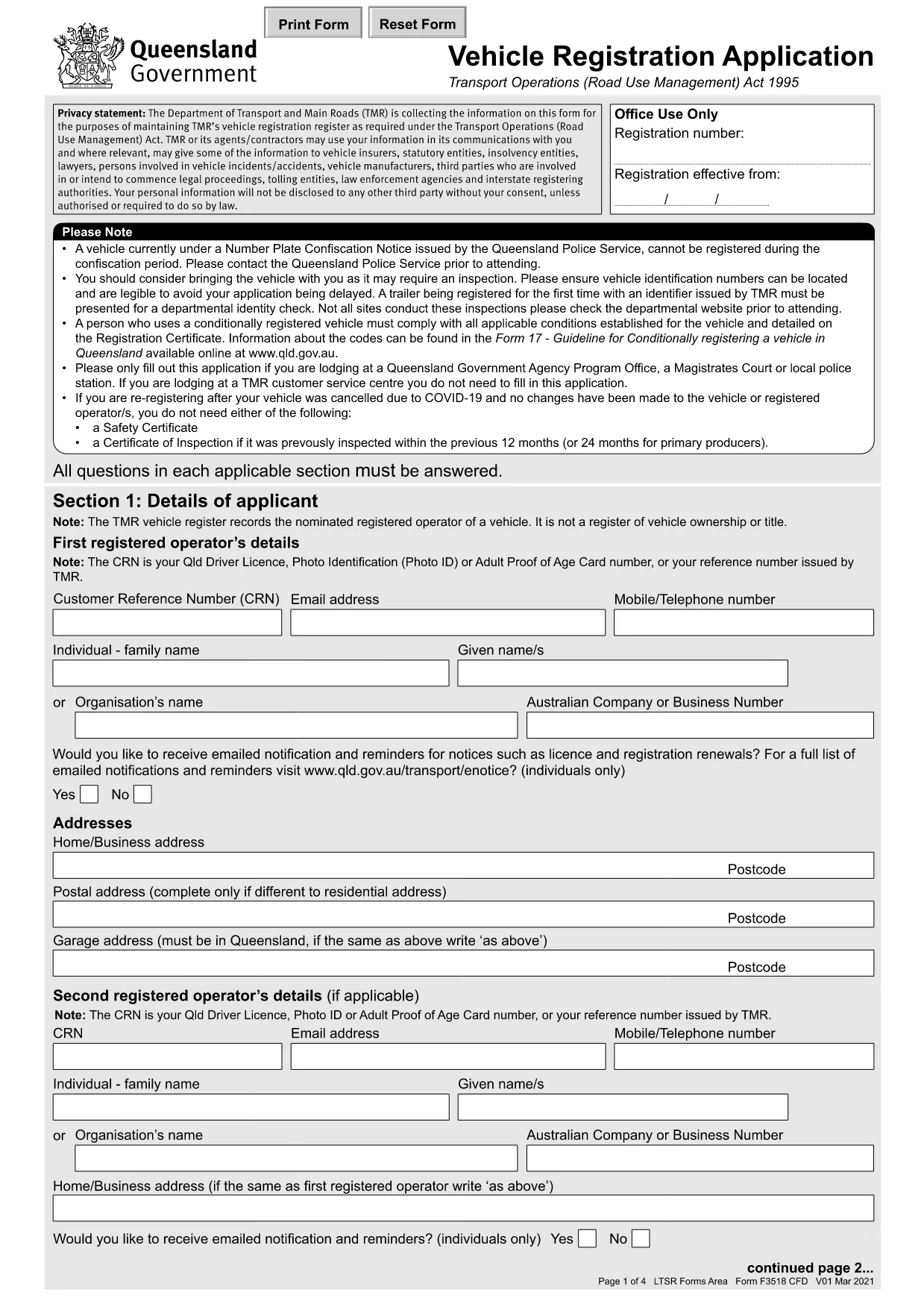
Queensland Vehicle Registration Application Form (Fillable PDF)

  1. زبان انگلیسی
  2. کشور استرالیا
  3. فعالیت ثبت نام خودرو
  4. بخش وزارت حمل و نقل
این فرم را پر کنید
Queensland Vehicle Registration Application Form (Fillable PDF)

The Queensland Vehicle Registration Application is the official form required to register a motor vehicle with the Department of Transport and Main Roads. Instead of printing, printing‑and‑scanning, or hand‑writing, you can now complete the form directly in your browser using Formize’s secure PDF filler.

Key benefits of using the online fillable PDF:

  • Instant validation of required fields
  • Automatic calculations for fees and taxes
  • Save a digital copy for your records
  • Easy download or email of the completed form

Below you’ll find everything you need to know to fill out the Queensland Vehicle Registration Application correctly, avoid common errors, and submit it to the right authority.

Why Use the Online Fillable PDF?

Formize’s PDF filler loads the exact government‑issued PDF, preserving the official layout while adding interactive fields. This ensures your submission meets the Queensland government’s formatting standards.

Step‑by‑Step Guide to Completing the Form

Follow our simple steps (see the How‑To section) to complete the form in minutes.

Common Mistakes to Avoid

  • Leaving the VIN or engine number blank – the form will not validate.
  • Entering an incorrect postcode for the vehicle’s registered address.
  • Forgetting to sign the declaration section; an unsigned form is rejected.
  • Using the wrong vehicle type code – check the guide on the Queensland government website.

Where to Submit Your Completed Application

Once you have saved the completed PDF, you can either:

Keep a copy for your records and note the transaction reference number provided after submission.

سوالات متداول
  • Do I need a Queensland driver’s licence to fill out this form?

    No. The form requires the vehicle owner's details, not a driver’s licence. However, the licence number may be requested for verification in some cases.

  • Can I submit the form without paying the registration fees?

    No. The registration fees must be paid at the time of submission, either online through the portal or in person at a service centre.

  • Is the online filler compatible with mobile devices?

    Yes. Formize’s PDF filler works on modern smartphones and tablets, though a larger screen (tablet or desktop) provides the best experience.

  • What if I make a mistake after downloading the completed PDF?

    You can reopen the saved PDF in Formize’s filler, correct the error, and re‑download. The form retains all previously entered data.

  • How long is the Queensland Vehicle Registration valid?

    Registration is typically valid for one year from the date of issue. The expiry date is printed on the completed form and on your registration certificate.

  • Do I need to provide proof of vehicle ownership?

    Yes. Attach a copy of the purchase receipt, transfer of registration, or any other proof of ownership when you submit the form.

  • Can I save my progress and finish later?

    Absolutely. Click the “Save” button within the filler to download a partially completed PDF. You can reopen it later to finish.

چگونه

نحوه پر کردن Queensland vehicle registration form به صورت رایگان و آنلاین در 5 با مراحل آسان:

  1. 1
    Click the "Fill out this form" button
    Start by clicking the bright “Fill out this form” button on the page. This launches Formize’s secure PDF filler in a new tab.
  2. 2
    Wait for the Formize PDF Filler to load
    The filler loads the official Queensland Vehicle Registration PDF. All fields become interactive; you’ll see a loading indicator that disappears in a few seconds.
  3. 3
    Complete each section
    Enter your personal details, vehicle information, and payment details. Required fields are highlighted in red until they are filled correctly.
  4. 4
    Review and validate
    Use the built‑in validation to check for missing or incorrect data. Correct any highlighted errors before proceeding.
  5. 5
    Save or email the finished form
    When you’re satisfied, click “Download” to save a copy to your device or choose “Email” to send the completed PDF directly to the Department of Transport and Main Roads.
برنامه PDF Filler را فرم‌بندی کنید
در باره

فرم های ثبت نام خودرو

Queensland vehicle registration form یکی از فرم‌های DMV است که به فرم‌های دپارتمان وسایل نقلیه موتوری نیز معروف است و اسنادی هستند که در معاملات و فرآیندهای مختلف مربوط به وسایل نقلیه موتوری استفاده می‌شوند. DMV یک آژانس دولتی است که مسئول صدور گواهینامه رانندگی، ثبت خودرو و اجرای قوانین وسایل نقلیه موتوری است. فرم‌های خاص DMV موجود می‌تواند بسته به حوزه قضایی متفاوت باشد، اما در اینجا چند نمونه رایج وجود دارد:

فرم‌های گواهینامه رانندگی: از این فرم‌ها برای درخواست گواهینامه رانندگی یا درخواست تغییر یا تمدید استفاده می‌شود. آنها معمولاً به اطلاعات شخصی، مدرک هویت نیاز دارند و ممکن است شامل بخش هایی برای اطلاعات پزشکی یا سابقه رانندگی باشند.

فرم‌های ثبت خودرو: این فرم‌ها برای ثبت وسیله نقلیه موتوری در DMV استفاده می‌شوند. آنها به اطلاعات خودرو، جزئیات مالکیت و گواهی بیمه نیاز دارند.

فرم‌های انتقال عنوان: هنگام خرید یا فروش خودرو، از این فرم‌ها برای انتقال مالکیت از یک طرف به طرف دیگر استفاده می‌شود. آنها به اطلاعاتی در مورد خریدار، فروشنده، جزئیات خودرو نیاز دارند و ممکن است شامل یک صورتحساب فروش باشند.

فرم‌های آزادسازی مسئولیت خودرو: هنگام فروش یا انتقال مالکیت خودرو، این فرم‌ها به DMV اطلاع می‌دهند که فروشنده دیگر مسئولیتی در قبال خودرو ندارد. این امر به محافظت از فروشنده در برابر مسئولیت حوادث یا حوادث مربوط به وسیله نقلیه پس از فروش کمک می کند.

فرم های تمدید پلاک و ثبت نام: این فرم ها برای تمدید ثبت نام خودرو یا درخواست پلاک جدید استفاده می شود. آنها معمولاً به اطلاعاتی در مورد مالک ثبت شده، جزئیات ثبت نام فعلی و پرداخت هزینه های قابل اعمال نیاز دارند.

فرم‌های درخواست سوابق رانندگی: این فرم‌ها به افراد امکان می‌دهند سوابق رانندگی خود را از DMV درخواست کنند، که اطلاعاتی در مورد تخلفات رانندگی، وضعیت گواهینامه و سایر جزئیات مرتبط ارائه می‌کند.

فرم‌های پلاک ویژه یا شخصی‌شده: از این فرم‌ها برای درخواست پلاک‌های شخصی یا ویژه استفاده می‌شود که به افراد امکان می‌دهد پلاک خودرو خود را با شخصیت‌ها یا طرح‌های خاص سفارشی کنند.

اینها فقط چند نمونه از فرم‌های زیادی هستند که ممکن است از طریق DMV در دسترس باشند. فرم ها و الزامات خاص می تواند بسته به حوزه قضایی متفاوت باشد، بنابراین مهم است که با وب سایت محلی DMV مشورت کنید یا از یک دفتر DMV دیدن کنید تا فرم های صحیح را برای نیازهای خاص خود دریافت کنید.

امکانات

پرکننده PDF

ساده ترین راه برای پر کردن فرم های PDF به صورت آنلاین

  • به سرعت Queensland vehicle registration form را پر کنید
    به دنبال راهی برای پر کردن سریع Queensland vehicle registration form آنلاین هستید؟ با پرکننده فرم PDF رایگان آنلاین ما، می‌دانید چگونه این سند pdf را در کمتر از یک دقیقه ویرایش و پر کنید.
  • آسان برای استفاده از ویرایشگر PDF آنلاین
    آیا از چاپ فایل‌های پی‌دی‌اف خسته شده‌اید تا بتوانید آن‌ها را قبل از اسکن مجدد و ارسال مجدد، ویرایش کنید؟ اسناد PDF را به صورت آنلاین به صورت رایگان ویرایش کنید. از ویرایشگر pdf آنلاین ما برای صرفه جویی در زمان و کاغذ استفاده کنید.
  • ابزارهای عالی، همه پلتفرم ها
    آیا نمی دانید که چگونه Queensland vehicle registration form را در مک پر کنید، یا شاید چگونه از پرکننده PDF به صورت رایگان استفاده کنید؟ ابزارهای PDF آنلاین ما روی همه پلتفرم ها کار می کنند.
  • ذخیره سازی امن فایل
    فایل‌های تکمیل‌شده «Queensland vehicle registration form» در یک پایگاه داده ایمن که توسط میزبانی ابری آمازون مدیریت می‌شود، ذخیره می‌شوند. شما می توانید فایل های خود را در هر زمان از سیستم ما حذف کنید. در هر صورت این فایل ها پس از 24 ساعت به صورت خودکار پاک می شوند.
  • چت با Queensland vehicle registration form
    با «Queensland vehicle registration form» در Chatize که یک دستیار PDF خوان رایگان است، گپ بزنید. سوال بپرسید و از "Queensland vehicle registration form" پاسخ بگیرید. فقط روی دکمه Chat With Document در بالا کلیک کنید.

حذف جلسه پر کردن

جلسه پر کردن انتخاب شده را حذف کنید؟ در این صورت پیشرفت شما در تکمیل فرم از بین خواهد رفت.

حذف جلسه ویرایش

جلسه ویرایش انتخابی حذف شود؟ در این صورت پیشرفت شما در ایجاد و ویرایش فرم از بین خواهد رفت.