زبان را انتخاب کنید

Form 1194 – Certification of Immigration Status (Fillable PDF)

  1. زبان انگلیسی
  2. کشور استرالیا
  3. فعالیت ترک استرالیا
این فرم را پر کنید
Form 1194 – Certification of Immigration Status (Fillable PDF)

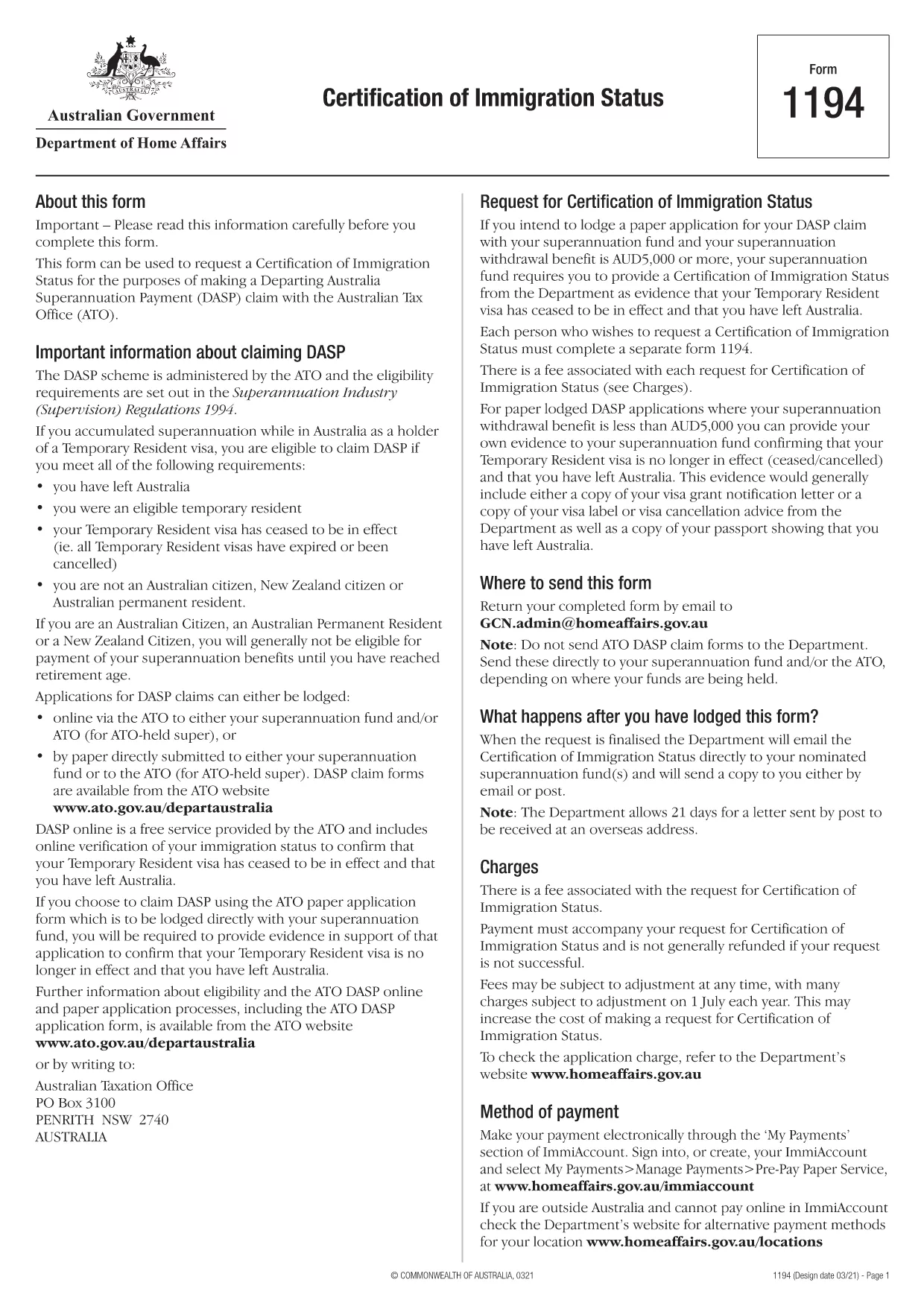
Form 1194 is the official Australian Certification of Immigration Status used when you need to prove your visa status for a Departing Australia Superannuation Payment (DASP) claim, bank verification, or any other official purpose. The form is required for former temporary residents who have left Australia and no longer hold citizenship or permanent residency.

What is Form 1194 and when do you need it?

The Department of Home Affairs issues Form 1194 to certify whether you are a former temporary resident, a New Zealand citizen, or an Australian permanent resident. You will need this certification if you are:

  • Applying for a DASP claim with your superannuation fund.
  • Providing proof of immigration status to a financial institution.
  • Requesting the cancellation of a Temporary Resident visa.

Key sections of Form 1194 explained

Form 1194 contains four main parts:

  1. Applicant details – name, date of birth, passport number, and contact information.
  2. Visa information – visa subclass, grant date, and expiry date.
  3. Certification request – choose whether you need a certification of status or a visa cancellation.
  4. Signature & declaration – sign and date the form to confirm the information is correct.

How to complete Form 1194 online with Formize

Instead of downloading, printing, and scanning, you can fill the form directly in your browser using Formize’s secure PDF filler. Follow these simple steps:

Common mistakes to avoid

  • Leaving the passport number blank – the form will be rejected.
  • Using an outdated visa subclass number.
  • Forgetting to sign the declaration page.
  • Submitting the form to the wrong department (it must go to the Department of Home Affairs).

Where to submit the completed form

Once you have filled and signed Form 1194, you can submit it by:

  • Mailing it to the address printed on the form.
  • Uploading a scanned copy via the Department of Home Affairs online portal.

Make sure to keep a copy of the signed PDF for your records.

سوالات متداول
  • Do I need to print Form 1194 after filling it online?

    No. The Formize filler creates a fully signed PDF that you can download and submit electronically or print if you prefer.

  • Can I use Form 1194 if I am still a permanent resident?

    Form 1194 is intended for former temporary residents or New Zealand citizens. Permanent residents should use the appropriate Australian citizenship or residency certification form.

  • How long does it take for the Department to process the certification?

    Processing times vary, but most certifications are issued within 10‑15 business days after receipt of the complete form.

  • Is there a fee to submit Form 1194?

    There is no fee for the certification itself, but some superannuation funds may charge a small administrative fee for DASP processing.

  • What should I do if I make a mistake after submitting?

    Contact the Department of Home Affairs immediately. You may need to submit a corrected form with a brief explanation of the error.

  • Can I submit Form 1194 via email?

    Yes, you can email the signed PDF to the address provided on the form, but ensure the file is not password‑protected.

  • Is the Formize filler secure?

    Formize uses end‑to‑end encryption and complies with Australian privacy standards, keeping your personal data safe.

چگونه

نحوه پر کردن Form 1194 به صورت رایگان و آنلاین در 4 با مراحل آسان:

  1. 1
    Open the fillable form
    Click the **Fill out this form** button on this page. The Formize PDF Filler app will load the PDF directly in your browser.
  2. 2
    Enter your information
    Type your details into each field – the form automatically saves your entries as you go.
  3. 3
    Add your signature
    Use the built‑in e‑signature tool to sign the declaration section. No printer needed.
  4. 4
    Download or share
    When you’re finished, click **Download PDF** to save a copy or **Share Link** to email it directly to the Department of Home Affairs.
برنامه PDF Filler را فرم‌بندی کنید
در باره

قالب Form 1194

با مجموعه‌ای از ویژگی‌های سنتی برای مشاهده و پر کردن یک سند PDF، همراه با مزایای یک برنامه وب و طرح‌بندی واکنش‌گرا، می‌توانید Form 1194 را در چند دقیقه تکمیل کنید.

امکانات

پرکننده PDF

ساده ترین راه برای پر کردن فرم های PDF به صورت آنلاین

  • به سرعت Form 1194 را پر کنید
    به دنبال راهی برای پر کردن سریع Form 1194 آنلاین هستید؟ با پرکننده فرم PDF رایگان آنلاین ما، می‌دانید چگونه این سند pdf را در کمتر از یک دقیقه ویرایش و پر کنید.
  • آسان برای استفاده از ویرایشگر PDF آنلاین
    آیا از چاپ فایل‌های پی‌دی‌اف خسته شده‌اید تا بتوانید آن‌ها را قبل از اسکن مجدد و ارسال مجدد، ویرایش کنید؟ اسناد PDF را به صورت آنلاین به صورت رایگان ویرایش کنید. از ویرایشگر pdf آنلاین ما برای صرفه جویی در زمان و کاغذ استفاده کنید.
  • ابزارهای عالی، همه پلتفرم ها
    آیا نمی دانید که چگونه Form 1194 را در مک پر کنید، یا شاید چگونه از پرکننده PDF به صورت رایگان استفاده کنید؟ ابزارهای PDF آنلاین ما روی همه پلتفرم ها کار می کنند.
  • ذخیره سازی امن فایل
    فایل‌های تکمیل‌شده «Form 1194» در یک پایگاه داده ایمن که توسط میزبانی ابری آمازون مدیریت می‌شود، ذخیره می‌شوند. شما می توانید فایل های خود را در هر زمان از سیستم ما حذف کنید. در هر صورت این فایل ها پس از 24 ساعت به صورت خودکار پاک می شوند.
  • چت با Form 1194
    با «Form 1194» در Chatize که یک دستیار PDF خوان رایگان است، گپ بزنید. سوال بپرسید و از "Form 1194" پاسخ بگیرید. فقط روی دکمه Chat With Document در بالا کلیک کنید.

حذف جلسه پر کردن

جلسه پر کردن انتخاب شده را حذف کنید؟ در این صورت پیشرفت شما در تکمیل فرم از بین خواهد رفت.

حذف جلسه ویرایش

جلسه ویرایش انتخابی حذف شود؟ در این صورت پیشرفت شما در ایجاد و ویرایش فرم از بین خواهد رفت.