
زبان را انتخاب کنید

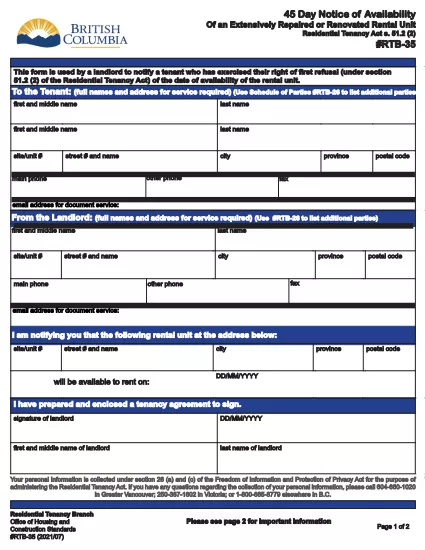
RTB‑35 45‑Day Notice of Availability (Fillable PDF)

  1. کشور کانادا
  2. زبان انگلیسی
  3. فعالیت اجاره
  4. بخش Residential Tenancy Branch
این فرم را پر کنید
RTB‑35 45‑Day Notice of Availability (Fillable PDF)

The RTB‑35 is the official 45‑Day Notice of Availability required by British Columbia’s Residential Tenancy Act. Landlords must give tenants at least 45 days’ notice before a rental unit becomes available for a new tenancy. This form ensures the notice is clear, legally compliant, and ready to be filed.

What Is the RTB‑35 Form?

RTB‑35 is a standardized, government‑approved PDF used by landlords across the province. It captures the date the unit will be available, the reason for vacancy, and the landlord’s contact information. Because it is a fillable PDF, you can complete it directly in your browser without printing a paper copy first.

When and Why You Need This Notice

  • When you plan to end a tenancy because the unit will be re‑rented or taken off the market.
  • When you are selling the property or converting it to another use.
  • To comply with the Residential Tenancy Act and avoid disputes or penalties.

How to Complete the RTB‑35 Online

Follow the simple steps below. The Formize PDF Filler loads the fillable version instantly, so you never need to download a separate editor.

Common Mistakes to Avoid

  • Providing a date that is less than 45 days from the notice date.
  • Leaving the “Reason for Vacancy” field blank.
  • Forgetting to sign the form before submitting to the tenant.

Download the Fillable PDF

Click the button below to open the RTB‑35 form in the Formize PDF Filler. When the app loads, you can fill, save, and print the notice in minutes.

Fill out this form

سوالات متداول
  • What happens if I give less than 45 days’ notice?

    The notice will be considered invalid under the Residential Tenancy Act, and you may be required to continue the tenancy or face a dispute resolution claim.

  • Can I use a handwritten version of RTB‑35?

    Yes, but a fillable PDF is recommended because it reduces errors, ensures legibility, and creates a digital record.

  • Do I need to attach any supporting documents?

    Only if the reason for vacancy requires proof (e.g., a sale agreement). Otherwise, the RTB‑35 alone is sufficient.

  • Is the Formize PDF Filler free to use?

    Yes. You can fill, save, and download the form at no cost. No software installation is required.

  • Can I email the completed RTB‑35 to my tenant?

    Absolutely. Once you save the completed PDF, you can attach it to an email or upload it to a tenant portal.

  • Do I need to keep a copy of the notice?

    Keep a saved copy for your records for at least the length of the tenancy, as it may be requested during dispute resolution.

  • What if the tenant disputes the notice date?

    Provide the saved PDF with timestamps from the Formize app as evidence of when the notice was completed and sent.

چگونه

نحوه پر کردن RTB-35 به صورت رایگان و آنلاین در 5 با مراحل آسان:

  1. 1
    Open the Form
    Click the “Fill out this form” button above. The Formize PDF Filler app will load the RTB‑35 fillable PDF in a new tab.
  2. 2
    Enter Required Information
    Type the date the unit will be available, the reason for vacancy, and your contact details. All fields are interactive and save automatically.
  3. 3
    Review and Sign
    Check each section for accuracy, then add your electronic signature using the built‑in signature field.
  4. 4
    Save or Print
    When you’re finished, click “Save” to download a copy or “Print” to give a hard copy to your tenant.
  5. 5
    Submit to Tenant
    Deliver the completed notice by hand, email, or mail within the 45‑day window required by law.
برنامه PDF Filler را فرم‌بندی کنید
در باره

فرم هایی برای مالکان و/یا مستاجرین برای پیشنهاد اقدام در رابطه با قراردادهای اجاره.

RTB-35 نوع قراردادهای اجاره مسکن است که توسط اکثر مالکان خصوصی و انجمن های مسکن استفاده می شود.

مواردی وجود دارد که مالکان یا مستاجران باید قوانین خاصی را که در مقررات تعیین شده است رعایت کنند. در برخی موارد ممکن است لازم باشد فرمی به نام «فرم تجویز شده» را تکمیل کنند که عملی را پیشنهاد می‌کند که ممکن است طرف دیگر قرارداد اجاره را تحت تأثیر قرار دهد.

فرم‌ها را فرم‌های تجویزی می‌نامند، زیرا عبارات موجود در آن‌ها به دقت پیش‌نویس شده است تا اطمینان حاصل شود که فردی که فرم را تکمیل می‌کند و شخصی که به او ارائه می‌شود می‌تواند بفهمد چه چیزی پیشنهاد می‌شود و چه کاری می‌تواند در پاسخ انجام دهد. عدم ارائه فرم صحیح ممکن است اقدام پیشنهادی را باطل کند.

شما نمی توانید عبارت را در این فرم ها تغییر دهید، مگر اینکه فرمی بگوید که می توانید این کار را انجام دهید. اگر عبارت را تغییر دهید، ممکن است فرم باطل شود. همچنین باید از مهلت‌های اعلام شده در فرم پیروی کنید.

امکانات

پرکننده PDF

ساده ترین راه برای پر کردن فرم های PDF به صورت آنلاین

  • به سرعت RTB-35 را پر کنید
    به دنبال راهی برای پر کردن سریع RTB-35 آنلاین هستید؟ با پرکننده فرم PDF رایگان آنلاین ما، می‌دانید چگونه این سند pdf را در کمتر از یک دقیقه ویرایش و پر کنید.
  • آسان برای استفاده از ویرایشگر PDF آنلاین
    آیا از چاپ فایل‌های پی‌دی‌اف خسته شده‌اید تا بتوانید آن‌ها را قبل از اسکن مجدد و ارسال مجدد، ویرایش کنید؟ اسناد PDF را به صورت آنلاین به صورت رایگان ویرایش کنید. از ویرایشگر pdf آنلاین ما برای صرفه جویی در زمان و کاغذ استفاده کنید.
  • ابزارهای عالی، همه پلتفرم ها
    آیا نمی دانید که چگونه RTB-35 را در مک پر کنید، یا شاید چگونه از پرکننده PDF به صورت رایگان استفاده کنید؟ ابزارهای PDF آنلاین ما روی همه پلتفرم ها کار می کنند.
  • ذخیره سازی امن فایل
    فایل‌های تکمیل‌شده «RTB-35» در یک پایگاه داده ایمن که توسط میزبانی ابری آمازون مدیریت می‌شود، ذخیره می‌شوند. شما می توانید فایل های خود را در هر زمان از سیستم ما حذف کنید. در هر صورت این فایل ها پس از 24 ساعت به صورت خودکار پاک می شوند.
  • چت با RTB-35
    با «RTB-35» در Chatize که یک دستیار PDF خوان رایگان است، گپ بزنید. سوال بپرسید و از "RTB-35" پاسخ بگیرید. فقط روی دکمه Chat With Document در بالا کلیک کنید.

حذف جلسه پر کردن

جلسه پر کردن انتخاب شده را حذف کنید؟ در این صورت پیشرفت شما در تکمیل فرم از بین خواهد رفت.

حذف جلسه ویرایش

جلسه ویرایش انتخابی حذف شود؟ در این صورت پیشرفت شما در ایجاد و ویرایش فرم از بین خواهد رفت.