
زبان را انتخاب کنید

IMM 5476 – Use of a Representative (Canada)

  1. کشور کانادا
  2. زبان انگلیسی فرانسوی
  3. فعالیت ویزا
این فرم را پر کنید
IMM 5476 – Use of a Representative (Canada)

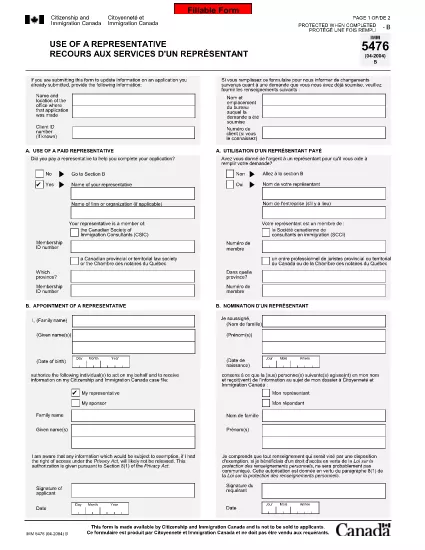
The IMM 5476 – Use of a Representative form allows you to officially appoint an immigration consultant, lawyer, or another authorized person to act on your behalf with Immigration, Refugees and Citizenship Canada (IRCC) and the Canada Border Services Agency (CBSA). This form is required for most permanent‑resident, temporary‑resident, and citizenship applications.

What Is the IMM 5476 Form?

IMM 5476 is a government‑issued PDF that records the details of your chosen representative, their contact information, and the scope of authority you are granting. It is available in both English and French and must be signed by both you (the applicant) and your representative.

How to Fill Out IMM 5476 Online

Instead of downloading the PDF and editing it manually, simply click the "Fill out this form" button on the page. Our Formize PDF Filler app will load the fillable version instantly, letting you complete the form directly in your browser.

Common Mistakes to Avoid

  • Incorrect Representative Details: Double‑check the name, address, and CRA‑issued client number of your representative.
  • Missing Signatures: Both the applicant and the representative must sign; unsigned forms are rejected.
  • Wrong Language Version: Use the official English or French version that matches the rest of your application package.
  • Out‑of‑Date Form: Always use the latest version – the link below always points to the current PDF.

When to Submit the Form

Attach IMM 5476 to the same package as your main application (e.g., Express Entry, Study Permit, Visitor Visa). If you change representatives later, submit a new, signed IMM 5476 with your updated request.

Need More Help?

While Formize does not provide live support, you can find detailed guidance on the IRCC website or consult a licensed immigration professional.

سوالات متداول
  • Do I need a lawyer to fill out IMM 5476?

    No. You can appoint any authorized representative, such as a licensed immigration consultant, lawyer, or family member, as long as they have a valid client number.

  • Can I change my representative after submitting the form?

    Yes. Submit a new, signed IMM 5476 with the updated representative’s details and include a brief letter explaining the change.

  • Is a digital signature accepted?

    IRCC accepts electronic signatures generated within a fillable PDF application like Formize, provided the signature field is clearly marked.

  • What happens if I forget to sign the form?

    An unsigned IMM 5476 will be considered incomplete and may delay processing of your entire application.

  • Do I need to submit both English and French versions?

    Submit only the language version that matches the rest of your application package. IRCC does not require both versions.

  • Is there a fee to use the Formize PDF Filler?

    No. Formize provides free access to fillable PDFs for government forms like IMM 5476.

  • Can I print the form after filling it online?

    Yes. Once you finish, click "Download PDF" and print a hard copy if your submission requires a physical signature.

  • Where can I find the latest version of IMM 5476?

    The link on this page always points to the most recent version published by Immigration, Refugees and Citizenship Canada.

چگونه

نحوه پر کردن IMM 5476 به صورت رایگان و آنلاین در 5 با مراحل آسان:

  1. 1
    Open the Fillable Form
    Click the "Fill out this form" button on the page. The Formize PDF Filler app will load the IMM 5476 form directly in your browser.
  2. 2
    Enter Applicant Information
    Fill in your full name, client ID, and contact details in the Applicant section. All fields are required.
  3. 3
    Enter Representative Details
    Provide the representative’s name, firm, address, phone, and email. Make sure the CRA client number matches the one on record.
  4. 4
    Add Signatures
    Use the built‑in signature fields to sign electronically. Both you and your representative must sign before saving.
  5. 5
    Download or Submit
    After completing the form, click "Download PDF" to save a copy for your records, then attach it to your immigration application package.
برنامه PDF Filler را فرم‌بندی کنید
در باره

فرم های ویزا

IMM 5476 یکی از فرم‌های ویزا است که برای درخواست ویزا برای ورود به یک کشور خارجی استفاده می‌شود. ویزا مدرکی است که به یک تبعه خارجی اجازه می دهد برای مدت زمان مشخصی وارد یک کشور خارجی، اقامت و گاهی اوقات کار کند. فرم ها و شرایط دقیق برای دریافت ویزا بسته به کشور و نوع ویزا متفاوت است.

فرم های ویزا معمولاً به اطلاعات شخصی مانند نام، تاریخ تولد و اطلاعات پاسپورت و همچنین اطلاعاتی درباره هدف و طول سفر، مقصد مورد نظر و اینکه آیا متقاضی قبلاً از دریافت ویزا رد شده یا از کشوری اخراج شده است، نیاز دارد. این فرم ها همچنین ممکن است به مدارک پشتیبان مانند گذرنامه، عکس و مدرک حمایت مالی نیاز داشته باشند.

در ایالات متحده، رایج ترین فرم های ویزا فرم های DS-160 و DS-260 هستند. فرم DS-160 برای درخواست ویزای غیر مهاجرتی استفاده می شود، در حالی که فرم DS-260 برای درخواست ویزای مهاجرتی استفاده می شود. این فرم ها به اطلاعات دقیق در مورد تاریخچه شخصی و سفر متقاضی و همچنین مدارک پشتیبانی مانند گذرنامه، برنامه سفر و سوابق مالی نیاز دارند.

سایر کشورها ممکن است فرم‌ها و شرایط ویزا متفاوتی داشته باشند، اما فرآیند اصلی معمولاً شامل تکمیل درخواست ویزا، ارائه مدارک پشتیبانی و شرکت در مصاحبه با یک افسر کنسولی در سفارت یا کنسولگری ایالات متحده است. توجه به این نکته ضروری است که فرآیند درخواست ویزا می تواند پیچیده و زمان بر باشد و توصیه می شود افرادی که به دنبال ویزا هستند با یک وکیل مهاجرت یا سایر متخصصان واجد شرایط مشورت کنند تا اطمینان حاصل شود که تمام فرم ها و الزامات لازم برآورده شده است.

امکانات

پرکننده PDF

ساده ترین راه برای پر کردن فرم های PDF به صورت آنلاین

  • به سرعت IMM 5476 را پر کنید
    به دنبال راهی برای پر کردن سریع IMM 5476 آنلاین هستید؟ با پرکننده فرم PDF رایگان آنلاین ما، می‌دانید چگونه این سند pdf را در کمتر از یک دقیقه ویرایش و پر کنید.
  • آسان برای استفاده از ویرایشگر PDF آنلاین
    آیا از چاپ فایل‌های پی‌دی‌اف خسته شده‌اید تا بتوانید آن‌ها را قبل از اسکن مجدد و ارسال مجدد، ویرایش کنید؟ اسناد PDF را به صورت آنلاین به صورت رایگان ویرایش کنید. از ویرایشگر pdf آنلاین ما برای صرفه جویی در زمان و کاغذ استفاده کنید.
  • ابزارهای عالی، همه پلتفرم ها
    آیا نمی دانید که چگونه IMM 5476 را در مک پر کنید، یا شاید چگونه از پرکننده PDF به صورت رایگان استفاده کنید؟ ابزارهای PDF آنلاین ما روی همه پلتفرم ها کار می کنند.
  • ذخیره سازی امن فایل
    فایل‌های تکمیل‌شده «IMM 5476» در یک پایگاه داده ایمن که توسط میزبانی ابری آمازون مدیریت می‌شود، ذخیره می‌شوند. شما می توانید فایل های خود را در هر زمان از سیستم ما حذف کنید. در هر صورت این فایل ها پس از 24 ساعت به صورت خودکار پاک می شوند.
  • چت با IMM 5476
    با «IMM 5476» در Chatize که یک دستیار PDF خوان رایگان است، گپ بزنید. سوال بپرسید و از "IMM 5476" پاسخ بگیرید. فقط روی دکمه Chat With Document در بالا کلیک کنید.

حذف جلسه پر کردن

جلسه پر کردن انتخاب شده را حذف کنید؟ در این صورت پیشرفت شما در تکمیل فرم از بین خواهد رفت.

حذف جلسه ویرایش

جلسه ویرایش انتخابی حذف شود؟ در این صورت پیشرفت شما در ایجاد و ویرایش فرم از بین خواهد رفت.