زبان را انتخاب کنید

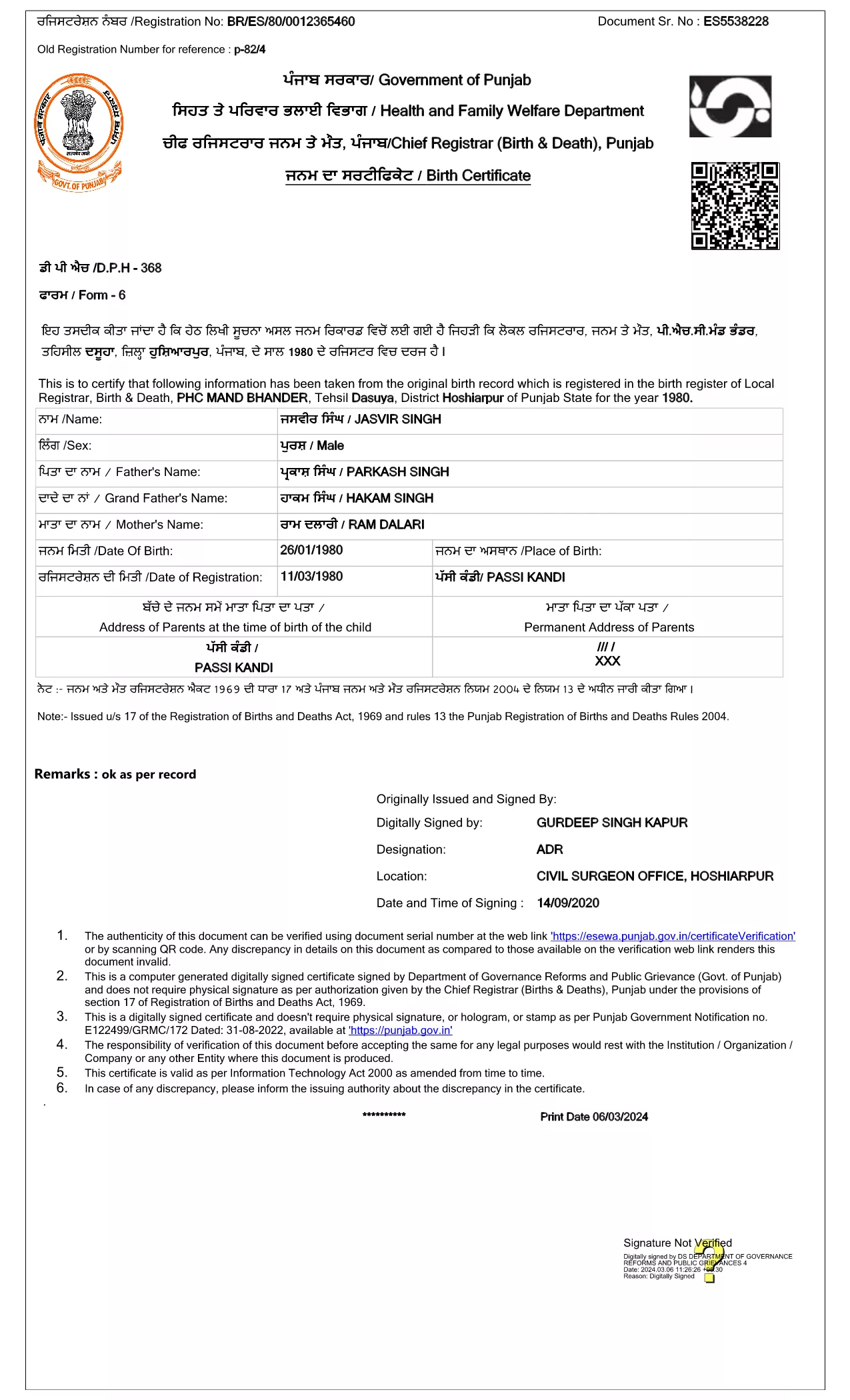
Punjab Birth Certificate Application Form (Fillable PDF)

  1. کشور هند
  2. زبان انگلیسی
  3. فعالیت Birth Certificate
  4. بخش Birth & Death Registration
این فرم را پر کنید
Punjab Birth Certificate Application Form (Fillable PDF)

The Punjab Birth Certificate Application Form is the government‑approved document you need to obtain a certified birth record for a child born in Punjab, India. This form is now available as a fillable PDF, allowing you to complete it directly in your browser using the Formize PDF Filler – no printer, scanner, or physical signatures required.

Why Use the Official Fillable PDF?

Using the official fillable PDF ensures that your submission complies with the Registration of Births and Deaths Act, 1969. The digital signature from the Department of Governance Reforms and Public Grievance guarantees authenticity, speeds up processing, and eliminates the need for manual handling.

How to Fill the Punjab Birth Certificate Form Online

Simply click the "Fill out this form" button on the page, wait for the Formize PDF Filler app to load, and start entering the required details. The interface is intuitive: click a field, type your answer, and move to the next section. When you’re done, save the completed PDF and submit it to the local registration office.

Required Documents & Information

  • Child’s full name (as per parents’ records)
  • Date and place of birth (village/town, district)
  • Parents’ full names, ages, and occupations
  • Proof of identity for at least one parent (Aadhaar, Voter ID, etc.)
  • Hospital discharge summary or midwife’s certificate (if applicable)

Common Mistakes to Avoid

  • Leaving mandatory fields blank – the form will not submit.
  • Using unofficial abbreviations for place names.
  • Uploading an outdated version of the PDF (always use the latest link provided).
  • Providing mismatched names between the birth record and parents’ IDs.

Follow the steps below to ensure a smooth, error‑free submission.

سوالات متداول
  • Is the Punjab birth certificate form free to download?

    Yes, the official fillable PDF is provided by the Punjab government at no cost. You only pay any standard processing fees when you submit the completed form.

  • Can I submit the filled PDF online?

    Most districts still require a physical copy, but many accept a digital PDF via email or the e‑services portal. Check your local office’s guidelines.

  • What if I make a mistake after saving the PDF?

    Open the saved PDF again in the Formize PDF Filler, correct the error, and re‑save. The form is fully editable until you finalize it.

  • Do I need a digital signature?

    The PDF is pre‑signed by the Department of Governance Reforms and Public Grievance, so no additional digital signature is required from you.

  • How long does processing take after submission?

    Processing times vary by district, typically ranging from 7 to 15 business days once the complete application and supporting documents are received.

  • What documents are required to accompany the application?

    You’ll need a parent’s ID proof (Aadhaar, Voter ID, etc.), the hospital discharge summary or midwife’s certificate, and any other documents specified by your local office.

  • Can I request a duplicate birth certificate using this form?

    Yes. Select the “Duplicate Certificate” option in the form and provide the original certificate number if available.

چگونه

نحوه پر کردن Punjab birth certificate به صورت رایگان و آنلاین در 4 با مراحل آسان:

  1. 1
    Open the Fillable Form
    Click the "Fill out this form" button on the page. The Formize PDF Filler will load automatically in a new tab.
  2. 2
    Enter Your Information
    Fill each highlighted field with the required details. Use the tab key or click to move between sections.
  3. 3
    Save and Review
    When all fields are completed, click "Save" to download the filled PDF. Review it for any errors before submission.
  4. 4
    Submit to the Local Office
    Print the saved PDF (if required) or submit the digital copy to your nearest Birth & Death Registration office as instructed.
برنامه PDF Filler را فرم‌بندی کنید
در باره

قالب Punjab birth certificate

با مجموعه‌ای از ویژگی‌های سنتی برای مشاهده و پر کردن یک سند PDF، همراه با مزایای یک برنامه وب و طرح‌بندی واکنش‌گرا، می‌توانید Punjab birth certificate را در چند دقیقه تکمیل کنید.

امکانات

پرکننده PDF

ساده ترین راه برای پر کردن فرم های PDF به صورت آنلاین

  • به سرعت Punjab birth certificate را پر کنید
    به دنبال راهی برای پر کردن سریع Punjab birth certificate آنلاین هستید؟ با پرکننده فرم PDF رایگان آنلاین ما، می‌دانید چگونه این سند pdf را در کمتر از یک دقیقه ویرایش و پر کنید.
  • آسان برای استفاده از ویرایشگر PDF آنلاین
    آیا از چاپ فایل‌های پی‌دی‌اف خسته شده‌اید تا بتوانید آن‌ها را قبل از اسکن مجدد و ارسال مجدد، ویرایش کنید؟ اسناد PDF را به صورت آنلاین به صورت رایگان ویرایش کنید. از ویرایشگر pdf آنلاین ما برای صرفه جویی در زمان و کاغذ استفاده کنید.
  • ابزارهای عالی، همه پلتفرم ها
    آیا نمی دانید که چگونه Punjab birth certificate را در مک پر کنید، یا شاید چگونه از پرکننده PDF به صورت رایگان استفاده کنید؟ ابزارهای PDF آنلاین ما روی همه پلتفرم ها کار می کنند.
  • ذخیره سازی امن فایل
    فایل‌های تکمیل‌شده «Punjab birth certificate» در یک پایگاه داده ایمن که توسط میزبانی ابری آمازون مدیریت می‌شود، ذخیره می‌شوند. شما می توانید فایل های خود را در هر زمان از سیستم ما حذف کنید. در هر صورت این فایل ها پس از 24 ساعت به صورت خودکار پاک می شوند.
  • چت با Punjab birth certificate
    با «Punjab birth certificate» در Chatize که یک دستیار PDF خوان رایگان است، گپ بزنید. سوال بپرسید و از "Punjab birth certificate" پاسخ بگیرید. فقط روی دکمه Chat With Document در بالا کلیک کنید.

حذف جلسه پر کردن

جلسه پر کردن انتخاب شده را حذف کنید؟ در این صورت پیشرفت شما در تکمیل فرم از بین خواهد رفت.

حذف جلسه ویرایش

جلسه ویرایش انتخابی حذف شود؟ در این صورت پیشرفت شما در ایجاد و ویرایش فرم از بین خواهد رفت.