زبان را انتخاب کنید

Anganwadi Application Form – Fill Online Instantly

  1. کشور هند
  2. زبان انگلیسی
  3. بخش Women and Child Development
  4. فعالیت Child Development
این فرم را پر کنید
Anganwadi Application Form – Fill Online Instantly

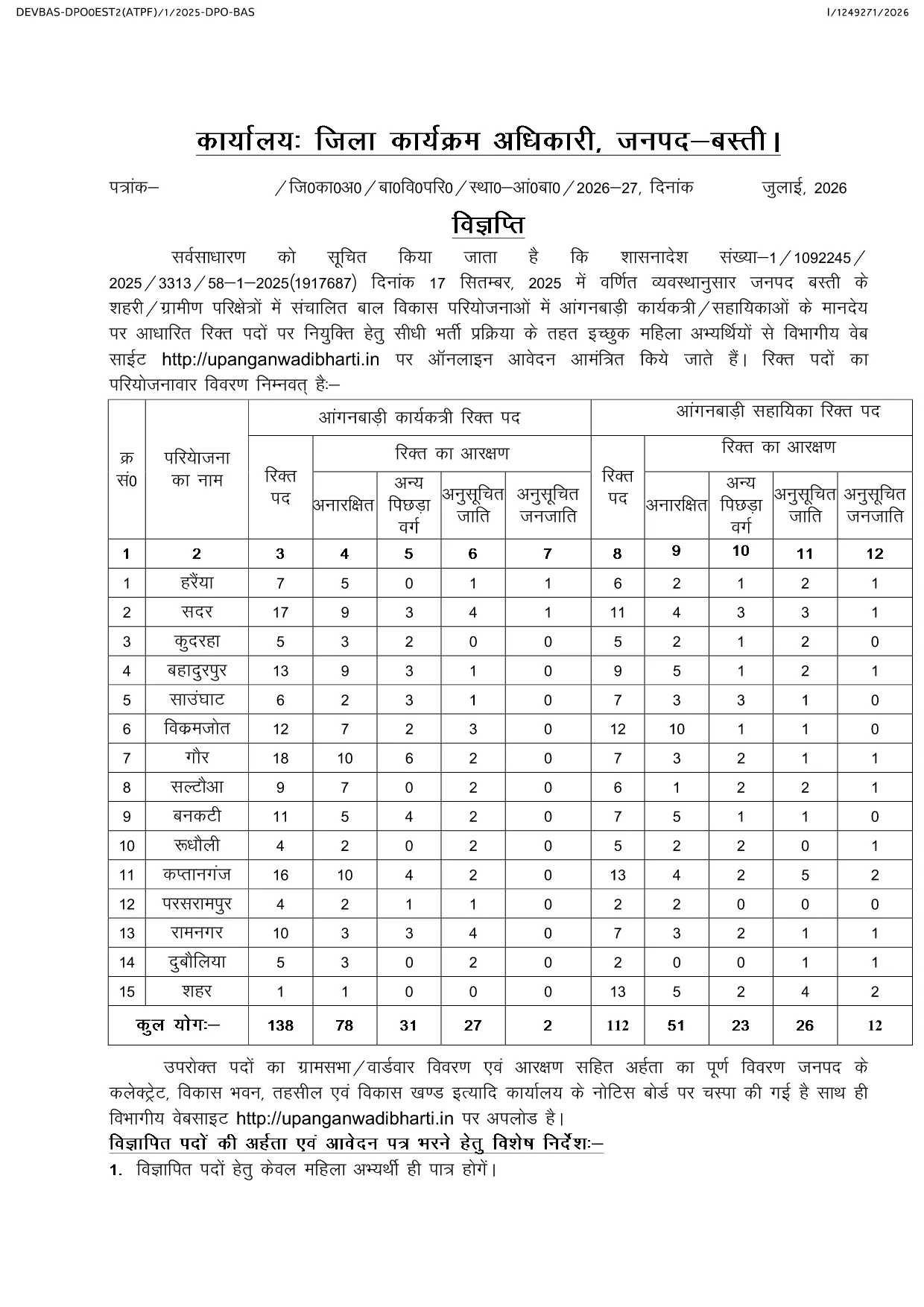
Looking for the official Anganwadi application form for the latest recruitment cycle? Formize lets you open the PDF directly in your browser, fill every field, and submit without ever downloading or printing. The form is fully compatible with the Uttar Pradesh Anganwadi Worker Bharti 2026 notification and follows the Integrated Child Development Services (ICDS) guidelines.

Why Choose Formize for Anganwadi Forms

  • Instant loading of the official PDF – no extra software required.
  • All fields are editable and auto‑saved while you work.
  • Secure, browser‑based filling keeps your personal data private.
  • One‑click download of the completed PDF for submission.

How to Complete the Anganwadi Application Online

Simply click the "Fill out this form" button below. The Formize PDF Filler app will load the document, and you can start entering your details right away.

Eligibility & Required Documents

Before you begin, make sure you meet the basic criteria and have the following documents ready:

  • Age between 18 and 35 years (relaxations applicable as per UP government rules).
  • Minimum educational qualification: 10+2 or equivalent.
  • Proof of residence in the village/ward you are applying for.
  • Recent passport‑size photograph, signature, and scanned ID proof.

Common Mistakes to Avoid

  • Leaving mandatory fields blank – the form will not submit.
  • Uploading photos that do not meet size or format requirements.
  • Entering incorrect village or ward codes – double‑check the official notification.
  • Failing to review the preview before final submission.

Ready to start? Click the button below, fill out the form, and submit your application with confidence.

سوالات متداول
  • Is there any fee to fill the Anganwadi application form online?

    No. The Anganwadi application form is completely free to fill and download using Formize.

  • Can I edit the form after I have downloaded it?

    Yes. The PDF remains fully editable, but it is recommended to complete and review the form before the first download to avoid errors.

  • What file formats are accepted for photo and signature uploads?

    Upload JPG or PNG images. The maximum file size is 200 KB for each image.

  • Do I need a PDF reader to use Formize?

    No. Formize works entirely in the browser, so you do not need any additional PDF software.

  • How can I be sure my data is secure?

    All data is processed locally in your browser and never stored on our servers unless you choose to download the completed PDF.

  • What should I do if I encounter an error while filling the form?

    Refresh the page and reopen the form. If the problem persists, clear your browser cache or try a different browser.

  • When is the last date to submit the Anganwadi application?

    The last date varies by district. Refer to the official notification linked on the page for the exact deadline for your district.

چگونه

نحوه پر کردن Anganwadi application form به صورت رایگان و آنلاین در 4 با مراحل آسان:

  1. 1
    Open the Form
    Click the "Fill out this form" button on the page. The Formize PDF Filler app will load the Anganwadi application PDF directly in your browser.
  2. 2
    Enter Your Details
    Complete each field—personal information, education, residence, and upload your photo and signature. All changes are saved automatically.
  3. 3
    Review & Validate
    Use the preview function to double‑check every entry. Ensure all mandatory fields are filled and documents meet the size requirements.
  4. 4
    Download & Submit
    After confirming the preview, click the download button to save the filled PDF. Submit the file according to the instructions in the official notification.
برنامه PDF Filler را فرم‌بندی کنید
در باره

قالب Anganwadi application form

با مجموعه‌ای از ویژگی‌های سنتی برای مشاهده و پر کردن یک سند PDF، همراه با مزایای یک برنامه وب و طرح‌بندی واکنش‌گرا، می‌توانید Anganwadi application form را در چند دقیقه تکمیل کنید.

امکانات

پرکننده PDF

ساده ترین راه برای پر کردن فرم های PDF به صورت آنلاین

  • به سرعت Anganwadi application form را پر کنید
    به دنبال راهی برای پر کردن سریع Anganwadi application form آنلاین هستید؟ با پرکننده فرم PDF رایگان آنلاین ما، می‌دانید چگونه این سند pdf را در کمتر از یک دقیقه ویرایش و پر کنید.
  • آسان برای استفاده از ویرایشگر PDF آنلاین
    آیا از چاپ فایل‌های پی‌دی‌اف خسته شده‌اید تا بتوانید آن‌ها را قبل از اسکن مجدد و ارسال مجدد، ویرایش کنید؟ اسناد PDF را به صورت آنلاین به صورت رایگان ویرایش کنید. از ویرایشگر pdf آنلاین ما برای صرفه جویی در زمان و کاغذ استفاده کنید.
  • ابزارهای عالی، همه پلتفرم ها
    آیا نمی دانید که چگونه Anganwadi application form را در مک پر کنید، یا شاید چگونه از پرکننده PDF به صورت رایگان استفاده کنید؟ ابزارهای PDF آنلاین ما روی همه پلتفرم ها کار می کنند.
  • ذخیره سازی امن فایل
    فایل‌های تکمیل‌شده «Anganwadi application form» در یک پایگاه داده ایمن که توسط میزبانی ابری آمازون مدیریت می‌شود، ذخیره می‌شوند. شما می توانید فایل های خود را در هر زمان از سیستم ما حذف کنید. در هر صورت این فایل ها پس از 24 ساعت به صورت خودکار پاک می شوند.
  • چت با Anganwadi application form
    با «Anganwadi application form» در Chatize که یک دستیار PDF خوان رایگان است، گپ بزنید. سوال بپرسید و از "Anganwadi application form" پاسخ بگیرید. فقط روی دکمه Chat With Document در بالا کلیک کنید.

حذف جلسه پر کردن

جلسه پر کردن انتخاب شده را حذف کنید؟ در این صورت پیشرفت شما در تکمیل فرم از بین خواهد رفت.

حذف جلسه ویرایش

جلسه ویرایش انتخابی حذف شود؟ در این صورت پیشرفت شما در ایجاد و ویرایش فرم از بین خواهد رفت.