
زبان را انتخاب کنید

Form 1116 Schedule C – Fillable PDF for Foreign Tax Credit

  1. کشور ایالات متحده آمریکا
  2. زبان انگلیسی
  3. فعالیت مالیات
  4. بخش خدمات درآمد داخلی
این فرم را پر کنید
Form 1116 Schedule C – Fillable PDF for Foreign Tax Credit

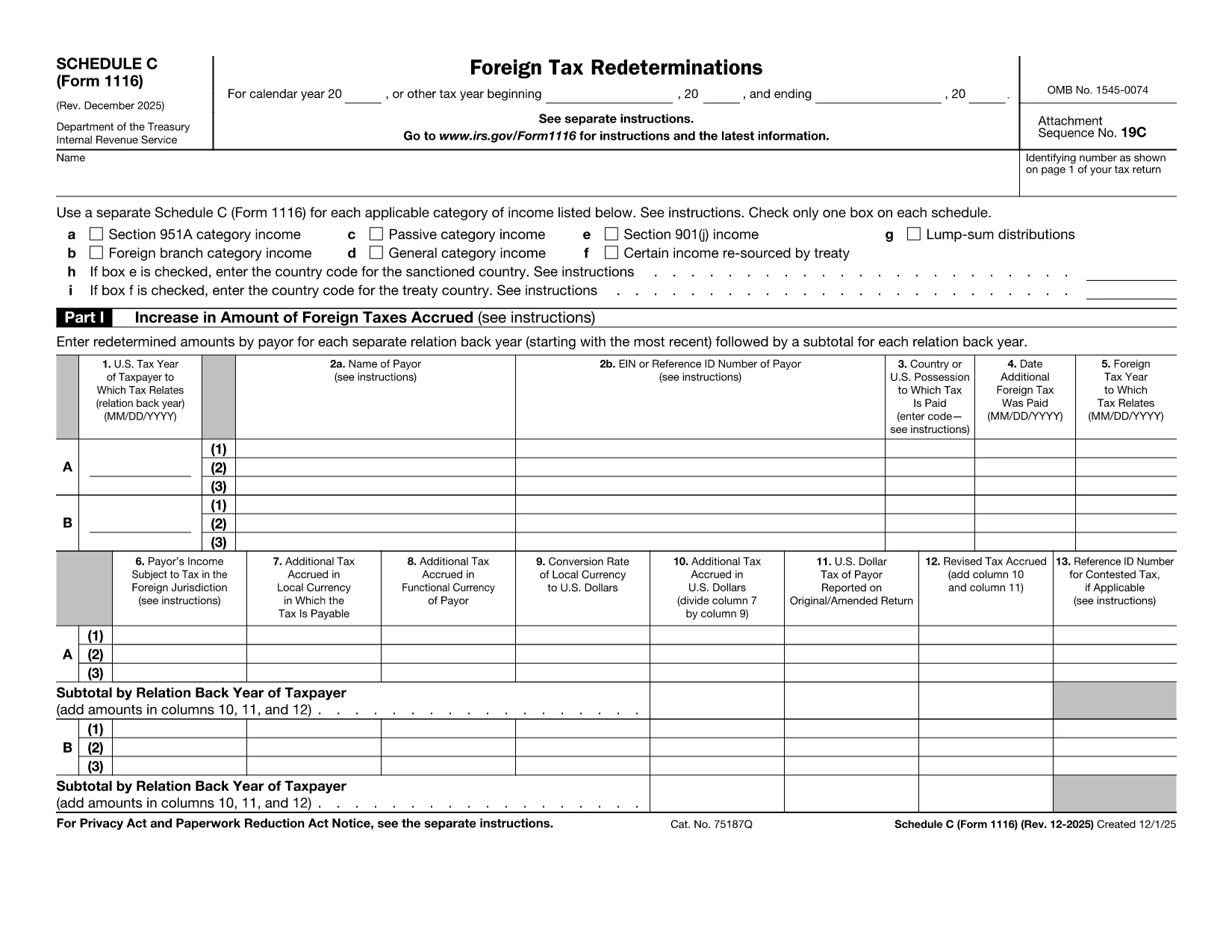
Form 1116 Schedule C is the supplemental worksheet used with the IRS Form 1116 to report foreign tax redeterminations and adjustments. Taxpayers who receive refunds, credits, or other changes to foreign taxes must complete this schedule to keep the Foreign Tax Credit accurate.

Our fillable PDF version is fully compatible with the Formize PDF Filler app, letting you fill, sign, and download the completed form without printing a single page.

What Is Form 1116 Schedule C?

Schedule C captures any redetermination of foreign tax amounts after the original Form 1116 was filed. Typical scenarios include:

  • Receiving a refund from a foreign government.
  • Amending a prior year foreign tax credit claim.
  • Adjusting foreign tax credits for an Alternative Minimum Tax (AMT) calculation.

How to Complete the Fillable PDF Online

Instead of downloading the PDF and opening a separate editor, simply click the "Fill out this form" button on this page. The Formize PDF Filler app will load, and you can:

  1. Enter your personal information and tax year.
  2. Provide the original foreign tax amount and the new corrected amount.
  3. Check the appropriate boxes for regular or AMT calculations.
  4. Save, preview, and download the completed Schedule C.

Common Mistakes to Avoid

  • Skipping the box for the correct tax year. Each Schedule C must match the year of the original Form 1116.
  • Leaving the "Refund" or "Additional Tax" fields blank. Even a $0 entry should be entered to avoid IRS processing delays.
  • Using the wrong Schedule version. The Schedule C for 2022‑2023 is the one linked below; older versions may be rejected.

Where to Find Help and Resources

For detailed instructions, see the IRS instructions that accompany Form 1116. If you need clarification on foreign tax credit rules, consult a qualified tax professional or refer to IRS Publication 514.

دستورالعمل ها

سوالات متداول
  • Do I need to file Schedule C with every Form 1116?

    Only file Schedule C when you have a foreign tax redetermination—such as a refund, credit, or AMT adjustment—after the original Form 1116 was submitted.

  • Can I use the same Schedule C for multiple tax years?

    No. Each Schedule C must correspond to the specific tax year of the original Form 1116. Use the version dated for that year.

  • Is the fillable PDF version legally acceptable?

    Yes. The IRS accepts electronically completed PDF worksheets as long as they are legible, signed (if required), and attached to the appropriate tax return.

  • What if I made an error after submitting the Schedule C?

    You can file an amended Schedule C along with an amended Form 1116 (Form 1040X) to correct any mistakes.

  • Do I need a tax professional to complete Schedule C?

    While many taxpayers can complete it themselves, complex foreign tax situations often benefit from professional guidance to ensure the credit is calculated correctly.

  • How long should I keep a copy of Schedule C?

    Retain the completed Schedule C and supporting documentation for at least seven years, the same period the IRS may audit foreign tax credit claims.

چگونه

نحوه پر کردن Form 1116 Schedule C به صورت رایگان و آنلاین در 5 با مراحل آسان:

  1. 1
    Open the Fillable Form
    Click the "Fill out this form" button on the page. The Formize PDF Filler app will launch in your browser.
  2. 2
    Enter Your Information
    Fill in the taxpayer name, SSN, tax year, and the original foreign tax amount as shown on your original Form 1116.
  3. 3
    Record the Redetermination
    Enter the corrected foreign tax amount, select whether it is a refund or additional tax, and indicate if the AMT version is required.
  4. 4
    Review and Save
    Use the preview feature to verify all entries, then click "Save & Download" to obtain the completed Schedule C PDF.
  5. 5
    Attach to Your Return
    Include the saved Schedule C with your amended Form 1116 when filing with the IRS.
برنامه PDF Filler را فرم‌بندی کنید
در باره

فرم های مالیاتی

Form 1116 Schedule C یکی از فرم‌های مالیاتی است که برای گزارش اطلاعات مربوط به مالیات به سازمان مالیاتی مربوطه استفاده می‌شود. انواع مختلفی از فرم های مالیاتی از جمله فرم های مالیات فدرال، ایالتی و محلی وجود دارد که بسته به شرایط و موقعیت مالیات دهندگان می تواند متفاوت باشد.

امکانات

پرکننده PDF

ساده ترین راه برای پر کردن فرم های PDF به صورت آنلاین

  • به سرعت Form 1116 Schedule C را پر کنید
    به دنبال راهی برای پر کردن سریع Form 1116 Schedule C آنلاین هستید؟ با پرکننده فرم PDF رایگان آنلاین ما، می‌دانید چگونه این سند pdf را در کمتر از یک دقیقه ویرایش و پر کنید.
  • آسان برای استفاده از ویرایشگر PDF آنلاین
    آیا از چاپ فایل‌های پی‌دی‌اف خسته شده‌اید تا بتوانید آن‌ها را قبل از اسکن مجدد و ارسال مجدد، ویرایش کنید؟ اسناد PDF را به صورت آنلاین به صورت رایگان ویرایش کنید. از ویرایشگر pdf آنلاین ما برای صرفه جویی در زمان و کاغذ استفاده کنید.
  • ابزارهای عالی، همه پلتفرم ها
    آیا نمی دانید که چگونه Form 1116 Schedule C را در مک پر کنید، یا شاید چگونه از پرکننده PDF به صورت رایگان استفاده کنید؟ ابزارهای PDF آنلاین ما روی همه پلتفرم ها کار می کنند.
  • ذخیره سازی امن فایل
    فایل‌های تکمیل‌شده «Form 1116 Schedule C» در یک پایگاه داده ایمن که توسط میزبانی ابری آمازون مدیریت می‌شود، ذخیره می‌شوند. شما می توانید فایل های خود را در هر زمان از سیستم ما حذف کنید. در هر صورت این فایل ها پس از 24 ساعت به صورت خودکار پاک می شوند.
  • چت با Form 1116 Schedule C
    با «Form 1116 Schedule C» در Chatize که یک دستیار PDF خوان رایگان است، گپ بزنید. سوال بپرسید و از "Form 1116 Schedule C" پاسخ بگیرید. فقط روی دکمه Chat With Document در بالا کلیک کنید.

حذف جلسه پر کردن

جلسه پر کردن انتخاب شده را حذف کنید؟ در این صورت پیشرفت شما در تکمیل فرم از بین خواهد رفت.

حذف جلسه ویرایش

جلسه ویرایش انتخابی حذف شود؟ در این صورت پیشرفت شما در ایجاد و ویرایش فرم از بین خواهد رفت.