
زبان را انتخاب کنید

Form 1120-F Schedule V – Fillable PDF

  1. کشور ایالات متحده آمریکا
  2. زبان انگلیسی
  3. فعالیت مالیات
  4. بخش خدمات درآمد داخلی
این فرم را پر کنید
Form 1120-F Schedule V – Fillable PDF

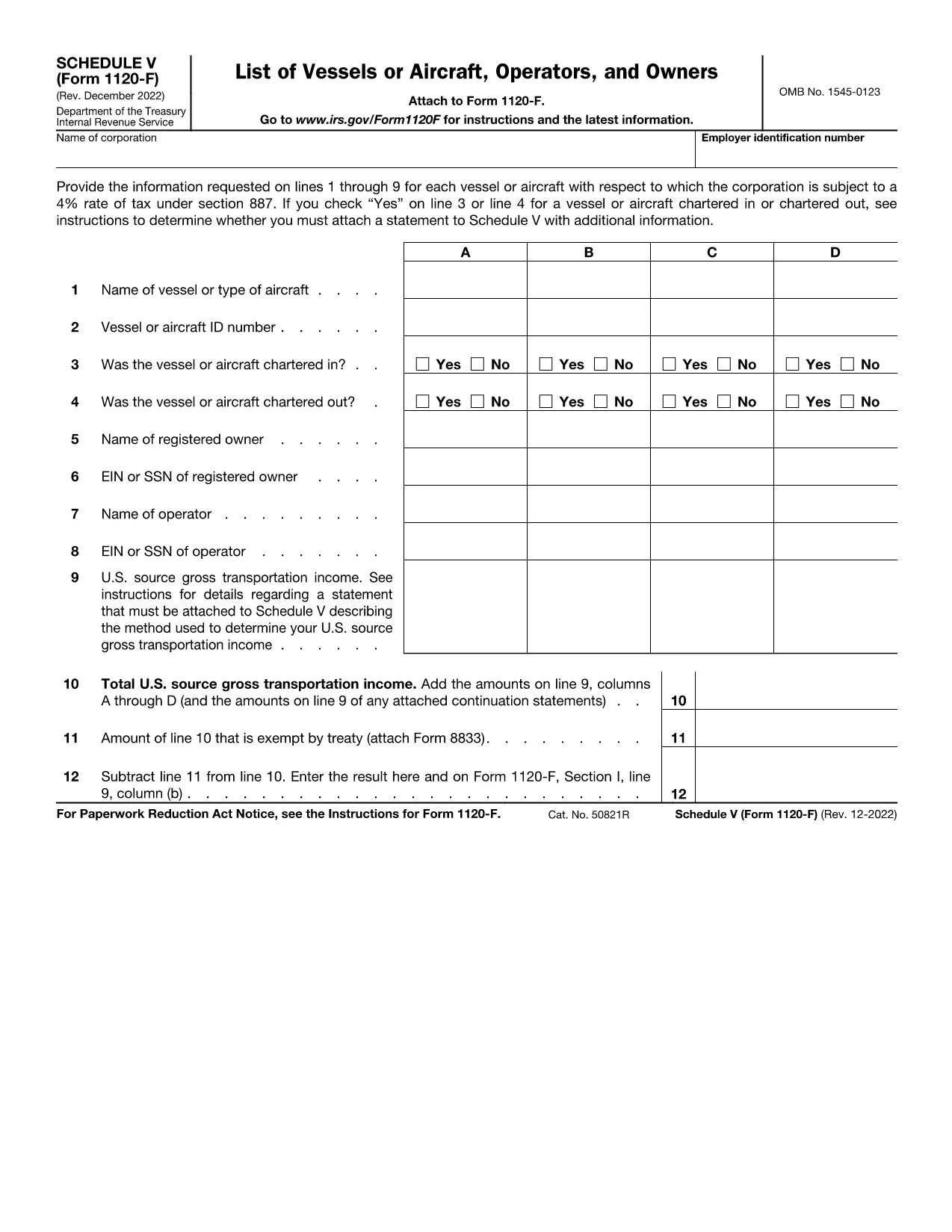
Schedule V (Form 1120-F) is the supplemental schedule used by foreign corporations to report vessel or aircraft activities that are subject to the 4% tax rate under IRC §887. If your corporation owns, charters, or operates any qualifying vessel or aircraft, you must fill out lines 1‑9 for each asset.

What Is Schedule V?

Schedule V captures detailed information about each vessel or aircraft, including identification numbers, charter status, and the amount of tax owed. The IRS requires this schedule to be attached to Form 1120-F when the 4% tax applies.

How to Complete Schedule V Online

With Formize’s fillable PDF, you can complete Schedule V directly in your browser—no download‑edit‑upload cycle needed. Simply click the "Fill out this form" button, wait for the Formize PDF Filler app to load, and start entering your data.

  • Enter the vessel or aircraft name and identification number.
  • Indicate whether the asset was chartered in, chartered out, or both.
  • Provide the tax‑calculating figures for each line as instructed.
  • Review the completed schedule and use the built‑in validation to catch common errors.

Common Mistakes to Avoid

Even experienced filers slip up. Keep an eye on these frequent errors:

  • Leaving line 3 or line 4 blank when a charter exists.
  • Entering the wrong vessel identification number (e.g., IMO vs. registration).
  • Mis‑calculating the 4% tax amount—use the Formize calculator for accuracy.
  • Forgetting to attach an additional statement when the schedule requires it.

Where to Submit Your Completed Form

After you’ve saved the filled Schedule V, attach it to your Form 1120-F filing. Submit the combined package to the IRS address listed in the Form 1120-F instructions or upload it through the IRS e‑file system if you’re filing electronically.

Need a printable copy? The fillable PDF also offers a Download button so you can keep a hard copy for your records.

دستورالعمل ها

سوالات متداول
  • What is the purpose of Schedule V on Form 1120-F?

    Schedule V reports vessel or aircraft activities that trigger the 4% foreign corporation tax under IRC §887. It must be attached to Form 1120‑F when applicable.

  • Can I fill out Schedule V directly in my browser?

    Yes. Using Formize’s fillable PDF, you can complete Schedule V online without downloading any software.

  • Do I need to attach a separate statement if I answer “Yes” on line 3 or 4?

    If you answer “Yes” to chartering in or out, the IRS instructions require an additional statement with more details. The Formize app provides a template you can fill and attach.

  • Is the fillable PDF version the same as the IRS paper form?

    The fillable PDF is an exact replica of the IRS Schedule V (Form 1120‑F) with interactive fields, ensuring compliance with the official format.

  • How do I submit the completed Schedule V with my Form 1120-F?

    Attach the saved PDF to your Form 1120‑F filing and submit it either by mail to the IRS address in the instructions or electronically through the IRS e‑file system.

  • What if I make a mistake after submitting?

    You can file an amended Form 1120‑F with a corrected Schedule V. Keep a copy of the original filing for reference.

چگونه

نحوه پر کردن Form 1120-F Schedule V به صورت رایگان و آنلاین در 4 با مراحل آسان:

  1. 1
    Open the Fillable Form
    Click the “Fill out this form” button on the page. The Formize PDF Filler app will load in your browser.
  2. 2
    Enter Vessel or Aircraft Details
    Fill in each line (1‑9) with the required information, such as identification numbers and charter status.
  3. 3
    Validate and Review
    Use the built‑in validation to check for missing fields or calculation errors. Correct any issues before saving.
  4. 4
    Save or Download
    When finished, click “Save” to store the completed Schedule V in your Formize account, or click “Download” to get a PDF copy for printing or offline filing.
برنامه PDF Filler را فرم‌بندی کنید
در باره

فرم های مالیاتی

Form 1120-F Schedule V یکی از فرم‌های مالیاتی است که برای گزارش اطلاعات مربوط به مالیات به سازمان مالیاتی مربوطه استفاده می‌شود. انواع مختلفی از فرم های مالیاتی از جمله فرم های مالیات فدرال، ایالتی و محلی وجود دارد که بسته به شرایط و موقعیت مالیات دهندگان می تواند متفاوت باشد.

امکانات

پرکننده PDF

ساده ترین راه برای پر کردن فرم های PDF به صورت آنلاین

  • به سرعت Form 1120-F Schedule V را پر کنید
    به دنبال راهی برای پر کردن سریع Form 1120-F Schedule V آنلاین هستید؟ با پرکننده فرم PDF رایگان آنلاین ما، می‌دانید چگونه این سند pdf را در کمتر از یک دقیقه ویرایش و پر کنید.
  • آسان برای استفاده از ویرایشگر PDF آنلاین
    آیا از چاپ فایل‌های پی‌دی‌اف خسته شده‌اید تا بتوانید آن‌ها را قبل از اسکن مجدد و ارسال مجدد، ویرایش کنید؟ اسناد PDF را به صورت آنلاین به صورت رایگان ویرایش کنید. از ویرایشگر pdf آنلاین ما برای صرفه جویی در زمان و کاغذ استفاده کنید.
  • ابزارهای عالی، همه پلتفرم ها
    آیا نمی دانید که چگونه Form 1120-F Schedule V را در مک پر کنید، یا شاید چگونه از پرکننده PDF به صورت رایگان استفاده کنید؟ ابزارهای PDF آنلاین ما روی همه پلتفرم ها کار می کنند.
  • ذخیره سازی امن فایل
    فایل‌های تکمیل‌شده «Form 1120-F Schedule V» در یک پایگاه داده ایمن که توسط میزبانی ابری آمازون مدیریت می‌شود، ذخیره می‌شوند. شما می توانید فایل های خود را در هر زمان از سیستم ما حذف کنید. در هر صورت این فایل ها پس از 24 ساعت به صورت خودکار پاک می شوند.
  • چت با Form 1120-F Schedule V
    با «Form 1120-F Schedule V» در Chatize که یک دستیار PDF خوان رایگان است، گپ بزنید. سوال بپرسید و از "Form 1120-F Schedule V" پاسخ بگیرید. فقط روی دکمه Chat With Document در بالا کلیک کنید.

حذف جلسه پر کردن

جلسه پر کردن انتخاب شده را حذف کنید؟ در این صورت پیشرفت شما در تکمیل فرم از بین خواهد رفت.

حذف جلسه ویرایش

جلسه ویرایش انتخابی حذف شود؟ در این صورت پیشرفت شما در ایجاد و ویرایش فرم از بین خواهد رفت.