
زبان را انتخاب کنید

Form 13615 – Volunteer Standards of Conduct Agreement (Fillable PDF)

  1. کشور ایالات متحده آمریکا
  2. زبان انگلیسی
  3. فعالیت مالیات
  4. بخش خدمات درآمد داخلی
این فرم را پر کنید
Form 13615 – Volunteer Standards of Conduct Agreement (Fillable PDF)

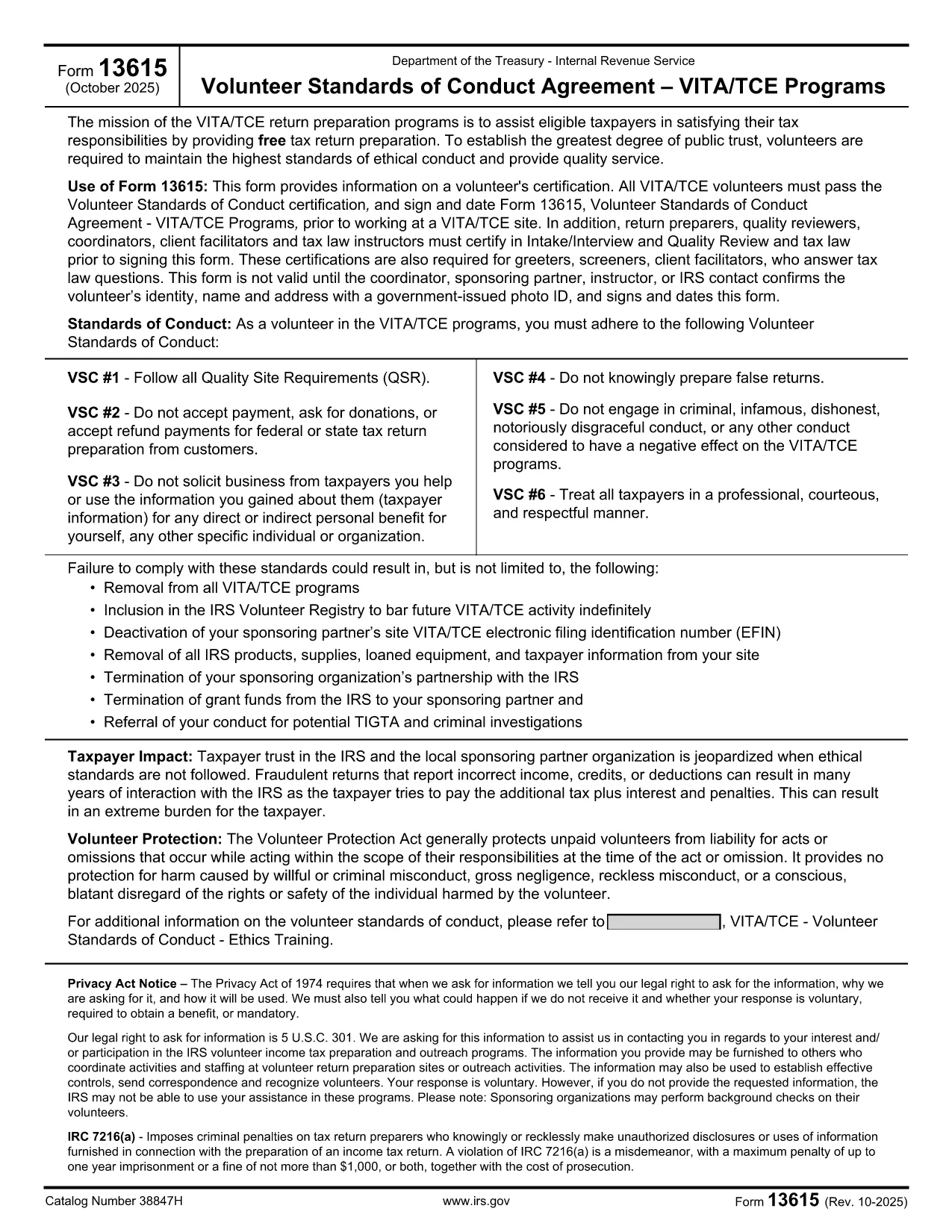
Form 13615 is the Volunteer Standards of Conduct Agreement required for anyone participating in the IRS Volunteer Income Tax Assistance (VITA) or Tax Counseling for the Elderly (TCE) programs. This agreement confirms that volunteers have completed the required training, understand the ethical standards, and agree to follow them while assisting taxpayers.

What Is Form 13615?

The form captures:

  • Volunteer identification (name, address, phone, email)
  • Signature confirming completion of training and testing
  • Agreement to abide by the IRS Volunteer Standards of Conduct

All VITA/TCE volunteers—paid or unpaid—must sign Form 13615 before working at a site. The form is also required for return preparers, quality reviewers, and site coordinators.

Why Use a Fillable PDF with Formize?

Formize’s online PDF filler turns the static IRS PDF into an interactive, browser‑based form. Benefits include:

  • Instant loading – no need to download, install, or print.
  • Auto‑save functionality so you never lose entered data.
  • Secure, encrypted transmission to protect personal information.
  • One‑click printing or electronic submission after completion.

Step‑by‑Step Guide to Completing Form 13615

Follow the steps below to finish the agreement quickly and correctly.

Common Mistakes to Avoid

Even experienced volunteers can slip up. Here are the most frequent errors and how to prevent them:

  • Leaving required fields blank: The form will not submit if any mandatory field is empty.
  • Using an outdated version: Always verify the revision date (current version is Rev. 10‑2025).
  • Incorrect signature format: Use a clear, legible digital signature; avoid stylized fonts.

Where to Find Help

If you need assistance, contact your local VITA/TCE coordinator or consult the IRS Volunteer Training Materials. The Formize platform also includes a built‑in help tooltip for each field.

سوالات متداول
  • Do I need to download Form 13615 before filling it out?

    No. With Formize you can fill out the form directly in your browser. Simply click the **Fill out this form** button and the fillable PDF loads automatically.

  • Is the online filler secure?

    Yes. Formize uses SSL encryption, and all data is stored locally in your browser until you choose to download or print the completed form.

  • Can I save my progress and finish later?

    Absolutely. The filler auto‑saves your entries. When you return, click **Load saved draft** to continue where you left off.

  • What version of Form 13615 should I use?

    Use the most recent revision (Rev. 10‑2025). The PDF linked on this page is always the latest official version from the IRS.

  • Who must sign Form 13615?

    All VITA/TCE volunteers, return preparers, quality reviewers, site coordinators, and tax law instructors must sign the agreement before beginning any volunteer work.

  • What happens if I make a mistake on the form?

    You can edit any field before finalizing. If you have already printed a copy, simply correct the error on a new form and submit the updated version.

  • Do I need a physical signature for IRS filing?

    A clear digital signature is acceptable for the volunteer agreement. If your organization requires a wet signature, print the completed PDF and sign it manually.

  • Where can I find training materials for VITA/TCE?

    Visit the IRS VITA/TCE website or contact your local volunteer coordinator for the latest training manuals and webinars.

چگونه

نحوه پر کردن Form 13615 به صورت رایگان و آنلاین در 5 با مراحل آسان:

  1. 1
    Open the Fillable Form
    Click the **Fill out this form** button on the page. The Formize PDF Filler app will load directly in your browser.
  2. 2
    Enter Your Information
    Complete each required field—name, address, phone, email, and training details. The filler highlights any missing information.
  3. 3
    Add Your Digital Signature
    Use the signature box to type or draw your signature. Make sure it is clear and matches the printed version.
  4. 4
    Review and Save
    Click **Review** to see a summary. Save a copy to your device or cloud storage for your records.
  5. 5
    Submit or Print
    When the form is complete, choose **Print** to produce a hard copy for your VITA/TCE site, or **Download** to send electronically.
برنامه PDF Filler را فرم‌بندی کنید
در باره

فرم های مالیات فدرال

Form 13615 یکی از فرم‌های مالیات فدرال است که اسنادی است که برای گزارش و ثبت مالیات بر درآمد فدرال در سرویس درآمد داخلی (IRS) در ایالات متحده استفاده می‌شود. این فرم‌ها توسط افراد، مشاغل و سازمان‌ها برای گزارش درآمد، کسورات و سایر اطلاعات مرتبط لازم برای محاسبه بدهی مالیاتی فدرال خود استفاده می‌شود.

رایج ترین فرم مالیات فدرال فرم 1040 است که توسط مالیات دهندگان فردی برای گزارش مالیات بر درآمد شخصی خود استفاده می شود. سایر فرم‌های پرکاربرد عبارتند از فرم 1065 برای مشارکت، فرم 1120 برای شرکت‌ها و فرم 990 برای سازمان‌های معاف از مالیات.

فرم‌های مالیاتی فدرال معمولاً مالیات دهندگان را ملزم می‌کند که منابع درآمدی مختلفی مانند دستمزد، حقوق، و انعام و همچنین درآمد حاصل از سرمایه‌گذاری، املاک اجاره‌ای و سایر منابع را گزارش کنند. این فرم ها همچنین به مالیات دهندگان این امکان را می دهد که برای هزینه های مختلف، مانند کمک های خیریه، بهره وام مسکن و هزینه های مراقبت های بهداشتی، کسر و اعتبار درخواست کنند.

مهم است که فرم های مالیات فدرال را به طور دقیق و به موقع ارسال کنید، زیرا عدم انجام این کار می تواند منجر به جریمه ها و هزینه های بهره از IRS شود.

امکانات

پرکننده PDF

ساده ترین راه برای پر کردن فرم های PDF به صورت آنلاین

  • به سرعت Form 13615 را پر کنید
    به دنبال راهی برای پر کردن سریع Form 13615 آنلاین هستید؟ با پرکننده فرم PDF رایگان آنلاین ما، می‌دانید چگونه این سند pdf را در کمتر از یک دقیقه ویرایش و پر کنید.
  • آسان برای استفاده از ویرایشگر PDF آنلاین
    آیا از چاپ فایل‌های پی‌دی‌اف خسته شده‌اید تا بتوانید آن‌ها را قبل از اسکن مجدد و ارسال مجدد، ویرایش کنید؟ اسناد PDF را به صورت آنلاین به صورت رایگان ویرایش کنید. از ویرایشگر pdf آنلاین ما برای صرفه جویی در زمان و کاغذ استفاده کنید.
  • ابزارهای عالی، همه پلتفرم ها
    آیا نمی دانید که چگونه Form 13615 را در مک پر کنید، یا شاید چگونه از پرکننده PDF به صورت رایگان استفاده کنید؟ ابزارهای PDF آنلاین ما روی همه پلتفرم ها کار می کنند.
  • ذخیره سازی امن فایل
    فایل‌های تکمیل‌شده «Form 13615» در یک پایگاه داده ایمن که توسط میزبانی ابری آمازون مدیریت می‌شود، ذخیره می‌شوند. شما می توانید فایل های خود را در هر زمان از سیستم ما حذف کنید. در هر صورت این فایل ها پس از 24 ساعت به صورت خودکار پاک می شوند.
  • چت با Form 13615
    با «Form 13615» در Chatize که یک دستیار PDF خوان رایگان است، گپ بزنید. سوال بپرسید و از "Form 13615" پاسخ بگیرید. فقط روی دکمه Chat With Document در بالا کلیک کنید.

حذف جلسه پر کردن

جلسه پر کردن انتخاب شده را حذف کنید؟ در این صورت پیشرفت شما در تکمیل فرم از بین خواهد رفت.

حذف جلسه ویرایش

جلسه ویرایش انتخابی حذف شود؟ در این صورت پیشرفت شما در ایجاد و ویرایش فرم از بین خواهد رفت.