
زبان را انتخاب کنید

IRS Form 433‑B – Fillable PDF Collection Statement for Businesses

  1. کشور ایالات متحده آمریکا
  2. زبان انگلیسی
  3. فعالیت مالیات
  4. بخش خدمات درآمد داخلی
این فرم را پر کنید
IRS Form 433‑B – Fillable PDF Collection Statement for Businesses

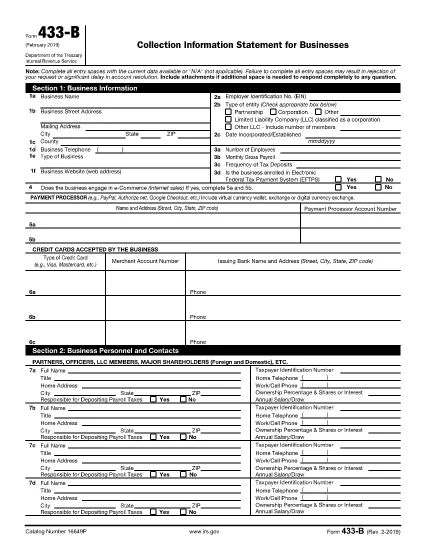
Form 433‑B, Collection Information Statement for Businesses, is the IRS’s standard form for gathering detailed financial data from corporations, partnerships, LLCs, and other business entities that owe tax. Completing this form accurately is essential when you are pursuing an Offer in Compromise, requesting a payment plan, or negotiating any other tax‑relief option.

What Is Form 433‑B and Who Needs It?

The form captures business information, assets, income, expenses, and the minimum offer amount the IRS will accept. It is required for:

  • Corporations (C‑corp, S‑corp)
  • Partnerships
  • LLCs taxed as corporations or partnerships
  • Any other entity with unpaid federal tax liabilities

Step‑by‑Step Guide to Fill Out Form 433‑B

Follow these simple steps using Formize’s built‑in PDF filler:

  1. Open the Fillable Form – Click the “Fill out this form” button on this page. The Formize PDF Filler loads automatically.
  2. Enter Business Information – Provide the legal name, EIN, address, phone, and a brief description of your business.
  3. Provide Officer/Owner Details – List each partner, officer, or member with name, title, ownership percentage, and salary.
  4. Report Assets – Include cash, bank accounts, real‑estate, equipment, vehicles, and any other valuable assets.
  5. Report Income & Expenses – Fill in monthly gross receipts, cost of goods sold, payroll, rent, utilities, and other operating costs.
  6. Calculate Minimum Offer – The form automatically totals the data; use the built‑in calculator to see the IRS‑required minimum offer amount.
  7. Review & Sign – Double‑check every field, then add the authorized signature and date.

Common Mistakes to Avoid

  • Leaving required fields blank – the IRS will reject the form.
  • Using outdated asset valuations – provide current market values.
  • Misclassifying the business entity – select the correct box for corporation, partnership, or LLC.
  • Forgetting to attach supporting documents – statements, depreciation schedules, and loan agreements are often required.

How to Submit the Completed Form

Once you finish, you have three options:

  • Download PDF and mail it to the IRS address indicated in the instructions.
  • Print & fax a hard copy to the appropriate IRS office.
  • Save securely and upload it through your IRS online account if you are working with a tax professional.

Using Formize ensures the PDF stays fillable and printable without losing formatting.

سوالات متداول
  • What types of businesses must use Form 433‑B?

    Corporations, partnerships, and LLCs (taxed as corporations or partnerships) with unpaid federal tax liabilities are required to complete Form 433‑B.

  • Can I use Form 433‑B for a sole proprietorship?

    No. Sole proprietors should use Form 433‑A, the collection statement for wage earners and self‑employed individuals.

  • Is the PDF on Formize really fillable?

    Yes. The PDF retains all fillable fields, and the Formize online filler lets you type, save, and print without altering the original layout.

  • Do I need to attach supporting documents?

    Attach recent bank statements, asset appraisals, loan balances, and depreciation schedules as referenced in the form’s instructions.

  • How long does the IRS take to process a completed Form 433‑B?

    Processing time varies, but expect 30‑60 days for the IRS to review the information and respond to your request.

  • Can I submit the form electronically?

    The IRS does not accept an electronic upload for Form 433‑B directly. You must mail or fax the printed form, or provide it to your tax professional for electronic submission through the IRS portal.

  • What happens if I make a mistake on the form?

    Correct any errors before signing. If you discover a mistake after submission, send a revised form with “Amended” noted at the top of the first page.

چگونه

نحوه پر کردن IRS Form 433-B به صورت رایگان و آنلاین در 5 با مراحل آسان:

  1. 1
    Open the Fillable Form
    Click the “Fill out this form” button on this page. The Formize PDF Filler loads in your browser, no download required.
  2. 2
    Enter Business Information
    Type the legal name, EIN, address, phone number, and a short description of your business into the highlighted fields.
  3. 3
    Add Asset and Income Details
    Provide current values for cash, bank accounts, real‑estate, equipment, and vehicles. Then enter monthly income and expense figures.
  4. 4
    Review Calculations
    Use the built‑in calculator to verify the minimum offer amount and ensure all totals are correct.
  5. 5
    Submit or Print
    When you’re satisfied, click “Save PDF” to download a completed copy, or print directly from the filler to mail to the IRS.
برنامه PDF Filler را فرم‌بندی کنید
در باره

فرم های مالیاتی

IRS Form 433-B یکی از فرم‌های مالیاتی است که اسنادی است که برای گزارش اطلاعات مربوط به درآمد، کسورات و بدهی مالیاتی یک فرد یا کسب‌وکار به اداره مالیاتی مربوطه استفاده می‌شود. این فرم ها برای رعایت قوانین مالیاتی و انجام تعهدات مالیاتی ضروری هستند. فرم های مالیاتی بسته به کشور و شرایط خاص مالیاتی موجود متفاوت است. در اینجا چند نوع رایج از فرم های مالیاتی آورده شده است:

فرم‌های مالیاتی فردی: مالیات‌دهندگان فردی از این فرم‌ها برای گزارش درآمد شخصی خود و مطالبه کسورات، اعتبارات و معافیت‌ها استفاده می‌کنند. نمونه‌ها عبارتند از فرم 1040 در ایالات متحده یا فرم اظهارنامه مالیاتی خود ارزیابی در بریتانیا.

فرم‌های مالیات کسب و کار: فرم‌های مالیات کسب‌وکار توسط شرکت‌ها، شراکت‌ها یا افراد خوداشتغال برای گزارش درآمد، هزینه‌ها و سایر اطلاعات مربوط به مالیات کسب‌وکار استفاده می‌شود. به عنوان مثال می توان به فرم جدول C (سود یا زیان کسب و کار) در ایالات متحده یا فرم CT600 (بازگشت مالیات شرکت) در بریتانیا اشاره کرد.

فرم‌های مالیات حقوق و دستمزد: این فرم‌ها توسط کارفرمایان برای گزارش دستمزد، حقوق و مالیات‌های کسر شده از چک حقوق کارمندانشان استفاده می‌شود. به عنوان مثال می توان به فرم W-2 در ایالات متحده یا فرم P60 در انگلستان اشاره کرد.

فرم‌های مالیات فروش: فرم‌های مالیات بر فروش توسط کسب‌وکارها برای گزارش و پرداخت مالیات بر فروش جمع‌آوری‌شده بر روی کالاها یا خدمات مشمول مالیات استفاده می‌شود. فرم‌های مالیات فروش خاص بسته به حوزه قضایی متفاوت است.

فرم‌های مالیات بر ارزش افزوده (VAT): فرم‌های مالیات بر ارزش افزوده در کشورهایی استفاده می‌شود که مالیات بر ارزش افزوده را برای گزارش و پرداخت مالیات بر ارزش افزوده جمع‌آوری‌شده از فروش و مطالبه اعتبار مالیات بر ارزش افزوده برای خریدها اعمال می‌کنند. به عنوان مثال می توان به فرم های اظهارنامه مالیات بر ارزش افزوده که در بسیاری از کشورها استفاده می شود اشاره کرد.

فرم‌های مالیاتی تخمینی: فرم‌های مالیات تخمینی برای گزارش و پرداخت مالیات‌های تخمینی بر درآمدی که مشمول کسر کسر نمی‌شود، مانند درآمد خوداشتغالی یا درآمد سرمایه‌گذاری، استفاده می‌شود.

اینها تنها چند نمونه از اشکال مالیاتی متعددی است که ممکن است وجود داشته باشد. فرم های خاص مورد نیاز به قوانین و مقررات مالیاتی در کشور یا حوزه قضایی شما بستگی دارد. مهم است که با دستورالعمل های سازمان مالیاتی مشورت کنید یا به دنبال مشاوره حرفه ای باشید تا مشخص کنید کدام فرم ها برای وضعیت شما قابل اجرا هستند.

امکانات

پرکننده PDF

ساده ترین راه برای پر کردن فرم های PDF به صورت آنلاین

  • به سرعت IRS Form 433-B را پر کنید
    به دنبال راهی برای پر کردن سریع IRS Form 433-B آنلاین هستید؟ با پرکننده فرم PDF رایگان آنلاین ما، می‌دانید چگونه این سند pdf را در کمتر از یک دقیقه ویرایش و پر کنید.
  • آسان برای استفاده از ویرایشگر PDF آنلاین
    آیا از چاپ فایل‌های پی‌دی‌اف خسته شده‌اید تا بتوانید آن‌ها را قبل از اسکن مجدد و ارسال مجدد، ویرایش کنید؟ اسناد PDF را به صورت آنلاین به صورت رایگان ویرایش کنید. از ویرایشگر pdf آنلاین ما برای صرفه جویی در زمان و کاغذ استفاده کنید.
  • ابزارهای عالی، همه پلتفرم ها
    آیا نمی دانید که چگونه IRS Form 433-B را در مک پر کنید، یا شاید چگونه از پرکننده PDF به صورت رایگان استفاده کنید؟ ابزارهای PDF آنلاین ما روی همه پلتفرم ها کار می کنند.
  • ذخیره سازی امن فایل
    فایل‌های تکمیل‌شده «IRS Form 433-B» در یک پایگاه داده ایمن که توسط میزبانی ابری آمازون مدیریت می‌شود، ذخیره می‌شوند. شما می توانید فایل های خود را در هر زمان از سیستم ما حذف کنید. در هر صورت این فایل ها پس از 24 ساعت به صورت خودکار پاک می شوند.
  • چت با IRS Form 433-B
    با «IRS Form 433-B» در Chatize که یک دستیار PDF خوان رایگان است، گپ بزنید. سوال بپرسید و از "IRS Form 433-B" پاسخ بگیرید. فقط روی دکمه Chat With Document در بالا کلیک کنید.

حذف جلسه پر کردن

جلسه پر کردن انتخاب شده را حذف کنید؟ در این صورت پیشرفت شما در تکمیل فرم از بین خواهد رفت.

حذف جلسه ویرایش

جلسه ویرایش انتخابی حذف شود؟ در این صورت پیشرفت شما در ایجاد و ویرایش فرم از بین خواهد رفت.