
زبان را انتخاب کنید

Form 4506‑T‑EZ (SP) – Fillable PDF for Tax Transcript Requests

  1. کشور ایالات متحده آمریکا
  2. زبان اسپانیایی
  3. فعالیت مالیات
  4. بخش خدمات درآمد داخلی
این فرم را پر کنید
Form 4506‑T‑EZ (SP) – Fillable PDF for Tax Transcript Requests

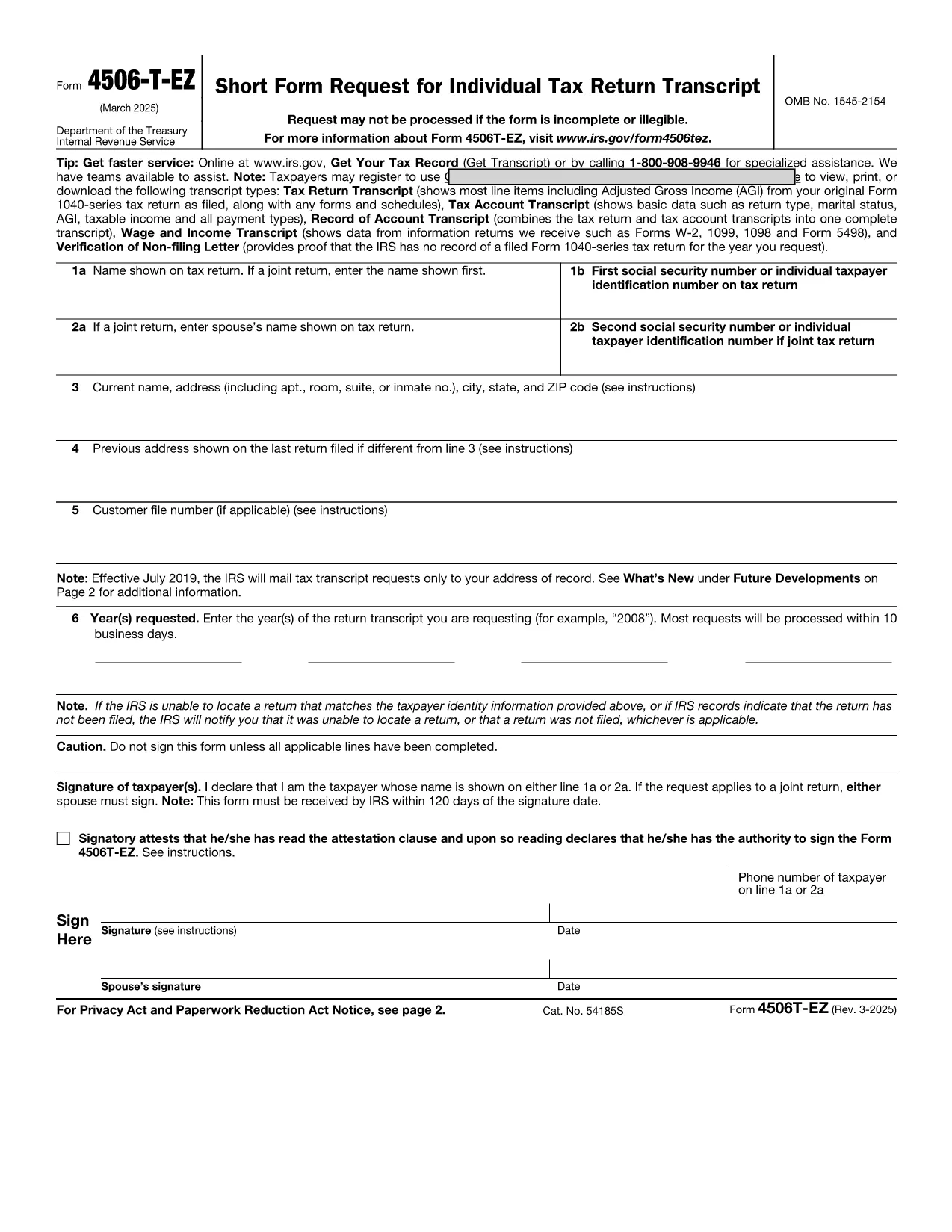
The IRS Form 4506‑T‑EZ (SP) is the Spanish‑language version of the short request for tax return transcripts. It allows individuals and businesses to obtain a copy of their tax return information, W‑2, 1099 data, or a verification of non‑filing directly from the Internal Revenue Service.

What Is Form 4506‑T‑EZ (SP)?

This one‑page form is designed for quick requests. You can use it to ask for:

  • Tax return transcripts
  • Account information
  • W‑2 and 1099 details
  • Verification of non‑filing

Key Sections of the Spanish Form

The form is divided into clear sections:

  1. Información del Contribuyente – Name, SSN, and address.
  2. Tipo de Solicitud – Choose the transcript type you need.
  3. Periodo Fiscal – Specify the tax year or period.
  4. Firma y Fecha – Your signature and date.

How to Complete the Form Using Formize

Instead of printing and scanning, simply click the “Fill out this form” button below. The Formize PDF Filler loads in your browser, letting you type directly into each field.

Common Mistakes to Avoid

  • Leaving the SSN blank or entering it with dashes.
  • Selecting the wrong transcript type.
  • Providing an incorrect tax‑year format (use MM/DD/YYYY).
  • Forgetting to sign the form – an unsigned form is rejected.

Where to Submit Your Completed Form

After you finish, you can:

  • Mail the printed copy to the address listed on the form.
  • Fax it to the IRS fax number for transcript requests.
  • Upload the signed PDF through the IRS “Get Transcript” portal (if available).

Need help? The IRS website provides additional guidance, but most users find the Formize fillable version fast and error‑free.

سوالات متداول
  • Do I need to attach any supporting documents?

    No. Form 4506‑T‑EZ (SP) is a request only. Attachments are required only for the full Form 4506‑T when you need copies of the actual return.

  • Can I request multiple years on one form?

    The short form allows one tax year per submission. For multiple years, submit a separate form for each year.

  • Is the Formize filler secure?

    Yes. Formize uses SSL encryption, and the PDF never leaves your browser unless you choose to download or upload it.

  • How long does the IRS take to process the request?

    Standard processing is 5‑10 business days for transcript requests, but it can be longer during peak filing season.

  • What if I need a transcript for a business entity?

    Use Form 4506‑T (not the EZ version) and select the appropriate entity type on the form.

  • Do I have to file the form in Spanish?

    If you are submitting the Spanish version (SP), the IRS accepts it in Spanish. You may also file the English version if preferred.

  • Can I submit the form electronically?

    The IRS does not currently accept a fully electronic submission for 4506‑T‑EZ. You must mail, fax, or upload a signed PDF.

  • What is the difference between Form 4506‑T‑EZ and Form 4506‑T?

    The EZ version is shorter and only requests transcripts. The regular 4506‑T can request copies of the actual tax return and attachments.

  • Is there a fee to request a transcript?

    No. Transcript requests are free of charge.

  • Where can I find the official PDF?

    The official IRS PDF is linked below and is used by the Formize filler.

چگونه

نحوه پر کردن 4506-T-EZ SP به صورت رایگان و آنلاین در 4 با مراحل آسان:

  1. 1
    Open the Fillable Form
    Click the “Fill out this form” button on the page. The Formize PDF Filler app will launch in your browser.
  2. 2
    Enter Your Information
    Type directly into each field – name, SSN, address, transcript type, and tax year. The form saves your entries in real time.
  3. 3
    Review and Sign
    Check all entries for accuracy, then use the digital signature field to sign. If you prefer a handwritten signature, download, print, sign, and re‑upload.
  4. 4
    Submit or Download
    When you’re done, click “Save & Download” to get a PDF copy you can mail, fax, or upload to the IRS portal.
برنامه PDF Filler را فرم‌بندی کنید
در باره

فرم های مالیاتی

4506-T-EZ SP یکی از فرم‌های مالیاتی است که برای گزارش اطلاعات مربوط به مالیات به سازمان مالیاتی مربوطه استفاده می‌شود. انواع مختلفی از فرم های مالیاتی از جمله فرم های مالیات فدرال، ایالتی و محلی وجود دارد که بسته به شرایط و موقعیت مالیات دهندگان می تواند متفاوت باشد.

امکانات

پرکننده PDF

ساده ترین راه برای پر کردن فرم های PDF به صورت آنلاین

  • به سرعت 4506-T-EZ SP را پر کنید
    به دنبال راهی برای پر کردن سریع 4506-T-EZ SP آنلاین هستید؟ با پرکننده فرم PDF رایگان آنلاین ما، می‌دانید چگونه این سند pdf را در کمتر از یک دقیقه ویرایش و پر کنید.
  • آسان برای استفاده از ویرایشگر PDF آنلاین
    آیا از چاپ فایل‌های پی‌دی‌اف خسته شده‌اید تا بتوانید آن‌ها را قبل از اسکن مجدد و ارسال مجدد، ویرایش کنید؟ اسناد PDF را به صورت آنلاین به صورت رایگان ویرایش کنید. از ویرایشگر pdf آنلاین ما برای صرفه جویی در زمان و کاغذ استفاده کنید.
  • ابزارهای عالی، همه پلتفرم ها
    آیا نمی دانید که چگونه 4506-T-EZ SP را در مک پر کنید، یا شاید چگونه از پرکننده PDF به صورت رایگان استفاده کنید؟ ابزارهای PDF آنلاین ما روی همه پلتفرم ها کار می کنند.
  • ذخیره سازی امن فایل
    فایل‌های تکمیل‌شده «4506-T-EZ SP» در یک پایگاه داده ایمن که توسط میزبانی ابری آمازون مدیریت می‌شود، ذخیره می‌شوند. شما می توانید فایل های خود را در هر زمان از سیستم ما حذف کنید. در هر صورت این فایل ها پس از 24 ساعت به صورت خودکار پاک می شوند.
  • چت با 4506-T-EZ SP
    با «4506-T-EZ SP» در Chatize که یک دستیار PDF خوان رایگان است، گپ بزنید. سوال بپرسید و از "4506-T-EZ SP" پاسخ بگیرید. فقط روی دکمه Chat With Document در بالا کلیک کنید.

حذف جلسه پر کردن

جلسه پر کردن انتخاب شده را حذف کنید؟ در این صورت پیشرفت شما در تکمیل فرم از بین خواهد رفت.

حذف جلسه ویرایش

جلسه ویرایش انتخابی حذف شود؟ در این صورت پیشرفت شما در ایجاد و ویرایش فرم از بین خواهد رفت.