
زبان را انتخاب کنید

Form 5500‑EZ – Fillable PDF for Single‑Participant Retirement Plans

  1. کشور ایالات متحده آمریکا
  2. زبان انگلیسی
  3. فعالیت مالیات
  4. بخش خدمات درآمد داخلی
این فرم را پر کنید
Form 5500‑EZ – Fillable PDF for Single‑Participant Retirement Plans

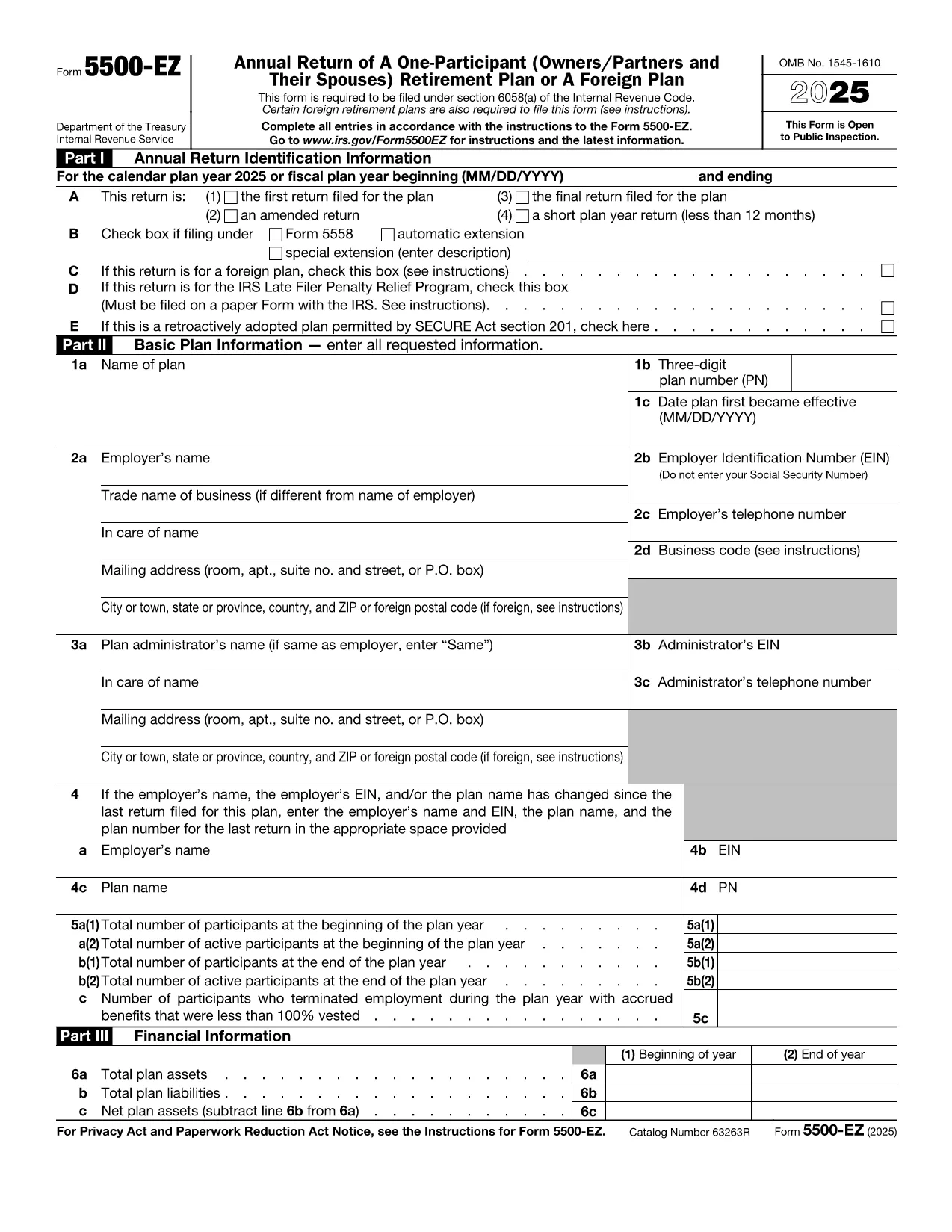
Form 5500‑EZ is the streamlined annual reporting form used by the Internal Revenue Service (IRS) for small retirement plans that have only one participant or are foreign plans. It replaces the longer Form 5500 series and includes basic plan information, number of participants, contributions, benefits, and other required details.

What Is Form 5500‑EZ?

This form is required for:

  • One‑participant pension plans (e.g., solo 401(k) or SIMPLE IRA)
  • Foreign retirement plans that meet the IRS definition of a small plan
  • Plans that do not need to file Schedule MB or Schedule SB

Filing Form 5500‑EZ on time helps you avoid penalties and keeps your retirement plan in good standing.

How to Fill Out the Form Online with Formize

Instead of downloading the PDF and editing it manually, you can complete the form directly on our site:

  1. Click the "Fill out this form" button below.
  2. The Formize PDF Filler app loads the official fillable PDF.
  3. Enter the required information in each field – the form validates data as you type.
  4. When you’re done, add your electronic signature, then save or download the completed PDF.

All changes are saved automatically, so you never lose your work.

Common Mistakes & Tips for a Smooth Filing

  • Incorrect plan year: Verify the plan year on the first page; a mismatch triggers an IRS notice.
  • Missing participant count: Even a single‑participant plan must list the exact number of participants.
  • Wrong contribution totals: Double‑check employer and employee contributions – they must equal the amounts reported on Schedule A.
  • Signature errors: Use the built‑in electronic signature tool; hand‑written signatures on a printed PDF are not accepted for e‑filings.

Download the Official IRS PDF

If you prefer the original IRS version, you can download it directly from the link below. The file is the same one used by Formize, ensuring full compatibility with the online filler.

Download Form 5500‑EZ (PDF)

دستورالعمل ها

  • دستورالعمل های 5500-EZ - دستورالعمل های فرم 5500-EZ، بازگشت سالانه A-Participant (Owners/Partners و همسران آنها) برنامه بازنشستگی یا برنامه خارجی
سوالات متداول
  • Who must file Form 5500‑EZ?

    Any one‑participant retirement plan or foreign plan that meets the IRS definition of a small plan must file Form 5500‑EZ annually.

  • Can I file Form 5500‑EZ electronically?

    Yes. Use the IRS e‑file system or a compliant online filler like Formize, then submit the completed PDF through the FIRE system.

  • What is the filing deadline?

    The form is due by the last day of the seventh month after the plan year ends (typically July 31 for calendar‑year plans).

  • Do I need Schedule MB or Schedule SB?

    No. Form 5500‑EZ does not require Schedule MB (Money‑Based) or Schedule SB (Service‑Based).

  • What if I make a mistake after filing?

    You can file an amended Form 5500‑EZ using the same fillable PDF. Mark the form as "Amended" and include an explanation of the changes.

  • Is there a fee to use Formize's filler?

    Formize offers a free basic fillable version for Form 5500‑EZ. Advanced features may require a subscription, but the core filing process is free.

  • Can I print the completed form for a paper filing?

    Yes. After completing the form online, download the PDF and print it. Sign the printed copy if you are filing by paper.

چگونه

نحوه پر کردن Form 5500 EZ به صورت رایگان و آنلاین در 4 با مراحل آسان:

  1. 1
    Open the Fillable Form
    Click the "Fill out this form" button on the page. The Formize PDF Filler will load the official Form 5500‑EZ.
  2. 2
    Enter Your Information
    Complete each field. The filler validates entries in real time, helping you avoid common errors.
  3. 3
    Add Your Electronic Signature
    Use the built‑in signature tool to sign the form securely.
  4. 4
    Save or Download
    When all sections are complete, click "Save" to store the file in your account or "Download" to get the finished PDF.
برنامه PDF Filler را فرم‌بندی کنید
در باره

فرم های مالیاتی

Form 5500 EZ یکی از فرم‌های مالیاتی است که برای گزارش اطلاعات مربوط به مالیات به سازمان مالیاتی مربوطه استفاده می‌شود. انواع مختلفی از فرم های مالیاتی از جمله فرم های مالیات فدرال، ایالتی و محلی وجود دارد که بسته به شرایط و موقعیت مالیات دهندگان می تواند متفاوت باشد.

امکانات

پرکننده PDF

ساده ترین راه برای پر کردن فرم های PDF به صورت آنلاین

  • به سرعت Form 5500 EZ را پر کنید
    به دنبال راهی برای پر کردن سریع Form 5500 EZ آنلاین هستید؟ با پرکننده فرم PDF رایگان آنلاین ما، می‌دانید چگونه این سند pdf را در کمتر از یک دقیقه ویرایش و پر کنید.
  • آسان برای استفاده از ویرایشگر PDF آنلاین
    آیا از چاپ فایل‌های پی‌دی‌اف خسته شده‌اید تا بتوانید آن‌ها را قبل از اسکن مجدد و ارسال مجدد، ویرایش کنید؟ اسناد PDF را به صورت آنلاین به صورت رایگان ویرایش کنید. از ویرایشگر pdf آنلاین ما برای صرفه جویی در زمان و کاغذ استفاده کنید.
  • ابزارهای عالی، همه پلتفرم ها
    آیا نمی دانید که چگونه Form 5500 EZ را در مک پر کنید، یا شاید چگونه از پرکننده PDF به صورت رایگان استفاده کنید؟ ابزارهای PDF آنلاین ما روی همه پلتفرم ها کار می کنند.
  • ذخیره سازی امن فایل
    فایل‌های تکمیل‌شده «Form 5500 EZ» در یک پایگاه داده ایمن که توسط میزبانی ابری آمازون مدیریت می‌شود، ذخیره می‌شوند. شما می توانید فایل های خود را در هر زمان از سیستم ما حذف کنید. در هر صورت این فایل ها پس از 24 ساعت به صورت خودکار پاک می شوند.
  • چت با Form 5500 EZ
    با «Form 5500 EZ» در Chatize که یک دستیار PDF خوان رایگان است، گپ بزنید. سوال بپرسید و از "Form 5500 EZ" پاسخ بگیرید. فقط روی دکمه Chat With Document در بالا کلیک کنید.

حذف جلسه پر کردن

جلسه پر کردن انتخاب شده را حذف کنید؟ در این صورت پیشرفت شما در تکمیل فرم از بین خواهد رفت.

حذف جلسه ویرایش

جلسه ویرایش انتخابی حذف شود؟ در این صورت پیشرفت شما در ایجاد و ویرایش فرم از بین خواهد رفت.