
زبان را انتخاب کنید

IRS Form 8834 – Fillable PDF for Qualified Electric Vehicle Credit

  1. کشور ایالات متحده آمریکا
  2. زبان انگلیسی
  3. فعالیت مالیات
  4. بخش خدمات درآمد داخلی
این فرم را پر کنید
IRS Form 8834 – Fillable PDF for Qualified Electric Vehicle Credit

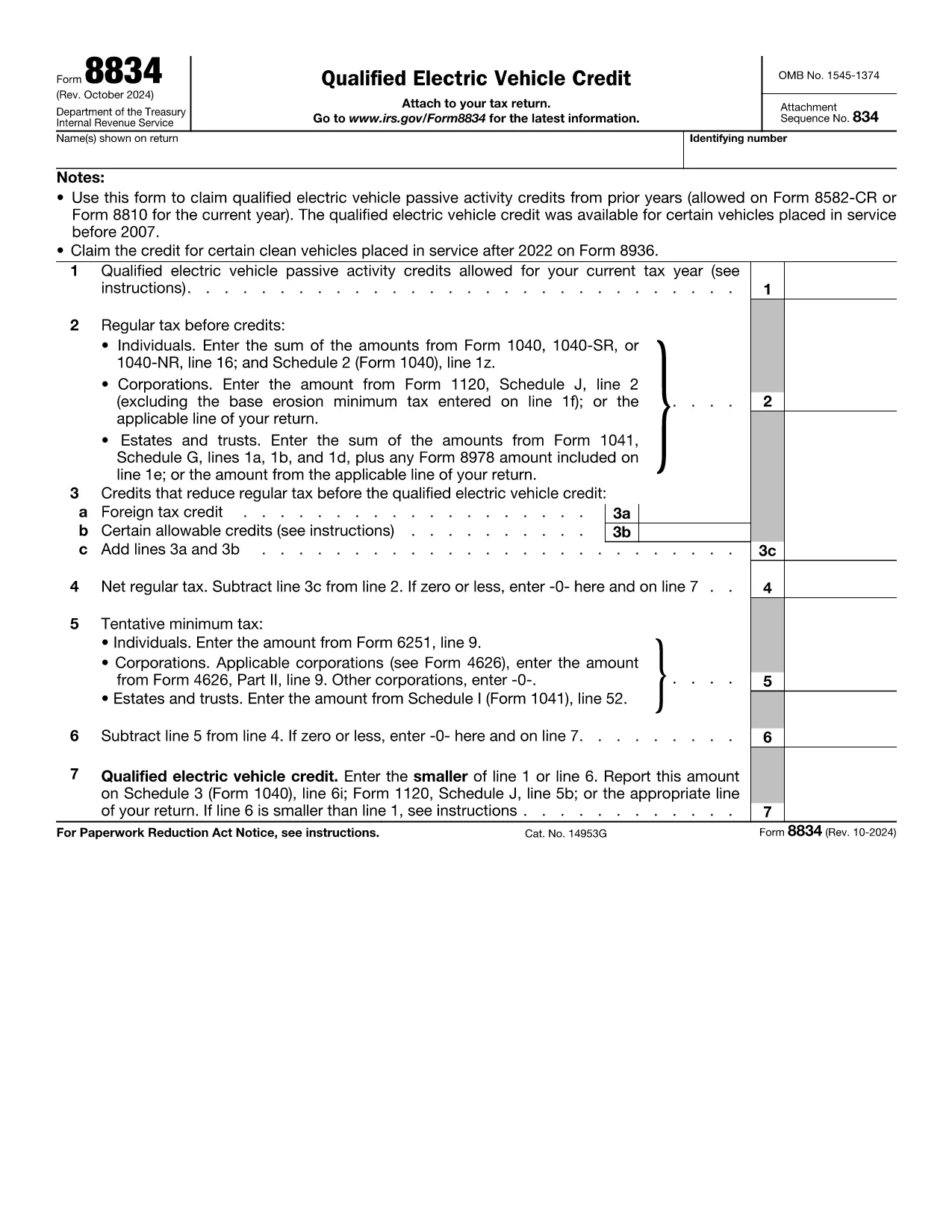
Form 8834, officially titled Qualified Electric Vehicle Credit, is used by taxpayers to claim passive activity credits from qualified electric vehicles placed in service before 2007. Although newer EV credits are reported on Form 8936, many taxpayers still have carry‑forward credits that belong on Form 8834.

What Is Form 8834?

This one‑page IRS form calculates the amount of qualified electric vehicle passive activity credit you can apply to your current tax year. It interacts with other forms such as Form 8582‑CR (individuals) or Form 8810 (corporations) to determine the credit limit.

How to Complete Form 8834 Online

Instead of downloading the PDF and editing it manually, simply click the "Fill out this form" button on this page. The Formize PDF Filler app will load instantly, allowing you to enter data directly in your browser.

  • Enter taxpayer information (name, SSN/EIN) exactly as it appears on your tax return.
  • Provide the credit amount allowed from prior years (Line 1).
  • Input your regular tax before credits (Line 2) and any other credits that reduce your tax (Line 3).
  • Follow the automatic calculations for net regular tax, tentative minimum tax, and the final credit amount.

Common Mistakes to Avoid

  • Using the wrong form: Form 8834 is only for pre‑2007 EV credits. New EV purchases require Form 8936.
  • Incorrect credit limit: Always reference the latest Form 8582‑CR or Form 8810 for the allowable amount.
  • Mismatching tax year: Credits must be claimed in the year you are allowed to use them, not the year the vehicle was purchased.
  • Leaving lines blank: Even a zero value must be entered to avoid IRS processing delays.

Where to Submit the Completed Form

After you finish in Formize, download the completed PDF. Attach it to your federal tax return:

  • Individuals – attach to Schedule 3 (Form 1040), line 6i.
  • Corporations – attach to Form 1120, Schedule J.
  • Estates & Trusts – attach to Form 1041, Schedule G.

Download the Fillable PDF

If you prefer to work offline, you can download the official IRS fillable PDF below. The same file is used by the Formize online filler.

سوالات متداول
  • Who should use Form 8834?

    Taxpayers who have qualified electric vehicle passive activity credits from vehicles placed in service before 2007 and need to claim any unused credit in the current tax year.

  • Can I use Form 8834 for a 2023 EV purchase?

    No. Vehicles placed in service after 2022 are claimed on Form 8936. Form 8834 only covers pre‑2007 credits.

  • Do I need to attach supporting schedules?

    Yes. Include the relevant credit limitation schedules (Form 8582‑CR for individuals or Form 8810 for corporations) that show the allowable credit amount.

  • What if my regular tax is lower than the credit amount?

    The credit you can claim is the lesser of the allowable credit (Line 1) or your net regular tax after other credits (Line 6). Any excess can be carried forward.

  • Is the Formize filler secure?

    Formize uses SSL encryption and processes data locally in your browser, ensuring your personal information remains private.

  • Can I e‑file Form 8834?

    Most commercial tax software accepts the completed PDF as an attachment. Check your software’s instructions for attaching supplemental forms.

  • What common errors cause IRS rejections?

    Missing SSN/EIN, entering a zero on Line 1 when a credit exists, or failing to include the required supporting schedules.

چگونه

نحوه پر کردن Form 8834 به صورت رایگان و آنلاین در 6 با مراحل آسان:

  1. 1
    Click the Fill‑out Button
    Press the “Fill out this form” button on the page to launch the Formize PDF Filler.
  2. 2
    Wait for the Filler to Load
    The web‑based filler loads in seconds; no download or installation is required.
  3. 3
    Enter Your Information
    Fill in taxpayer name, SSN/EIN, credit amounts, and tax liability fields exactly as shown on your return.
  4. 4
    Review Calculations
    The filler automatically computes net regular tax, tentative minimum tax, and the final credit amount.
  5. 5
    Save or Download
    When finished, click “Save” to store the completed PDF in your browser or “Download” to get a copy for your records.
  6. 6
    Submit with Your Tax Return
    Attach the completed Form 8834 to the appropriate schedule of your federal tax return and file as usual.
برنامه PDF Filler را فرم‌بندی کنید
در باره

فرم های مالیاتی

Form 8834 یکی از فرم‌های مالیاتی است که برای گزارش درآمد، کسورات و بدهی مالیاتی به سازمان مالیاتی مربوطه استفاده می‌شود. این فرم ها بخش مهمی از فرآیند تشکیل پرونده مالیاتی هستند و برای اطمینان از رعایت قوانین مالیاتی افراد و مشاغل و محاسبه دقیق تعهدات مالیاتی خود استفاده می شوند.

فرم های مالیاتی خاص مورد نیاز می تواند بسته به عواملی مانند وضعیت پرونده افراد، منابع درآمد و قوانین مالیاتی کشور متفاوت باشد. با این حال، در اینجا برخی از انواع رایج فرم های مالیاتی وجود دارد:

فرم‌های مالیات بر درآمد فردی: این فرم‌ها، مانند سری 1040 در ایالات متحده استفاده می‌شوند. توسط افراد برای گزارش درآمد خود، مطالبه کسورات و اعتبارات و محاسبه بدهی مالیاتی خود.

فرم‌های مالیات کسب و کار: کسب‌وکارها، از جمله شرکت‌های انحصاری، مشارکت، شرکت‌های بزرگ و افراد خوداشتغال، ممکن است مجبور باشند فرم‌های مختلفی را برای گزارش درآمد، هزینه‌ها و مالیات‌های بدهی خود ارسال کنند. به عنوان مثال می‌توان به جدول C (سود یا زیان کسب‌وکار) و فرم 1120 (بایگانی مالیات بر درآمد شرکت ایالات متحده) اشاره کرد.

فرم‌های مالیات بر استخدام: کارفرمایان موظفند دستمزد کارمندان را گزارش کنند و مالیات حقوق و دستمزد را کسر و پرداخت کنند. برای این منظور از فرم هایی مانند W-2 (بیانیه دستمزد و مالیات) و 941 ( اظهارنامه مالیاتی فصلی فدرال کارفرما) استفاده می شود.

فرم‌های سرمایه‌گذاری و حساب بازنشستگی: این فرم‌ها برای گزارش درآمد سرمایه‌گذاری، سود سرمایه و زیان، و همچنین مشارکت‌ها و توزیع‌های حساب‌های بازنشستگی استفاده می‌شوند. نمونه‌ها عبارتند از فرم 1099-DIV (سود سهام و توزیع‌ها) و فرم 5498 (اطلاعات مشارکت IRA).

فرم‌های مالیات بر دارایی و هدیه: وقتی شخصی فوت می‌کند یا هدایای مهمی می‌دهد، فرم‌های خاصی مانند فرم 706 a> ( اظهارنامه مالیاتی املاک ایالات متحده (و انتقال نسلی) و فرم 709 (هدیه ایالات متحده (و نسل- رد شدن از انتقال) اظهارنامه مالیاتی) برای گزارش و محاسبه هر گونه مالیات بر دارایی یا هدیه قابل اعمال استفاده می شود.

توجه به این نکته مهم است که قوانین و فرم‌های مالیاتی می‌توانند در طول زمان تغییر کنند، بنابراین افراد و مشاغل باید با سازمان مالیاتی مربوطه مشورت کنند یا از مشاوره مالیاتی حرفه‌ای برای اطمینان از انطباق با الزامات فعلی استفاده کنند.

امکانات

پرکننده PDF

ساده ترین راه برای پر کردن فرم های PDF به صورت آنلاین

  • به سرعت Form 8834 را پر کنید
    به دنبال راهی برای پر کردن سریع Form 8834 آنلاین هستید؟ با پرکننده فرم PDF رایگان آنلاین ما، می‌دانید چگونه این سند pdf را در کمتر از یک دقیقه ویرایش و پر کنید.
  • آسان برای استفاده از ویرایشگر PDF آنلاین
    آیا از چاپ فایل‌های پی‌دی‌اف خسته شده‌اید تا بتوانید آن‌ها را قبل از اسکن مجدد و ارسال مجدد، ویرایش کنید؟ اسناد PDF را به صورت آنلاین به صورت رایگان ویرایش کنید. از ویرایشگر pdf آنلاین ما برای صرفه جویی در زمان و کاغذ استفاده کنید.
  • ابزارهای عالی، همه پلتفرم ها
    آیا نمی دانید که چگونه Form 8834 را در مک پر کنید، یا شاید چگونه از پرکننده PDF به صورت رایگان استفاده کنید؟ ابزارهای PDF آنلاین ما روی همه پلتفرم ها کار می کنند.
  • ذخیره سازی امن فایل
    فایل‌های تکمیل‌شده «Form 8834» در یک پایگاه داده ایمن که توسط میزبانی ابری آمازون مدیریت می‌شود، ذخیره می‌شوند. شما می توانید فایل های خود را در هر زمان از سیستم ما حذف کنید. در هر صورت این فایل ها پس از 24 ساعت به صورت خودکار پاک می شوند.
  • چت با Form 8834
    با «Form 8834» در Chatize که یک دستیار PDF خوان رایگان است، گپ بزنید. سوال بپرسید و از "Form 8834" پاسخ بگیرید. فقط روی دکمه Chat With Document در بالا کلیک کنید.

حذف جلسه پر کردن

جلسه پر کردن انتخاب شده را حذف کنید؟ در این صورت پیشرفت شما در تکمیل فرم از بین خواهد رفت.

حذف جلسه ویرایش

جلسه ویرایش انتخابی حذف شود؟ در این صورت پیشرفت شما در ایجاد و ویرایش فرم از بین خواهد رفت.