
زبان را انتخاب کنید

IRS Form 8857 – Request for Innocent Spouse Relief (Fillable PDF)

  1. کشور ایالات متحده آمریکا
  2. زبان انگلیسی
  3. فعالیت مالیات
  4. بخش خدمات درآمد داخلی
این فرم را پر کنید
IRS Form 8857 – Request for Innocent Spouse Relief (Fillable PDF)

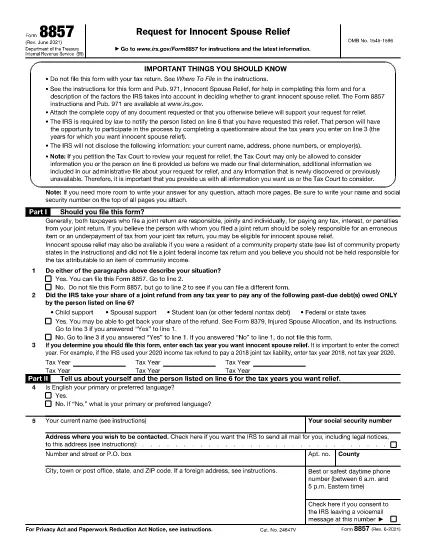
Form 8857, officially titled Request for Innocent Spouse Relief, lets taxpayers ask the Internal Revenue Service (IRS) to remove or reduce their joint tax liability when they believe the spouse or former spouse is solely responsible for an error or underpayment. This page provides a fillable PDF version, a simple step‑by‑step guide, and answers to the most common questions.

What Is Form 8857 and Who Can Use It?

Form 8857 is used when you filed a joint return and later discover that the tax liability is the result of:

  • Undisclosed income or fraudulent activity by your spouse,
  • Errors you were unaware of at the time of signing,
  • Coercion or duress that forced you to sign the return, or
  • Significant financial hardship if you were held liable.

If any of these situations apply, you may qualify for innocent spouse relief, equitable relief, or separation of liability relief.

How to Fill Out the Fillable PDF with Formize

Instead of downloading the PDF and editing it with a separate editor, use the built‑in Formize PDF Filler. Follow these easy steps:

  1. Click “Fill out this form” on this page.
  2. The Formize PDF Filler app loads directly in your browser.
  3. Enter your information in each fillable field – the form automatically saves your progress.
  4. When finished, click Save & Download to get a completed PDF.
  5. Print, sign, and mail the form to the IRS address shown in the instructions, or submit it electronically if you have an IRS e‑file account.

Common Mistakes to Avoid When Completing Form 8857

Even a small error can delay processing. Keep these tips in mind:

  • Don’t leave any required boxes blank. If a question does not apply, write “N/A”.
  • Provide supporting documentation. Attach copies of the joint return, notices, and any evidence of the spouse’s wrongdoing.
  • Use the correct tax year. The year you are requesting relief for must match the year on the joint return.
  • Sign both the taxpayer and spouse sections. If you have a paid preparer, they must also sign.
  • Check the address. Mail the form to the IRS location specified in the instructions for your state.

Following these guidelines will help the IRS process your request faster.

دستورالعمل ها

سوالات متداول
  • What is IRS Form 8857 used for?

    Form 8857 is the Request for Innocent Spouse Relief. It allows a taxpayer to ask the IRS to remove or reduce liability on a joint return when the spouse is responsible for the tax debt.

  • Who qualifies for innocent spouse relief?

    You may qualify if you were unaware of the error, were coerced into signing, had no control over the financial matters, or would suffer significant hardship if held liable.

  • Can I file Form 8857 electronically?

    Yes, if you have an IRS e‑file account you can upload the completed PDF through the IRS portal. Otherwise, mail the signed form to the address in the instructions.

  • What supporting documents should I include?

    Attach a copy of the joint tax return, any IRS notices, proof of the spouse’s wrongdoing (e.g., fraud letters), and documentation of hardship (e.g., medical bills).

  • Is there a deadline to submit Form 8857?

    Generally, you must file within two years after the IRS issues a notice of liability, but it’s best to submit as soon as possible.

  • Do I need a tax professional to complete Form 8857?

    A professional can help, but the fillable PDF and step‑by‑step guide make it possible to complete the form on your own.

  • What happens after I submit the form?

    The IRS will review your request, may contact you for additional information, and will issue a determination letter with its decision.

  • Can I request relief for more than one tax year?

    Yes, you can file separate Form 8857 requests for each tax year you need relief for.

چگونه

نحوه پر کردن Form 8857 به صورت رایگان و آنلاین در 5 با مراحل آسان:

  1. 1
    Open the Fillable Form
    Click the “Fill out this form” button on the page. The Formize PDF Filler loads instantly in your browser.
  2. 2
    Enter Your Information
    Complete each field. The form auto‑saves as you type, so you won’t lose any data.
  3. 3
    Attach Supporting Documents
    Use the “Add Attachment” option to upload copies of the joint return, IRS notices, and any evidence of spouse misconduct.
  4. 4
    Save and Download
    When all sections are complete, click “Save & Download”. A completed PDF will be saved to your device.
  5. 5
    Print, Sign, and Submit
    Print the PDF, sign where required, and mail it to the IRS address listed in the form instructions, or submit electronically if eligible.
برنامه PDF Filler را فرم‌بندی کنید
در باره

فرم های مالیاتی

Form 8857 یکی از فرم‌های مالیاتی است که برای گزارش اطلاعات مربوط به مالیات به سازمان مالیاتی مربوطه استفاده می‌شود. انواع مختلفی از فرم های مالیاتی از جمله فرم های مالیات فدرال، ایالتی و محلی وجود دارد که بسته به شرایط و موقعیت مالیات دهندگان می تواند متفاوت باشد.

امکانات

پرکننده PDF

ساده ترین راه برای پر کردن فرم های PDF به صورت آنلاین

  • به سرعت Form 8857 را پر کنید
    به دنبال راهی برای پر کردن سریع Form 8857 آنلاین هستید؟ با پرکننده فرم PDF رایگان آنلاین ما، می‌دانید چگونه این سند pdf را در کمتر از یک دقیقه ویرایش و پر کنید.
  • آسان برای استفاده از ویرایشگر PDF آنلاین
    آیا از چاپ فایل‌های پی‌دی‌اف خسته شده‌اید تا بتوانید آن‌ها را قبل از اسکن مجدد و ارسال مجدد، ویرایش کنید؟ اسناد PDF را به صورت آنلاین به صورت رایگان ویرایش کنید. از ویرایشگر pdf آنلاین ما برای صرفه جویی در زمان و کاغذ استفاده کنید.
  • ابزارهای عالی، همه پلتفرم ها
    آیا نمی دانید که چگونه Form 8857 را در مک پر کنید، یا شاید چگونه از پرکننده PDF به صورت رایگان استفاده کنید؟ ابزارهای PDF آنلاین ما روی همه پلتفرم ها کار می کنند.
  • ذخیره سازی امن فایل
    فایل‌های تکمیل‌شده «Form 8857» در یک پایگاه داده ایمن که توسط میزبانی ابری آمازون مدیریت می‌شود، ذخیره می‌شوند. شما می توانید فایل های خود را در هر زمان از سیستم ما حذف کنید. در هر صورت این فایل ها پس از 24 ساعت به صورت خودکار پاک می شوند.
  • چت با Form 8857
    با «Form 8857» در Chatize که یک دستیار PDF خوان رایگان است، گپ بزنید. سوال بپرسید و از "Form 8857" پاسخ بگیرید. فقط روی دکمه Chat With Document در بالا کلیک کنید.

حذف جلسه پر کردن

جلسه پر کردن انتخاب شده را حذف کنید؟ در این صورت پیشرفت شما در تکمیل فرم از بین خواهد رفت.

حذف جلسه ویرایش

جلسه ویرایش انتخابی حذف شود؟ در این صورت پیشرفت شما در ایجاد و ویرایش فرم از بین خواهد رفت.