زبان را انتخاب کنید

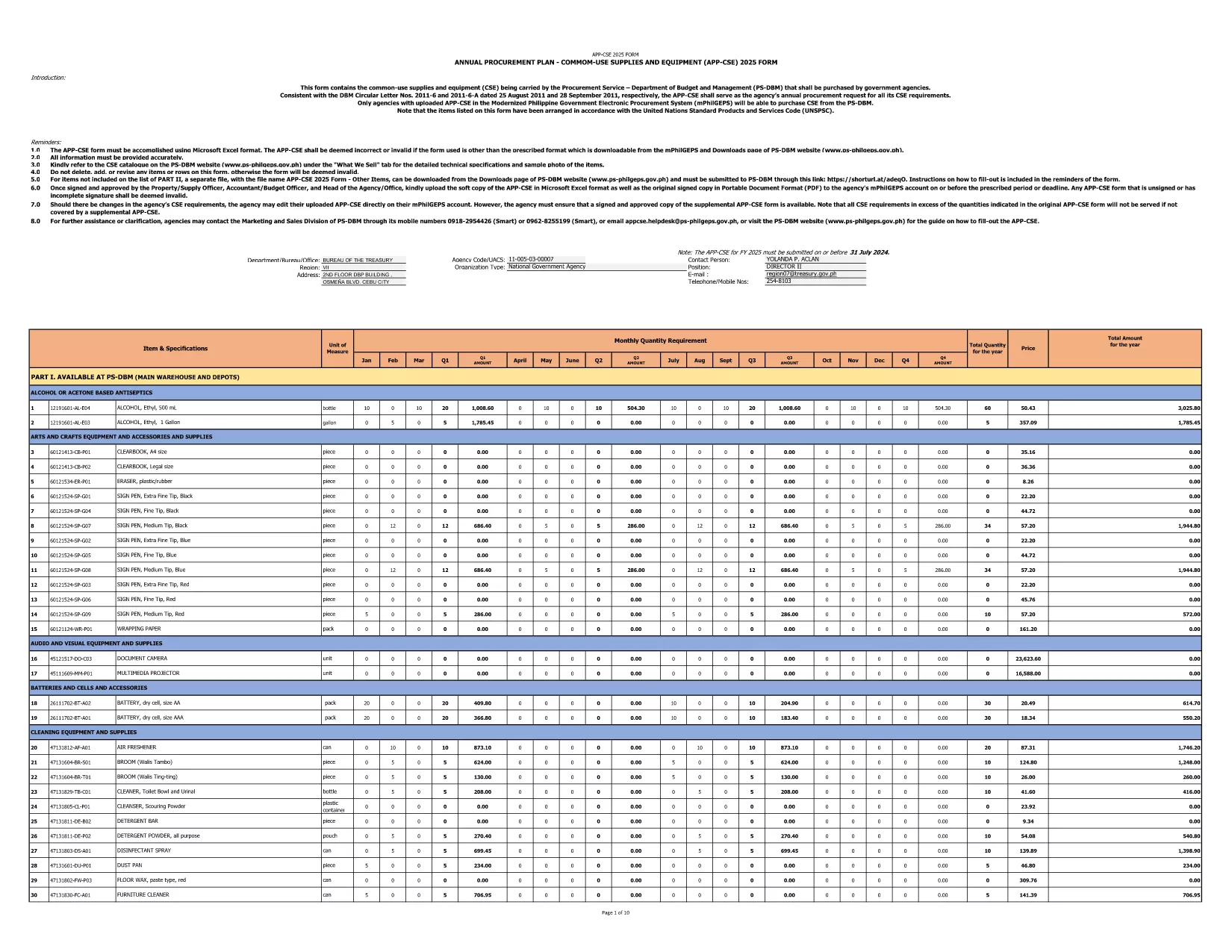
2025 CSE Application Form – Fillable Online

  1. زبان انگلیسی
  2. کشور Philippines
  3. بخش Department of Budget and Management
  4. فعالیت Procurement
این فرم را پر کنید
2025 CSE Application Form – Fillable Online

The 2025 CSE (Common‑Use Supplies and Equipment) Application Form is the official document used by Philippine government agencies to request procurement of shared supplies and equipment. This fillable PDF is hosted by the Department of Budget and Management and follows the latest DBM Circular Letters.

What Is the CSE Application Form?

The CSE form consolidates all common‑use items that agencies plan to purchase for the fiscal year. It ensures transparency, avoids duplication, and streamlines the procurement process across the public sector.

How to Complete the Form Online

Instead of downloading the PDF and opening a separate editor, simply click the "Fill out this form" button on this page. The Formize PDF Filler app will load in your browser, letting you enter data directly into the fields.

Common Mistakes to Avoid

  • Leaving required fields blank – the form will flag them before submission.
  • Using the wrong fiscal year – this version is for FY 2025 only.
  • Entering non‑numeric values in budget columns.
  • Forgetting to attach supporting documents where indicated.

Download the Official PDF

If you prefer to keep a local copy, you can download the original PDF from the government site. The file is the same one used by Formize.

Why Use Formize PDF Filler?

Formize provides a secure, browser‑based environment that:

  • Preserves the original formatting of the government form.
  • Auto‑saves your progress, preventing data loss.
  • Allows you to submit the completed form directly to your agency’s procurement portal.

Start filling the 2025 CSE Application Form now and accelerate your agency’s procurement workflow.

سوالات متداول
  • Is this form only for FY 2025?

    Yes. The downloaded PDF is specifically labeled APP‑CSE FY 2025 and follows the 2025 procurement guidelines.

  • Do I need a PDF editor to fill the form?

    No. The Formize PDF Filler works in any modern browser—no extra software is required.

  • Can I save my progress and return later?

    Absolutely. The filler auto‑saves your entries, and you can download a draft PDF at any time.

  • What if I make a mistake after submitting?

    You can download the completed PDF, correct it using Formize, and re‑submit. Always keep a backup copy.

  • Is the form secure?

    Formize uses SSL encryption, and the PDF remains on your device unless you choose to upload it to a secure agency portal.

  • Where can I find guidance on each field?

    Each field includes a tooltip with brief instructions. For detailed guidance, refer to DBM Circular Letter Nos. 2011‑6 and 2011‑6‑A.

  • Can I print the completed form?

    Yes. After filling out the form, click "Print" to generate a printer‑ready version.

چگونه

نحوه پر کردن CSE application form به صورت رایگان و آنلاین در 4 با مراحل آسان:

  1. 1
    Open the Fillable Form
    Click the "Fill out this form" button on the page. The Formize PDF Filler loads instantly in your browser.
  2. 2
    Enter Required Information
    Complete each highlighted field—agency name, item description, quantity, budget, and supporting details.
  3. 3
    Validate and Save
    Use the built‑in validation to check for missing or incorrect entries, then click "Save" to store a copy on your device.
  4. 4
    Submit or Export
    When finished, either submit the form directly to your procurement portal or export it as a completed PDF for offline filing.
برنامه PDF Filler را فرم‌بندی کنید
در باره

قالب CSE application form

با مجموعه‌ای از ویژگی‌های سنتی برای مشاهده و پر کردن یک سند PDF، همراه با مزایای یک برنامه وب و طرح‌بندی واکنش‌گرا، می‌توانید CSE application form را در چند دقیقه تکمیل کنید.

امکانات

پرکننده PDF

ساده ترین راه برای پر کردن فرم های PDF به صورت آنلاین

  • به سرعت CSE application form را پر کنید
    به دنبال راهی برای پر کردن سریع CSE application form آنلاین هستید؟ با پرکننده فرم PDF رایگان آنلاین ما، می‌دانید چگونه این سند pdf را در کمتر از یک دقیقه ویرایش و پر کنید.
  • آسان برای استفاده از ویرایشگر PDF آنلاین
    آیا از چاپ فایل‌های پی‌دی‌اف خسته شده‌اید تا بتوانید آن‌ها را قبل از اسکن مجدد و ارسال مجدد، ویرایش کنید؟ اسناد PDF را به صورت آنلاین به صورت رایگان ویرایش کنید. از ویرایشگر pdf آنلاین ما برای صرفه جویی در زمان و کاغذ استفاده کنید.
  • ابزارهای عالی، همه پلتفرم ها
    آیا نمی دانید که چگونه CSE application form را در مک پر کنید، یا شاید چگونه از پرکننده PDF به صورت رایگان استفاده کنید؟ ابزارهای PDF آنلاین ما روی همه پلتفرم ها کار می کنند.
  • ذخیره سازی امن فایل
    فایل‌های تکمیل‌شده «CSE application form» در یک پایگاه داده ایمن که توسط میزبانی ابری آمازون مدیریت می‌شود، ذخیره می‌شوند. شما می توانید فایل های خود را در هر زمان از سیستم ما حذف کنید. در هر صورت این فایل ها پس از 24 ساعت به صورت خودکار پاک می شوند.
  • چت با CSE application form
    با «CSE application form» در Chatize که یک دستیار PDF خوان رایگان است، گپ بزنید. سوال بپرسید و از "CSE application form" پاسخ بگیرید. فقط روی دکمه Chat With Document در بالا کلیک کنید.

حذف جلسه پر کردن

جلسه پر کردن انتخاب شده را حذف کنید؟ در این صورت پیشرفت شما در تکمیل فرم از بین خواهد رفت.

حذف جلسه ویرایش

جلسه ویرایش انتخابی حذف شود؟ در این صورت پیشرفت شما در ایجاد و ویرایش فرم از بین خواهد رفت.