زبان را انتخاب کنید

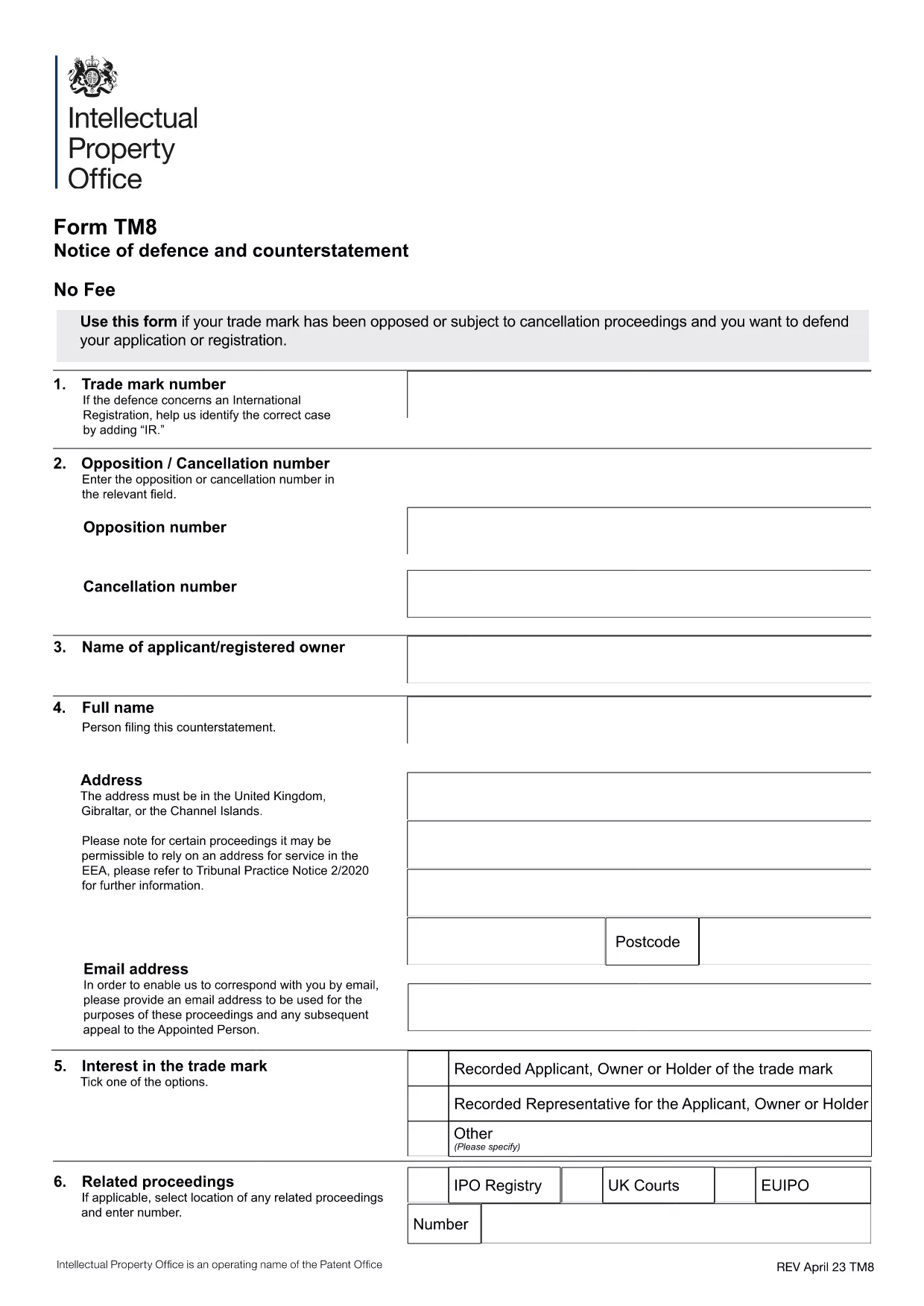
Form TM8 – Notice of Defence and Counterstatement (UK Trademark)

  1. کشور United Kingdom
  2. زبان انگلیسی
  3. فعالیت Trademarks
  4. بخش Intellectual Property Office
این فرم را پر کنید
Form TM8 – Notice of Defence and Counterstatement (UK Trademark)

The Form TM8 is the official UK Intellectual Property Office (IPO) document used to submit a defence and counter‑statement when you are challenged on a trademark registration. Whether you are responding to a notice of opposition or a cancellation request, TM8 lets you set out the legal reasons why your trademark should remain protected.

What is Form TM8 and When Is It Required?

TM8 is filed by the trademark owner (or a licensed user) after receiving a formal objection from an opponent. It must detail the factual and legal basis of your defence, and may include any counter‑claims you wish to raise.

Key Sections of the TM8 Form Explained

  • Section 1 – Applicant Details: Name, address, and registration number of the trademark.
  • Section 2 – Grounds of Defence: List each ground you rely on, such as prior use, lack of similarity, or procedural errors.
  • Section 3 – Evidence: Attach supporting documents, screenshots, or contracts.
  • Section 4 – Counter‑Statement (if any): State any claims you are making against the opponent.
  • Section 5 – Signature: Certified declaration by the owner or authorised representative.

How to Complete TM8 Online with Formize

Instead of downloading, printing, and scanning, you can fill the form directly in your browser. Simply click the “Fill out this form” button below, and the Formize PDF Filler will load the official TM8 template ready for editing.

Common Mistakes to Avoid

  • Leaving any mandatory field blank – the IPO will reject the submission.
  • Submitting outdated contact details – you may miss important communications.
  • Failing to attach all referenced evidence – unsupported arguments are dismissed.
  • Using an unsigned PDF – the declaration must be signed electronically or manually before filing.

Where to Submit Your Completed Form

Once you have saved the filled PDF, upload it through the UK IPO online portal or send it by post to the address listed on the form. Keep a copy for your records.

سوالات متداول
  • What is the deadline for filing Form TM8?

    The deadline is usually 28 days from the date you receive the opposition or cancellation notice, but always check the specific notice for the exact timeframe.

  • Can I submit a partially completed TM8?

    No. The IPO will reject any TM8 that has empty mandatory fields or missing signatures.

  • Do I need a lawyer to fill out TM8?

    A lawyer is not required, but legal advice can help ensure your defence is robust, especially for complex grounds.

  • Is an electronic signature accepted?

    Yes. The IPO accepts a qualified electronic signature or a scanned handwritten signature attached to the PDF.

  • Can I edit the TM8 after I have saved it?

    Yes. Open the saved PDF again in Formize or any PDF editor, make the changes, and re‑save before submission.

  • What evidence should I attach?

    Include any documents that prove prior use, ownership, or that counter the opponent’s claims – such as invoices, marketing material, or correspondence.

  • Is there a fee for filing TM8?

    Filing a defence does not incur a separate fee, but the original trademark application or opposition may have associated costs.

  • Where can I find the official TM8 PDF?

    The official version is available for download via the link below, hosted by the UK government.

چگونه

نحوه پر کردن Form TM8 به صورت رایگان و آنلاین در 5 با مراحل آسان:

  1. 1
    Open the Fillable Form
    Click the “Fill out this form” button on the page. The Formize PDF Filler app will load the official TM8 template instantly.
  2. 2
    Enter Your Details
    Complete each section – applicant information, grounds of defence, evidence, and counter‑statement – using the on‑screen fields.
  3. 3
    Add Attachments
    Use the “Add File” button to upload supporting documents (e.g., contracts, screenshots) directly into the PDF.
  4. 4
    Review & Sign
    Double‑check all entries for accuracy, then apply your electronic signature in the final declaration field.
  5. 5
    Save and Submit
    Save the completed PDF to your computer. Upload it to the UK IPO portal or mail it as instructed on the form.
برنامه PDF Filler را فرم‌بندی کنید
در باره

قالب Form TM8

با مجموعه‌ای از ویژگی‌های سنتی برای مشاهده و پر کردن یک سند PDF، همراه با مزایای یک برنامه وب و طرح‌بندی واکنش‌گرا، می‌توانید Form TM8 را در چند دقیقه تکمیل کنید.

امکانات

پرکننده PDF

ساده ترین راه برای پر کردن فرم های PDF به صورت آنلاین

  • به سرعت Form TM8 را پر کنید
    به دنبال راهی برای پر کردن سریع Form TM8 آنلاین هستید؟ با پرکننده فرم PDF رایگان آنلاین ما، می‌دانید چگونه این سند pdf را در کمتر از یک دقیقه ویرایش و پر کنید.
  • آسان برای استفاده از ویرایشگر PDF آنلاین
    آیا از چاپ فایل‌های پی‌دی‌اف خسته شده‌اید تا بتوانید آن‌ها را قبل از اسکن مجدد و ارسال مجدد، ویرایش کنید؟ اسناد PDF را به صورت آنلاین به صورت رایگان ویرایش کنید. از ویرایشگر pdf آنلاین ما برای صرفه جویی در زمان و کاغذ استفاده کنید.
  • ابزارهای عالی، همه پلتفرم ها
    آیا نمی دانید که چگونه Form TM8 را در مک پر کنید، یا شاید چگونه از پرکننده PDF به صورت رایگان استفاده کنید؟ ابزارهای PDF آنلاین ما روی همه پلتفرم ها کار می کنند.
  • ذخیره سازی امن فایل
    فایل‌های تکمیل‌شده «Form TM8» در یک پایگاه داده ایمن که توسط میزبانی ابری آمازون مدیریت می‌شود، ذخیره می‌شوند. شما می توانید فایل های خود را در هر زمان از سیستم ما حذف کنید. در هر صورت این فایل ها پس از 24 ساعت به صورت خودکار پاک می شوند.
  • چت با Form TM8
    با «Form TM8» در Chatize که یک دستیار PDF خوان رایگان است، گپ بزنید. سوال بپرسید و از "Form TM8" پاسخ بگیرید. فقط روی دکمه Chat With Document در بالا کلیک کنید.

حذف جلسه پر کردن

جلسه پر کردن انتخاب شده را حذف کنید؟ در این صورت پیشرفت شما در تکمیل فرم از بین خواهد رفت.

حذف جلسه ویرایش

جلسه ویرایش انتخابی حذف شود؟ در این صورت پیشرفت شما در ایجاد و ویرایش فرم از بین خواهد رفت.