زبان را انتخاب کنید

Title VI Complaint Form – Fillable PDF

  1. زبان انگلیسی
  2. کشور ایالات متحده آمریکا
  3. بخش Civil Rights
  4. فعالیت Discrimination Complaints
این فرم را پر کنید
Title VI Complaint Form – Fillable PDF

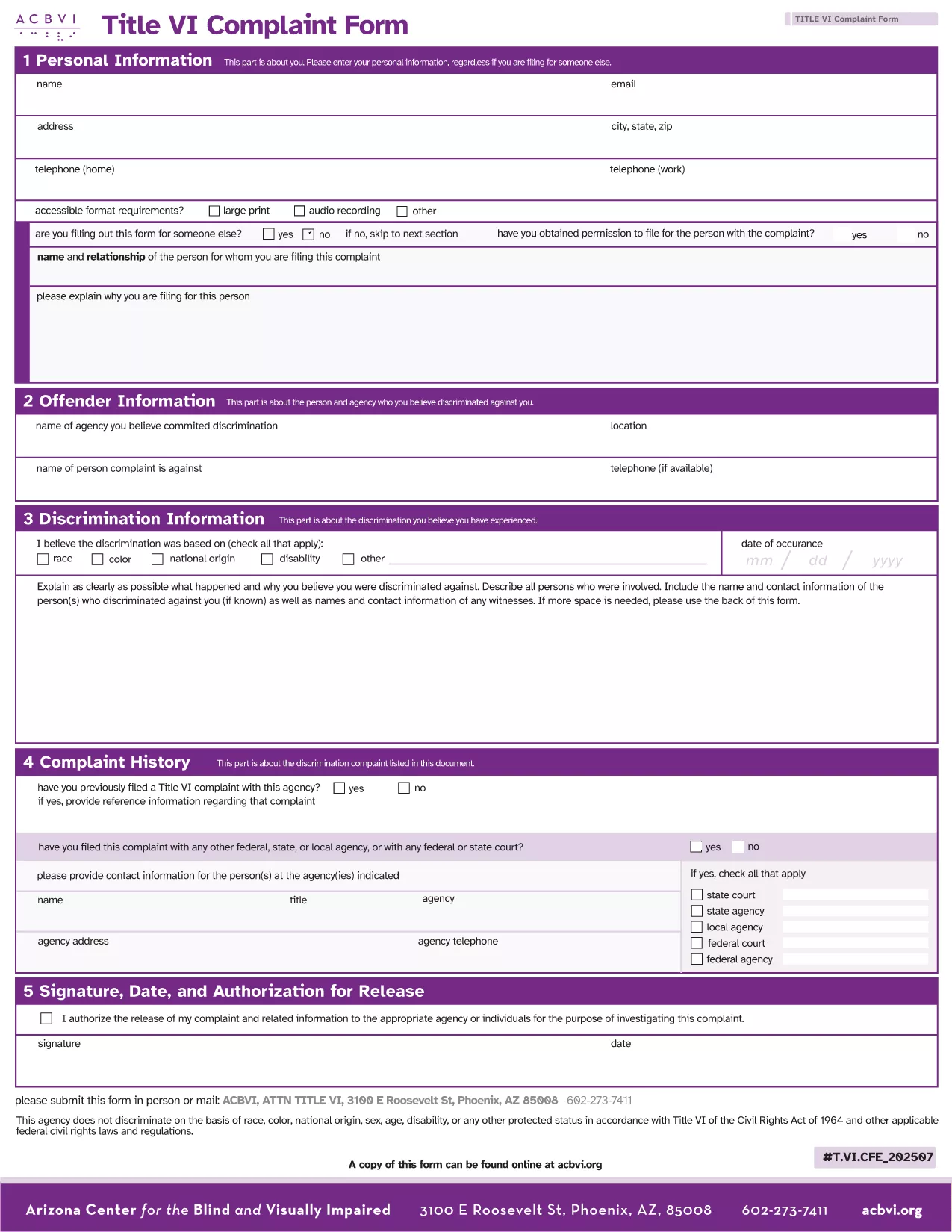
The Title VI Complaint Form lets you report discrimination based on race, color, or national origin that occurs in any program receiving federal financial assistance. Our fillable PDF version is ready to download, edit, and submit directly from your browser.

What Is a Title VI Complaint?

Title VI of the Civil Rights Act of 1964 prohibits recipients of federal funds from discriminating on the basis of race, color, or national origin. If you believe a school, hospital, or any federally‑funded entity has violated this law, you can file a complaint using the official form.

Why Use Our Fillable PDF Form?

  • Instant online editing – No need for Adobe Acrobat; the Formize PDF Filler loads automatically.
  • Secure and private – Your data stays encrypted while you fill out the form.
  • Free download – Access the official, up‑to‑date form at no cost.
  • Print‑ready – Once completed, you can print or submit electronically.

How to Complete the Title VI Complaint Form Online

Follow these simple steps to submit a complete, accurate complaint:

  1. Click the Fill out this form button below.
  2. Wait a few seconds while the Formize PDF Filler app loads.
  3. Enter your information in each fillable field. The form guides you with helpful prompts.
  4. Review the entered data, then click Save & Download or Print to keep a copy.
  5. Mail or deliver the completed form to the appropriate agency (e.g., the U.S. Department of Justice or the relevant state agency).

Common Mistakes to Avoid When Filing

  • Leaving required fields blank – the form will highlight missing information.
  • Submitting after the 180‑day deadline – complaints must be filed within 180 days of the alleged act.
  • Providing vague descriptions – be specific about dates, locations, and the nature of discrimination.
  • Forgetting to sign – an unsigned form may be rejected.

By using our fillable PDF, you ensure the form is legible, complete, and ready for processing.

سوالات متداول
  • Who can file a Title VI complaint?

    Any individual who believes they have been discriminated against on the basis of race, color, or national origin by a program that receives federal funds.

  • Is there a deadline for filing?

    Yes. Complaints must be filed within 180 days of the alleged discriminatory act.

  • Do I need Adobe Acrobat to fill out the form?

    No. Our fillable PDF works directly in your web browser via the Formize PDF Filler—no additional software required.

  • Can I submit the form electronically?

    You can download the completed PDF and email it if the receiving agency accepts electronic submissions; otherwise, print and mail it.

  • Is my information kept confidential?

    Yes. The Formize PDF Filler uses secure, encrypted connections to protect your data while you complete the form.

  • What if I make a mistake after saving?

    Simply reopen the saved PDF in the Formize filler, edit the incorrect fields, and re‑save the document.

  • Do I need to attach supporting documents?

    If you have evidence (e.g., emails, photos), attach them when you mail the completed complaint to the agency.

چگونه

نحوه پر کردن Title VI complaint form به صورت رایگان و آنلاین در 4 با مراحل آسان:

  1. 1
    Click the Fill Out Button
    Press the “Fill out this form” button on the page to launch the Formize PDF Filler.
  2. 2
    Wait for the Filler to Load
    A few seconds later the fillable PDF will appear in your browser—no extra software needed.
  3. 3
    Enter Your Information
    Complete each highlighted field, following the on‑screen prompts for dates, names, and incident details.
  4. 4
    Save, Print, or Submit
    When finished, click Save & Download to keep a copy, or print the form to mail to the appropriate agency.
برنامه PDF Filler را فرم‌بندی کنید
در باره

قالب Title VI complaint form

با مجموعه‌ای از ویژگی‌های سنتی برای مشاهده و پر کردن یک سند PDF، همراه با مزایای یک برنامه وب و طرح‌بندی واکنش‌گرا، می‌توانید Title VI complaint form را در چند دقیقه تکمیل کنید.

امکانات

پرکننده PDF

ساده ترین راه برای پر کردن فرم های PDF به صورت آنلاین

  • به سرعت Title VI complaint form را پر کنید
    به دنبال راهی برای پر کردن سریع Title VI complaint form آنلاین هستید؟ با پرکننده فرم PDF رایگان آنلاین ما، می‌دانید چگونه این سند pdf را در کمتر از یک دقیقه ویرایش و پر کنید.
  • آسان برای استفاده از ویرایشگر PDF آنلاین
    آیا از چاپ فایل‌های پی‌دی‌اف خسته شده‌اید تا بتوانید آن‌ها را قبل از اسکن مجدد و ارسال مجدد، ویرایش کنید؟ اسناد PDF را به صورت آنلاین به صورت رایگان ویرایش کنید. از ویرایشگر pdf آنلاین ما برای صرفه جویی در زمان و کاغذ استفاده کنید.
  • ابزارهای عالی، همه پلتفرم ها
    آیا نمی دانید که چگونه Title VI complaint form را در مک پر کنید، یا شاید چگونه از پرکننده PDF به صورت رایگان استفاده کنید؟ ابزارهای PDF آنلاین ما روی همه پلتفرم ها کار می کنند.
  • ذخیره سازی امن فایل
    فایل‌های تکمیل‌شده «Title VI complaint form» در یک پایگاه داده ایمن که توسط میزبانی ابری آمازون مدیریت می‌شود، ذخیره می‌شوند. شما می توانید فایل های خود را در هر زمان از سیستم ما حذف کنید. در هر صورت این فایل ها پس از 24 ساعت به صورت خودکار پاک می شوند.
  • چت با Title VI complaint form
    با «Title VI complaint form» در Chatize که یک دستیار PDF خوان رایگان است، گپ بزنید. سوال بپرسید و از "Title VI complaint form" پاسخ بگیرید. فقط روی دکمه Chat With Document در بالا کلیک کنید.

حذف جلسه پر کردن

جلسه پر کردن انتخاب شده را حذف کنید؟ در این صورت پیشرفت شما در تکمیل فرم از بین خواهد رفت.

حذف جلسه ویرایش

جلسه ویرایش انتخابی حذف شود؟ در این صورت پیشرفت شما در ایجاد و ویرایش فرم از بین خواهد رفت.