
زبان را انتخاب کنید

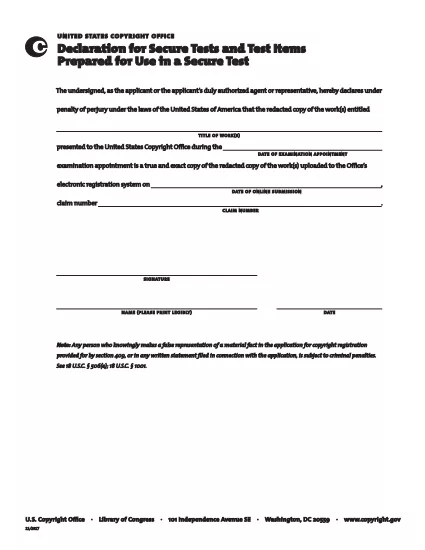
Secure Test Declaration – Fillable PDF Form

  1. زبان انگلیسی
  2. کشور ایالات متحده آمریکا
  3. بخش دفتر کپی رایت
این فرم را پر کنید
Secure Test Declaration – Fillable PDF Form

The Secure Test Declaration is a legally‑required statement used by the United States Copyright Office to certify that a test item is protected and will be handled securely. Our fillable PDF version lets you complete the form quickly, accurately, and without installing any extra software.

With Formize’s integrated PDF Filler, you can open the document directly in your browser, enter the required information, and save or print a certified copy. This eliminates the hassle of downloading, editing, and re‑uploading static PDFs.

Below you’ll find a brief overview of the form’s sections, tips for avoiding common errors, and step‑by‑step instructions for completing the declaration online.

What Is a Secure Test Declaration?

A Secure Test Declaration confirms that the test material you are submitting is confidential, that you have the authority to submit it, and that you understand the penalties for false statements. It is commonly required for copyrighted works that involve proprietary testing methods or confidential data.

Key Sections of the Form

  • Applicant Information – Name, address, and contact details.
  • Test Description – Title, purpose, and nature of the test.
  • Security Measures – How the test will be protected.
  • Declaration Statement – Signature line confirming truthfulness.

How to Fill Out the Secure Test Declaration Online

Instead of downloading the PDF and opening it in a separate editor, simply click the "Fill out this form" button on this page. The Formize PDF Filler app will load automatically, allowing you to complete every field directly in your browser.

Common Mistakes to Avoid

  • Leaving required fields blank – the filler will highlight missing information.
  • Using an unofficial signature image – type your name in the signature field for a legally accepted electronic signature.
  • Submitting outdated contact details – double‑check phone numbers and email addresses before saving.

Where to Submit the Completed Form

After saving the completed declaration, you can either:

  1. Upload the PDF through the Copyright Office’s online portal.
  2. Print, sign physically (if required), and mail it to the address listed on the form.

For most users, the electronic submission option is faster and provides immediate confirmation of receipt.

سوالات متداول
  • Do I need Adobe Acrobat to fill out the Secure Test Declaration?

    No. Formize’s online PDF Filler works in any modern browser, so you don’t need Acrobat or any other software.

  • Can I edit the form after I’ve saved it?

    Yes. Open the saved PDF with Formize again, make any necessary changes, and re‑save.

  • Is an electronic signature accepted by the Copyright Office?

    For the Secure Test Declaration, an electronic signature entered through the Formize filler is considered valid, provided the form is submitted electronically.

  • What happens if I submit incomplete information?

    The filler will highlight missing required fields before you can save. Submitting an incomplete form may delay processing.

  • Is there a fee to download or use the Secure Test Declaration form?

    The PDF download and online filling are free. Any filing fees are set by the Copyright Office and are paid separately during submission.

چگونه

نحوه پر کردن secure test declaration به صورت رایگان و آنلاین در 4 با مراحل آسان:

  1. 1
    Open the Fillable Form
    Click the "Fill out this form" button on the page. The Formize PDF Filler loads in a new tab.
  2. 2
    Enter Your Information
    Complete each highlighted field – the filler will guide you through Applicant Information, Test Description, and Security Measures.
  3. 3
    Sign Electronically
    Type your name in the signature field. The system records a timestamp for legal validity.
  4. 4
    Save and Submit
    Click "Save PDF" to download a copy, then upload it to the Copyright Office portal or print and mail as instructed.
برنامه PDF Filler را فرم‌بندی کنید
در باره

فرم های دفتر کپی رایت

secure test declaration یکی از فرم‌های رسمی است که توسط اداره کپی رایت ایالات متحده، یکی از بخش‌های کتابخانه کنگره، برای ثبت و محافظت از حق چاپ استفاده می‌شود. اداره کپی رایت مسئول اجرای قوانین کپی رایت در ایالات متحده است، از جمله ثبت حق چاپ، ثبت نقل و انتقالات حق چاپ و مجوزها، و ارائه اطلاعات و خدمات مرتبط با حق چاپ.

در اینجا چند نمونه از فرم های دفتر حق چاپ آورده شده است:

برنامه ثبت حق نسخه برداری: این فرم اصلی است که برای ثبت حق نسخه برداری در اداره حق نسخه برداری ایالات متحده استفاده می شود. فرم‌های درخواستی مختلفی برای انواع مختلف آثار، مانند آثار ادبی، هنرهای تجسمی، آهنگ‌های موسیقی، ضبط صدا، تصاویر متحرک و غیره موجود است. برنامه اطلاعات مربوط به اثر ثبت شده، نویسنده، مدعی و سایر جزئیات مرتبط را جمع آوری می کند.

فرم‌های ثبت اسناد: از این فرم‌ها برای ثبت انتقال حق نسخه‌برداری، مانند واگذاری یا مجوز، با دفتر حق نسخه‌برداری استفاده می‌شود. آنها راهی برای ایجاد یک سابقه عمومی از انتقال مالکیت کپی رایت ارائه می کنند.

فرم فهرست راهنمای نماینده تعیین شده DMCA: این فرم برای تعیین یک نماینده با دفتر حق نسخه‌برداری تحت قانون حق نسخه‌برداری هزاره دیجیتال (DMCA) استفاده می‌شود. نماینده تعیین شده مسئول دریافت و رسیدگی به اعلامیه های حذف مربوط به نقض حق نسخه برداری آنلاین است.

برنامه هزینه دفتر حق نسخه‌برداری: اگرچه فرم مشخصی نیست، اما جدول هزینه اطلاعاتی در مورد هزینه‌های مرتبط با خدمات مختلف حق نسخه‌برداری، از جمله ثبت، ثبت، و سایر خدمات مرتبط ارائه می‌دهد.

توجه به این نکته مهم است که فرم ها و الزامات خاص ممکن است در طول زمان تغییر کنند و ممکن است برای انواع مختلف ثبت حق چاپ یا خدمات، فرم های متفاوتی مورد نیاز باشد. توصیه می‌شود از وب‌سایت رسمی دفتر حق نسخه‌برداری ایالات متحده (www.copyright.gov) بازدید کنید یا با متخصصان حقوقی متخصص در قانون حق چاپ مشورت کنید تا اطلاعات دقیق و به‌روز را به دست آورید. در مورد فرم‌های خاص دفتر حق نسخه‌برداری مرتبط با نیازهای مرتبط با حق چاپ شما.

امکانات

پرکننده PDF

ساده ترین راه برای پر کردن فرم های PDF به صورت آنلاین

  • به سرعت secure test declaration را پر کنید
    به دنبال راهی برای پر کردن سریع secure test declaration آنلاین هستید؟ با پرکننده فرم PDF رایگان آنلاین ما، می‌دانید چگونه این سند pdf را در کمتر از یک دقیقه ویرایش و پر کنید.
  • آسان برای استفاده از ویرایشگر PDF آنلاین
    آیا از چاپ فایل‌های پی‌دی‌اف خسته شده‌اید تا بتوانید آن‌ها را قبل از اسکن مجدد و ارسال مجدد، ویرایش کنید؟ اسناد PDF را به صورت آنلاین به صورت رایگان ویرایش کنید. از ویرایشگر pdf آنلاین ما برای صرفه جویی در زمان و کاغذ استفاده کنید.
  • ابزارهای عالی، همه پلتفرم ها
    آیا نمی دانید که چگونه secure test declaration را در مک پر کنید، یا شاید چگونه از پرکننده PDF به صورت رایگان استفاده کنید؟ ابزارهای PDF آنلاین ما روی همه پلتفرم ها کار می کنند.
  • ذخیره سازی امن فایل
    فایل‌های تکمیل‌شده «secure test declaration» در یک پایگاه داده ایمن که توسط میزبانی ابری آمازون مدیریت می‌شود، ذخیره می‌شوند. شما می توانید فایل های خود را در هر زمان از سیستم ما حذف کنید. در هر صورت این فایل ها پس از 24 ساعت به صورت خودکار پاک می شوند.
  • چت با secure test declaration
    با «secure test declaration» در Chatize که یک دستیار PDF خوان رایگان است، گپ بزنید. سوال بپرسید و از "secure test declaration" پاسخ بگیرید. فقط روی دکمه Chat With Document در بالا کلیک کنید.

حذف جلسه پر کردن

جلسه پر کردن انتخاب شده را حذف کنید؟ در این صورت پیشرفت شما در تکمیل فرم از بین خواهد رفت.

حذف جلسه ویرایش

جلسه ویرایش انتخابی حذف شود؟ در این صورت پیشرفت شما در ایجاد و ویرایش فرم از بین خواهد رفت.