
زبان را انتخاب کنید

WH‑380‑E Fillable PDF – Family & Medical Leave Act Medical Certification

  1. زبان انگلیسی
  2. کشور ایالات متحده آمریکا
  3. بخش وزارت کار
  4. آژانس بخش دستمزد و ساعت
این فرم را پر کنید
WH‑380‑E Fillable PDF – Family & Medical Leave Act Medical Certification

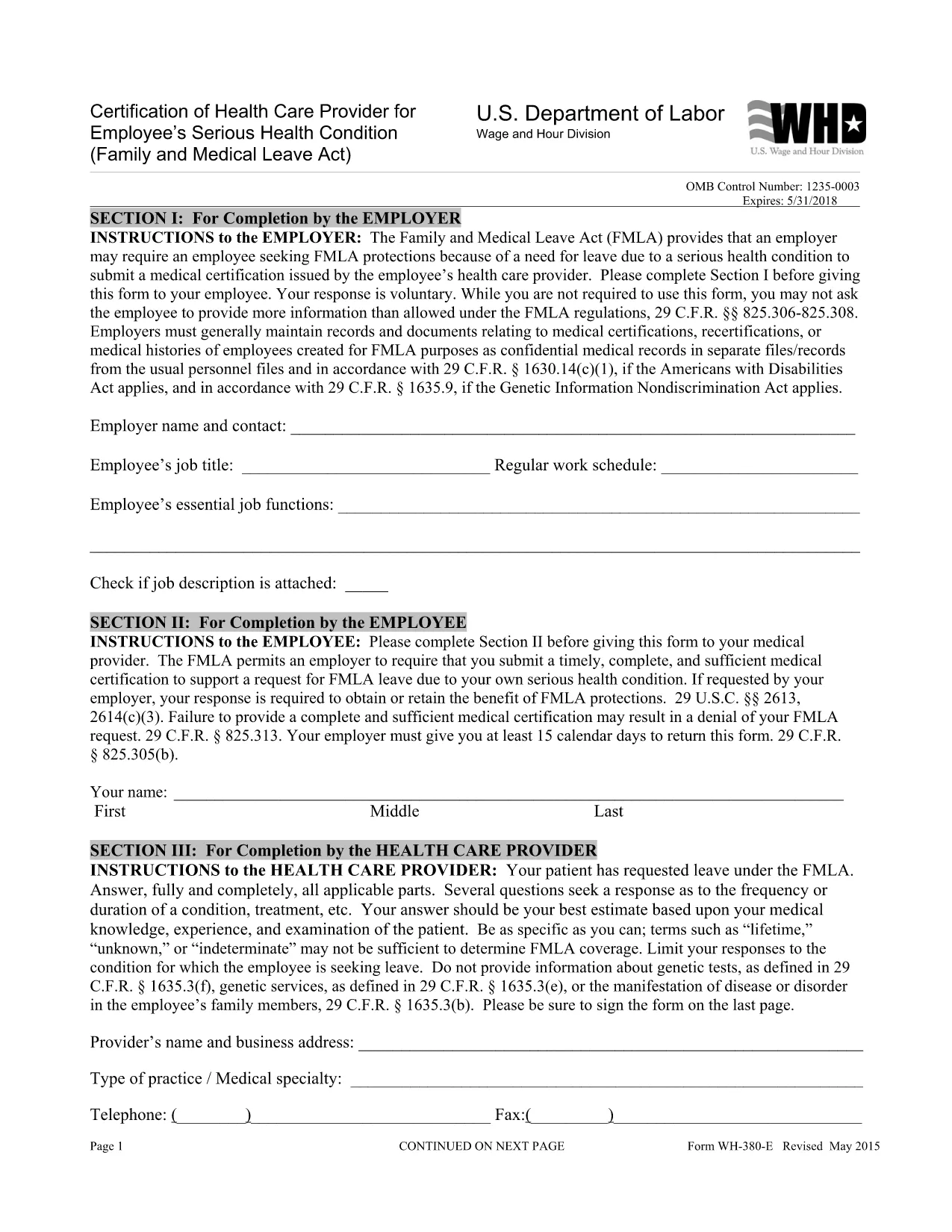
The WH‑380‑E is the official certification of a health care provider required under the Family and Medical Leave Act (FMLA). Employers use this form to verify an employee’s serious health condition, a newborn or newly‑adopted child, or a need for caretaker leave.

What Is the WH‑380‑E Form?

This government‑issued PDF collects detailed medical information, including diagnosis, treatment dates, and the provider’s certification that the condition qualifies for FMLA leave. It is used by federal, state, and private employers across the United States.

How to Complete the WH‑380‑E Online

Instead of downloading and editing the PDF in a separate editor, simply click the “Fill out this form” button on this page. The Formize PDF Filler app will load the fillable version instantly. Follow these steps:

  • Step 1: Click the “Fill out this form” button.
  • Step 2: The Formize filler loads – the document becomes interactive.
  • Step 3: Enter the employee’s information, health‑care provider details, and medical certification data.
  • Step 4: Review for completeness and accuracy.
  • Step 5: Click “Save & Download” to obtain a completed PDF you can print or email to HR.

Common Mistakes to Avoid

  • Leaving any required field blank – every asterisk (*) field must be completed.
  • Providing a diagnosis when the form states it is optional (unless your employer requests it).
  • Using illegible handwriting – the online filler ensures clear, typed text.
  • Submitting the form without the provider’s signature and date.

Where to Submit the Certified Form

After saving the completed WH‑380‑E, send it to your employer’s Human Resources or Benefits department according to your company’s leave‑request policy. Federal employees may also submit it to the agency’s HR office.

Download the Fillable WH‑380‑E PDF

If you prefer to keep a copy of the original document, you can download the official WH‑380‑E PDF from the West Virginia Legislature site. Our online filler uses the same version, guaranteeing compliance.

سوالات متداول
  • What is the purpose of the WH‑380‑E form?

    The WH‑380‑E certifies that an employee’s serious health condition (or a family member’s condition) meets the eligibility criteria for FMLA leave.

  • Can I fill out WH‑380‑E on a mobile device?

    Yes. The Formize PDF Filler works on smartphones and tablets, allowing you to complete the form on any modern browser.

  • Do I need to include a diagnosis on the form?

    A diagnosis is optional unless your employer specifically requests it. The form’s instructions note that the provider may omit the diagnosis while still meeting FMLA requirements.

  • How many copies of the completed WH‑380‑E do I need?

    Typically one completed, signed copy is submitted to HR. Keep a personal copy for your records.

  • Is the WH‑380‑E required for all FMLA leave types?

    The form is required for serious health conditions of the employee or an immediate family member. Separate certification forms exist for newborn or adopted child care.

  • What if I make a mistake after submitting the form?

    Contact your HR department immediately. You can submit a corrected WH‑380‑E with a note explaining the changes.

  • Is the WH‑380‑E a federal or state form?

    It is a federal form issued under the Family and Medical Leave Act, but many states adopt the same version for their own leave programs.

  • Do I need a notary for the WH‑380‑E?

    No. The health‑care provider’s signature and date satisfy the certification requirements.

چگونه

نحوه پر کردن WH-380-E به صورت رایگان و آنلاین در 5 با مراحل آسان:

  1. 1
    Open the Fillable Form
    Click the “Fill out this form” button on the page. The Formize PDF Filler loads the WH‑380‑E as an interactive document.
  2. 2
    Enter Required Information
    Type the employee’s name, dates of care, and the health‑care provider’s details into the highlighted fields.
  3. 3
    Complete the Medical Certification
    Provide the diagnosis (if required), treatment plan, and any functional limitations. Ensure the provider signs and dates the form.
  4. 4
    Review and Save
    Double‑check all entries for accuracy, then click “Save & Download” to get a completed PDF you can print or email.
  5. 5
    Submit to HR
    Send the saved PDF to your employer’s HR or Benefits department following your organization’s leave‑submission guidelines.
برنامه PDF Filler را فرم‌بندی کنید
در باره

فرم های وزارت کار (DOL).

WH-380-E یکی از فرم‌های رسمی است که توسط وزارت کار ایالات متحده و آژانس‌های مختلف آن برای جمع‌آوری اطلاعات، مدیریت برنامه‌ها و اجرای قوانین و مقررات مربوط به کار استفاده می‌شود. وزارت کار یک بخش اجرایی فدرال است که مسئول ارتقا و حمایت از رفاه کارگران، تضمین شیوه های شغلی منصفانه، و نظارت بر جنبه های مختلف کار و اشتغال در ایالات متحده است.

در اینجا چند نمونه از فرم های وزارت کار آورده شده است:

تأیید صلاحیت اشتغال (فرم I-9): در حالی که توسط خدمات شهروندی و مهاجرت ایالات متحده (USCIS) اداره می شود، فرم I-9 اغلب با وزارت کار مرتبط است. این توسط کارفرمایان برای تأیید هویت و صلاحیت شغلی افراد استخدام شده برای استخدام در ایالات متحده استفاده می شود.

فرم‌های قانون مرخصی خانوادگی و پزشکی (FMLA): بخش دستمزد و ساعت DOL FMLA را اداره می‌کند و اشکال مختلفی برای اجرا و مطابقت با مفاد این قانون فدرال، از جمله گواهی مراقبت‌های بهداشتی استفاده می‌شود. فرم ارائه دهنده و فرم FMLA اطلاعیه واجد شرایط بودن و حقوق و مسئولیت ها.

فرم‌های اداره ایمنی و بهداشت شغلی (OSHA): OSHA، بخشی از DOL، از کارفرمایان خاصی می‌خواهد که سوابق آسیب‌ها و بیماری‌های محل کار را با استفاده از فرم‌هایی مانند OSHA Form 300، OSHA Form 300A و OSHA حفظ کنند. فرم 301.

فرم‌های بیمه بیکاری: اداره کار و آموزش DOL بر برنامه بیمه بیکاری (UI) نظارت دارد و سازمان‌های نیروی کار دولتی از اشکال مختلف برای مدیریت و پردازش ادعاهای مزایای UI استفاده می‌کنند.

فرم‌های انطباق با دستمزد و ساعت: بخش دستمزد و ساعت DOL قوانین کار مختلفی را اجرا می‌کند، از جمله قانون استانداردهای کار منصفانه (FLSA) و قانون مرخصی خانوادگی و پزشکی (FMLA). ممکن است از کارفرمایان خواسته شود که از فرم های خاصی برای حفظ انطباق با این قوانین استفاده کنند، مانند سوابق ساعات کار، نرخ دستمزد، و سایر اطلاعات مرتبط.

این نمونه‌ها برخی از دسته‌های رایج فرم‌های وزارت کار را نشان می‌دهند، اما بسیاری از اشکال دیگر توسط DOL و آژانس‌های مختلف آن برای انجام مسئولیت‌های خود در رابطه با کار و اشتغال استفاده می‌شوند. فرم های خاص مورد نیاز ممکن است بسته به برنامه، مقررات یا اقدام اجرایی مربوطه متفاوت باشد. توصیه می شود از وب سایت رسمی وزارت کار ایالات متحده بازدید کنید (www.dol.gov) یا با آژانس های مربوطه DOL یا متخصصان حقوقی مشورت کنید تا اطلاعات دقیق و به روز را دریافت کنید. اطلاعات تاریخ مربوط به فرم های خاص DOL مربوط به نیازهای مربوط به کار یا الزامات انطباق شما.

امکانات

پرکننده PDF

ساده ترین راه برای پر کردن فرم های PDF به صورت آنلاین

  • به سرعت WH-380-E را پر کنید
    به دنبال راهی برای پر کردن سریع WH-380-E آنلاین هستید؟ با پرکننده فرم PDF رایگان آنلاین ما، می‌دانید چگونه این سند pdf را در کمتر از یک دقیقه ویرایش و پر کنید.
  • آسان برای استفاده از ویرایشگر PDF آنلاین
    آیا از چاپ فایل‌های پی‌دی‌اف خسته شده‌اید تا بتوانید آن‌ها را قبل از اسکن مجدد و ارسال مجدد، ویرایش کنید؟ اسناد PDF را به صورت آنلاین به صورت رایگان ویرایش کنید. از ویرایشگر pdf آنلاین ما برای صرفه جویی در زمان و کاغذ استفاده کنید.
  • ابزارهای عالی، همه پلتفرم ها
    آیا نمی دانید که چگونه WH-380-E را در مک پر کنید، یا شاید چگونه از پرکننده PDF به صورت رایگان استفاده کنید؟ ابزارهای PDF آنلاین ما روی همه پلتفرم ها کار می کنند.
  • ذخیره سازی امن فایل
    فایل‌های تکمیل‌شده «WH-380-E» در یک پایگاه داده ایمن که توسط میزبانی ابری آمازون مدیریت می‌شود، ذخیره می‌شوند. شما می توانید فایل های خود را در هر زمان از سیستم ما حذف کنید. در هر صورت این فایل ها پس از 24 ساعت به صورت خودکار پاک می شوند.
  • چت با WH-380-E
    با «WH-380-E» در Chatize که یک دستیار PDF خوان رایگان است، گپ بزنید. سوال بپرسید و از "WH-380-E" پاسخ بگیرید. فقط روی دکمه Chat With Document در بالا کلیک کنید.

حذف جلسه پر کردن

جلسه پر کردن انتخاب شده را حذف کنید؟ در این صورت پیشرفت شما در تکمیل فرم از بین خواهد رفت.

حذف جلسه ویرایش

جلسه ویرایش انتخابی حذف شود؟ در این صورت پیشرفت شما در ایجاد و ویرایش فرم از بین خواهد رفت.