
زبان را انتخاب کنید

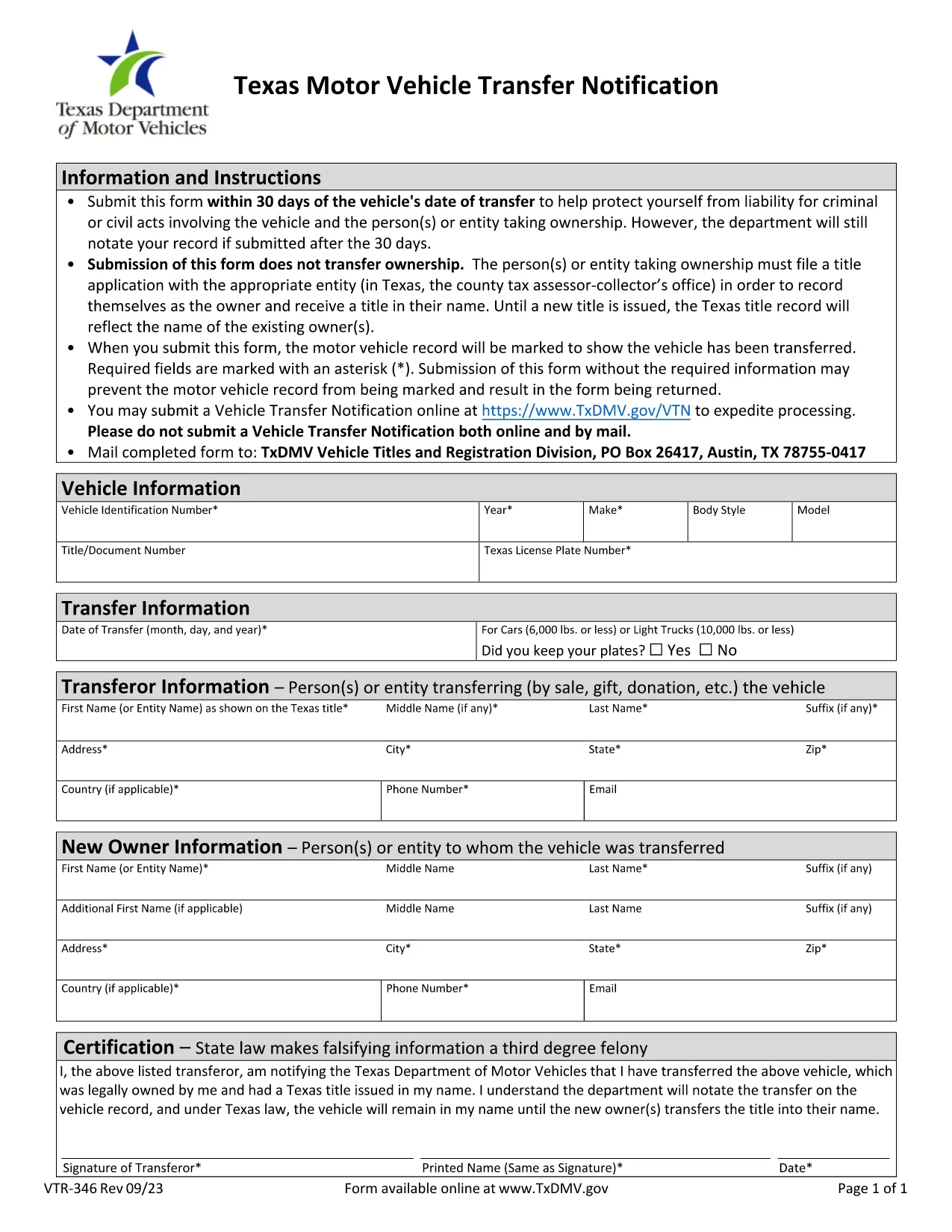
Application Form with Undertaking for Change of Ownership

  1. زبان انگلیسی
  2. کشور ایالات متحده آمریکا
  3. فعالیت ثبت نام خودرو
  4. بخش Department of Motor Vehicles
این فرم را پر کنید
Application Form with Undertaking for Change of Ownership

The Application Form with Undertaking for Change of Ownership is the official document required when you transfer the title of a vehicle, boat, or other registered asset to a new owner. This form not only captures the buyer and seller information but also includes an undertaking that protects the seller from future liabilities such as parking tickets or toll violations.

What Is This Form and When Is It Needed?

State motor vehicle departments (DMVs) require this form whenever a title is transferred. It is used for private sales, dealer-to-private sales, and any situation where ownership changes hands. The undertaking clause is essential because it formally releases the seller from responsibility after the transfer is recorded.

How to Complete the Form Online with Formize

Instead of printing, scanning, and mailing a paper copy, you can fill the form directly in your browser using the Formize PDF Filler. The process is fast, secure, and fully compliant with DMV requirements.

Common Mistakes to Avoid

  • Leaving the sale price or odometer reading blank.
  • Not signing the undertaking section.
  • Forgetting to include the VIN (Vehicle Identification Number) in the correct format.
  • Submitting the form without the required proof of identity for both parties.

Where to Submit the Completed Form

After you have filled, reviewed, and signed the form, you can:

  • Upload it through your state’s online DMV portal (if available).
  • Print and hand‑deliver it to your local tax office or DMV.
  • Mail the PDF to the address listed on the form’s instructions.

Using the fillable PDF ensures the data is captured accurately, reducing processing time and avoiding delays in title issuance.

سوالات متداول
  • Do I need to print the form after filling it online?

    No. The Formize PDF Filler lets you complete, sign, and save the form entirely online. Printing is only required if your local DMV asks for a hard copy.

  • What is the undertaking section for?

    The undertaking releases the seller from future liabilities (e.g., tickets, tolls) after the title transfer is recorded.

  • Can I use this form for a vehicle sold out of state?

    Yes, but you must also comply with the receiving state’s registration requirements. The form’s VIN and sale details remain valid nationwide.

  • How long does it take for the DMV to process the transfer?

    Processing times vary by state, but a correctly completed, electronically signed form typically speeds up the process to 5‑10 business days.

  • What documents should I keep after submitting the form?

    Keep a copy of the signed PDF, a receipt of submission (if online), and any proof of identity for both parties. These may be needed for future reference.

  • Is there a fee for filing this form?

    Yes, most states charge a title transfer fee. Check your local DMV’s fee schedule for the exact amount.

چگونه

نحوه پر کردن change of ownership form به صورت رایگان و آنلاین در 5 با مراحل آسان:

  1. 1
    Click the Fill‑out Button
    On this page, click the "Fill out this form" button to launch the Formize PDF Filler.
  2. 2
    Wait for the Formize PDF Filler to Load
    The fillable PDF will open in a secure browser window. No download or installation is required.
  3. 3
    Enter All Required Information
    Complete buyer and seller details, vehicle information, sale price, odometer reading, and the undertaking clause.
  4. 4
    Review and Electronically Sign
    Double‑check every field, then use the built‑in e‑signature tool to sign the form.
  5. 5
    Save or Submit
    Download the finished PDF for your records or submit it directly to the DMV if the portal supports online upload.
برنامه PDF Filler را فرم‌بندی کنید
در باره

فرم های ثبت نام خودرو

change of ownership form یکی از فرم‌های ثبت خودرو است که اسنادی است که برای ثبت وسیله نقلیه موتوری نزد مقامات دولتی مربوطه، معمولاً اداره وسایل نقلیه موتوری (DMV) یا آژانس‌های مشابه استفاده می‌شود. این فرم ها زمانی مورد نیاز است که شخصی یک وسیله نقلیه نو یا دست دوم خریداری می کند، مالکیت یک وسیله نقلیه را منتقل می کند، یا با وسیله نقلیه به حوزه قضایی جدید نقل مکان می کند.

فرم‌های ثبت نام خودروی خاص ممکن است بسته به حوزه قضایی متفاوت باشد، اما معمولاً به اطلاعات زیر نیاز دارند:

اطلاعات خودرو: این شامل جزئیات مربوط به خودرو، مانند مدل، مدل، سال، شماره شناسایی وسیله نقلیه (VIN) و قرائت کیلومتر شمار است.

اطلاعات مالک: فرم به اطلاعاتی در مورد مالک خودرو از جمله نام، آدرس، اطلاعات تماس و شماره گواهینامه رانندگی نیاز دارد.

اثبات مالکیت: بسته به شرایط، ممکن است به اثبات مالکیت نیاز باشد، مانند گواهی مالکیت، صورت‌حساب فروش، یا گواهی مبدا سازنده (برای خودروهای جدید).

اطلاعات بیمه: معمولاً به اثبات پوشش معتبر بیمه خودرو نیاز است. این ممکن است شامل ارائه شماره بیمه نامه، تاریخ پوشش و جزئیات شرکت بیمه باشد.

پرداخت هزینه‌ها: ثبت خودرو شامل پرداخت هزینه‌های مختلفی مانند هزینه‌های ثبت نام، مالیات، و احتمالاً سایر هزینه‌های خاص حوزه قضایی است.

علاوه بر این الزامات اساسی، برخی از حوزه های قضایی ممکن است فرم های اضافی یا الزامات اسنادی داشته باشند. به عنوان مثال، نتایج آزمایش گازهای گلخانه ای، بازرسی های ایمنی، یا اثبات اقامت ممکن است در مناطق خاصی ضروری باشد.

پس از تکمیل و ارسال فرم های ثبت نام خودرو، مقام دولتی گواهی ثبت، پلاک و برچسب های ثبت نام را صادر می کند. این اسناد نشان می دهد که خودرو به صورت قانونی ثبت شده و مجاز به کار در جاده های عمومی است.

مهم است که توجه داشته باشید که الزامات ثبت نام خودرو می تواند به طور قابل توجهی بسته به حوزه قضایی متفاوت باشد. بنابراین، توصیه می‌شود برای فرم‌ها و رویه‌های خاص مربوط به محل شما با DMV محلی یا آژانس معادل آن مشورت کنید.

امکانات

پرکننده PDF

ساده ترین راه برای پر کردن فرم های PDF به صورت آنلاین

  • به سرعت change of ownership form را پر کنید
    به دنبال راهی برای پر کردن سریع change of ownership form آنلاین هستید؟ با پرکننده فرم PDF رایگان آنلاین ما، می‌دانید چگونه این سند pdf را در کمتر از یک دقیقه ویرایش و پر کنید.
  • آسان برای استفاده از ویرایشگر PDF آنلاین
    آیا از چاپ فایل‌های پی‌دی‌اف خسته شده‌اید تا بتوانید آن‌ها را قبل از اسکن مجدد و ارسال مجدد، ویرایش کنید؟ اسناد PDF را به صورت آنلاین به صورت رایگان ویرایش کنید. از ویرایشگر pdf آنلاین ما برای صرفه جویی در زمان و کاغذ استفاده کنید.
  • ابزارهای عالی، همه پلتفرم ها
    آیا نمی دانید که چگونه change of ownership form را در مک پر کنید، یا شاید چگونه از پرکننده PDF به صورت رایگان استفاده کنید؟ ابزارهای PDF آنلاین ما روی همه پلتفرم ها کار می کنند.
  • ذخیره سازی امن فایل
    فایل‌های تکمیل‌شده «change of ownership form» در یک پایگاه داده ایمن که توسط میزبانی ابری آمازون مدیریت می‌شود، ذخیره می‌شوند. شما می توانید فایل های خود را در هر زمان از سیستم ما حذف کنید. در هر صورت این فایل ها پس از 24 ساعت به صورت خودکار پاک می شوند.
  • چت با change of ownership form
    با «change of ownership form» در Chatize که یک دستیار PDF خوان رایگان است، گپ بزنید. سوال بپرسید و از "change of ownership form" پاسخ بگیرید. فقط روی دکمه Chat With Document در بالا کلیک کنید.

حذف جلسه پر کردن

جلسه پر کردن انتخاب شده را حذف کنید؟ در این صورت پیشرفت شما در تکمیل فرم از بین خواهد رفت.

حذف جلسه ویرایش

جلسه ویرایش انتخابی حذف شود؟ در این صورت پیشرفت شما در ایجاد و ویرایش فرم از بین خواهد رفت.