
زبان را انتخاب کنید

Fillable Form VTR-228 – Texas DMV Vehicle Title Transfer

  1. زبان انگلیسی
  2. کشور ایالات متحده آمریکا
  3. فعالیت ثبت نام خودرو
  4. بخش Department of Motor Vehicles
این فرم را پر کنید
Fillable Form VTR-228 – Texas DMV Vehicle Title Transfer

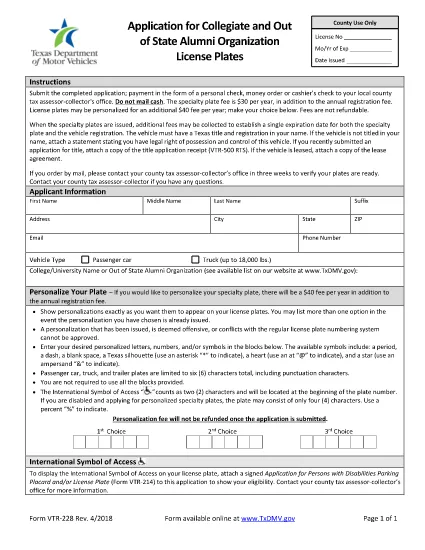
Form VTR-228 is the Texas Department of Motor Vehicles (DMV) application used to request a certified copy of a vehicle title or to verify vehicle information. Whether you’re a dealer, a private owner, or an attorney, you’ll need this form to obtain official records for legal or resale purposes.

What is Form VTR-228?

The VTR-228 is a fillable PDF that captures details such as the vehicle identification number (VIN), owner information, and the specific type of record you’re requesting. It is accepted by all Texas county tax offices and the Texas DMV.

Who Needs to Complete VTR-228?

  • Vehicle owners who have lost their title.
  • Dealers needing a certified copy for a sale.
  • Lawyers or lienholders requesting verification of ownership.
  • Anyone filing a legal claim that requires official vehicle records.

How to Fill Out VTR-228 Online with Formize

Instead of downloading the PDF and opening it in a separate editor, simply click the "Fill out this form" button on this page. The Formize PDF Filler app will load automatically, letting you complete every field directly in your browser.

Common Mistakes to Avoid

  • Leaving the VIN field blank or entering an incorrect number.
  • Forgetting to sign and date the form (the electronic signature is accepted).
  • Providing an outdated address – the DMV will mail the certified copy to the address on the form.
  • Submitting the form without the required payment receipt.

Where to Submit the Completed Form

After you finish the online fill‑out, you can:

  • Print and mail it to your local Texas County Tax Office.
  • Upload the completed PDF through the Texas DMV e‑services portal.
  • Bring a printed copy to any Texas DMV office.

Using Formize ensures the PDF is correctly formatted, so you avoid delays caused by illegible handwriting or missing fields.

سوالات متداول
  • Is Form VTR-228 available for free?

    The PDF itself is free to download, but the Texas DMV charges a processing fee for certified copies. You can pay this fee online when you submit the form.

  • Can I submit VTR-228 without a signature?

    No. The form requires a signature—either handwritten on a printed copy or an electronic signature via Formize.

  • How long does it take to receive the certified copy?

    Processing typically takes 5‑7 business days after the DMV receives the completed form and payment.

  • Do I need a notary for VTR-228?

    A notary is not required for the VTR-228 itself, but some counties may ask for notarized documents if the request is on behalf of another party.

  • What if I enter the wrong VIN?

    The DMV will reject the request. Correct the VIN in the Formize editor and resubmit to avoid delays.

  • Can I use the same form for out‑of‑state vehicles?

    VTR-228 is specific to Texas‑registered vehicles. For out‑of‑state titles, contact the appropriate state DMV.

  • Is the Formize filler secure?

    Yes. All data is encrypted in transit and never stored on our servers after you download the completed PDF.

چگونه

نحوه پر کردن form vtr-228 به صورت رایگان و آنلاین در 5 با مراحل آسان:

  1. 1
    Open the Fillable Form
    Click the blue "Fill out this form" button on the page. The Formize PDF Filler loads in seconds.
  2. 2
    Enter Your Information
    Complete each field – VIN, owner name, address, and the type of record you need. The interface validates entries in real time.
  3. 3
    Add Your Signature
    Use the built‑in electronic signature tool to sign the form. No need to print or scan.
  4. 4
    Review and Submit
    Double‑check all entries, then click "Submit". You can download a copy for your records or send it directly to the Texas DMV.
  5. 5
    Pay the Required Fee
    Follow the on‑screen instructions to pay the processing fee online, or print the payment voucher if you prefer mailing.
برنامه PDF Filler را فرم‌بندی کنید
در باره

فرم های ثبت نام خودرو

اگر وسیله نقلیه موتوری، تریلر یا قایق دارید یا اجاره می‌کنید، باید تعهدات خاصی را برای ثبت قانونی و ایمن نگه داشتن وسیله نقلیه خود رعایت کنید.

form vtr-228 یکی از فرم‌های ثبت نام خودرو است که برای ثبت نام وسیله نقلیه موتوری در مراجع دولتی یا استانی مربوطه استفاده می‌شود. این فرم ها معمولاً زمانی که شخصی یک وسیله نقلیه نو یا دست دوم خریداری می کند یا زمانی که با وسیله نقلیه به ایالت یا استان جدید نقل مکان می کند، مورد نیاز است.

الزامات دقیق و فرم های مورد نیاز برای ثبت نام وسیله نقلیه می تواند بسته به مکان متفاوت باشد، اما به طور کلی، این فرآیند شامل ارائه اطلاعات در مورد وسیله نقلیه، مالک و هرگونه حق حبس روی وسیله نقلیه است.

پس از ارسال فرم ها و هزینه های ثبت نام، مقامات ایالتی یا استانی گواهی ثبت یا پلاک را برای صاحب وسیله نقلیه صادر می کنند. این ثبت اجازه می دهد تا خودرو به طور قانونی در جاده ها و بزرگراه های عمومی اداره شود.

امکانات

پرکننده PDF

ساده ترین راه برای پر کردن فرم های PDF به صورت آنلاین

  • به سرعت form vtr-228 را پر کنید
    به دنبال راهی برای پر کردن سریع form vtr-228 آنلاین هستید؟ با پرکننده فرم PDF رایگان آنلاین ما، می‌دانید چگونه این سند pdf را در کمتر از یک دقیقه ویرایش و پر کنید.
  • آسان برای استفاده از ویرایشگر PDF آنلاین
    آیا از چاپ فایل‌های پی‌دی‌اف خسته شده‌اید تا بتوانید آن‌ها را قبل از اسکن مجدد و ارسال مجدد، ویرایش کنید؟ اسناد PDF را به صورت آنلاین به صورت رایگان ویرایش کنید. از ویرایشگر pdf آنلاین ما برای صرفه جویی در زمان و کاغذ استفاده کنید.
  • ابزارهای عالی، همه پلتفرم ها
    آیا نمی دانید که چگونه form vtr-228 را در مک پر کنید، یا شاید چگونه از پرکننده PDF به صورت رایگان استفاده کنید؟ ابزارهای PDF آنلاین ما روی همه پلتفرم ها کار می کنند.
  • ذخیره سازی امن فایل
    فایل‌های تکمیل‌شده «form vtr-228» در یک پایگاه داده ایمن که توسط میزبانی ابری آمازون مدیریت می‌شود، ذخیره می‌شوند. شما می توانید فایل های خود را در هر زمان از سیستم ما حذف کنید. در هر صورت این فایل ها پس از 24 ساعت به صورت خودکار پاک می شوند.
  • چت با form vtr-228
    با «form vtr-228» در Chatize که یک دستیار PDF خوان رایگان است، گپ بزنید. سوال بپرسید و از "form vtr-228" پاسخ بگیرید. فقط روی دکمه Chat With Document در بالا کلیک کنید.

حذف جلسه پر کردن

جلسه پر کردن انتخاب شده را حذف کنید؟ در این صورت پیشرفت شما در تکمیل فرم از بین خواهد رفت.

حذف جلسه ویرایش

جلسه ویرایش انتخابی حذف شود؟ در این صورت پیشرفت شما در ایجاد و ویرایش فرم از بین خواهد رفت.