
زبان را انتخاب کنید

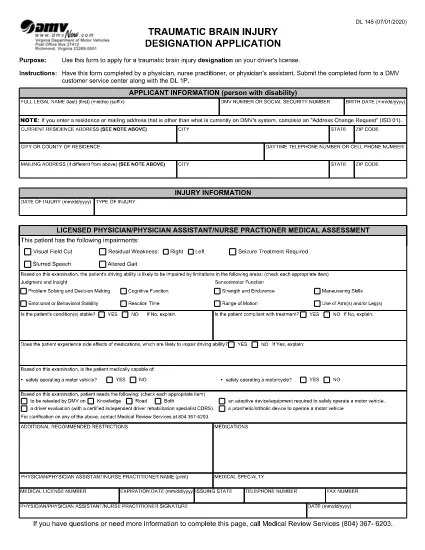
Virginia DL-145 Driver’s License Form – Fillable PDF

  1. زبان انگلیسی
  2. کشور ایالات متحده آمریکا
  3. فعالیت گواهینامه رانندگی
  4. بخش DMV
این فرم را پر کنید
Virginia DL-145 Driver’s License Form – Fillable PDF

What Is the DL-145 Form?

The DL-145 is the official Virginia Department of Motor Vehicles (DMV) application used to request a driver’s license, learner’s permit, or ID card. It gathers personal information, residency proof, and eligibility details required by state law.

How to Complete the DL-145 Online

Instead of printing, filling out by hand, and scanning, you can complete the DL-145 instantly on our page:

  1. Click the Fill out this form button below.
  2. Wait a few seconds while the Formize PDF Filler app loads the fillable version of the DL-145.
  3. Enter your information in the interactive fields – the form saves your progress automatically.
  4. When you’re done, choose to download a completed PDF or print it directly for submission.

Common Mistakes to Avoid

  • Incorrect address format: Use the exact street address as it appears on your utility bill or lease.
  • Missing signatures: The applicant and any required sponsors must sign the designated fields.
  • Out‑of‑date documents: Ensure all supporting documents (e.g., birth certificate, SSN card) are current and legible.
  • Skipping required checkboxes: The DMV validates each required box; unselected boxes cause delays.

Where to Submit the Completed Form

After you download the filled DL-145, bring it to any Virginia DMV customer service center along with the required supporting documents and payment. Some locations also accept mail‑in submissions; check the Virginia DMV website for specific instructions.

Why Use Formize’s Fillable PDF

Formize provides a secure, browser‑based PDF filler that eliminates the need for third‑party software. Benefits include:

  • Instant loading – no downloads or installations.
  • Auto‑save feature prevents data loss.
  • Fully compliant with Virginia DMV formatting requirements.
  • Free and accessible from any device.
سوالات متداول
  • Is the DL-145 form available for free?

    Yes. The Virginia DMV provides the DL-145 PDF at no cost, and Formize lets you fill it out online for free.

  • Can I save my progress and finish later?

    The Formize filler auto‑saves your data while the browser session is open. For longer breaks, download a partially completed PDF and reopen it later.

  • Do I need special software to use the fillable PDF?

    No. The Formize PDF Filler runs entirely in your web browser—no Adobe Acrobat or other editor required.

  • What documents must I bring with the completed DL-145?

    Typically you need proof of identity, residency, Social Security number, and any applicable fee receipts. Check the Virginia DMV checklist for the exact list.

  • Can I submit the DL-145 electronically?

    The Virginia DMV still requires a printed, signed form for most license types. Some renewals may be completed online, but the DL-145 itself is submitted in person or by mail.

  • What if I make a mistake after downloading?

    You can reopen the downloaded PDF in any standard PDF editor, correct the error, and re‑print. Alternatively, start a new session in Formize and fill the form again.

  • Is my personal information safe when using Formize?

    Formize processes data locally in your browser and does not store any personal information on its servers.

چگونه

نحوه پر کردن DL-145 به صورت رایگان و آنلاین در 5 با مراحل آسان:

  1. 1
    Open the Fillable Form
    Click the "Fill out this form" button on the page. The Formize PDF Filler will open the DL-145 in your browser.
  2. 2
    Enter Your Information
    Fill each field with accurate data. The form automatically saves your entries as you type.
  3. 3
    Review & Validate
    Double‑check all entries, especially signatures and checkboxes, to ensure the DMV accepts the form.
  4. 4
    Download or Print
    When finished, click "Download" to save a copy or "Print" to produce a hard copy for submission.
  5. 5
    Submit to the DMV
    Take the printed form and required documents to a Virginia DMV office or follow the mail‑in instructions on the DMV website.
برنامه PDF Filler را فرم‌بندی کنید
در باره

فرم های درخواست گواهینامه رانندگی

در اکثر کشورها، داشتن گواهینامه رانندگی قبل از اینکه بتوانید به جاده بروید، الزامی است. گرفتن گواهینامه رانندگی یک نقطه عطف مهم برای کسانی است که می خواهند رانندگی کنند.

DL-145 یکی از فرم‌های درخواست گواهینامه رانندگی است که اسنادی برای جمع‌آوری اطلاعات از افرادی است که می‌خواهند برای گواهینامه رانندگی درخواست دهند. معمولاً شامل فیلدهایی برای نام متقاضی، تاریخ تولد، شماره شناسایی، اطلاعات تماس و همچنین سابقه گواهینامه رانندگی و تجربه آنها می باشد.

امکانات

پرکننده PDF

ساده ترین راه برای پر کردن فرم های PDF به صورت آنلاین

  • به سرعت DL-145 را پر کنید
    به دنبال راهی برای پر کردن سریع DL-145 آنلاین هستید؟ با پرکننده فرم PDF رایگان آنلاین ما، می‌دانید چگونه این سند pdf را در کمتر از یک دقیقه ویرایش و پر کنید.
  • آسان برای استفاده از ویرایشگر PDF آنلاین
    آیا از چاپ فایل‌های پی‌دی‌اف خسته شده‌اید تا بتوانید آن‌ها را قبل از اسکن مجدد و ارسال مجدد، ویرایش کنید؟ اسناد PDF را به صورت آنلاین به صورت رایگان ویرایش کنید. از ویرایشگر pdf آنلاین ما برای صرفه جویی در زمان و کاغذ استفاده کنید.
  • ابزارهای عالی، همه پلتفرم ها
    آیا نمی دانید که چگونه DL-145 را در مک پر کنید، یا شاید چگونه از پرکننده PDF به صورت رایگان استفاده کنید؟ ابزارهای PDF آنلاین ما روی همه پلتفرم ها کار می کنند.
  • ذخیره سازی امن فایل
    فایل‌های تکمیل‌شده «DL-145» در یک پایگاه داده ایمن که توسط میزبانی ابری آمازون مدیریت می‌شود، ذخیره می‌شوند. شما می توانید فایل های خود را در هر زمان از سیستم ما حذف کنید. در هر صورت این فایل ها پس از 24 ساعت به صورت خودکار پاک می شوند.
  • چت با DL-145
    با «DL-145» در Chatize که یک دستیار PDF خوان رایگان است، گپ بزنید. سوال بپرسید و از "DL-145" پاسخ بگیرید. فقط روی دکمه Chat With Document در بالا کلیک کنید.

حذف جلسه پر کردن

جلسه پر کردن انتخاب شده را حذف کنید؟ در این صورت پیشرفت شما در تکمیل فرم از بین خواهد رفت.

حذف جلسه ویرایش

جلسه ویرایش انتخابی حذف شود؟ در این صورت پیشرفت شما در ایجاد و ویرایش فرم از بین خواهد رفت.