

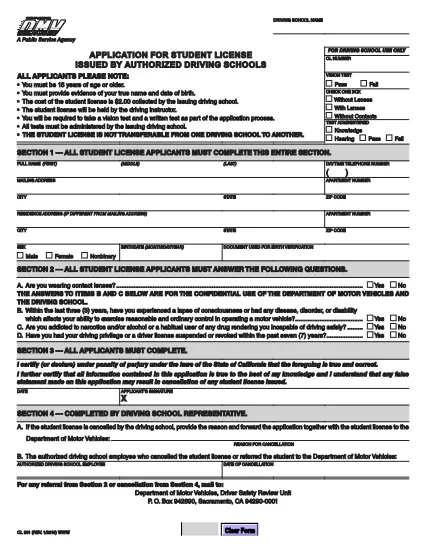

فرم های درخواست گواهینامه رانندگی
OL 801 یکی از فرمهای گواهینامه رانندگی است که در فرآیند اخذ یا تمدید گواهینامه رانندگی مورد استفاده قرار میگیرد، که یک سند رسمی صادر شده توسط دولت است که به افراد اجازه میدهد تا با وسیله نقلیه موتوری در جادههای عمومی رانندگی کنند. این فرم ها ممکن است بسته به حوزه قضایی متفاوت باشد، اما به طور کلی شامل موارد زیر است:
فرم درخواست: این فرم برای درخواست گواهینامه رانندگی استفاده می شود و معمولاً اطلاعات شخصی مانند نام، آدرس، تاریخ تولد و شماره تامین اجتماعی را می خواهد.
اسناد شناسایی: معمولاً افراد به همراه فرم درخواست، باید مدارک شناسایی خاصی را برای اثبات هویت، اقامت و حضور قانونی خود در کشور ارائه دهند. اینها ممکن است شامل گذرنامه معتبر، گواهی تولد، کارت تامین اجتماعی یا سایر مدارک شناسایی صادر شده توسط دولت باشد.
اثبات اقامت: بسیاری از حوزههای قضایی متقاضیان را ملزم میکنند که برای تأیید آدرس خود، مدرکی مبنی بر اقامت، مانند قبض آب و برق، قرارداد اجاره، یا صورتحساب بانکی ارائه دهند.
فرم معاینه پزشکی: برخی از حوزههای قضایی ممکن است نیاز به معاینه پزشکی داشته باشند تا اطمینان حاصل شود که متقاضی شرایط جسمی و روحی لازم برای رانندگی ایمن را برآورده میکند. یک متخصص پزشکی معمولاً این فرم را تکمیل می کند.
فرم تکمیل آموزش راننده: برای رانندگانی که بار اول میشوند، ممکن است تکمیل برنامه آموزشی راننده مورد نیاز باشد. اغلب برای درخواست گواهینامه رانندگی، فرم یا گواهینامه ای که نشان دهنده تکمیل موفقیت آمیز آن باشد، ضروری است.
فرم تست بینایی: یک تست بینایی معمولاً در طول فرآیند درخواست گواهینامه رانندگی انجام می شود. یک متخصص مراقبت از چشم یا پرسنل مجاز، حدت بینایی متقاضی را ارزیابی کرده و فرم مورد نیاز را تکمیل می کند.
این فرم ها معمولاً در دپارتمان محلی وسایل نقلیه موتوری (DMV) یا آژانس دولتی معادل مسئول صدور گواهینامه رانندگی در دسترس هستند. مهم است که الزامات و فرم های خاص مربوط به حوزه قضایی خود را بررسی کنید، زیرا آنها می توانند متفاوت باشند.