زبان را انتخاب کنید

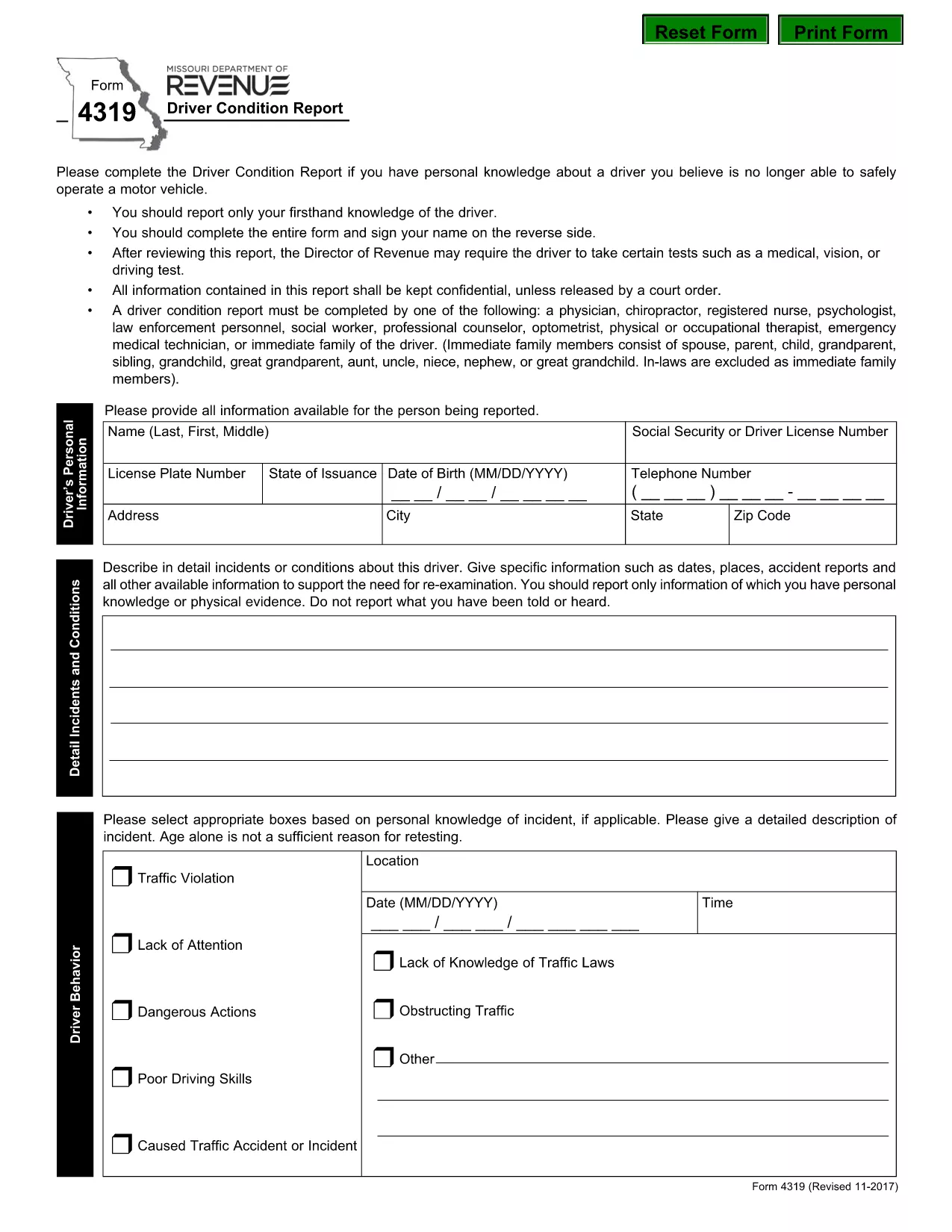
Form 4319 – Missouri Driver Condition Report

  1. زبان انگلیسی
  2. کشور ایالات متحده آمریکا
  3. فعالیت گواهینامه رانندگی
  4. دولت میسوری
این فرم را پر کنید
Form 4319 – Missouri Driver Condition Report

The Missouri Form 4319, also known as the Driver Condition Report, is required when a driver’s medical, vision, or overall condition may affect safe operation of a vehicle. This form is used by the Missouri Department of Revenue to evaluate whether additional testing or restrictions are needed.

What is Form 4319?

Form 4319 collects detailed information about a driver’s health, recent accidents, and any conditions that could impair driving ability. The report is confidential and is only shared with authorized officials or a court order.

How to Fill Out the Driver Condition Report Online

Instead of downloading and editing the PDF manually, simply click the “Fill out this form” button on this page. The Formize PDF Filler app will load in your browser, allowing you to complete the form directly, save your progress, and submit it electronically.

Common Mistakes to Avoid

  • Leaving any required field blank – the filler will highlight missing information before you can submit.
  • Signing on the reverse side of the PDF – use the built‑in signature field in the online filler.
  • Providing outdated medical information – ensure all health details are current.
  • Forgetting to attach supporting documents (e.g., physician’s statement) when required.

Where to Submit the Completed Form

After completing the form, you can:

  • Submit electronically through the Formize platform (recommended).
  • Print and mail the signed form to the Missouri Department of Revenue, Driver Licensing Division.

Keep a copy of the completed PDF for your records.

Download the Fillable PDF

If you prefer to work offline, you can download the official fillable PDF directly from the Missouri Department of Revenue:

Download Form 4319 (PDF)

سوالات متداول
  • What is the purpose of Form 4319?

    Form 4319 is used by the Missouri Department of Revenue to assess a driver’s medical, vision, or other conditions that could affect safe driving.

  • Can I fill out Form 4319 on a mobile device?

    Yes. The Formize PDF Filler works on most smartphones and tablets with a modern browser.

  • Do I need a doctor’s signature on this form?

    If a physician’s statement is required, you must attach a signed statement from your doctor as a separate PDF attachment.

  • How long does it take for the Department of Revenue to process the report?

    Processing times vary, but most reviews are completed within 10‑14 business days after receipt.

  • Is the information on Form 4319 confidential?

    Yes. All information is kept confidential and is only disclosed under a court order or as required by law.

  • What should I do if I make a mistake after submitting?

    Contact the Missouri Department of Revenue’s Driver Licensing Division immediately to request a correction or to submit a revised form.

  • Can I submit the form by email?

    The online Formize submission is the preferred method. If you mail a printed copy, you can also email a scanned version to the department’s designated address.

  • Is there a fee to submit Form 4319?

    No, there is no fee to complete or submit Form 4319.

چگونه

نحوه پر کردن form 4319 به صورت رایگان و آنلاین در 5 با مراحل آسان:

  1. 1
    Open the Fillable Form
    Click the “Fill out this form” button on the page. The Formize PDF Filler will open in a new tab.
  2. 2
    Enter Your Information
    Complete each field. Required fields are highlighted. Use the drop‑down menus and date pickers for easy entry.
  3. 3
    Add Your Signature
    Click the signature box, type your name, and the filler will create a digital signature.
  4. 4
    Save and Review
    Press the “Save” button to store a copy on your device. Review all entries for accuracy.
  5. 5
    Submit or Download
    Choose “Submit” to send the form directly to the Missouri Department of Revenue, or click “Download” to get a PDF copy for mailing.
برنامه PDF Filler را فرم‌بندی کنید
در باره

فرم های درخواست گواهینامه رانندگی

در اکثر کشورها، داشتن گواهینامه رانندگی قبل از اینکه بتوانید به جاده بروید، الزامی است. گرفتن گواهینامه رانندگی یک نقطه عطف مهم برای کسانی است که می خواهند رانندگی کنند.

form 4319 یکی از فرم‌های درخواست گواهینامه رانندگی است که اسنادی برای جمع‌آوری اطلاعات از افرادی است که می‌خواهند برای گواهینامه رانندگی درخواست دهند. معمولاً شامل فیلدهایی برای نام متقاضی، تاریخ تولد، شماره شناسایی، اطلاعات تماس و همچنین سابقه گواهینامه رانندگی و تجربه آنها می باشد.

امکانات

پرکننده PDF

ساده ترین راه برای پر کردن فرم های PDF به صورت آنلاین

  • به سرعت form 4319 را پر کنید
    به دنبال راهی برای پر کردن سریع form 4319 آنلاین هستید؟ با پرکننده فرم PDF رایگان آنلاین ما، می‌دانید چگونه این سند pdf را در کمتر از یک دقیقه ویرایش و پر کنید.
  • آسان برای استفاده از ویرایشگر PDF آنلاین
    آیا از چاپ فایل‌های پی‌دی‌اف خسته شده‌اید تا بتوانید آن‌ها را قبل از اسکن مجدد و ارسال مجدد، ویرایش کنید؟ اسناد PDF را به صورت آنلاین به صورت رایگان ویرایش کنید. از ویرایشگر pdf آنلاین ما برای صرفه جویی در زمان و کاغذ استفاده کنید.
  • ابزارهای عالی، همه پلتفرم ها
    آیا نمی دانید که چگونه form 4319 را در مک پر کنید، یا شاید چگونه از پرکننده PDF به صورت رایگان استفاده کنید؟ ابزارهای PDF آنلاین ما روی همه پلتفرم ها کار می کنند.
  • ذخیره سازی امن فایل
    فایل‌های تکمیل‌شده «form 4319» در یک پایگاه داده ایمن که توسط میزبانی ابری آمازون مدیریت می‌شود، ذخیره می‌شوند. شما می توانید فایل های خود را در هر زمان از سیستم ما حذف کنید. در هر صورت این فایل ها پس از 24 ساعت به صورت خودکار پاک می شوند.
  • چت با form 4319
    با «form 4319» در Chatize که یک دستیار PDF خوان رایگان است، گپ بزنید. سوال بپرسید و از "form 4319" پاسخ بگیرید. فقط روی دکمه Chat With Document در بالا کلیک کنید.

حذف جلسه پر کردن

جلسه پر کردن انتخاب شده را حذف کنید؟ در این صورت پیشرفت شما در تکمیل فرم از بین خواهد رفت.

حذف جلسه ویرایش

جلسه ویرایش انتخابی حذف شود؟ در این صورت پیشرفت شما در ایجاد و ویرایش فرم از بین خواهد رفت.