
زبان را انتخاب کنید

Nevada DMV Form 301 – Certification of Attendance (Fillable PDF)

  1. زبان انگلیسی
  2. کشور ایالات متحده آمریکا
  3. فعالیت گواهینامه رانندگی
  4. دولت نوادا
این فرم را پر کنید
Nevada DMV Form 301 – Certification of Attendance (Fillable PDF)

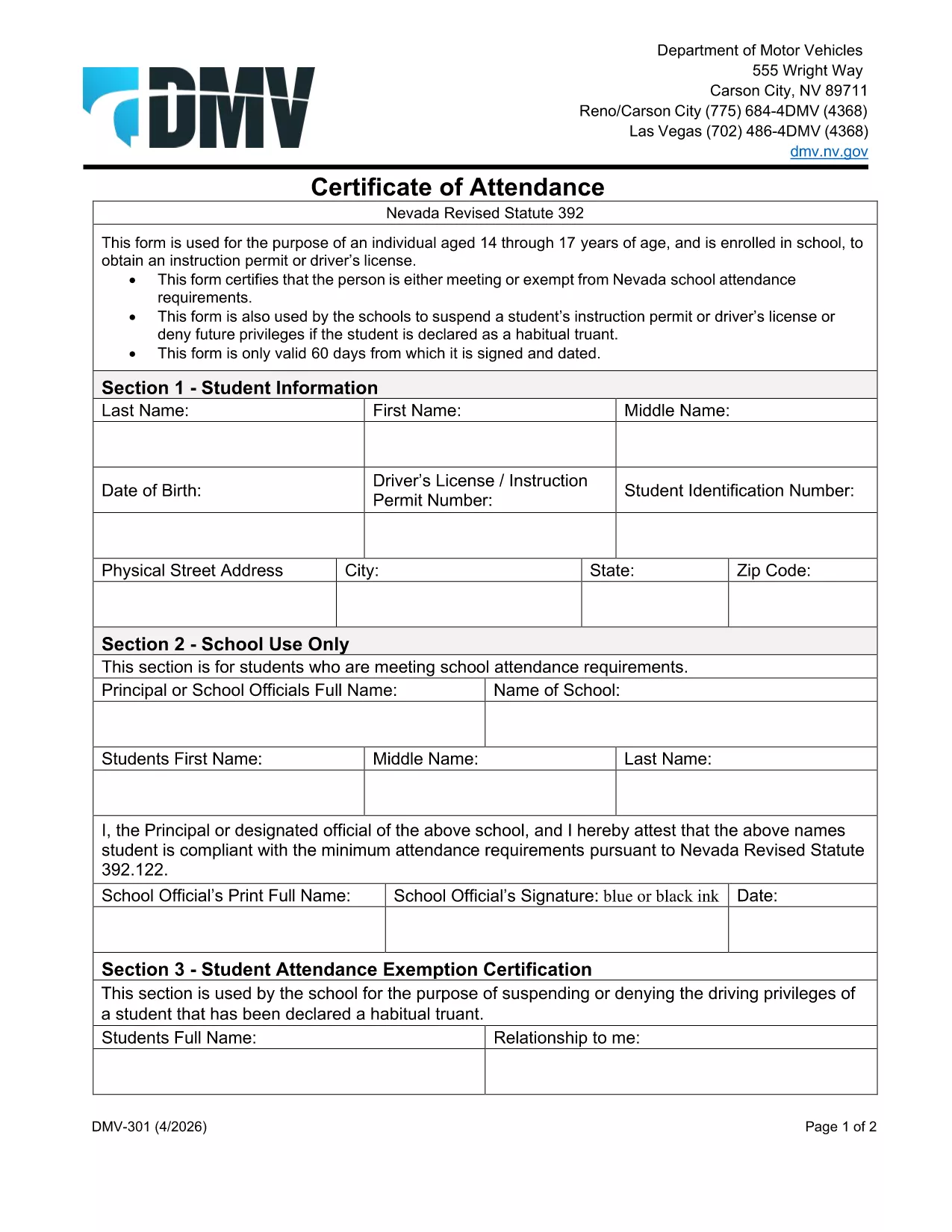
The Nevada Department of Motor Vehicles (DMV) requires Form 301 – Certification of Attendance for teens ages 14‑18 who are enrolled in school and are applying for an instruction permit or driver’s license. This form verifies that the student meets the state’s school attendance requirements or is exempt.

What Is DMV Form 301?

Form 301 is a short, one‑page certificate completed by the student, a parent/guardian, and the school. It is used to:

  • Confirm regular school attendance
  • Document any legal exemption
  • Allow the DMV to issue an instruction permit or driver’s license

How to Complete the Certification of Attendance

Follow the simple steps below. The form is fully fillable online, so you don’t need any PDF editor.

  1. Click the "Fill out this form" button on this page.
  2. Wait a few seconds while the Formize PDF Filler app loads the fillable DMV 301 PDF.
  3. Enter the student’s printed name, date of birth, and school information in the designated fields.
  4. Have the parent/guardian sign the required section electronically.
  5. If you are a school administrator, complete the "School Use Only" part and add the school seal.
  6. When all fields are completed, click Save to download a completed copy, or click Print to bring a hard copy to the DMV.

Common Mistakes to Avoid

To ensure your form is accepted, avoid these frequent errors:

  • Leaving any required field blank – the filler will highlight missing data.
  • Using an illegible signature – the electronic signature must be clear.
  • Submitting an outdated school name or address – verify the information with your school office.
  • Forgetting to date the form – the DMV requires a current date.

Where to Submit the Form

After you’ve filled and signed Form 301, bring the printed copy (or a secured digital version on a tablet) to any Nevada DMV office together with the required identification documents. The form is accepted at all DMV locations across Nevada.

Download the Fillable PDF Instantly

Ready to start? Click the button above, let Formize load the fillable PDF, and complete the Certification of Attendance in minutes.

سوالات متداول
  • Who needs to complete DMV Form 301?

    Any Nevada resident between 14 and 18 years old who is enrolled in school and is applying for an instruction permit or driver’s license must submit a completed Form 301.

  • Can I fill out Form 301 on a mobile device?

    Yes. The Formize PDF Filler works on smartphones, tablets, and computers, allowing you to complete the form on any device.

  • Do I need a physical signature?

    The DMV accepts an electronic signature entered through the fillable PDF. Print the form with the signature if you prefer a hard copy.

  • What if my school does not have a seal?

    If the school lacks an official seal, have the school administrator write the school name and date in the "School Use Only" section and sign it.

  • How long is the Certification of Attendance valid?

    The form is valid for the specific permit or license application it accompanies. If the application is delayed, a new form may be required.

  • Where can I submit the completed Form 301?

    Bring the completed form to any Nevada DMV office, or submit it as part of your online permit application if the DMV offers that option.

  • Is there a fee to download the PDF?

    No. The PDF is provided free of charge; you only pay the standard DMV fees for the permit or license.

چگونه

نحوه پر کردن DMV 301 به صورت رایگان و آنلاین در 4 با مراحل آسان:

  1. 1
    Open the Fillable Form
    Click the "Fill out this form" button on the page. The Formize PDF Filler app will load the DMV 301 PDF automatically.
  2. 2
    Enter Required Information
    Type the student's name, date of birth, school details, and any exemption notes directly into the highlighted fields.
  3. 3
    Add Signatures
    Use your mouse or touchscreen to sign the parent/guardian section. School officials can add their signature and seal if needed.
  4. 4
    Save or Print
    When all fields are completed, click "Save" to download the completed PDF or "Print" to obtain a hard‑copy for the DMV.
برنامه PDF Filler را فرم‌بندی کنید
در باره

فرم های درخواست گواهینامه رانندگی

DMV 301 یکی از فرم‌های گواهینامه رانندگی است که برای درخواست گواهینامه رانندگی یا درخواست خدمات مختلف مرتبط با گواهینامه رانندگی استفاده می‌شود. این فرم ها معمولاً توسط دپارتمان یا آژانس مسئول صدور گواهینامه رانندگی در یک حوزه قضایی خاص مانند وزارت وسایل نقلیه موتوری (DMV) در ایالات متحده ارائه می شود.

فرم های رایج گواهینامه رانندگی عبارتند از:

برنامه گواهینامه رانندگی: این فرم برای درخواست گواهینامه رانندگی جدید یا تمدید گواهینامه موجود استفاده می شود. معمولاً به اطلاعات شخصی مانند نام، آدرس، تاریخ تولد و شماره تأمین اجتماعی نیاز دارد.

اسناد شناسایی: برخی از حوزه‌های قضایی به مدارک شناسایی خاصی برای تأیید هویت و اقامت متقاضی نیاز دارند. اینها ممکن است شامل فرم هایی مانند شناسنامه، گذرنامه یا کارت تامین اجتماعی باشد.

معاینه بینایی: بسیاری از درخواست‌های گواهینامه رانندگی به فرم معاینه بینایی نیاز دارند، که در آن یک متخصص پزشکی مجاز یا متخصص مراقبت از چشم گواهی می‌دهد که متقاضی حداقل شرایط بینایی را برای رانندگی دارد.

فرم‌های آموزش راننده: در برخی موارد، افراد ممکن است نیاز به ارائه مدرکی دال بر تکمیل دوره آموزشی راننده داشته باشند، مانند گواهی پایان تحصیلات راننده یا فرمی که توسط یک مربی امضا شده است.

ارزیابی پزشکی: برخی شرایط پزشکی ممکن است نیاز به تکمیل فرم های اضافی توسط متخصص مراقبت های بهداشتی داشته باشد. این فرم ها آمادگی جسمانی و روانی متقاضی را برای رانندگی تأیید می کند.

فرم تغییر آدرس: اگر دارنده گواهینامه رانندگی به آدرس جدیدی نقل مکان کند، ممکن است لازم باشد فرم تغییر آدرس را برای به روز رسانی اطلاعات گواهینامه رانندگی خود پر کند.

فرم های گواهینامه رانندگی را می توان از دفتر محلی DMV دریافت کرد یا از وب سایت آنها دانلود کرد. مهم است که فرم های مورد نیاز را به همراه هر گونه مدارک پشتیبان با دقت تکمیل و ارسال کنید تا از یک روند نرم افزاری یا خدمات اطمینان حاصل شود.

امکانات

پرکننده PDF

ساده ترین راه برای پر کردن فرم های PDF به صورت آنلاین

  • به سرعت DMV 301 را پر کنید
    به دنبال راهی برای پر کردن سریع DMV 301 آنلاین هستید؟ با پرکننده فرم PDF رایگان آنلاین ما، می‌دانید چگونه این سند pdf را در کمتر از یک دقیقه ویرایش و پر کنید.
  • آسان برای استفاده از ویرایشگر PDF آنلاین
    آیا از چاپ فایل‌های پی‌دی‌اف خسته شده‌اید تا بتوانید آن‌ها را قبل از اسکن مجدد و ارسال مجدد، ویرایش کنید؟ اسناد PDF را به صورت آنلاین به صورت رایگان ویرایش کنید. از ویرایشگر pdf آنلاین ما برای صرفه جویی در زمان و کاغذ استفاده کنید.
  • ابزارهای عالی، همه پلتفرم ها
    آیا نمی دانید که چگونه DMV 301 را در مک پر کنید، یا شاید چگونه از پرکننده PDF به صورت رایگان استفاده کنید؟ ابزارهای PDF آنلاین ما روی همه پلتفرم ها کار می کنند.
  • ذخیره سازی امن فایل
    فایل‌های تکمیل‌شده «DMV 301» در یک پایگاه داده ایمن که توسط میزبانی ابری آمازون مدیریت می‌شود، ذخیره می‌شوند. شما می توانید فایل های خود را در هر زمان از سیستم ما حذف کنید. در هر صورت این فایل ها پس از 24 ساعت به صورت خودکار پاک می شوند.
  • چت با DMV 301
    با «DMV 301» در Chatize که یک دستیار PDF خوان رایگان است، گپ بزنید. سوال بپرسید و از "DMV 301" پاسخ بگیرید. فقط روی دکمه Chat With Document در بالا کلیک کنید.

حذف جلسه پر کردن

جلسه پر کردن انتخاب شده را حذف کنید؟ در این صورت پیشرفت شما در تکمیل فرم از بین خواهد رفت.

حذف جلسه ویرایش

جلسه ویرایش انتخابی حذف شود؟ در این صورت پیشرفت شما در ایجاد و ویرایش فرم از بین خواهد رفت.