
زبان را انتخاب کنید

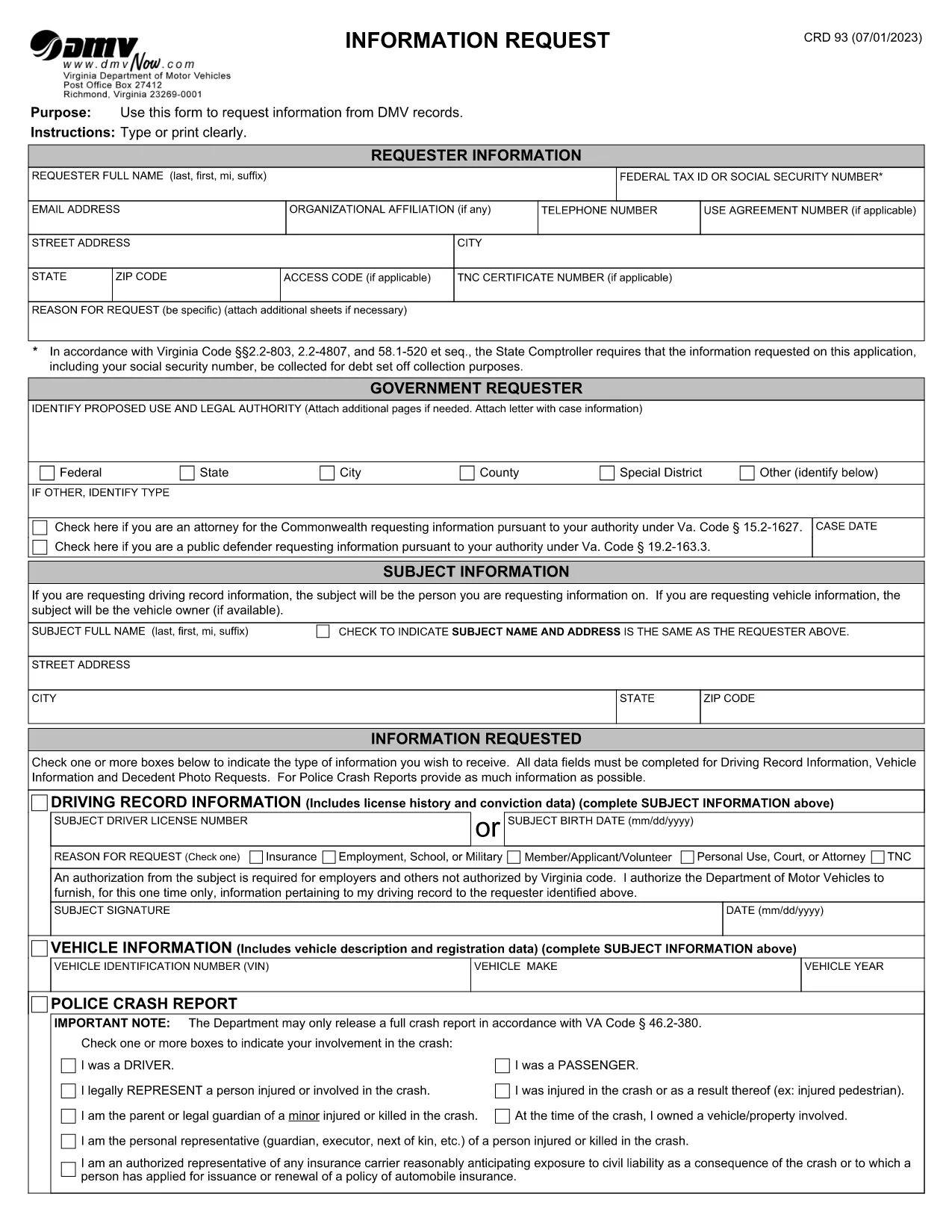
Virginia DMV CRD 93 Information Request Form (Fillable PDF)

  1. کشور ایالات متحده آمریکا
  2. زبان انگلیسی
  3. فعالیت گواهینامه رانندگی
  4. دولت ویرجینیا
این فرم را پر کنید
Virginia DMV CRD 93 Information Request Form (Fillable PDF)

The CRD 93 is Virginia’s official Information Request form used to obtain driving records, vehicle data, crash reports, and other DMV‑maintained information. Traditionally you would print, fill, sign, and mail the form, but with Formize you can complete the same document entirely online – faster, error‑free, and fully fillable PDF ready.

What Is the CRD 93 Form?

Issued by the Virginia Department of Motor Vehicles (DMV), the CRD 93 allows individuals, businesses, and law‑enforcement agencies to request specific records such as:

  • Driver’s license history
  • Vehicle registration details
  • Police crash reports
  • Decedent photographs and other special‑request items

Because the form contains sensitive personal data, the DMV requires a clear statement of purpose and, in many cases, a fee.

How to Complete the CRD 93 Online with Formize

Instead of downloading, printing, and scanning, simply click the “Fill out this form” button below. Formize will load the official PDF into its secure PDF Filler app, letting you type, sign, and save directly in your browser.

Common Mistakes to Avoid

  • Leaving required fields blank: The DMV will reject incomplete requests.
  • Incorrect identification numbers: Double‑check Social Security or Tax ID numbers.
  • Vague reason for request: Provide a specific, lawful purpose (e.g., “court‑ordered driver‑record review”).
  • Missing signatures: Use the electronic signature tool; a handwritten signature on a printed copy is no longer required.

Where to Submit Your Request

After completing the form, download the signed PDF and mail it to:

Virginia Department of Motor Vehicles
Information Request Division
P.O. Box 27412
Richmond, VA 23269‑7412

Include any required fees (check or money order) as instructed on the last page of the form.

Download the Official Fillable PDF

Ready to start? Click the button below to open the official CRD 93 PDF in Formize’s filler.

Fill out this form

سوالات متداول
  • What is the purpose of the CRD 93 form?

    The CRD 93 is used to request specific DMV records in Virginia, such as driver histories, vehicle registrations, crash reports, and decedent photos.

  • Can I submit the CRD 93 electronically?

    Virginia DMV still requires a mailed PDF with any applicable fees, but you can complete the form electronically using Formize and then print or email the PDF to yourself for mailing.

  • Do I need a Virginia address to use this form?

    No. The form can be used by anyone who has a lawful reason to request the records, regardless of residency, as long as the request complies with Virginia law.

  • How long does it take to receive the requested records?

    Processing times vary. Standard requests typically take 10‑15 business days after the DMV receives your completed form and payment.

  • What fees are associated with a CRD 93 request?

    Fees depend on the type of record requested (e.g., driver history, crash report). The fee schedule is listed on the last page of the form.

  • Is a handwritten signature still required?

    No. An electronic signature created in the Formize PDF Filler satisfies the DMV’s signature requirement.

  • Can I request records for someone else?

    Yes, but you must provide a valid reason, proof of authority (e.g., power of attorney), and the subject’s identifying information.

  • What should I do if I make a mistake on the form?

    Because the PDF is fillable, you can edit any field before saving. If you’ve already downloaded the PDF, simply open it again in Formize, correct the error, and re‑save.

چگونه

نحوه پر کردن CRD 93 به صورت رایگان و آنلاین در 5 با مراحل آسان:

  1. 1
    Open the Fillable Form
    Click the “Fill out this form” button above. The official CRD 93 PDF loads instantly in Formize’s secure PDF Filler.
  2. 2
    Enter Your Information
    Type your name, Tax ID or Social Security Number, address, and detailed reason for the request directly into the fields.
  3. 3
    Add Subject Details
    Provide the driver’s license number, vehicle VIN, or other identifiers for the record you are requesting.
  4. 4
    Sign Electronically
    Use the built‑in signature tool to add a digital signature. No printer or scanner needed.
  5. 5
    Save and Submit
    Download the completed PDF, attach the required fee, and mail it to the Virginia DMV address shown on the form.
برنامه PDF Filler را فرم‌بندی کنید
در باره

فرم های درخواست گواهینامه رانندگی

در اکثر کشورها، داشتن گواهینامه رانندگی قبل از اینکه بتوانید به جاده بروید، الزامی است. گرفتن گواهینامه رانندگی یک نقطه عطف مهم برای کسانی است که می خواهند رانندگی کنند.

CRD 93 یکی از فرم‌های درخواست گواهینامه رانندگی است که اسنادی برای جمع‌آوری اطلاعات از افرادی است که می‌خواهند برای گواهینامه رانندگی درخواست دهند. معمولاً شامل فیلدهایی برای نام متقاضی، تاریخ تولد، شماره شناسایی، اطلاعات تماس و همچنین سابقه گواهینامه رانندگی و تجربه آنها می باشد.

امکانات

پرکننده PDF

ساده ترین راه برای پر کردن فرم های PDF به صورت آنلاین

  • به سرعت CRD 93 را پر کنید
    به دنبال راهی برای پر کردن سریع CRD 93 آنلاین هستید؟ با پرکننده فرم PDF رایگان آنلاین ما، می‌دانید چگونه این سند pdf را در کمتر از یک دقیقه ویرایش و پر کنید.
  • آسان برای استفاده از ویرایشگر PDF آنلاین
    آیا از چاپ فایل‌های پی‌دی‌اف خسته شده‌اید تا بتوانید آن‌ها را قبل از اسکن مجدد و ارسال مجدد، ویرایش کنید؟ اسناد PDF را به صورت آنلاین به صورت رایگان ویرایش کنید. از ویرایشگر pdf آنلاین ما برای صرفه جویی در زمان و کاغذ استفاده کنید.
  • ابزارهای عالی، همه پلتفرم ها
    آیا نمی دانید که چگونه CRD 93 را در مک پر کنید، یا شاید چگونه از پرکننده PDF به صورت رایگان استفاده کنید؟ ابزارهای PDF آنلاین ما روی همه پلتفرم ها کار می کنند.
  • ذخیره سازی امن فایل
    فایل‌های تکمیل‌شده «CRD 93» در یک پایگاه داده ایمن که توسط میزبانی ابری آمازون مدیریت می‌شود، ذخیره می‌شوند. شما می توانید فایل های خود را در هر زمان از سیستم ما حذف کنید. در هر صورت این فایل ها پس از 24 ساعت به صورت خودکار پاک می شوند.
  • چت با CRD 93
    با «CRD 93» در Chatize که یک دستیار PDF خوان رایگان است، گپ بزنید. سوال بپرسید و از "CRD 93" پاسخ بگیرید. فقط روی دکمه Chat With Document در بالا کلیک کنید.

حذف جلسه پر کردن

جلسه پر کردن انتخاب شده را حذف کنید؟ در این صورت پیشرفت شما در تکمیل فرم از بین خواهد رفت.

حذف جلسه ویرایش

جلسه ویرایش انتخابی حذف شود؟ در این صورت پیشرفت شما در ایجاد و ویرایش فرم از بین خواهد رفت.