
زبان را انتخاب کنید

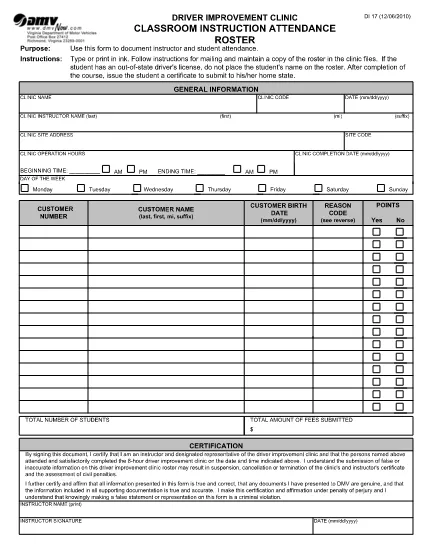
DI-17 Classroom Instruction Attendance Roster (Fillable PDF)

  1. کشور ایالات متحده آمریکا
  2. زبان انگلیسی
  3. فعالیت گواهینامه رانندگی
  4. دولت ویرجینیا
این فرم را پر کنید
DI-17 Classroom Instruction Attendance Roster (Fillable PDF)

The DI-17 is the Virginia Department of Motor Vehicles (DMV) form used to record attendance for classroom driver‑education instruction. Schools, driving instructors, and training programs must submit this roster within 24 hours of completing a class.

What Is the DI-17 Form?

DI-17 captures essential details such as the instructor’s name, student information, dates of instruction, and the specific curriculum covered. It ensures compliance with Virginia DMV regulations and helps verify that learners have met the required training hours before taking the road‑skills test.

How to Complete the DI-17 Online

With Formize’s fillable PDF technology you can complete the DI‑17 directly in your browser—no extra software needed. Follow the simple steps below:

  • Click the Fill out this form button on this page.
  • Wait for the Formize PDF Filler app to load (usually a few seconds).
  • Enter all required fields exactly as they appear on the original paper form.
  • Use the Save button to store a copy on your device or in the cloud.
  • When finished, click Download to get the completed PDF ready for submission.

Common Errors to Avoid

Even a small mistake can delay processing. Keep these tips in mind:

  • Incorrect dates: Verify the class date matches the DMV’s calendar.
  • Missing signatures: Both the instructor and each student must sign.
  • Illegible handwriting: The fillable fields ensure clear, legible text.
  • Wrong form version: Use the latest DI‑17 PDF provided by the Virginia DMV (the link below is always up‑to‑date).

Submit Your Completed DI-17

After saving the filled PDF, upload it to the Virginia DMV Extranet portal or email it according to your organization’s instructions. The DMV requires receipt within 24 hours of the class.

Why Use Formize Fillable PDF

Formize turns static PDFs into interactive, web‑based forms. Benefits include:

  • Instant access: No downloads or installations.
  • Data accuracy: Built‑in validation reduces entry errors.
  • Secure storage: Your completed form is saved locally or to cloud storage of your choice.
  • Compliance‑ready: The PDF matches the official DMV layout exactly.

Ready to start? Click the button below and fill out the DI‑17 in seconds.

سوالات متداول
  • What is the purpose of the DI‑17 form?

    The DI‑17 records attendance for classroom driver‑education instruction and verifies that students have completed the required training before taking the road‑skills test.

  • Can I fill out the DI‑17 on a mobile device?

    Yes. Formize’s fillable PDF works on smartphones and tablets with any modern browser.

  • Do I need Adobe Acrobat to complete the DI‑17?

    No. The Formize PDF Filler runs entirely in the browser, eliminating the need for separate PDF editors.

  • How soon must the DI‑17 be submitted after a class?

    Virginia DMV requires the completed DI‑17 to be submitted within 24 hours of the class date.

  • What if I make a mistake after saving the form?

    Open the saved PDF again in the Formize filler, correct the error, and re‑save before submitting.

  • Is the DI‑17 form free to download?

    Yes. The official DI‑17 PDF is provided by the Virginia DMV at no cost.

  • Do I need a DMV account to use the fillable version?

    No. You can fill out and download the PDF without a DMV login; however, submission through the Extranet may require an authorized account.

  • Can I print the completed DI‑17 after filling it online?

    Absolutely. After saving, you can print the PDF for your records or to submit a hard copy if required.

چگونه

نحوه پر کردن DI-17 به صورت رایگان و آنلاین در 5 با مراحل آسان:

  1. 1
    Click the Fill‑out Button
    On this page, press the “Fill out this form” button to launch the Formize PDF Filler.
  2. 2
    Wait for the Filler to Load
    The web app loads the DI‑17 PDF in a few seconds. No download or installation is required.
  3. 3
    Enter Required Information
    Complete each fillable field with accurate data—dates, instructor name, student details, and signatures.
  4. 4
    Review and Save
    Double‑check all entries, then click Save to store a copy on your device or cloud storage.
  5. 5
    Download or Submit
    Download the finished PDF and upload it to the Virginia DMV Extranet portal, or follow your organization’s submission guidelines.
برنامه PDF Filler را فرم‌بندی کنید
در باره

فرم های درخواست گواهینامه رانندگی

DI-17 یکی از فرم‌های گواهینامه رانندگی است که در فرآیند اخذ یا تمدید گواهینامه رانندگی مورد استفاده قرار می‌گیرد، که یک سند رسمی صادر شده توسط دولت است که به افراد اجازه می‌دهد تا با وسیله نقلیه موتوری در جاده‌های عمومی رانندگی کنند. این فرم ها ممکن است بسته به حوزه قضایی متفاوت باشد، اما به طور کلی شامل موارد زیر است:

فرم درخواست: این فرم برای درخواست گواهینامه رانندگی استفاده می شود و معمولاً اطلاعات شخصی مانند نام، آدرس، تاریخ تولد و شماره تامین اجتماعی را می خواهد.

اسناد شناسایی: معمولاً افراد به همراه فرم درخواست، باید مدارک شناسایی خاصی را برای اثبات هویت، اقامت و حضور قانونی خود در کشور ارائه دهند. اینها ممکن است شامل گذرنامه معتبر، گواهی تولد، کارت تامین اجتماعی یا سایر مدارک شناسایی صادر شده توسط دولت باشد.

اثبات اقامت: بسیاری از حوزه‌های قضایی متقاضیان را ملزم می‌کنند که برای تأیید آدرس خود، مدرکی مبنی بر اقامت، مانند قبض آب و برق، قرارداد اجاره، یا صورت‌حساب بانکی ارائه دهند.

فرم معاینه پزشکی: برخی از حوزه‌های قضایی ممکن است نیاز به معاینه پزشکی داشته باشند تا اطمینان حاصل شود که متقاضی شرایط جسمی و روحی لازم برای رانندگی ایمن را برآورده می‌کند. یک متخصص پزشکی معمولاً این فرم را تکمیل می کند.

فرم تکمیل آموزش راننده: برای رانندگانی که بار اول می‌شوند، ممکن است تکمیل برنامه آموزشی راننده مورد نیاز باشد. اغلب برای درخواست گواهینامه رانندگی، فرم یا گواهینامه ای که نشان دهنده تکمیل موفقیت آمیز آن باشد، ضروری است.

فرم تست بینایی: یک تست بینایی معمولاً در طول فرآیند درخواست گواهینامه رانندگی انجام می شود. یک متخصص مراقبت از چشم یا پرسنل مجاز، حدت بینایی متقاضی را ارزیابی کرده و فرم مورد نیاز را تکمیل می کند.

این فرم ها معمولاً در دپارتمان محلی وسایل نقلیه موتوری (DMV) یا آژانس دولتی معادل مسئول صدور گواهینامه رانندگی در دسترس هستند. مهم است که الزامات و فرم های خاص مربوط به حوزه قضایی خود را بررسی کنید، زیرا آنها می توانند متفاوت باشند.

امکانات

پرکننده PDF

ساده ترین راه برای پر کردن فرم های PDF به صورت آنلاین

  • به سرعت DI-17 را پر کنید
    به دنبال راهی برای پر کردن سریع DI-17 آنلاین هستید؟ با پرکننده فرم PDF رایگان آنلاین ما، می‌دانید چگونه این سند pdf را در کمتر از یک دقیقه ویرایش و پر کنید.
  • آسان برای استفاده از ویرایشگر PDF آنلاین
    آیا از چاپ فایل‌های پی‌دی‌اف خسته شده‌اید تا بتوانید آن‌ها را قبل از اسکن مجدد و ارسال مجدد، ویرایش کنید؟ اسناد PDF را به صورت آنلاین به صورت رایگان ویرایش کنید. از ویرایشگر pdf آنلاین ما برای صرفه جویی در زمان و کاغذ استفاده کنید.
  • ابزارهای عالی، همه پلتفرم ها
    آیا نمی دانید که چگونه DI-17 را در مک پر کنید، یا شاید چگونه از پرکننده PDF به صورت رایگان استفاده کنید؟ ابزارهای PDF آنلاین ما روی همه پلتفرم ها کار می کنند.
  • ذخیره سازی امن فایل
    فایل‌های تکمیل‌شده «DI-17» در یک پایگاه داده ایمن که توسط میزبانی ابری آمازون مدیریت می‌شود، ذخیره می‌شوند. شما می توانید فایل های خود را در هر زمان از سیستم ما حذف کنید. در هر صورت این فایل ها پس از 24 ساعت به صورت خودکار پاک می شوند.
  • چت با DI-17
    با «DI-17» در Chatize که یک دستیار PDF خوان رایگان است، گپ بزنید. سوال بپرسید و از "DI-17" پاسخ بگیرید. فقط روی دکمه Chat With Document در بالا کلیک کنید.

حذف جلسه پر کردن

جلسه پر کردن انتخاب شده را حذف کنید؟ در این صورت پیشرفت شما در تکمیل فرم از بین خواهد رفت.

حذف جلسه ویرایش

جلسه ویرایش انتخابی حذف شود؟ در این صورت پیشرفت شما در ایجاد و ویرایش فرم از بین خواهد رفت.