
زبان را انتخاب کنید

Wisconsin MV3112 Driver Instructor Application – Fillable PDF

  1. زبان انگلیسی
  2. کشور ایالات متحده آمریکا
  3. فعالیت گواهینامه رانندگی
  4. دولت ویسکانسین
این فرم را پر کنید
Wisconsin MV3112 Driver Instructor Application – Fillable PDF

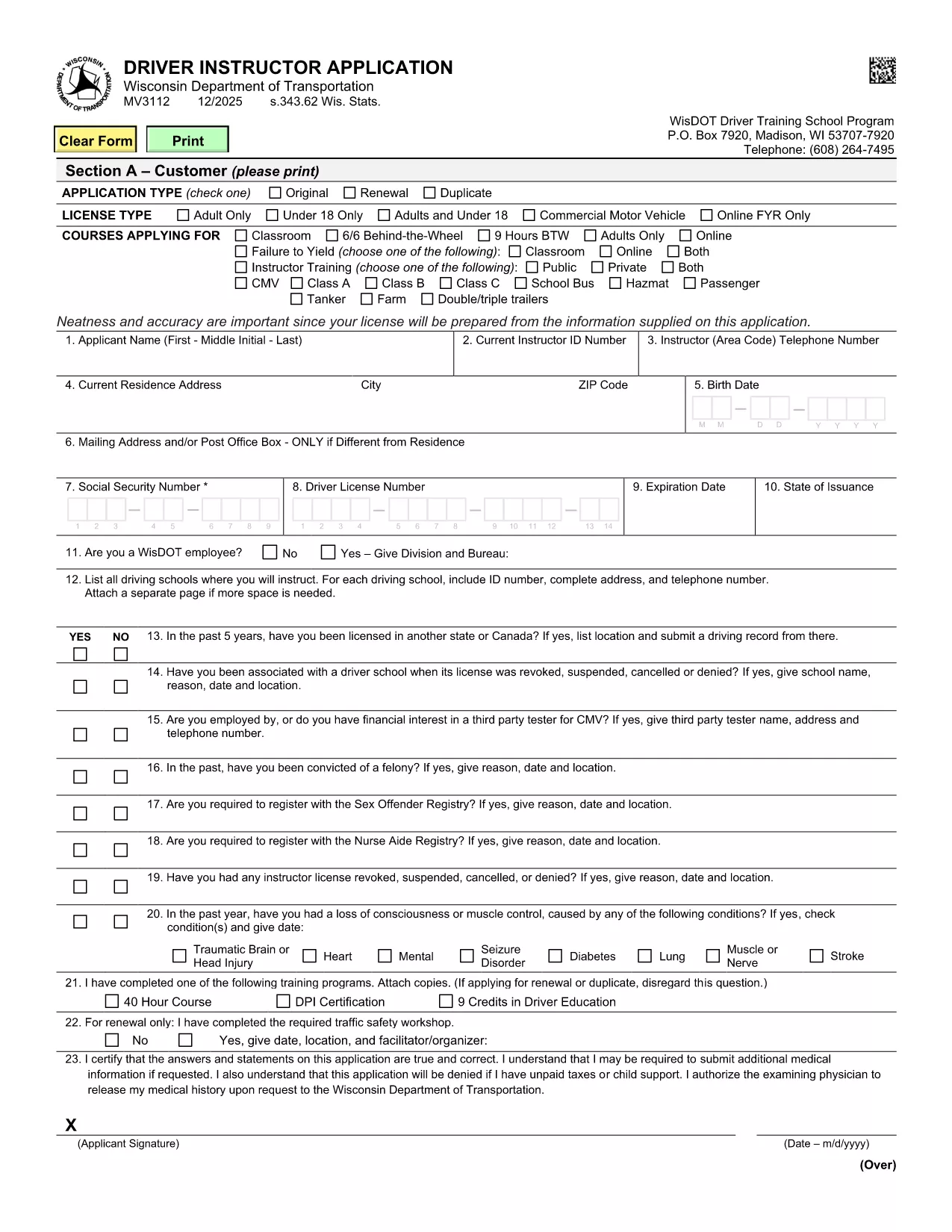
The MV3112 is the official Driver Instructor Application required by the Wisconsin Department of Transportation (WisDOT). Whether you’re starting a new driver‑training school or adding an instructor to an existing program, this form must be completed, signed, and submitted before you can begin teaching.

Formize makes the MV3112 completely fillable online. No more printing, scanning, or hand‑writing. Simply click the “Fill out this form” button, enter your information, and download a completed PDF ready for submission.

What Is the MV3112 Form?

The MV3112 collects personal data, driving history, medical qualifications, and background information about the applicant. It also includes a certification section where you attest that all statements are true and that you meet WisDOT’s eligibility criteria.

How to Complete the MV3112 Online

Follow these quick steps to fill the form using Formize’s PDF Filler:

  • Click the Fill out this form button on this page.
  • Wait for the Formize PDF Filler to load (a few seconds).
  • Enter all required information in the highlighted fields.
  • Upload any supporting documents (e.g., medical clearance, driver record).
  • Save the completed PDF, print it, sign where required, and mail it to WisDOT.

Common Mistakes to Avoid

Even a small error can delay your application. Keep these tips in mind:

  • Missing signatures: Every signature box must be signed in ink after printing.
  • Incomplete medical info: Attach the most recent medical examination if requested.
  • Incorrect fee amount: Verify the current fee on WisDOT’s website before mailing.
  • Out‑of‑date driver record: Use a driver record dated within the last 90 days.

Submission Guidelines & Fees

After you’ve filled and printed the form, mail it to:

Wisconsin Department of Transportation
Division of Driver Services
P.O. Box 7448
Madison, WI 53707‑7448

Include the application fee (check the latest WisDOT fee schedule) and any required medical documentation. Processing typically takes 10‑14 business days.

Need Help? Frequently Asked Questions

Below are answers to the most common questions about the MV3112.

سوالات متداول
  • Who is eligible to use the MV3112 form?

    Any individual who wishes to become a licensed driver instructor in Wisconsin, including those starting a new school or joining an existing one.

  • Do I need a medical examination?

    A medical exam is required only if WisDOT requests it. Attach a current medical report (within 60 days) when requested.

  • What is the application fee?

    The fee varies; check WisDOT’s current fee schedule on their website before submitting the form.

  • Can I submit the MV3112 electronically?

    WisDOT currently requires a printed, signed copy. The online filler speeds up data entry, but you must mail the final PDF.

  • How long does processing take?

    Standard processing is 10‑14 business days after WisDOT receives the complete, signed application.

  • What should I do if I make a mistake on the form?

    Correct any errors before printing. If you discover a mistake after mailing, contact WisDOT to request a replacement form.

  • Is there a deadline for submitting the MV3112?

    There is no fixed deadline, but you should submit the application before you begin any instructor activities to avoid penalties.

  • Where can I find additional guidance?

    Visit the WisDOT Driver Services website for detailed instructions, fee information, and contact details for further assistance.

چگونه

نحوه پر کردن MV3112 به صورت رایگان و آنلاین در 5 با مراحل آسان:

  1. 1
    Open the Fillable Form
    Click the “Fill out this form” button on this page. The Formize PDF Filler will open in a new tab.
  2. 2
    Enter Your Information
    Type your details into each highlighted field. Use the drop‑down menus where available for easy selection.
  3. 3
    Upload Supporting Documents
    Attach required files such as medical clearance or a recent driver record using the upload icons.
  4. 4
    Save and Print
    When every field is completed, click “Save PDF”. Print the document, sign the required sections in ink, and prepare it for mailing.
  5. 5
    Submit to WisDOT
    Mail the signed PDF along with the application fee to the WisDOT address listed on the form.
برنامه PDF Filler را فرم‌بندی کنید
در باره

فرم های درخواست گواهینامه رانندگی

MV3112 یکی از فرم‌های گواهینامه رانندگی است که در فرآیند اخذ یا تمدید گواهینامه رانندگی مورد استفاده قرار می‌گیرد، که یک سند رسمی صادر شده توسط دولت است که به افراد اجازه می‌دهد تا با وسیله نقلیه موتوری در جاده‌های عمومی رانندگی کنند. این فرم ها ممکن است بسته به حوزه قضایی متفاوت باشد، اما به طور کلی شامل موارد زیر است:

فرم درخواست: این فرم برای درخواست گواهینامه رانندگی استفاده می شود و معمولاً اطلاعات شخصی مانند نام، آدرس، تاریخ تولد و شماره تامین اجتماعی را می خواهد.

اسناد شناسایی: معمولاً افراد به همراه فرم درخواست، باید مدارک شناسایی خاصی را برای اثبات هویت، اقامت و حضور قانونی خود در کشور ارائه دهند. اینها ممکن است شامل گذرنامه معتبر، گواهی تولد، کارت تامین اجتماعی یا سایر مدارک شناسایی صادر شده توسط دولت باشد.

اثبات اقامت: بسیاری از حوزه‌های قضایی متقاضیان را ملزم می‌کنند که برای تأیید آدرس خود، مدرکی مبنی بر اقامت، مانند قبض آب و برق، قرارداد اجاره، یا صورت‌حساب بانکی ارائه دهند.

فرم معاینه پزشکی: برخی از حوزه‌های قضایی ممکن است نیاز به معاینه پزشکی داشته باشند تا اطمینان حاصل شود که متقاضی شرایط جسمی و روحی لازم برای رانندگی ایمن را برآورده می‌کند. یک متخصص پزشکی معمولاً این فرم را تکمیل می کند.

فرم تکمیل آموزش راننده: برای رانندگانی که بار اول می‌شوند، ممکن است تکمیل برنامه آموزشی راننده مورد نیاز باشد. اغلب برای درخواست گواهینامه رانندگی، فرم یا گواهینامه ای که نشان دهنده تکمیل موفقیت آمیز آن باشد، ضروری است.

فرم تست بینایی: یک تست بینایی معمولاً در طول فرآیند درخواست گواهینامه رانندگی انجام می شود. یک متخصص مراقبت از چشم یا پرسنل مجاز، حدت بینایی متقاضی را ارزیابی کرده و فرم مورد نیاز را تکمیل می کند.

این فرم ها معمولاً در دپارتمان محلی وسایل نقلیه موتوری (DMV) یا آژانس دولتی معادل مسئول صدور گواهینامه رانندگی در دسترس هستند. مهم است که الزامات و فرم های خاص مربوط به حوزه قضایی خود را بررسی کنید، زیرا آنها می توانند متفاوت باشند.

امکانات

پرکننده PDF

ساده ترین راه برای پر کردن فرم های PDF به صورت آنلاین

  • به سرعت MV3112 را پر کنید
    به دنبال راهی برای پر کردن سریع MV3112 آنلاین هستید؟ با پرکننده فرم PDF رایگان آنلاین ما، می‌دانید چگونه این سند pdf را در کمتر از یک دقیقه ویرایش و پر کنید.
  • آسان برای استفاده از ویرایشگر PDF آنلاین
    آیا از چاپ فایل‌های پی‌دی‌اف خسته شده‌اید تا بتوانید آن‌ها را قبل از اسکن مجدد و ارسال مجدد، ویرایش کنید؟ اسناد PDF را به صورت آنلاین به صورت رایگان ویرایش کنید. از ویرایشگر pdf آنلاین ما برای صرفه جویی در زمان و کاغذ استفاده کنید.
  • ابزارهای عالی، همه پلتفرم ها
    آیا نمی دانید که چگونه MV3112 را در مک پر کنید، یا شاید چگونه از پرکننده PDF به صورت رایگان استفاده کنید؟ ابزارهای PDF آنلاین ما روی همه پلتفرم ها کار می کنند.
  • ذخیره سازی امن فایل
    فایل‌های تکمیل‌شده «MV3112» در یک پایگاه داده ایمن که توسط میزبانی ابری آمازون مدیریت می‌شود، ذخیره می‌شوند. شما می توانید فایل های خود را در هر زمان از سیستم ما حذف کنید. در هر صورت این فایل ها پس از 24 ساعت به صورت خودکار پاک می شوند.
  • چت با MV3112
    با «MV3112» در Chatize که یک دستیار PDF خوان رایگان است، گپ بزنید. سوال بپرسید و از "MV3112" پاسخ بگیرید. فقط روی دکمه Chat With Document در بالا کلیک کنید.

حذف جلسه پر کردن

جلسه پر کردن انتخاب شده را حذف کنید؟ در این صورت پیشرفت شما در تکمیل فرم از بین خواهد رفت.

حذف جلسه ویرایش

جلسه ویرایش انتخابی حذف شود؟ در این صورت پیشرفت شما در ایجاد و ویرایش فرم از بین خواهد رفت.