زبان را انتخاب کنید

Youth Empowerment Services Application Form (Fillable PDF)

  1. کشور ایالات متحده آمریکا
  2. زبان انگلیسی
  3. بخش Health and Human Services
  4. فعالیت Youth Empowerment
این فرم را پر کنید
Youth Empowerment Services Application Form (Fillable PDF)

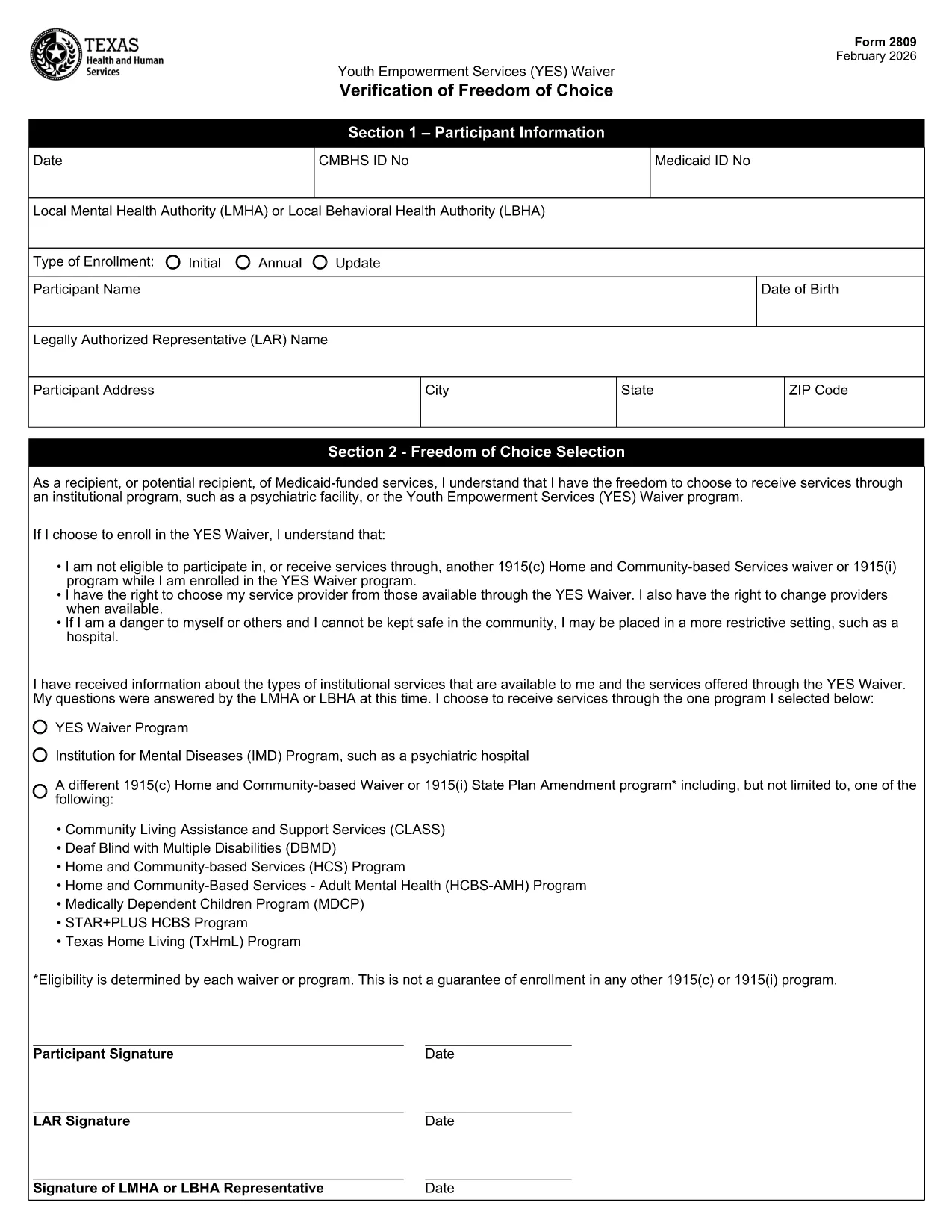
Looking for a quick, paper‑less way to apply for Youth Empowerment Services (YES) in Texas? The official YES Waiver Verification Form (Form 2809) is now available as a fillable PDF on Formize. You can complete the entire application online, save a copy for your records, and submit it without ever printing a single page.

This page explains everything you need to know about the form, the sections you’ll encounter, and best practices to avoid common errors.

What Is the Youth Empowerment Application?

The Youth Empowerment Services (YES) Waiver Verification is used by local mental health authorities (LMHA) or local behavioral health authorities (LBHA) to document a participant’s choice to receive community‑based services instead of institutional care. It serves as the official application for eligibility and enrollment in the YES program.

How to Fill the Form Online

Instead of downloading the PDF and opening it in a separate editor, simply click the "Fill out this form" button on this page. The Formize PDF Filler app will load automatically, allowing you to type directly into each field.

Key Sections & Required Information

  • Date & IDs: Enter the current date, CMBHS ID, and Medicaid ID.
  • Participant Details: Full name, date of birth, and contact address.
  • Legal Authorized Representative (LAR): Name and signature of the LAR.
  • Choice of Service: Select the YES Waiver program or an alternative option.
  • Signatures: Participant (or X mark), LAR, and LMHA/LBHA representative.

Common Mistakes to Avoid

  • Leaving required fields blank – the form will not save until every mandatory field is completed.
  • Using an illegible signature – type your name or use the built‑in signature tool for a clear, printable mark.
  • Choosing the wrong enrollment type (Initial vs. Annual) – verify the purpose of your submission before selecting.
  • Entering outdated ID numbers – double‑check your CMBHS and Medicaid numbers with your provider.

Download & Print Options

If you still prefer a hard copy, you can download the completed PDF after filling it out and print it using any standard printer. The file remains fully editable until you finalize and save the document.

Ready to start? Click the button below, fill out the form in seconds, and take the next step toward youth empowerment.

سوالات متداول
  • Is the Youth Empowerment Services form free to use?

    Yes. The fillable PDF is provided at no cost, and Formize lets you complete it online for free.

  • Can I edit the form after I’ve saved it?

    As long as you keep the file in its original fillable format, you can reopen it in Formize and make changes.

  • Do I need Adobe Reader to fill out the form?

    No. Formize’s web‑based PDF filler works in any modern browser without additional software.

  • What happens if I make a mistake in a required field?

    The Formize validator will highlight missing or incorrect entries, preventing you from saving until they’re corrected.

  • How do I submit the completed form to the authorities?

    Download the finished PDF and follow the submission instructions from your LMHA or LBHA—usually via secure email or a physical drop‑off.

  • Is my personal information safe when using Formize?

    Formize uses SSL encryption for all data transmitted between your browser and our servers, ensuring your information remains private.

  • Can I print a hard copy after filling it out online?

    Absolutely. After saving, click the download button and print the PDF like any standard document.

  • Do I need a Texas address to use this form?

    The YES Waiver Verification is specific to Texas youth empowerment programs, so a Texas residency or enrollment through a Texas authority is required.

چگونه

نحوه پر کردن youth empowerment application به صورت رایگان و آنلاین در 4 با مراحل آسان:

  1. 1
    Open the Fillable Form
    Click the "Fill out this form" button on the page. The Formize PDF Filler loads in your browser.
  2. 2
    Complete All Required Fields
    Enter dates, IDs, participant details, and select the appropriate enrollment type. Use the signature tool for signatures.
  3. 3
    Save and Download
    When you finish, click "Save". You can download the completed PDF for your records or print it if needed.
  4. 4
    Submit the Application
    Send the saved PDF to your local mental health authority (LMHA) or behavioral health authority (LBHA) as instructed.
برنامه PDF Filler را فرم‌بندی کنید
در باره

قالب youth empowerment application

با مجموعه‌ای از ویژگی‌های سنتی برای مشاهده و پر کردن یک سند PDF، همراه با مزایای یک برنامه وب و طرح‌بندی واکنش‌گرا، می‌توانید youth empowerment application را در چند دقیقه تکمیل کنید.

امکانات

پرکننده PDF

ساده ترین راه برای پر کردن فرم های PDF به صورت آنلاین

  • به سرعت youth empowerment application را پر کنید
    به دنبال راهی برای پر کردن سریع youth empowerment application آنلاین هستید؟ با پرکننده فرم PDF رایگان آنلاین ما، می‌دانید چگونه این سند pdf را در کمتر از یک دقیقه ویرایش و پر کنید.
  • آسان برای استفاده از ویرایشگر PDF آنلاین
    آیا از چاپ فایل‌های پی‌دی‌اف خسته شده‌اید تا بتوانید آن‌ها را قبل از اسکن مجدد و ارسال مجدد، ویرایش کنید؟ اسناد PDF را به صورت آنلاین به صورت رایگان ویرایش کنید. از ویرایشگر pdf آنلاین ما برای صرفه جویی در زمان و کاغذ استفاده کنید.
  • ابزارهای عالی، همه پلتفرم ها
    آیا نمی دانید که چگونه youth empowerment application را در مک پر کنید، یا شاید چگونه از پرکننده PDF به صورت رایگان استفاده کنید؟ ابزارهای PDF آنلاین ما روی همه پلتفرم ها کار می کنند.
  • ذخیره سازی امن فایل
    فایل‌های تکمیل‌شده «youth empowerment application» در یک پایگاه داده ایمن که توسط میزبانی ابری آمازون مدیریت می‌شود، ذخیره می‌شوند. شما می توانید فایل های خود را در هر زمان از سیستم ما حذف کنید. در هر صورت این فایل ها پس از 24 ساعت به صورت خودکار پاک می شوند.
  • چت با youth empowerment application
    با «youth empowerment application» در Chatize که یک دستیار PDF خوان رایگان است، گپ بزنید. سوال بپرسید و از "youth empowerment application" پاسخ بگیرید. فقط روی دکمه Chat With Document در بالا کلیک کنید.

حذف جلسه پر کردن

جلسه پر کردن انتخاب شده را حذف کنید؟ در این صورت پیشرفت شما در تکمیل فرم از بین خواهد رفت.

حذف جلسه ویرایش

جلسه ویرایش انتخابی حذف شود؟ در این صورت پیشرفت شما در ایجاد و ویرایش فرم از بین خواهد رفت.