زبان را انتخاب کنید

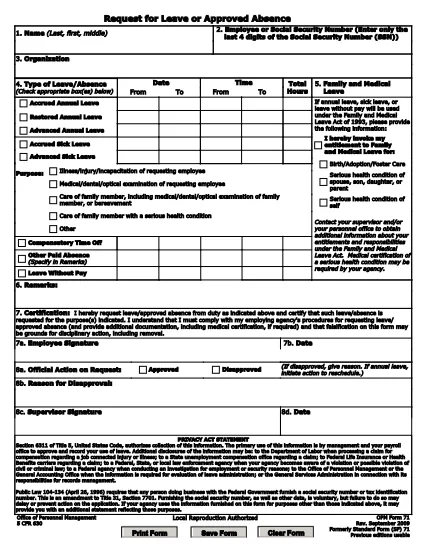
Application for Yesterday Absent – Fillable PDF Form

  1. زبان انگلیسی
  2. کشور ایالات متحده آمریکا
  3. بخش Human Resources
  4. فعالیت Employee Management
این فرم را پر کنید
Application for Yesterday Absent – Fillable PDF Form

When you missed work or school yesterday and need official documentation, the Application for Yesterday Absent is the right tool. This fillable PDF lets you quickly request a one‑day absence, provide a reason, and obtain the necessary approvals—all without printing or scanning.

Why You Need a Yesterday Absence Application

Employers and educational institutions often require a written request for any unplanned absence. Submitting a completed form demonstrates professionalism, helps payroll process correctly, and keeps HR records accurate.

How to Fill Out the Yesterday Absence Form Online

With Formize’s built‑in PDF filler, you can complete the form in seconds:

  1. Click the "Fill out this form" button on the page.
  2. Wait for the Formize PDF Filler app to load.
  3. Enter your personal information (name, employee ID, department).
  4. Select the date of absence – the form defaults to yesterday’s date.
  5. Provide a brief reason (e.g., medical, family emergency).
  6. Add your electronic signature and, if required, your supervisor’s signature.
  7. Submit the form directly from the app or download a copy for your records.

Common Mistakes to Avoid

  • Leaving fields blank: Every required field must be filled, otherwise the form will be rejected.
  • Incorrect date: Double‑check that the date shown is indeed yesterday’s date.
  • Unclear reason: Use concise language and, if needed, attach supporting documentation.
  • Missing signature: Both employee and supervisor signatures are mandatory for approval.

Download the Fillable PDF

If you prefer to work offline, you can download the original fillable PDF from the link below and open it with any PDF editor that supports form fields.

Download Yesterday Absence Application (PDF)

Frequently Asked Questions

Find quick answers to the most common queries about this form below.

سوالات متداول
  • Do I need a manager’s signature for a one‑day absence?

    Yes. Most organizations require both the employee’s and the manager’s signatures to approve any unplanned leave.

  • Can I edit the form after I submit it?

    Once submitted, the form is locked. If you need changes, request a new form and follow the same steps.

  • Is the PDF truly fillable on any device?

    The form is built with standard PDF form fields, so it works on desktop, tablet, and mobile browsers via Formize.

  • What if I don’t have an internet connection?

    Download the PDF from the link provided, fill it out offline with a PDF editor, then email or upload it once you’re back online.

  • How long does it take for HR to process the request?

    Processing time varies by organization, but most HR departments acknowledge receipt within 24 hours.

  • Can I attach supporting documents (e.g., doctor’s note)?

    Yes. After completing the form, use the upload feature in the Formize app or attach files when you email the PDF.

چگونه

نحوه پر کردن yesterday absent application به صورت رایگان و آنلاین در 7 با مراحل آسان:

  1. 1
    Click the Fill Out Button
    Press the "Fill out this form" button on the page to launch Formize’s online PDF editor.
  2. 2
    Wait for the Filler to Load
    The Formize PDF Filler app loads in a few seconds – you’ll see the form fields become editable.
  3. 3
    Enter Your Information
    Fill in your name, employee ID, department, and any other required personal details.
  4. 4
    Select Yesterday’s Date
    The date field defaults to yesterday; verify it’s correct before proceeding.
  5. 5
    Provide a Reason
    Write a brief, clear explanation for the absence (e.g., medical appointment, family emergency).
  6. 6
    Add Your Signature
    Use the e‑signature field to sign electronically, then have your supervisor sign if required.
  7. 7
    Submit or Download
    Click "Submit" to send the form directly to your HR portal, or download a copy for your records.
برنامه PDF Filler را فرم‌بندی کنید
در باره

قالب yesterday absent application

با مجموعه‌ای از ویژگی‌های سنتی برای مشاهده و پر کردن یک سند PDF، همراه با مزایای یک برنامه وب و طرح‌بندی واکنش‌گرا، می‌توانید yesterday absent application را در چند دقیقه تکمیل کنید.

امکانات

پرکننده PDF

ساده ترین راه برای پر کردن فرم های PDF به صورت آنلاین

  • به سرعت yesterday absent application را پر کنید
    به دنبال راهی برای پر کردن سریع yesterday absent application آنلاین هستید؟ با پرکننده فرم PDF رایگان آنلاین ما، می‌دانید چگونه این سند pdf را در کمتر از یک دقیقه ویرایش و پر کنید.
  • آسان برای استفاده از ویرایشگر PDF آنلاین
    آیا از چاپ فایل‌های پی‌دی‌اف خسته شده‌اید تا بتوانید آن‌ها را قبل از اسکن مجدد و ارسال مجدد، ویرایش کنید؟ اسناد PDF را به صورت آنلاین به صورت رایگان ویرایش کنید. از ویرایشگر pdf آنلاین ما برای صرفه جویی در زمان و کاغذ استفاده کنید.
  • ابزارهای عالی، همه پلتفرم ها
    آیا نمی دانید که چگونه yesterday absent application را در مک پر کنید، یا شاید چگونه از پرکننده PDF به صورت رایگان استفاده کنید؟ ابزارهای PDF آنلاین ما روی همه پلتفرم ها کار می کنند.
  • ذخیره سازی امن فایل
    فایل‌های تکمیل‌شده «yesterday absent application» در یک پایگاه داده ایمن که توسط میزبانی ابری آمازون مدیریت می‌شود، ذخیره می‌شوند. شما می توانید فایل های خود را در هر زمان از سیستم ما حذف کنید. در هر صورت این فایل ها پس از 24 ساعت به صورت خودکار پاک می شوند.
  • چت با yesterday absent application
    با «yesterday absent application» در Chatize که یک دستیار PDF خوان رایگان است، گپ بزنید. سوال بپرسید و از "yesterday absent application" پاسخ بگیرید. فقط روی دکمه Chat With Document در بالا کلیک کنید.

حذف جلسه پر کردن

جلسه پر کردن انتخاب شده را حذف کنید؟ در این صورت پیشرفت شما در تکمیل فرم از بین خواهد رفت.

حذف جلسه ویرایش

جلسه ویرایش انتخابی حذف شود؟ در این صورت پیشرفت شما در ایجاد و ویرایش فرم از بین خواهد رفت.